Yealink UVC30 Content Camera – 4K Whiteboard Collaboration for Microsoft Teams Rooms
The Yealink UVC30 Content Camera is a purpose-built whiteboard capture kit for organizations that want to bring handwritten meeting-room content into Microsoft Teams Rooms on Windows without replacing the familiar physical whiteboard. The system combines the UVC30 Room 4K USB camera with a length-adjustable wall-mount bracket and installation accessories, giving meeting-room designers a straightforward way to position the camera above a compatible board. Yealink specifies a 120-degree diagonal field of view and applicability for whiteboards from approximately 6 to 9 feet wide. That combination makes the kit particularly useful in boardrooms, project rooms, classrooms, training spaces and collaboration areas where sketches, diagrams, planning notes and workshop output must be visible to remote participants.
For a procurement team, the important question is not simply whether a camera can produce a sharp image. The complete installation must match the room, board width, mounting surface, cable path, host meeting-room system and user workflow. FourTeck therefore approaches the UVC30 Content Camera as a room component rather than an isolated peripheral. Before ordering, buyers can provide the board width, wall construction, approximate mounting height, room-system model, number of rooms and delivery city. This allows practical installation assumptions to be reviewed before the quotation is finalized.
The UVC30 platform uses an 8.51-megapixel 1/2.5-inch CMOS imaging sensor. Yealink documentation for the UVC30 Room identifies 4K output, electronic pan/tilt/zoom behavior, 3x digital zoom, wide dynamic range, automatic exposure and configurable white balance. In the Content Camera Kit, however, the central business function is whiteboard capture for Teams Rooms rather than conventional participant framing. The adjustable mounting hardware is therefore as important as the optical specification because the camera must be physically aligned to the writing surface.
Procurement Fact Rail
Yealink UVC30 Content Camera Kit
Teams Rooms whiteboard capture
UVC30 Room, 4K
120° diagonal
Approx. 6–9 ft width
2-year limited manufacturer hardware warranty
The fact rail provides a fast qualification view, but procurement should still validate the complete room. The kit is described by Yealink for Microsoft Teams Rooms on Windows. Buyers should therefore confirm that the intended room system and software environment support the required content-camera workflow. Mounting conditions also matter: a suitable wall surface, correct camera-to-board geometry and a clean cable route help avoid rework after equipment arrives. Quote status and delivery timing depend on current supply, quantity and destination, so commercial availability should be confirmed at order stage rather than assumed from a generic catalogue listing.
Operational Architecture and Meeting-Room Role
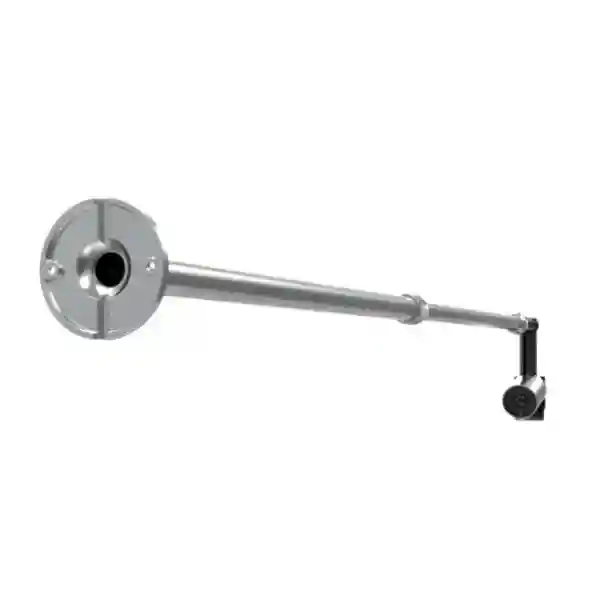
A conventional conference camera is normally positioned to frame people. A content camera has a different job: it observes a physical writing surface and makes that visual information available to the collaboration workflow. This changes the installation priorities. The optical path must cover the board, the mount must maintain a stable relationship to the writing surface, and the USB connection must reach the room system without creating an unreliable extension chain. The UVC30 Content Camera Kit addresses the physical side of that problem with a length-adjustable wall bracket designed for varying whiteboard dimensions.
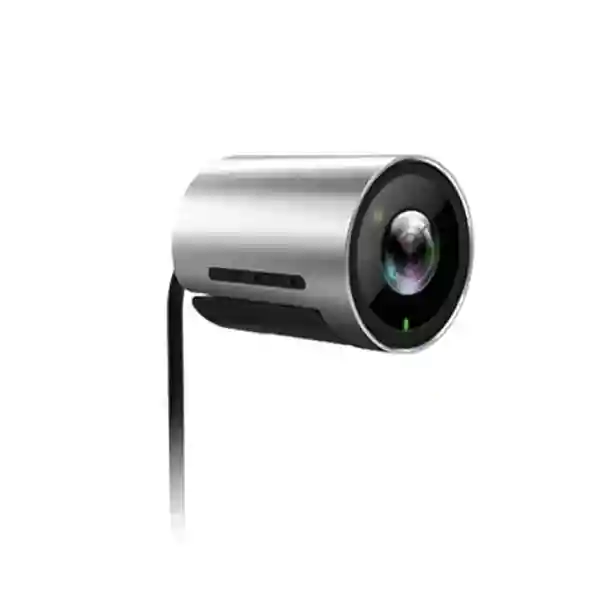
The camera itself is compact, but the deployment should be planned as part of the room. The UVC30 Room hardware uses a 1/2.5-inch CMOS sensor with 8.51 million pixels. Its wide field of view helps cover the target surface while the 4K imaging capability preserves detail that matters for handwritten notes, diagrams and workshop output. Wide dynamic range is useful in real rooms where lighting can vary across a wall, although good, even illumination remains desirable. Automatic exposure reduces day-to-day adjustment, while white-balance options help the camera adapt to different lighting conditions.
The most common procurement friction occurs when teams order the camera without checking board width, bracket reach, wall condition or cable routing. A board that is outside the recommended size range may require a different capture strategy. A solid concrete wall may require different anchors from a partition wall. A room-system compute unit mounted far from the board can introduce USB-distance considerations. For multi-room projects, documenting these variables before purchasing reduces inconsistent installations and makes rollout scheduling more predictable.
The content-camera concept also protects an existing investment: organizations can continue using traditional whiteboards rather than immediately replacing every room with a large interactive display. This is useful for teams that prefer freehand ideation, education environments where instructors already use marker boards, and project spaces where persistent physical notes are part of the working culture. The value is therefore less about adding another camera and more about connecting an established in-room behavior to a remote meeting workflow.
Enterprise Business Outcomes
Key Hardware and Software Highlights
The UVC30 Content Camera Kit is centered on the UVC30 Room camera and its mounting system. The camera’s 120-degree diagonal field of view is especially relevant because whiteboard capture requires broad surface coverage from a relatively short mounting distance. The 4K sensor provides a detailed source image, while electronic pan/tilt/zoom functions are available on the UVC30 platform. The Room camera documentation identifies a 3-meter USB 2.0 cable, giving installers a defined starting point for cable-route planning.
The adjustable wall bracket is a core component rather than an optional cosmetic accessory. It allows installers to adapt the camera position to different board sizes within the supported range. The package also includes the necessary mounting accessories and a quick-start guide. Organizations with standardized facilities should record the installed bracket extension, camera position, board dimensions and cable path in their room documentation so replacement or relocation can be handled consistently.
On the software side, the kit is positioned for Microsoft Teams Rooms on Windows. Compatibility should be validated against the actual room-system generation and current software configuration during project planning. This is particularly important in estates where meeting rooms have been deployed over several years and may not all use identical compute hardware or software baselines.
Technical Specifications Ledger
| Specification | Detail |
|---|---|
| Product type | Whiteboard content camera kit for Microsoft Teams Rooms on Windows |
| Included camera | Yealink UVC30 Room |
| Sensor | 1/2.5-inch CMOS, 8.51M pixels |
| Maximum resolution | 4K |
| Documented video output | 4K30, 1080p30, 720p30 in current UVC30 Room support table |
| Diagonal field of view | 120° |
| Zoom | 3x digital |
| PTZ method | Electronic pan/tilt/zoom |
| Wide dynamic range | Supported |
| Exposure | Automatic |
| White balance | ATW / Auto / Manual |
| Shutter speed | 1/60 to 1/10000 seconds |
| Signal-to-noise ratio | 63 dB |
| Lens | f=2.22 mm, F/2.4 |
| Camera dimensions | 59 mm × φ45 mm |
| UVC30 Room USB cable | 1 × 3 m USB 2.0 |
| Whiteboard applicability | Approx. 6–9 ft width |
| Kit hardware | Length-adjustable wall bracket, mounting accessories, quick-start guide |
| Manufacturer warranty | 2-year limited hardware warranty |
Specifications should be interpreted in the context of the Content Camera Kit. Some UVC30 documents cover both Room and Desktop editions; those variants differ in USB implementation, microphone and infrared capabilities. The content-camera package specifically identifies the UVC30 Room camera, so desktop-edition features should not be assumed to be included. This distinction is important when comparing listings from different suppliers.
Configuration and Sizing Worksheet
1. Measure the whiteboard
Record the actual writable width and height rather than relying on a room inventory label. Yealink states applicability for boards around 6 to 9 feet wide. If a board is outside this range, request validation before purchase rather than assuming the adjustable bracket will compensate.
2. Inspect the mounting surface
Identify whether the wall is concrete, masonry, gypsum partition, timber-backed partition or another construction. Confirm that the intended fixing points can support the bracket and camera. Check for nearby conduits, electrical services, architectural trim or glass that could prevent safe mounting.
3. Plan USB routing
The UVC30 Room specification identifies a 3-meter USB 2.0 cable. Measure the real cable route from camera to room-system connection, including vertical drops, cable-management channels and service loops. Do not calculate distance as a straight line through the room. If additional extension is required, have the proposed method validated for reliable video transport.
4. Validate the room platform
Confirm that the room uses Microsoft Teams Rooms on Windows and document the compute unit, current room configuration and software baseline. Mixed estates should be checked room by room or grouped by identical room-system type.
5. Review lighting and board condition
A high-resolution camera cannot compensate for every environmental problem. Strong reflections, uneven spot lighting, faded markers or heavily stained boards can reduce readability. Evaluate the room under normal working conditions and plan lighting improvements where necessary.
6. Prepare the quotation brief
For each room, provide site city, board width, wall type, room-system model, approximate cable distance, quantity and whether installation or pre-deployment validation is required. This creates a cleaner commercial request and reduces clarification cycles.
Deployment Scenarios
Large Enterprise and Multi-Site Networks
Enterprises with standardized Teams Rooms can deploy content cameras in selected collaboration spaces where whiteboard work is frequent. Rather than equipping every room identically, facilities teams can prioritize design studios, project war rooms, engineering spaces and executive planning rooms. A repeatable survey sheet for board size, wall type and USB path makes multi-site deployment easier to control.
Financial and Banking Institutions
Banks and financial organizations often run planning, operations, architecture and risk workshops where participants build process maps or incident timelines on a physical board. A managed room-based content camera can bring that material into a hybrid meeting without asking participants to hold personal cameras toward the board. Deployment should follow the institution’s approved meeting-room architecture and physical installation standards.
Education and Campus Environments
Teaching and training spaces often retain whiteboards because instructors can write quickly while explaining a concept. The UVC30 Content Camera can support rooms already standardized on compatible Teams Rooms infrastructure, enabling remote attendees to follow physical board work. Before a campus rollout, test typical marker colors, lighting conditions and board dimensions in representative rooms.
Government and Institutional Procurement
Public-sector deployments benefit from a clearly documented bill of materials and repeatable installation method. The kit’s defined camera, bracket and accessory package supports that approach. Procurement documentation should still state room-system compatibility, installation scope, warranty handling process and any site-specific mounting work so technical and commercial responsibilities remain clear.
Technical Deep Dive: Imaging and Capture Architecture
The UVC30 Room camera combines an 8.51-megapixel CMOS sensor with a wide 120-degree diagonal field of view. In whiteboard use, resolution and field coverage work together: the camera must see a broad surface while retaining enough source detail for handwriting and diagrams. The f=2.22 mm lens and F/2.4 aperture are part of the compact optical design. Wide dynamic range helps when the board is not illuminated uniformly, while automatic exposure responds to changing room brightness.
Digital zoom and electronic pan/tilt/zoom are implemented without the moving assemblies found in mechanical PTZ cameras. For content-camera deployment, the physical bracket and initial alignment remain central because the goal is stable coverage of a known writing surface. Installers should treat software framing as a complement to correct physical geometry, not a substitute for it.
Technical Deep Dive: Platform Control and Operational Consistency
The kit is positioned specifically for Microsoft Teams Rooms on Windows. This gives organizations a defined deployment context, but it also means platform validation belongs in the purchasing process. Room-system software changes over time, and an enterprise may have multiple generations of meeting-room hardware. Maintaining an inventory of room compute models, firmware levels and peripheral assignments helps support teams diagnose issues quickly and plan controlled upgrades.
Operationally, the strongest design is one in which users do not need to understand the camera. They should be able to enter the room, use the familiar whiteboard and rely on the configured Teams Rooms workflow. Technical teams should own alignment, cable integrity, software baseline and replacement procedures behind the scenes.
Technical Deep Dive: Resilience and Serviceability
A content camera is not a redundant infrastructure appliance, so resilience is achieved through good room design and service processes rather than dual power supplies or failover controllers. Use secure mounting, protected cable routes and documented connection points. Keep room records that show the installed camera model, bracket position, USB route and host system. For critical collaboration spaces, organizations may choose to hold a spare compatible unit or define a rapid replacement process.
Serviceability also depends on physical access. The camera should be mounted securely but not in a way that makes inspection impossible. Cable paths should avoid pinch points and unnecessary adapters. After installation, test the entire board area under normal room lighting and capture representative handwriting before accepting the room into service.
Pre-Purchase Buyer Gap Checklist
Is the Desktop edition the same product? No. UVC30 documentation covers Room and Desktop variants, but the Content Camera Kit specifies the UVC30 Room camera. Do not assume Desktop-only features such as its integrated microphone or infrared capability are part of this kit.
Will it fit every whiteboard? Yealink specifies support for approximately 6–9 ft board widths. Measure the board before ordering. Very small, very large or unusually positioned boards should be reviewed separately.
Does the kit include the mount? Yes. Yealink lists a length-adjustable wall-mount bracket, necessary mounting accessories and quick-start guide with the UVC30 Room camera.
What about cable length? The UVC30 Room specification lists a 3 m USB 2.0 cable. Survey the real path to the host system and identify any extension requirement before installation day.
Is a special electronic whiteboard required? The product is intended to reuse an existing traditional whiteboard, which is a major reason organizations consider this kit.
Are recurring licenses included? The camera kit is a hardware accessory. The organization’s Microsoft Teams Rooms licensing and room-system entitlement should be handled separately according to the deployed Microsoft environment. Buyers should not assume a Teams Rooms software license is supplied merely because the camera is designed for that workflow.
What hidden installation items should be considered? Depending on the site, projects may need appropriate wall anchors, cable containment, USB extension engineering, access equipment, room downtime coordination or lighting adjustments. These are room-specific and should be identified in the survey.
Uganda Procurement and Delivery Logistics
FourTeck can support quotation and supply planning for Yealink UVC30 Content Camera deployments in Uganda. A useful request should include quantity, delivery city, whiteboard dimensions and the existing Teams Rooms platform. For multi-room orders, a room schedule can identify which spaces share the same design and which require special mounting or cable work. This allows the commercial quotation to reflect the actual project rather than treating every room as identical.
Order processing depends on confirmed configuration, stock position and project quantity. Delivery timing should therefore be established on the formal quotation. Where deployment support is requested, staging and validation can be coordinated with the installation plan. Organizations should also define who is responsible for wall preparation, cable containment, access equipment and final Teams Rooms configuration before site work begins.
Kampala, Entebbe, Jinja, Mbarara and Gulu Coverage
Projects in Kampala may range from single executive rooms to larger corporate rollouts. Entebbe organizations can request supply planning for offices, hospitality administration and institutional meeting spaces. Jinja deployments can support industrial, education and regional business facilities, while Mbarara and Gulu projects can be scoped for branch offices, campuses and public-sector sites. For every location, delivery and installation expectations should be confirmed in the quotation because site access, quantity and project scope affect logistics.
Cross-Border and Regional Supply
Organizations operating across East Africa and the Gulf often benefit from standardizing the same meeting-room peripheral across several countries. FourTeck supports regional procurement pathways through Uganda, Kenya, Africa, UAE and Kuwait. Regional standardization should still account for local delivery, installation responsibility, warranty processing and room-system differences. A common bill of materials is most effective when each site has also been surveyed for board size, wall condition and cable routing.
Related Collaboration Planning
The UVC30 Content Camera is normally purchased as part of a wider meeting-room design. Buyers may also need to evaluate the host Yealink meeting-room environment, room audio, display connectivity, touch control and USB cable management. For projects spanning several countries, use the regional FourTeck sites above to coordinate supply. Because product-category URLs can change as catalogues are reorganized, the safest starting point for a related-model request is the Uganda site or the FourTeck contact team, where the required room-system model and accessories can be matched to the project.
FourTeck Technical Service Capabilities
A reliable content-camera deployment begins before shipment. FourTeck can review the requested bill of materials against room information, helping buyers distinguish the UVC30 Content Camera Kit from similarly named UVC30 Desktop or Room camera listings. For larger projects, room schedules can be checked for board width, host platform and installation assumptions so exceptions are identified early.
Pre-shipment coordination may include model verification, accessory checks and documentation of the agreed configuration. Where applicable to the broader room solution, firmware and platform readiness can be considered as part of staging. Post-sales support can then work from the same documented baseline, reducing ambiguity about what was supplied and how the room was intended to operate. Warranty cases are handled according to the applicable manufacturer terms and the commercial supply arrangement.
Extended Technical FAQ
What is the Yealink UVC30 Content Camera used for?
It is designed to capture a traditional physical whiteboard for collaboration in Microsoft Teams Rooms on Windows. Instead of asking a remote participant to rely on a distant room camera view, the content camera is positioned specifically for the board. Yealink combines the UVC30 Room camera with an adjustable wall bracket so the camera can be aligned to compatible whiteboard sizes. The intended result is a more practical hybrid-workflow for rooms where handwritten diagrams, workshop notes and freehand explanations remain important.
What whiteboard sizes does the UVC30 Content Camera support?
Yealink states applicability for whiteboards approximately 6 to 9 feet wide. That range should be treated as a procurement checkpoint, not as a substitute for measurement. Record the actual board width and height, note any surrounding frame or cabinets, and confirm there is suitable wall area for the adjustable bracket. If the board is outside the stated range or installed in an unusual location, request technical validation before purchasing equipment for multiple rooms.
Does the UVC30 Content Camera provide 4K capture?
Yes. Yealink identifies the UVC30 in the Content Camera Kit as a 4K content camera. Current UVC30 Room support documentation lists 4K30 as a supported video output along with 1080p30 and 720p30. High source resolution is valuable for whiteboard detail, but final remote visibility also depends on the Teams Rooms workflow, network conditions, display size, lighting, marker contrast and the remote participant’s viewing environment.
Is the wall bracket included?
Yes. The manufacturer lists a length-adjustable wall-mount bracket for the camera as part of the kit, together with necessary accessories including screws and a quick-start guide. The bracket is important because content-camera performance depends on physical placement relative to the board. Installers should still select fixings appropriate for the actual wall construction and comply with site safety requirements. The supplied hardware should not be assumed to suit every wall material without inspection.
Is this the same as the UVC30 Desktop camera?
No. The UVC30 family includes different editions. Yealink’s Content Camera Kit specifically identifies the UVC30 Room camera. The Desktop model has features and connection characteristics that should not be automatically attributed to the Content Camera Kit. This distinction matters when comparing supplier listings because a low-cost listing for a UVC30 camera may not include the content-camera bracket or may refer to a different edition. Confirm the exact kit before approving a purchase order.
Does the kit include Microsoft Teams Rooms licensing?
The UVC30 Content Camera Kit is a hardware accessory intended for Microsoft Teams Rooms on Windows. Teams Rooms software licensing, tenant configuration and any wider room-system entitlements belong to the organization’s Microsoft environment and should be confirmed separately. During procurement, document the existing room platform and licensing ownership so there is no assumption that purchasing a camera accessory creates or renews a Teams Rooms entitlement.
What should be checked before installation?
Measure the whiteboard, inspect the wall, identify the intended bracket position, measure the full USB cable path and confirm the host Teams Rooms system. Then review lighting and board condition. Check whether cable containment, access equipment or additional approved USB transport is required. For multiple rooms, use a repeatable survey form. This preparation reduces the chance that installers arrive with the correct camera but cannot complete the room because of an unexpected wall, distance or compatibility issue.
What warranty does Yealink state for the kit?
Yealink’s current product page states a two-year limited manufacturer hardware warranty for the UVC30 Content Camera Kit. Warranty processing is subject to manufacturer terms and the commercial supply route. Buyers should keep purchase records, serial information and deployment details so a support case can be handled efficiently. For large estates, maintaining a room asset register makes it easier to identify which device is installed in which room and when it was supplied.
Can FourTeck help with multi-room rollout planning?
Yes. Multi-room procurement benefits from grouping rooms by board size, wall type, host platform and cable-distance profile. FourTeck can use that information to review the requested bill of materials and identify rooms that need separate attention. A standardized room design also helps facilities and support teams because bracket positioning, cable routing and acceptance testing can be documented consistently. Provide the number of rooms, cities, target deployment schedule and current meeting-room equipment when requesting a project quotation.
How should the room be tested after installation?
Test the full writable area rather than only the center of the board. Use typical marker colors and normal room lighting, and verify that remote participants can follow handwriting and diagrams through the actual Teams Rooms workflow. Inspect cable strain relief and bracket stability, then record the final camera position and connection path. If the organization uses a room acceptance checklist, add content-camera capture to it so future installations are measured against the same practical standard.
Request a Yealink UVC30 Content Camera Quote in Uganda
Send FourTeck your required quantity, delivery location, whiteboard width and existing Microsoft Teams Rooms platform. For multi-room projects, include a room schedule so the camera kit, mounting requirements and cable assumptions can be reviewed before order placement. This approach helps procurement teams compare a complete deployment requirement rather than a camera-only price and gives installers a clearer starting point when equipment reaches site.



Reviews
There are no reviews yet.