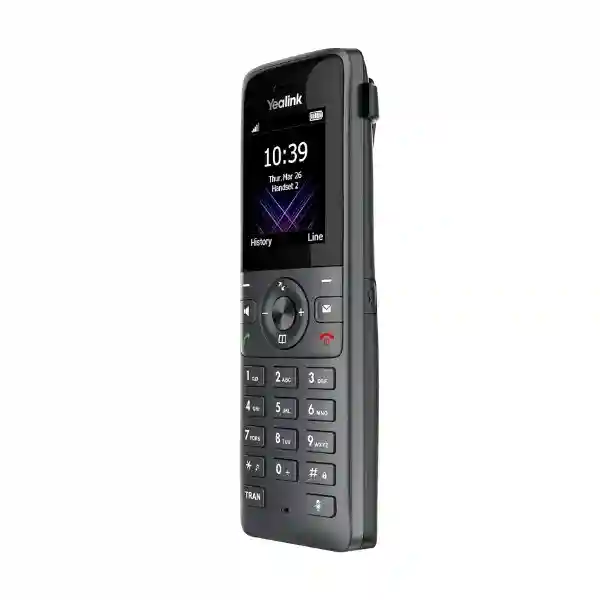
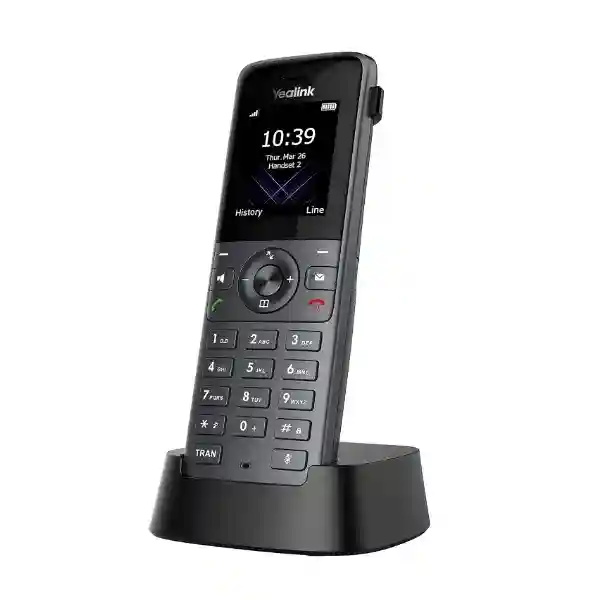
Yealink W78H DECT Handset – Professional Business Voice Mobility
The Yealink W78H is a professional business DECT handset for organisations that need staff to remain reachable while moving away from a fixed desk. It combines cordless mobility with a clear 2.4-inch colour interface, HD audio, noise reduction, Bluetooth 5.1, vibration alerts and practical quick charging. Rather than treating mobility as an afterthought, the W78H is designed around everyday calling workflows: answering while walking between rooms, transferring calls, consulting colleagues, using a headset, receiving voicemail notifications and remaining productive across compatible Yealink DECT coverage.
For procurement teams in Uganda, the important distinction is that W78H is the handset component of a DECT solution. A complete deployment requires a compatible Yealink DECT base or multi-cell architecture appropriate to the required user count and coverage area. This makes planning more important than simply counting handsets. FourTeck can help map handset quantities, base infrastructure, charging points, coverage zones and accessories into a bill of materials suitable for a branch, campus, hotel, clinic, warehouse or multi-floor office.
Procurement Fact Rail
Yealink W78H
Business DECT handset
2.4-inch 240 × 320 TFT
Bluetooth 5.1 / 3.5 mm
Request project quotation
Confirm regional terms on quote
The W78H is best specified as part of a complete communications design. Buyers should confirm the intended base station, the number of simultaneous users, expected call concurrency, physical coverage, building materials and charging locations. For single-site SMB deployments, compatible single-cell infrastructure can provide a straightforward route to cordless calling. Larger sites can use compatible Yealink multi-cell systems where roaming and handover across broader areas are required. The handset itself supports two simultaneous calls, while total system capacity depends on the selected DECT platform.
Operational Architecture and Product Overview
The W78H separates user mobility from the wired network edge. Instead of attaching an Ethernet cable to every handset, users carry the cordless endpoint while compatible Yealink DECT infrastructure provides the radio layer and connects into the IP telephony environment. This architecture is useful in environments where employees frequently move between desks, stock rooms, service counters, corridors, wards or operational zones. It can also reduce the temptation to rely on personal mobile phones for routine internal business calls.
At the user interface layer, the handset provides a 2.4-inch 240 × 320 TFT colour display with icons, soft keys, caller identification, notification indications, date and time, screen saver, multilingual interface and keypad backlighting. The physical keypad keeps common telephony controls immediately available. Users can handle call waiting, mute, hold, transfer, redial, speed dial, voicemail, call forwarding and three-way conference functions subject to the connected telephony platform and provisioning.

Audio design is a central reason to select the W78H. It supports HD audio, a full-duplex speakerphone, hearing-aid compatibility and flexible noise reduction/noise cancellation. These capabilities matter in offices and service environments where background conversation, equipment or customer traffic can make cordless calls harder to understand. Receiver and ringer volume controls provide additional adjustment, while vibration alerts add a tactile notification path for busy or noisy spaces.
The mobility architecture is scalable within the Yealink DECT family. Yealink identifies compatibility with single-cell and multi-cell solutions, allowing procurement teams to select an architecture based on site size rather than replacing the handset concept when the deployment grows. This is particularly useful when an organisation has a mixture of small branches and a larger headquarters. The same handset family can be incorporated into different supported Yealink DECT topologies, subject to firmware and platform compatibility checks.
Enterprise Business Outcomes and Value Analysis
Key Hardware and Software Highlights
2.4-inch Colour Display
The 240 × 320 TFT panel provides a compact visual workspace for caller information, menus, soft-key actions, notifications and directories. It gives mobile users more context than a basic monochrome cordless endpoint.
Bluetooth 5.1
Built-in Bluetooth supports compatible wireless headset workflows. This is especially useful for supervisors, service personnel and mobile office staff who need hands-free conversation while moving.
3.5 mm Headset Jack
A wired headset path remains available for users who prefer a simple physical connection or environments where standardised wired headsets are already deployed.
Vibration Alert
Tactile alerts supplement audible ringing, improving awareness in busy locations and allowing users to reduce dependence on loud ring volumes.
Quick Charging
Short charging intervals can restore meaningful calling time. This reduces the operational impact of an employee returning a handset to its cradle late in a shift.
OTA Upgrade Support
Over-the-air handset upgrading supports more manageable lifecycle administration when the handset is deployed with compatible Yealink infrastructure and properly maintained firmware.
Technical Specifications Ledger
| Specification | Yealink W78H | Procurement relevance |
|---|---|---|
| Display | 2.4-inch, 240 × 320 TFT colour | Readable mobile calling interface with caller information and soft keys. |
| Audio | HD audio; full-duplex speakerphone; FNR/noise cancellation | Supports clearer conversation in typical business surroundings. |
| Headset interfaces | Bluetooth 5.1 and 3.5 mm jack | Supports wireless and wired headset strategies. |
| Battery | Lithium-ion; revision-dependent construction | Confirm hardware revision for exact battery/standby specification. |
| Talk time | Up to 21 hours in ideal conditions | Designed for extended working-day mobility. |
| Standby | Up to 166 hours on earlier V0; up to 320 hours on later revisions in ideal conditions | Revision should be recorded when standby duration is procurement-critical. |
| Quick charge | 10 minutes for up to 2 hours talk time | Useful for rapid recovery during active shifts. |
| Calls per handset | Up to 2 simultaneous calls | System-wide concurrency remains dependent on base architecture. |
| DECT range | Up to 50 m indoors / 300 m outdoors in ideal conditions | Actual coverage depends heavily on walls, floors, interference and site layout. |
| European DECT band | 1880–1900 MHz | Confirm regional variant and regulatory suitability before supply. |
| Operating temperature | 0–40°C | Intended for normal indoor commercial operating environments. |
| Operating humidity | 10–95% | Environmental planning remains important for charger and handset longevity. |
| Charging power | Cradle DC 5V/0.6A; adapter 100–240V input | Plan sufficient protected outlets for all charging positions. |
| Base compatibility | Compatible Yealink DECT platforms including W70B and supported W80/W90 systems | Verify firmware and exact base model before deployment. |
Published dimensions and battery details can vary by W78H hardware revision. Where physical dimensions, battery construction or standby duration form part of a tender acceptance criterion, FourTeck recommends confirming the exact supplied revision during quotation rather than assuming an older datasheet applies to current stock.
Configuration and Sizing Worksheet
1. Estimate mobile users and call concurrency
Start with the number of employees who genuinely need a cordless handset rather than the total headcount. Receptionists may remain on desk phones while supervisors, warehouse staff, nurses, technicians, hospitality teams or floor managers require mobility. Record peak concurrent calls separately because base-system capacity is not the same as handset count.
2. Map coverage zones
Mark offices, corridors, stairwells, warehouses, external yards and service areas where calls must remain available. Published DECT range figures are ideal-condition maxima, not a guarantee inside a specific building. Reinforced concrete, metal shelving, machinery, multiple floors and dense walls can materially change radio behaviour. Larger environments should be evaluated for multi-cell architecture.
3. Plan charging
Every operational handset needs a reliable charging routine. Locate cradles where handsets are naturally returned at shift changes or overnight. Avoid sharing too few chargers across a large fleet. Where staff work extended or overlapping shifts, include spare-handset and charging capacity in the bill of materials.
4. Validate headsets
Determine whether users need Bluetooth or wired headsets. Bluetooth 5.1 is built into W78H, while a 3.5 mm jack supports compatible wired options. For standardised corporate headset deployments, verify the intended headset model before volume purchase.
5. Confirm telephony integration
The handset operates as part of the Yealink DECT environment, while SIP account handling and network connectivity are delivered through the base architecture. Confirm PBX or hosted voice platform requirements, SIP provisioning, directory needs, call features and security policies before deployment. Yealink notes that its DECT devices are not intended for third-party DECT base/handset interoperability, so cross-vendor radio compatibility should never be assumed.
6. Prepare the quotation brief
Provide the required W78H quantity, site count, approximate floor area, number of floors, existing Yealink DECT equipment if any, PBX or hosted platform, headset requirement, expected simultaneous calls, delivery destination and desired implementation date. This information enables a more useful quotation than requesting handset price alone.

Deployment Scenarios and Industry Use Cases
Large Enterprise and Multi-Site Networks
Enterprises can use W78H handsets for employees whose responsibilities cross desk boundaries. A small branch may use compatible single-cell infrastructure, while a headquarters or larger operational site may require a multi-cell design. This allows procurement teams to establish a common handset experience while sizing radio infrastructure independently for each site. Standardising the user endpoint can simplify training, spares and support documentation.
Financial and Banking Institutions
Branches and operational departments may need controlled cordless mobility for supervisors and authorised staff. The W78H can support business call handling while allowing personnel to move between counters, offices and service zones. Deployment should be aligned with the organisation’s PBX security, network segmentation and physical device-management policies. Cordless mobility does not replace the need for controlled provisioning and account governance.
Educational and Campus Networks
Schools, colleges and universities often have administrators, facilities teams, security personnel and department coordinators who move across buildings. DECT can provide a dedicated business voice layer without requiring every call to depend on cellular coverage. Multi-building campus design should be surveyed carefully because outdoor distance, building separation and construction materials affect the required base topology.
Government and Institutional Procurement
Public-sector projects often require clear bills of materials, model identification, delivery documentation and controlled acceptance. The W78H can be specified with compatible bases, charging accessories and implementation services as a defined communications package. Tender documentation should state required quantities, coverage expectations, telephony integration, warranty terms and any mandatory regulatory or compliance documentation so these can be validated before order confirmation.
Hospitality, Healthcare and Warehousing
These environments share a common requirement: people move while work continues. Hotel supervisors move between front office and service areas; healthcare administrators and support teams circulate between rooms and departments; warehouse supervisors cross aisles and loading zones. The W78H’s vibration alert, headset choices and portable form factor are useful in such roles, provided the environment does not require a ruggedised protection rating. Where impact, dust or water resistance is mandatory, a rugged Yealink DECT handset may be more appropriate.
Technical Deep Dive: DECT Radio and Voice Processing
The W78H’s role is fundamentally different from a Wi-Fi smartphone or a desk SIP phone. Its DECT radio communicates with compatible Yealink base infrastructure designed around cordless voice. That separation gives the communications designer a dedicated mobility layer and lets the wired Ethernet connection remain at the base station rather than the handset. In ideal conditions, Yealink publishes range figures of up to 50 metres indoors and 300 metres outdoors, but those values should be treated as planning references rather than promises for a specific building.
Voice processing combines HD audio support with full-duplex speakerphone capability and flexible noise reduction/noise cancellation. The practical objective is intelligibility. A mobile employee may be speaking while walking, standing near colleagues or working around routine background noise. Noise-reduction processing can suppress distracting elements, while HD audio can preserve a more natural voice experience when the complete call path supports the relevant wideband capability. Hearing Aid Compatibility broadens accessibility for users who depend on compatible hearing devices.
Technical Deep Dive: Firmware, Provisioning and Operational Control
A handset fleet becomes easier to operate when firmware and configuration are treated as managed assets rather than individual user choices. W78H supports over-the-air upgrading, while the exact management workflow depends on the connected Yealink DECT platform. Before rollout, administrators should establish an approved firmware baseline, document base/handset compatibility and test important call features. Production upgrades should follow change-control practices appropriate to the organisation.
Directory and calling behaviour also depend on the wider solution. W78H provides access to phonebook and call-history functions, while compatible Yealink systems can support remote directories and other business telephony integrations. Buyers should distinguish handset capabilities from base-station or PBX capabilities. This avoids procurement mistakes such as expecting an individual handset to provide an Ethernet interface, SIP account capacity or network security function that actually belongs to the base architecture.
Technical Deep Dive: Availability, Redundancy and Recovery
For a single handset, operational availability begins with battery discipline, spare devices and accessible charging. Quick charging reduces recovery time, but organisations with shift-based operations should still design a charging policy. A spare handset can be valuable where communications are operationally critical. For larger systems, availability also depends on the selected multi-cell architecture, network switching, PoE design, PBX availability and power protection.
Redundancy therefore needs to be designed at system level. A W78H handset alone cannot create a redundant voice service. Procurement teams should ask how base stations are powered, how network paths are protected, whether the PBX or hosted service has failover, and how replacement handsets will be registered if a unit is damaged. A complete continuity plan includes radio coverage, base infrastructure, LAN switching, upstream telephony and replacement logistics.
Pre-Purchase Buyer Gap Checklist
Does W78H work alone? No. It is a DECT handset and requires compatible Yealink DECT infrastructure. Buyers replacing an existing handset should provide the installed base model and firmware details for validation.
Can it register to any DECT base? Cross-vendor compatibility should not be assumed. Yealink explicitly states its DECT technology is incompatible with third-party DECT devices. Keep the radio solution within confirmed compatible Yealink platforms unless written interoperability information says otherwise.
Are there hidden subscriptions? The handset specification itself does not imply a mandatory handset subscription, but the PBX, hosted SIP service, management platform or third-party calling service used by the customer may carry licences or recurring charges. Quote these separately where applicable.
Will one base cover the whole building? Not necessarily. Indoor range is affected by construction. Multi-floor offices, reinforced concrete, metal storage systems and separated wings can require additional cells or a multi-cell design.
What standby figure should be used? W78H revisions differ. Earlier V0 documentation lists up to 166 hours in ideal conditions, while later revisions are documented up to 320 hours. Confirm the supplied revision where this specification is contractually important.
Is the W78H rugged? It is a professional business handset but is not positioned as an IP-rated rugged model. Sites requiring defined resistance to dust, water or harsh handling should evaluate a ruggedised handset instead.
Does Bluetooth guarantee every headset works? No. Bluetooth 5.1 provides a wireless headset interface, but headset interoperability and control behaviour can vary. Validate the intended model before standardising a large fleet.
What should be included besides the handset? Depending on whether this is a new deployment or expansion, the project may need compatible bases, PoE switching for base infrastructure, chargers, power protection, headsets, PBX configuration, cabling, installation and spare handsets.
Uganda Procurement and Delivery Logistics
FourTeck can structure a Yealink W78H quotation around the actual project rather than presenting the handset as an isolated item. For an expansion, provide the existing base station model, firmware environment and required additional handset count. For a new deployment, provide site details, expected users, call concurrency and coverage expectations so the appropriate supporting DECT infrastructure can be considered.
Order processing should include confirmation of model, quantity, regional radio variant, accessories, commercial terms and delivery destination. Project buyers can also request bill-of-materials validation so that bases, handsets, charging equipment and related network components are aligned before procurement approval. Delivery timing depends on quantity, project configuration and stock or sourcing conditions at the time of quotation; therefore lead times should be confirmed on the formal commercial offer rather than assumed from a generic product listing.
Pre-configuration requirements should be raised before dispatch. Where project scope permits, preparation can include firmware baseline checks, compatibility validation and configuration planning. For larger deployments, phased delivery may be useful when different branches or floors are being commissioned on separate schedules.
Uganda Coverage Matrix
Head offices, hotels, institutions, clinics and multi-floor commercial environments.
Hospitality, administration, logistics and service-oriented cordless voice projects.
Industrial, education, hospitality and branch-office communication requirements.
Regional offices, healthcare, education and commercial deployments.
Institutional, NGO, enterprise and distributed branch requirements.
For locations outside these hubs, delivery and project planning can be quoted according to destination, equipment quantity and implementation requirements. Remote sites benefit from careful pre-shipment validation because correct base selection, accessories and firmware alignment can reduce avoidable installation delays.
Cross-Border and Regional Supply Chains
Organisations operating across East Africa, the Gulf and wider African markets may need a consistent Yealink procurement framework across multiple countries. FourTeck regional sites provide contact paths for Uganda, Kenya, broader African markets, UAE and Kuwait. Regional procurement should still confirm radio variant, local compliance expectations, power accessories, warranty handling and delivery terms for each destination.
For multinational rollouts, use a standard bill-of-materials template but allow site-specific quantities and base topology. A small sales office should not automatically inherit the same multi-cell design as a warehouse or campus. Consistency should focus on approved product families, configuration standards and support procedures while allowing engineering to adapt coverage to each building.
Related Yealink Products and Deployment Options
A complete W78H project may include compatible Yealink DECT infrastructure, headsets and fixed desk endpoints. Buyers planning a small cordless deployment can ask FourTeck about the Yealink W70B base and W78P system configuration. Larger facilities can evaluate Yealink W80 or W90 multi-cell architectures. Where employees require a rugged handset rather than a standard business endpoint, Yealink’s rugged DECT range should be considered.
For mixed environments, browse the FourTeck Uganda technology portfolio and request guidance for compatible Yealink DECT systems, business IP phones, professional headsets, PoE switching and voice deployment services. Confirm exact accessory compatibility before purchasing in volume.
FourTeck Technical Service Capabilities
Enterprise communications procurement is more reliable when the bill of materials is validated before equipment ships. FourTeck can help review the intended Yealink architecture, identify whether W78H is being added to an existing base environment or deployed as part of a new system, and check the supporting components required for the proposed scale. This is particularly important when a project combines handset mobility, multi-cell coverage, PBX integration, PoE switching and headset requirements.
Project preparation can include model and quantity verification, firmware compatibility review, accessory matching and pre-shipment staging requirements according to the agreed scope. For multi-site deployments, a standard configuration worksheet can help keep naming, extension plans, firmware baselines and deployment records consistent. Post-sales support can focus on configuration guidance, compatibility troubleshooting and structured escalation where manufacturer-level support is required.
The objective is to reduce common procurement failures: ordering handsets without bases, underestimating radio coverage, assuming cross-vendor DECT compatibility, overlooking charger quantities or discovering after delivery that a specific headset workflow was never validated. Early technical review turns the quotation into a deployment plan rather than a simple parts list.
Extended Technical FAQ
1. What is the Yealink W78H designed for?
The W78H is designed as a professional cordless DECT handset for business communications. It is appropriate for employees who need to take and manage calls while moving within a designed DECT coverage area. Typical users include supervisors, administrators, hospitality staff, operations teams, warehouse coordinators and other employees who cannot remain at a fixed desk throughout the working day. It provides a colour display, physical keypad, HD audio, speakerphone, vibration alert, Bluetooth 5.1 and wired-headset connectivity. It is not a standalone cellular phone and it does not replace the compatible Yealink DECT base infrastructure required to connect the handset to the business voice environment.
2. Which base stations can be used with W78H?
Yealink documents W78H compatibility across supported members of its DECT portfolio, including W70B and supported W80/W90 multi-cell systems. Compatibility can depend on firmware level, so the installed base model and software version should be recorded when adding handsets to an existing system. This matters particularly for older deployments that have been running without firmware updates. FourTeck can review the existing equipment details before quotation. Yealink also states that its DECT technology is incompatible with third-party DECT devices, so a generic DECT label on another vendor’s base station should not be treated as evidence that W78H will register or operate correctly.
3. How much area will one DECT base cover?
Yealink publishes ideal-condition DECT range figures of up to 50 metres indoors and 300 metres outdoors. Actual building coverage can be substantially different. Concrete walls, metal structures, elevator cores, dense shelving, equipment rooms, floor slabs and building geometry can attenuate radio signals. For that reason, procurement teams should avoid calculating base quantity using radius alone. A small open-plan office may be straightforward, while a multi-storey hotel or warehouse may require a multi-cell design. Where uninterrupted mobility is important, coverage planning should consider the paths employees actually walk, not merely whether a signal can be detected at the edge of a building.
4. Does the W78H support Bluetooth headsets?
Yes. The W78H includes Bluetooth 5.1 for compatible wireless headset use and also provides a 3.5 mm headset jack for wired connectivity. This gives organisations flexibility when different job roles require different wearing styles. However, Bluetooth version compatibility alone does not guarantee every headset will provide identical call-control behaviour. Organisations standardising a particular headset should validate that model with the handset before a large purchase. The wired jack can be useful where simplicity, predictable pairing behaviour or an existing stock of compatible wired headsets is preferred. Include headset quantities and model requirements in the quotation brief if they form part of the rollout.
5. What battery performance should buyers expect?
Yealink specifies up to 21 hours of talk time in ideal conditions. Standby specifications vary by W78H hardware revision: older V0 documentation identifies up to 166 hours, while later revisions are documented with up to 320 hours under ideal conditions. Real-world results vary with signal conditions, call patterns, display use, battery age and environmental factors. The handset also supports quick charging, with a 10-minute charge specified to provide up to two hours of talk time. If standby duration is part of a tender requirement, request confirmation of the supplied hardware revision rather than relying on a specification copied from an older datasheet.
6. Does W78H require a licence or subscription?
The handset should be separated conceptually from the services that make the complete telephone solution work. A W78H handset itself is a hardware endpoint, but the organisation may use a PBX, hosted SIP service, calling plan, directory service or management environment with its own licences or recurring charges. Those costs depend on the customer’s communications platform rather than simply on owning a W78H. When preparing a budget, list hardware, voice-service licensing, PBX licensing, installation and support as separate cost categories. This makes recurring charges visible and avoids confusing the handset purchase price with the total cost of operating the business voice service.
7. Can W78H be used in warehouses or harsh environments?
It can be useful in normal warehouse and operational environments where cordless mobility, vibration alerts and headset support are required, but W78H is not positioned as an IP-rated rugged handset. If users routinely expose devices to dust, moisture, drops or harsh handling, procurement teams should evaluate a ruggedised Yealink DECT model with an appropriate published protection rating. This distinction is important because a handset that is functionally suitable for warehouse calling may not satisfy an occupational requirement for environmental resistance. Describe the physical environment during quotation so the handset family can be matched to the actual duty rather than selected solely on call features.
8. Can the handset be configured before delivery?
Configuration requirements depend on the complete solution. The W78H operates through compatible Yealink DECT infrastructure, so much of the network and SIP configuration resides at the base-system level. Project staging can nevertheless include compatibility review, firmware planning, handset registration strategy and configuration documentation where included in the agreed scope. For larger deployments, provide extension plans, user naming conventions, PBX details, site grouping and desired firmware baselines early. This allows staging work to be defined before dispatch and helps reduce the amount of repetitive configuration that must be completed at each site after equipment arrives.
9. What warranty and replacement process applies in Uganda?
Warranty terms should be confirmed on the formal FourTeck quotation because commercial coverage can depend on supply channel, project terms and the specific equipment supplied. Keep invoices, serial-number records and deployment information for all business communications hardware. If a fault occurs, support teams may first need to distinguish a handset problem from battery, charger, base-station, firmware, coverage or PBX issues. Maintaining a small pool of spare handsets can reduce downtime in larger fleets while diagnosis or warranty processing is underway. For critical deployments, include replacement strategy and spare quantity in the procurement plan instead of waiting until the first device failure.
10. What information is needed for an accurate W78H quotation?
For a simple expansion, provide the quantity of W78H handsets, existing Yealink base model, firmware information if available, required chargers or headsets and delivery destination. For a new installation, also provide the number of users, approximate site dimensions, number of floors, expected simultaneous calls, PBX or hosted voice platform, coverage areas, headset requirements and desired deployment date. If multiple branches are involved, list each site separately. This allows the quotation to distinguish handsets from base infrastructure, network components, accessories and services. The result is a clearer commercial comparison and reduces the risk of receiving equipment that is incomplete for the intended deployment.
Plan Your Yealink W78H Deployment in Uganda
Whether you need a few additional handsets for an existing Yealink DECT system or a complete cordless voice design for a new facility, start with the operating requirement. Share the number of users, current base equipment, building layout, call concurrency, headset needs and delivery destination. FourTeck can use that information to prepare a structured quotation covering W78H handsets and the compatible supporting components required by the project.
For larger sites, request coverage and multi-cell planning rather than relying only on ideal-condition distance figures. For existing sites, include base model and firmware details so compatibility can be reviewed before supply. For tenders, request confirmation of warranty terms, hardware revision where relevant, delivery lead time and technical scope in the formal offer.



Reviews
There are no reviews yet.