Professional AV room automation • Uganda supply
Yealink YPS20 Partition Sensor for Divisible Meeting Room Automation
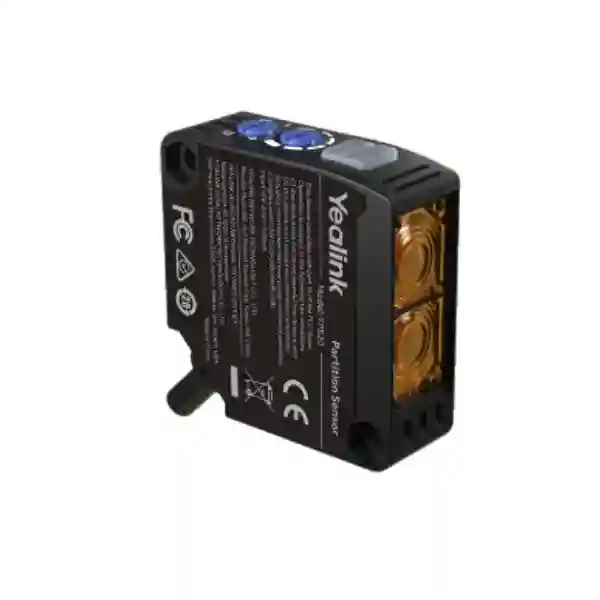
The Yealink YPS20 is a surface-mount infrared partition sensor built for meeting rooms that can operate as separate spaces or as one combined room. Its job is straightforward but operationally important: it detects whether a movable partition is present and provides the room system with a dependable physical-state signal. In a properly engineered Yealink divisible-room design, that signal can be used by the AP08 and room-control workflow to activate the intended divided or combined configuration. This reduces dependence on staff remembering which preset to select every time a wall is opened or closed.
For procurement teams, the YPS20 should be treated as part of a room automation architecture rather than as a standalone occupancy sensor. It uses infrared diffuse-reflection technology, offers an effective detection distance of up to 1.5 metres and provides adjustable sensitivity so the installer can account for partition distance and potential reflective objects beyond the wall. Yealink supplies a 10-metre cable for practical positioning. The device connects to the GPIO interface of the AP08, while Yealink Room Designer is used in the broader divisible-room configuration process.
The value becomes clear in hotels, training centres, universities, corporate offices, government facilities and conference venues where one large room is repeatedly split into two operating spaces. Audio routing, microphone behaviour, speaker zones and conferencing presets may need to change with the wall position. Automating the physical-state input helps make those changes repeatable and less dependent on operator intervention.
FourTeck supports Uganda projects with bill-of-materials review, room-layout validation, accessory checks, staging guidance and delivery coordination. Before ordering, buyers should provide the room dimensions, partition type, proposed sensor position, AP08 details and desired divided/combined operating modes. This makes it easier to confirm whether one sensor is sufficient and whether the physical layout respects the sensing geometry.
Instant Specifications & Procurement Fact Rail
YPS20
Divisible meeting rooms
Infrared diffuse reflection
Up to 1.5 m
10 m
Yealink AP08 GPIO
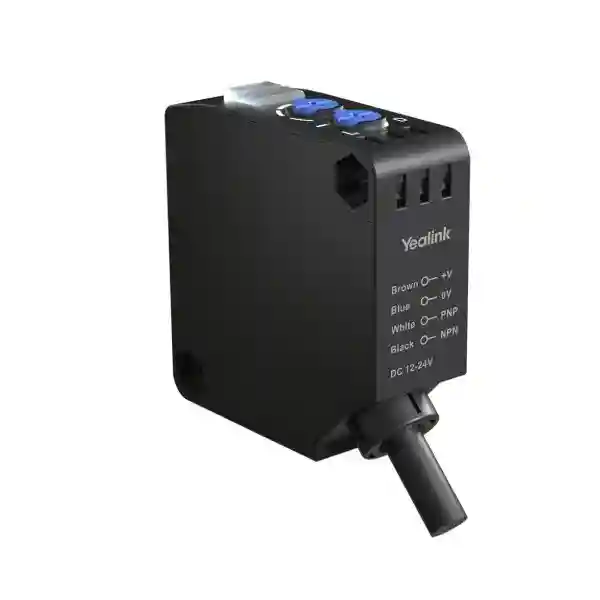
The YPS20 is best specified during the room-design stage because sensor placement, partition travel, reflective surfaces, cable route and AP08 location affect the final installation. It is not a network endpoint that independently manages conferencing devices. Instead, it provides the physical partition state to the Yealink room architecture. The sensor supports DC 12–24 V supply parameters, NPN/PNP output wiring, status indication and protective circuitry described in product documentation. Procurement should therefore include the sensor together with the compatible control and processing components required by the project design.
Stock and delivery are quotation dependent. Warranty terms should be confirmed on the commercial quotation because project channel, support programme and supplied system composition can affect coverage. For larger rollouts, FourTeck can structure a bill of materials by room so that sensor quantities, AP08 processors, microphones, speakers, controllers, conferencing devices, cabling and mounting requirements are traceable during approval and deployment.

Operational Product Architecture & Overview
Divisible rooms create a control problem that ordinary fixed meeting rooms do not have. The physical space changes, yet microphones, speakers, conferencing endpoints and control logic still need to behave as if each room mode had been designed independently. When the movable wall is closed, each side may need its own audio zone and meeting workflow. When the wall opens, the combined room may need a wider microphone pickup plan, coordinated loudspeaker coverage and a different conferencing preset. If room-state selection is manual, users can easily begin a meeting with the system in the wrong mode.
The YPS20 addresses the physical detection layer. It projects infrared light and uses diffuse reflection to determine whether the partition is in the sensing zone. The effective distance can reach 1.5 metres. Sensitivity adjustment matters because a sensor that is too sensitive may respond to an object beyond the open partition, while a setting that is too conservative may not reliably detect the wall. Yealink installation guidance therefore places emphasis on geometry: the optical axis should face the partition as directly as practical, the sensing distance must remain inside the effective range and obstructions behind the open wall should be considered during commissioning.
The sensor is connected to the AP08 GPIO interface. In the wider Yealink divisible-room workflow, Room Designer is used to represent and configure the room architecture. Presets for divided and combined operation must be planned correctly, and automatic activation must be enabled where required. This architecture separates physical detection from audio processing and control. That is useful for system engineering because the YPS20 can focus on reliable wall-state sensing while the AP08 and associated room system handle the actions that should follow.
Two indicator lights provide immediate commissioning feedback for power, communication and detection state. That simple local visibility is valuable during installation because technicians can verify the sensor response at the wall before troubleshooting higher layers of the room system. Adjustable sensitivity further allows commissioning teams to account for partition finish, mounting distance and objects that could create unwanted reflections.
The supplied 10-metre cable gives designers freedom to position the sensor where the partition can be detected reliably while locating processing equipment in an AV rack, credenza or technical area. Cable routing should still be planned early. Installers should avoid routes that create serviceability problems or expose the cable to moving partition hardware. Any proposed extension should be reviewed against Yealink installation guidance and the project wiring design rather than assumed during procurement.
For buyers, the most common mistake is ordering the sensor without validating the rest of the divisible-room architecture. The correct procurement question is not merely whether YPS20 detects a wall. The question is whether the room has a compatible AP08-based design, correct presets, appropriate conferencing endpoints, a defined microphone and speaker topology, suitable control logic and a commissioning plan. FourTeck can review these dependencies before the purchase order is finalised.
Enterprise Business Outcomes & Value Analysis
Automatic partition detection helps the room system react to the actual physical layout. This reduces the risk of users selecting a combined preset while the room is divided, or leaving separate-room behaviour active after the wall has been opened.
Infrared diffuse-reflection sensing, adjustable sensitivity and local indicators support predictable commissioning. Correct placement remains essential, but the architecture gives technicians a dedicated physical signal rather than depending on an operator to report wall state.
The YPS20 fits into a broader AP08 room architecture, allowing organisations to standardise divisible-space logic across conference suites, training facilities and multipurpose rooms while adapting the audio design to each location.
Because room-state actions are implemented through the designed Yealink workflow, engineering teams can define what should happen when a partition opens or closes instead of relying on ad-hoc user changes.
End users should not need to understand DSP routing simply to change the physical room size. A commissioned sensor-based workflow can make routine transitions more intuitive for reception teams, trainers and meeting organisers.
The sensor can reduce avoidable support calls caused by incorrect room-mode selection. More importantly, it encourages the divisible-room logic to be engineered and documented rather than depending on institutional knowledge held by a few operators.
Local LED indication and a defined GPIO path make it easier to isolate whether a fault originates at detection, wiring, AP08 configuration or the higher-level room preset. Structured diagnosis can reduce meeting-room downtime.
When the physical partition and AV configuration remain synchronised, users receive a more predictable experience regardless of whether the space is operating as one room or multiple rooms.
These outcomes depend on proper system design. A partition sensor cannot compensate for poor microphone coverage, incorrectly bound presets, outdated firmware, unsuitable room acoustics or a partition that sits outside the effective sensing geometry. The strongest business case therefore comes from treating the YPS20 as one component in an engineered divisible-room solution and validating the full operating sequence before handover.
Key Hardware & Software Highlights
| Element | Technical role | Operational outcome |
|---|---|---|
| Infrared diffuse-reflection sensor | Detects the movable partition without a mechanical contact switch. | Supports automatic room-state recognition while keeping the sensing device compact. |
| 850 nm infrared source | Provides the optical sensing source used for partition detection. | Designed for precise short-range detection when installed within the specified geometry. |
| Sensitivity control | Allows the active sensing distance to be tuned. | Helps reduce false detection from objects behind an open partition. |
| Dual indicators | Provides local status feedback. | Improves installation checks and fault isolation. |
| 10 m cable | Supports flexible placement relative to the processing location. | Reduces pressure to position the AP08 immediately beside the partition. |
| AP08 GPIO integration | Transfers physical partition state into the Yealink room-control architecture. | Enables designed divided/combined room actions. |
| Room Designer workflow | Supports configuration of the broader divisible-room design. | Provides a structured engineering approach instead of improvised room switching. |

Technical Specifications Ledger
The following ledger consolidates the principal YPS20 characteristics relevant to design and procurement. Environmental and electrical limits should be checked against the current manufacturer documentation at the point of final engineering approval, particularly where the room is exposed to unusual heat, humidity, vibration or strong ambient light.
| Specification | YPS20 detail | Procurement relevance |
|---|---|---|
| Product type | Surface-mount partition sensor | Designed specifically for physical partition detection in divisible rooms. |
| Sensor method | Diffuse reflection | No mechanical contact with the partition is required. |
| Detection distance | Up to 1.5 m effective range | Sensor mounting point must remain within effective distance of the closed partition. |
| Light source | Infrared LED, 850 nm | Supports optical partition detection. |
| Response time | Less than 0.5 ms sensor response | Physical sensing is fast; complete room transition also depends on system configuration. |
| Supply voltage | DC 12–24 V | Electrical integration should follow the AP08/YPS20 wiring design. |
| Control output | NPN/PNP output with wiring selection | Installer must use the correct wiring mode and GPIO connection. |
| Output current | 100 mA | Relevant to electrical design and interface validation. |
| Consumed current | Less than 25 mA | Low-load sensing component in the room architecture. |
| Sensitivity | Adjustable | Commissioning can be tuned to room geometry and interfering objects. |
| Indicators | Orange action and green stable indication | Provides local commissioning feedback. |
| Protection | Reverse-power, output short-circuit and output reverse protection | Adds resilience against common wiring faults, though correct installation remains mandatory. |
| Ingress rating | IP65 | Useful environmental protection for the sensor enclosure; project conditions still require review. |
| Housing / lens | ABS housing / PMMA lens | Compact material construction suited to discreet room installation. |
| Operating temperature | Approximately -35°C to 55°C | Confirm local installation conditions, especially ceiling voids or non-conditioned technical areas. |
| Cable | 10 m supplied | Measure the actual route, not straight-line distance, before ordering. |
| Primary integration | Yealink AP08 GPIO and room-control workflow | Confirm AP08 availability and complete room architecture. |
The YPS20 is not specified by packet throughput, backplane bandwidth or Ethernet port count because it is a sensing accessory rather than a network switch or computing appliance. For this product, the decisive engineering metrics are sensing distance, optical alignment, sensitivity, response, GPIO integration, cabling and the configuration of the associated room system.
Configuration & Sizing Worksheet
Step 1 — Define the room states
Document every physical mode the space must support. A simple room may have two states: divided and combined. More complex conference centres may have multiple partitions and several possible combinations. Record which conferencing endpoint, microphone zones, speaker zones, displays and control interfaces should operate in each state. This establishes what the partition signal must trigger and prevents the sensor from being treated as an isolated accessory.
Step 2 — Measure partition geometry
Measure the proposed sensor-to-partition distance with the wall fully closed. Keep the target within the effective sensing range and choose a position where people, doors, structural beams or decorative objects are unlikely to cross the optical path. Where direct perpendicular alignment is not possible, keep the installation angle within manufacturer guidance. Check what the sensor sees after the partition opens; an object immediately behind the wall path may cause an unwanted reflection.
Step 3 — Plan sensitivity and commissioning
Do not assume maximum sensitivity is always best. The correct setting is the one that reliably detects the partition while ignoring background objects when the wall is open. Commissioning should test repeated open-and-close cycles, different room lighting conditions and the actual furniture arrangement. Any later changes to the partition finish or nearby fixtures should be considered if detection behaviour changes.
Step 4 — Validate cabling and AP08 location
The supplied 10-metre cable is generous for many rooms, but the real route may travel up a wall, across a ceiling tray and down to an equipment location. Measure the service route and allow sensible maintenance slack. Confirm the AP08 GPIO connection and connector requirements in the system design. Avoid placing cable where moving partition mechanisms can pinch, pull or abrade it.
Step 5 — Validate software and room presets
The divided and combined states must be represented correctly in the Yealink room workflow. Confirm that the YPS20 remains included in the room design, presets are bound as required, automatic activation is enabled and the relevant devices are on compatible firmware. A correctly functioning sensor cannot produce the intended room transition if the downstream preset logic is incomplete.
Step 6 — Prepare the quote request
Send FourTeck the number of divisible rooms, number of partitions, room dimensions, partition material and travel, proposed sensor position, AP08 quantity, existing Yealink devices, conferencing platform, microphone and speaker plan, controller requirements, preferred delivery city and project timeline. Include drawings or photographs when available. This allows the quotation to distinguish required equipment from optional accessories and reduces revisions after procurement approval.
Deployment Scenarios & Industry Use Cases
Large enterprise and multi-site networks
A regional enterprise may operate divisible boardrooms at headquarters and training rooms in branch offices. Standardising on a documented YPS20/AP08 architecture can help facilities and collaboration teams maintain consistent room-state behaviour. The physical design still needs site-by-site validation because partition distances and room acoustics vary, but the operational model can remain familiar. Central standards can define naming, preset logic, commissioning records and support escalation so local teams know what to verify before raising a fault.
Financial and banking institutions
Banks often use multipurpose meeting floors for executive sessions, training and project workshops. A room may be divided for concurrent meetings and opened for town halls. Automatic partition-state detection helps reduce setup errors during rapid room turnover. The sensor itself does not provide information-security controls; however, predictable room configuration supports operational discipline by ensuring audio zones and conferencing modes follow the intended physical layout when the complete system is correctly designed.
Educational and campus environments
Universities, business schools and training institutes frequently use movable walls to convert lecture spaces into smaller classrooms. In these environments, lecturers should not need to understand DSP routing before a session. A commissioned divisible-room workflow can allow the physical wall state to initiate the appropriate system configuration. Procurement teams should still plan for local support, documented presets and a simple recovery procedure for occasions when a partition is moved while equipment is offline.
Government and institutional procurement
Government meeting facilities often require clear bills of materials, traceable model numbers and repeatable acceptance tests. The YPS20 can be specified as the partition-detection component in a broader Yealink ProAV room design. Tender documentation should state the required sensing function, compatible AP08 integration, cable routing, commissioning tests and expected divided/combined behaviour rather than describing the sensor without its dependencies.
Hotels and conference venues
Hospitality venues may change room layouts several times per day. A ballroom or meeting suite can host separate workshops in the morning and a combined event later. Automated partition sensing can reduce reliance on temporary operators remembering the correct AV preset. The room should be tested under realistic furniture layouts and lighting, and venue technicians should receive a concise handover explaining indicator states, sensitivity, cable route and how to confirm the AP08 has received the expected partition state.
Technical Deep Dive 1: Sensing Engine & Physical Detection
The YPS20 uses an infrared light-emitting source and diffuse-reflection sensing. Unlike a through-beam arrangement that requires a transmitter and receiver on opposite sides, diffuse reflection relies on light returning from the target surface. This makes the installation compact, but it also means the target surface, distance and surrounding objects influence commissioning. Yealink specifies an effective range up to 1.5 metres and provides sensitivity adjustment so the installer can balance reliable partition recognition against background reflections.
The sensor response is fast, but room automation should not be evaluated solely by the raw sensing time. The complete user experience includes detection, GPIO state interpretation, preset activation and the response of the associated AV devices. Acceptance testing should therefore measure the practical transition from moving the wall to achieving the intended room configuration. Repeated tests are more useful than a single successful demonstration because they expose marginal sensitivity settings or intermittent wiring issues.
Mounting geometry is central. The sensor should face the partition as directly as practical and remain within the effective distance. When the wall opens, the optical path should not immediately encounter another object that resembles the target. If unavoidable background objects exist, sensitivity can be reduced so the closed wall remains detectable while the farther object is ignored. This is why drawings and site photographs are useful during procurement: they reveal whether the proposed sensing position is realistic before installation labour begins.
Technical Deep Dive 2: Room Designer, Firmware & Operational Control
The YPS20 becomes operationally valuable when its physical state is incorporated into the Yealink divisible-room configuration. Room Designer provides the engineering context, while AP08 handles the relevant integration and preset behaviour. The room diagram should include the sensor, the required divided and combined presets must be prepared, and automatic activation must be enabled where the design calls for it. Yealink support guidance also highlights firmware currency and correct action-switch position as troubleshooting points.
This means commissioning documentation should capture more than the sensor model. Record the AP08 firmware version, room-design file, preset names, GPIO wiring, action mode, sensitivity setting and expected LED state for both wall positions. That information dramatically improves future serviceability. A technician visiting the room months later can compare the current state against a known-good baseline rather than rebuilding the logic from memory.
Change control is equally important. Firmware upgrades, room redesigns or replacement of AV components should be tested against both partition states. A combined room may work correctly while a divided preset contains an unnoticed routing error. Maintenance procedures should therefore include a two-state functional test whenever the processing or control configuration changes.
Technical Deep Dive 3: Reliability, Recovery & Continuity
High availability in a divisible room is less about duplicating the YPS20 and more about designing a predictable fallback process. The sensor provides a simple physical input, while the room system performs the complex actions. If automatic transition fails, trained support staff should be able to identify whether the partition is being detected, whether the GPIO input is correct and whether the appropriate preset is bound and active.
Local indicators are useful because they shorten the diagnostic chain. If the sensor does not change state when the wall moves, investigate alignment, sensitivity, obstructions, power and wiring. If the sensor responds but the room does not, focus on AP08 configuration, automatic activation, preset binding and firmware. This layered method prevents unnecessary replacement of working hardware.
For critical meeting spaces, retain the approved configuration files and a room-specific wiring diagram. Document the sensitivity position and sensor mounting location with photographs. Keep the sensor cable route identifiable. Where the organisation maintains spare equipment, confirm the exact spare strategy with the project engineer rather than assuming every accessory can be swapped without configuration review. Recovery planning should also define a manual room-mode procedure so meetings can continue while the automatic workflow is being serviced.
Pre-Purchase Buyer Gap Checklist
Is AP08 required? The YPS20 is designed to connect to the Yealink AP08 GPIO interface in the divisible-room solution. Buyers should confirm the AP08 and complete room architecture rather than treating the sensor as a universal standalone controller.
Does it detect people? Its intended role is partition detection. It should not be purchased as a general occupancy, motion or security sensor.
Will 1.5 metres work in the room? Measure the closed-wall distance from the proposed mounting point. The actual installation should also account for angle, background objects and the route of the supplied cable.
Can it be installed anywhere? No. A position that is frequently blocked by people or furniture can undermine detection. Ceiling or side-wall positions that preserve a clean optical path are generally preferable when consistent with the room design.
Are there hidden subscriptions? The sensor’s core detection function is a hardware role, but the complete Yealink room solution may include other products, support programmes or platform licensing. Request a full bill of materials and identify recurring commercial items separately before approval.
What about firmware? The associated AP08 and room system should be maintained on compatible releases. Firmware governance should be part of the room lifecycle, especially when multiple sites need consistent behaviour.
Can existing third-party AV equipment remain? Some projects may integrate mixed ecosystems, but compatibility must be engineered. The YPS20’s documented integration path is with Yealink AP08 and the Yealink room workflow. Do not assume a third-party processor will interpret or automate the signal identically without design validation.
How should acceptance be tested? Run repeated partition open/close cycles and verify both the local sensor state and the resulting room behaviour. Test every required room mode, not only the most common one. Record results in the commissioning handover.
What happens if furniture changes? Large reflective objects placed in the optical path can affect sensing. Facilities teams should know the sensor location and avoid introducing new obstructions without retesting.
What should be included on the purchase order? Include the exact YPS20 model, required quantity, AP08 and related system components, any room-controller hardware, cabling/accessory requirements, delivery location, warranty terms and requested technical services. A room-by-room bill of materials is preferable for multi-space deployments.
Uganda Regional Procurement & Delivery Logistics
FourTeck can structure YPS20 procurement around a single room, a multi-room office project or a wider collaboration-system rollout. The first stage is requirement validation: quantity of partitions, AP08 availability, room dimensions, cable path and the expected divided/combined behaviour. Once these details are clear, the quotation can separate the core sensor from the wider AV equipment and services required by the project.
Order processing should preserve model and room mapping. For projects with several divisible rooms, label each bill-of-materials line against the destination room or site. This reduces confusion during installation and helps technical teams verify that each room received the intended processing, sensing, microphone, speaker and control components.
Delivery timelines depend on confirmed stock position, project quantity, sourcing route and destination. Buyers with a fixed installation date should request lead-time confirmation before issuing the final purchase order and allow time for staging and commissioning. Where pre-shipment checks are included, FourTeck can help validate model references and prepare technical handover information before dispatch.
Uganda projects may also require coordination with local installers, electrical contractors, interior fit-out teams and movable-partition suppliers. The sensor mounting position should be agreed before ceilings and wall finishes are closed. Early coordination prevents the AV contractor from discovering late in the project that the preferred optical path is blocked or the cable route is inaccessible.
Local Coverage Matrix
Kampala: suitable for corporate headquarters, hotels, conference venues, financial institutions, government offices and education projects requiring divisible-room automation. Entebbe: practical for hospitality, institutional and conference facilities where rooms are frequently reconfigured for events. Jinja: supports industrial, education, hospitality and regional office projects requiring professional meeting-room systems. Mbarara: suitable for universities, healthcare administration, government and enterprise collaboration deployments. Gulu: supports institutional, education, NGO, government and commercial meeting-space projects.
For any city, the most useful quotation package includes site name, room count, partition count, room dimensions, proposed installation schedule and the existing Yealink equipment list. Remote design review can establish the initial bill of materials, while final placement should be validated against actual site conditions. Delivery arrangements, installation responsibility and commissioning scope should be clearly stated on the quotation so the procurement team knows which activities are included.
Cross-Border & Regional Supply Chains
Organisations operating across East Africa and the Gulf may need consistent meeting-room standards across multiple countries. FourTeck supports regional sourcing through Uganda, Kenya, African markets, UAE and Kuwait. For multinational projects, a standard room template can simplify model selection while each local site is checked for room geometry, delivery requirements and installation conditions.
Cross-border procurement should distinguish product standardisation from site standardisation. The same YPS20 model can be used as the partition sensor, but cable routes, wall construction, room dimensions, processor placement and support arrangements can differ significantly. Maintain a common engineering baseline and a site-specific commissioning record. This gives regional IT teams consistency without ignoring local physical constraints.
Related Products & System Planning
The YPS20 is normally purchased within a broader Yealink professional meeting-room design. Buyers should review the AP08 audio processor, compatible Yealink room controllers, ceiling microphones, ceiling speakers, conferencing endpoints and room cabling required for the complete space. Explore FourTeck Uganda for the current Yealink portfolio and use the project contact page when a room-specific bill of materials is required.
A typical divisible-room procurement can include one or more YPS20 sensors depending on the partition arrangement, AP08 processing, microphones sized to the pickup zones, loudspeakers designed for each room mode, a controller for user interaction, video conferencing hardware and installation accessories. The exact combination depends on whether the room is designed for Microsoft Teams, Zoom, standards-based conferencing or another workflow. Rather than selecting accessories individually, build the room around the required operating states and verify every component against those states.
Power, mounting and cabling accessories should also appear on the approved bill of materials. Small omitted parts can delay commissioning as effectively as a missing major device. FourTeck can help check model references and quantities before the purchase order is released.
FourTeck Technical Service Capabilities
FourTeck’s role can extend beyond supplying the YPS20 hardware. For project procurement, technical validation can review the proposed room topology, confirm that the sensor is being used for the intended partition-detection role and identify dependencies such as AP08 processing, room control, microphones, speakers and conferencing endpoints. Bill-of-materials verification is particularly useful when consultants, integrators and end customers each maintain separate equipment lists.
Staging can include model verification, accessory checks and preparation of deployment records where agreed in the project scope. Firmware planning should be coordinated across the room system so that the processor and associated devices use compatible releases. Configuration backups and room-design files should be retained as part of the handover package.
Post-sales support is most effective when the commissioning baseline is documented. Record sensor placement, sensitivity, cable route, GPIO connection, AP08 firmware and expected room behaviour. If a future fault occurs, support teams can compare the room against that baseline. For multi-site customers, standard templates can make troubleshooting and replacement processes more consistent across Uganda and regional offices.
Extended Technical FAQ
1. What exactly does the Yealink YPS20 do?
The YPS20 detects the physical state of a movable room partition using infrared diffuse-reflection sensing. In a compatible Yealink divisible-room design, that state is passed through the AP08 GPIO integration so the room system can apply the appropriate divided or combined configuration. The sensor is not a video camera, general occupancy detector or independent conferencing controller. Its purpose is to provide a reliable physical input indicating whether the partition is present in the sensing area. The resulting audio, video and control changes depend on the presets and room architecture configured around it.
2. What is the maximum sensing distance?
The effective working distance is up to 1.5 metres. That figure should be treated as an installation boundary, not as a reason to place the sensor as far away as possible. The correct position depends on the closed partition location, angle, surface and background objects. Yealink provides adjustable sensitivity so the installer can tune the sensor to detect the wall while reducing unwanted response from objects beyond the open partition. A site survey should measure the real mounting geometry and test repeated wall movements before the room is accepted.
3. Does the YPS20 require the Yealink AP08?
The documented divisible-room workflow connects the YPS20 to the GPIO interface of the Yealink AP08. Buyers planning a complete solution should therefore confirm that AP08 processing is part of the room architecture and that the room presets and automatic activation logic are configured correctly. If a project proposes a different processor or third-party control platform, compatibility should be engineered and validated rather than assumed. FourTeck can review the proposed bill of materials and help identify whether the room design follows the documented Yealink integration path.
4. Is special licensing required for the sensor?
The YPS20 itself is a hardware sensing component, but procurement should consider the complete room rather than the sensor alone. Conferencing platforms, support programmes or other system components may carry their own licensing or service requirements. Ask for a quotation that separates hardware, services and any recurring commercial items so the total lifecycle cost is clear. For an existing Yealink room, provide the current AP08 and conferencing-system details so compatibility and any wider support requirements can be reviewed before ordering the sensor.
5. How should the sensor be positioned?
Choose a location that stays within the effective distance of the closed partition and avoids routine obstruction by people, furniture or doors. The optical axis should face the partition as directly as practical; Yealink guidance indicates that where perfect perpendicular alignment cannot be achieved, the angle should remain limited. Also inspect the line of sight after the wall opens. A reflective object directly behind the former partition position may be detected unless sensitivity and geometry are adjusted. Ceiling or side-wall mounting can be useful when it keeps the sensor protected and the optical path clear.
6. What should be checked if the room does not merge or divide automatically?
Start at the sensing layer. Confirm that the YPS20 has power, responds when the partition moves and shows the expected indicator state. Then inspect the wiring to the AP08 GPIO and verify the required action mode. If physical detection is correct, move to system configuration: confirm the YPS20 is present in the Room Designer layout, divided and combined presets are bound correctly, automatic activation is enabled and relevant firmware is current. This layered method is preferable to replacing hardware immediately because many room-transition faults originate in wiring or configuration rather than the sensor itself.
7. Can the supplied 10-metre cable be assumed sufficient?
Not without measuring the actual route. A straight-line drawing may show the AP08 only a few metres from the sensor, while the installed cable must travel vertically to a ceiling tray, around structural elements and down to a rack or credenza. Include service loops and safe routing away from moving partition hardware. The supplied 10-metre cable provides useful flexibility, but projects with longer paths should review manufacturer guidance and the electrical design before deciding on any extension. Cable planning is best completed before ceilings and wall finishes are closed.
8. How is warranty handled in Uganda?
Warranty coverage should be confirmed on the FourTeck commercial quotation for the specific supply route and project. Keep the invoice, serial information where applicable, installation record and commissioning documentation. If a fault is reported, technical diagnosis may first confirm power, sensing response, wiring and AP08 configuration because an apparent sensor problem can originate elsewhere in the room system. Where replacement is justified under the applicable warranty terms, the documented purchase and technical records help streamline processing. Customers requiring extended service coverage should request available options during quotation.
9. Can FourTeck help with configuration and commissioning?
Yes, project support can be scoped around design review, bill-of-materials validation, staging guidance, configuration planning and post-sales troubleshooting. The exact service scope should be stated on the quotation so responsibilities are clear between FourTeck, the customer, the AV integrator and other contractors. For divisible rooms, useful project inputs include floor plans, partition drawings, AP08 details, microphone and speaker layout, conferencing platform and the required behaviour in every room state. A documented acceptance test should then verify the complete transition rather than only confirming that the sensor detects the wall.
10. Is YPS20 suitable for a new room and an existing-room upgrade?
It can be relevant to either scenario when the wider Yealink architecture is compatible. New rooms are generally easier because sensor placement, cable route and AP08 location can be planned before construction finishes. Existing-room upgrades require a closer survey of available mounting positions, cable access, current processor model, firmware, room presets and the physical partition path. In both cases, the most important step is to define the desired divided and combined behaviour before procurement. This ensures the sensor is purchased as part of a complete operating design rather than added without a clear control strategy.
Plan Your Yealink YPS20 Deployment in Uganda
A reliable divisible room begins with the physical layout and ends with a tested operating sequence. Send FourTeck your room dimensions, partition arrangement, AP08 details, conferencing platform and desired divided/combined behaviour. The team can help review the bill of materials, sensor placement assumptions, cabling dependencies and related Yealink room components before quotation.
For procurement teams, this approach reduces the risk of ordering a sensor without the processing, control or installation elements required to make it useful. For technical teams, it creates a clearer commissioning baseline and a more maintainable room. For end users, the objective is simple: when the movable wall changes, the meeting environment should follow the intended room state with minimal manual intervention.



Reviews
There are no reviews yet.