Enterprise wireless infrastructure | Uganda procurement
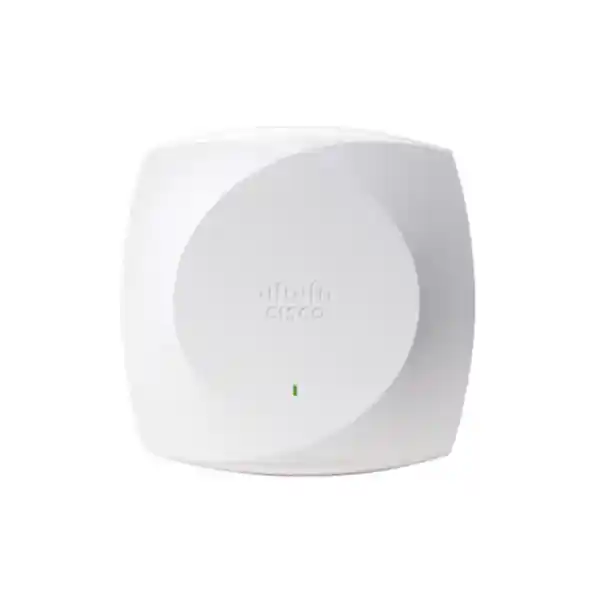
Cisco Meraki CW9171I Wi-Fi 7 Indoor Access Point
The Cisco Meraki CW9171I is an enterprise-class indoor wireless access point intended for offices and other comparatively lower-density deployments that need modern Wi-Fi 7 capability, predictable network administration and an upgrade path from older wireless generations. It brings together integrated omnidirectional antennas, a 2×2 wireless design, a multigigabit wired connection, a dedicated scanning radio and Bluetooth Low Energy functionality. For Ugandan organizations, the critical purchasing decision is not simply whether the unit supports Wi-Fi 7. A successful rollout depends on matching coverage design, client capabilities, available Ethernet cabling, switch power budget, permitted radio channels, controller or dashboard architecture and the correct subscriptions. A well-specified access point can reduce troubleshooting and operational surprises; an incorrectly specified installation can undermine an otherwise capable device.
FourTeck supports businesses planning wireless upgrades in Kampala and throughout Uganda. Buyers can request help validating access point quantities, deployment assumptions and the accessories that should accompany a quotation. The CW9171I is particularly useful for standardizing small branches and office floors where an organization wants a contemporary access point without selecting a larger high-density model for every room. Wi-Fi 7 technology introduces capabilities including multilink operation and wider channels, but practical results depend on software support, client devices, regional spectrum authorization and the site environment. Do not treat maximum physical-layer data rates as promised application throughput. A survey and design review remain the appropriate starting points for a reliable project.
Procurement Facts at a Glance
Cisco Wireless CW9171I indoor access point; quotation for Uganda. Confirm country-specific regulatory SKU.
Wi-Fi 7; 2×2:2 on 2.4 GHz and selectable 5 GHz or 6 GHz radio operation. This is not a promise of simultaneous 2.4, 5 and 6 GHz client service.
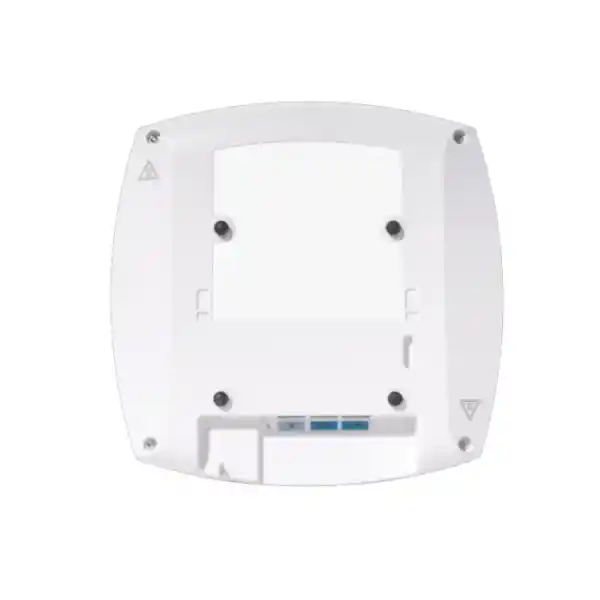
One 100M/1G/2.5G RJ-45 uplink; 802.3at PoE+ for full dual-radio functionality; 54V DC input option.
Price, local stock, lead time, license, regional warranty and shipping charges must be confirmed in a written quotation.
Wireless Architecture and Operational Overview
A business wireless network has two closely connected systems: the radio access layer used by laptops, handsets and connected equipment, and the wired infrastructure that carries traffic to internal applications, the internet and security services. The CW9171I bridges these layers through its multigigabit Ethernet uplink. Its integrated antennas simplify physical installation where a directional antenna design is unnecessary. The 2×2:2 architecture offers two spatial streams per supported client-serving radio. Its 2.4 GHz radio provides a familiar band for compatible devices, while the other client-serving radio operates in the 5 GHz or 6 GHz range according to supported configuration and regulatory rules. This distinction matters when comparing access points: a device described as supporting three frequency bands is not necessarily operating three client-serving bands simultaneously.
The dedicated scan or auxiliary radio helps support visibility into the radio environment without assuming that every monitoring function is available under every software mode or license. The integrated Bluetooth Low Energy radio offers a platform for compatible connected-device applications. Wireless performance depends on channel planning, client density, interference, building materials, user movement and the uplink. For example, a small meeting room with modern laptops presents different airtime requirements from a classroom with dozens of mixed-generation devices. A practical design counts concurrent active clients and the applications they use, rather than relying on a marketing figure for the maximum number of devices that could associate.
Wi-Fi 7 adds technical mechanisms such as 4096-QAM, multilink operation and preamble puncturing. These can improve efficiency under suitable conditions, but the capabilities actually available to users depend on device support and software configuration. The published maximum aggregate physical-layer rate of up to 6.0 Gbps is a theoretical specification, not an internet speed commitment. The CW9171I has a 2.5 Gbps wired uplink, which must also be considered when planning aggregate throughput. Organizations replacing older Wi-Fi access points should review whether their existing switches provide 802.3at power and whether the horizontal cabling supports the desired link rate.
A management decision should be made before ordering. Cisco lists supported software and management choices for the 9171 series, including Cisco Meraki software and Cisco IOS XE environments. Exact provisioning, license requirements and available features vary with the selected management persona. Confirm the intended dashboard or controller architecture with the supplier and network team before finalizing the bill of materials. A Meraki deployment should not be priced as hardware alone when a management subscription is required. Conversely, a controller-based deployment requires validation of controller compatibility and software release. The most reliable project outcome is an explicitly documented hardware, management and support combination.
Business Outcomes That Matter
- Predictable wireless performance. Deploying a modern access point with appropriate channel width, radio power and client distribution can reduce avoidable airtime contention. Performance should be validated through a coverage and capacity design rather than assumed from a headline wireless rate.
- Operational continuity. Standardized configurations, monitored switch ports, clear ownership of subscriptions and spare-device planning can reduce restoration time when faults occur. A single access point is not itself a redundant wireless system.
- Scalable branch standards. Reusing approved access point models, mounting procedures and network policies across offices can simplify change management. Different sites may still require different quantities and placements.
- Enterprise access control. WPA3 support and compatible enterprise authentication policies can strengthen access management. Network segmentation, identity services and endpoint configuration must be designed together.
- Central administration. Compatible management platforms can provide centralized configuration and monitoring. Verify which functions are licensed and supported in the intended software mode.
- Responsible operating cost. Power-efficient design and the ability to reuse appropriate switching or cabling may lower project cost. Include subscriptions, support renewals, survey work and installation labor in the full budget.
- Better change planning. Recording firmware baselines, AP placement and radio profiles helps teams evaluate changes and diagnose user complaints.
- Future client readiness. Wi-Fi 7 support can accommodate emerging client capabilities while continuing to serve compatible older devices. Regional frequency permissions and client adoption determine the pace of practical benefit.
Hardware and Software Highlights
| Component | Specification | Operational significance |
|---|---|---|
| Wireless radios | 2×2:2, 2.4 GHz plus 5 GHz or 6 GHz | Plan actual active bands rather than assuming concurrent tri-band service. |
| Ethernet | 100M/1G/2.5G RJ-45 | Use compatible multigigabit switching for full uplink capability. |
| Power | 802.3at PoE+; 54V DC jack | Check available switch PoE budget and power accessories. |
| USB | USB 2.0, 4.5W | Confirm use case and power compatibility before adding peripherals. |
| Auxiliary functions | Dedicated scanning and BLE radio | Provides hardware for supported visibility and IoT workflows. |
| Management | Compatible Cisco management modes | License and software persona must match the planned network. |
Technical Specifications Ledger
The following details are drawn from Cisco’s published 9171 series specifications. They describe the CW9171I model and should be checked against the selected regulatory domain, current software release and exact orderable part number. Feature support and legal channel availability may vary by region.
| Parameter | CW9171I details |
|---|---|
| Type | Indoor Wi-Fi 7 access point with internal omnidirectional antennas |
| Standards | 802.11be with backward compatibility for supported earlier Wi-Fi generations |
| Client radios | 2.4 GHz 2×2:2 and 5 GHz or 6 GHz 2×2:2 |
| PHY ceiling | Up to 6.0 Gbps under specified Wi-Fi 7 radio conditions; not measured application throughput |
| Wireless features | 4096-QAM, MLO, preamble puncturing, OFDMA, TWT, WPA3; availability subject to client, software and configuration |
| Ethernet uplink | One RJ-45, 100 Mbps / 1 Gbps / 2.5 Gbps |
| Console | RJ-45 management console, default 115200 bps |
| Other ports | USB 2.0 (4.5W) and 54V DC power jack |
| Power | 802.3at PoE+ supports 2×2 on both client-serving radios; 802.3af mode has major radio and link limitations |
| Typical consumption | 11.4W ± 4W under Cisco’s stated dual-radio PoE+ test conditions; idle 9.8W ± 2W |
| Dimensions | 20 × 20 × 5.3 cm without mounting brackets |
| Weight | Approximately 874 g |
| Brackets | AIR-AP-BRACKET-1 or AIR-AP-BRACKET-2; verify supplied accessories |
| Operating temperature | 0–50°C, with radio operation derated from 40–50°C |
| Operating humidity | 0–95%, noncondensing |
| Software baseline | Cisco IOS XE 17.18.2 or later; Cisco Meraki MR32.1.5 or later, subject to Cisco compatibility documentation |
Official technical reference: Cisco Wireless 9171 Series data sheet.
Configuration and Sizing Worksheet
Step 1 — Define real client demand
List the number of users per floor and identify how many are simultaneously active. Separate ordinary web browsing from video meetings, large file transfers, voice services and latency-sensitive applications. Record the client Wi-Fi generations, because an installation with many legacy devices behaves differently from one with predominantly Wi-Fi 7 clients. Identify guest access and business-critical device groups independently. This helps determine whether CW9171I capacity and radio design are appropriate or whether a higher-density alternative should be considered.
Step 2 — Evaluate the building
Request floor plans with walls, partitions, ceilings, stairwells and dense shelving. Concrete, metal and glazing can alter propagation significantly. Identify mounting heights, safe cable routes, security restrictions and places where the access point could be obstructed. In warm or dusty environments, confirm that the chosen indoor location remains within operating limits and is protected from moisture. Do not estimate coverage from square meters alone; a predictive or physical survey is more reliable.
Step 3 — Validate switching and power
Record the model and available PoE budget of every access switch. The CW9171I needs 802.3at PoE+ for its intended dual-radio configuration. With 802.3af, Cisco documents reduced operation, including a limited 2.4 GHz radio and 1 Gbps link. A switch that has PoE-capable ports may still lack sufficient total budget for all access points. Check cable condition, negotiated link speed and whether the selected port supports 2.5G Ethernet. Include UPS coverage where continuity is important.
Step 4 — Choose management and subscriptions
Specify whether the installation uses Meraki cloud management or a compatible Cisco controller ecosystem. Confirm subscription term, entitlement, required support and software versions. Ask for separate pricing lines for hardware, licenses, accessories, installation and any recurring services. Ensure the selected management approach aligns with existing corporate policy and the organization’s ability to maintain the environment.
Step 5 — Prepare the request for quotation
Provide quantities, locations, site drawings, existing switch models, expected client load, preferred management architecture, installation deadline and whether on-site survey or commissioning is required. Ask the supplier to identify the exact regulatory SKU, bracket, power accessory, license term, warranty route, delivery basis and taxes. This produces comparable offers and avoids omissions that become expensive after purchase.
Deployment Scenarios Across Uganda
Corporate offices and multi-site branches
A headquarters may need consistent user policies across multiple floors, while smaller branches require compact hardware and straightforward remote administration. CW9171I units can form part of a standardized wireless design where their capacity matches the space. A typical topology places access points on PoE+ access switches, connects switches to the site distribution or security layer and manages access points through the approved Cisco management system. Configure segmentation, authentication, naming conventions and monitoring before mass rollout. For distributed sites, document how equipment will be provisioned and recovered if the WAN is unavailable.
Banking and financial services
Financial environments often need controlled staff access, clear separation of guest traffic and consistent change records. The access point should be treated as one component of a larger security architecture that includes identity services, VLANs, firewalls and audit processes. Radio coverage must be designed around counters, meeting areas and back-office workspaces. Evaluate resilience for transaction-critical applications separately: a single wireless AP, uplink or power source can remain a point of failure. A procurement specification should address monitoring, support escalation and spare hardware policy.
Education and training facilities
Classrooms may appear physically small but can generate heavy concurrent traffic when students join online assessments or stream lessons. Compare actual active device counts and application patterns with the CW9171I’s lower-density positioning. Staff rooms, offices and selected teaching spaces may be suitable; crowded lecture halls may justify alternative access point models or denser cell planning. Plan guest and student access policies, roaming between rooms and the practical availability of 6 GHz spectrum for the location.
Government and regulated procurement
Public-sector deployments often require detailed bills of materials, documented warranties, approved product variants and clear handover procedures. Confirm the management location, operational responsibility and security policies with the purchasing authority. Request exact manufacturer specifications and compliance documentation rather than accepting generic descriptions. A written commissioning checklist should capture software release, installed serial numbers, switch ports, access point labels and post-installation acceptance tests.
Three Technical Deep Dives
1. Radio processing and throughput
Wi-Fi throughput is a shared-medium engineering problem. The CW9171I supports advanced modulation and Wi-Fi 7 scheduling features, but clients compete for airtime, and real throughput varies with signal quality, contention and frame overhead. Wider channels can deliver higher physical rates under favorable conditions, yet consume more spectrum and may be unsuitable in crowded buildings. Preamble puncturing and multilink capabilities can offer advantages when the relevant client, firmware and spectrum conditions support them. Avoid interpreting the 6.0 Gbps published PHY ceiling as a guaranteed per-client or WAN result. Design for sustained user experience, measured latency and capacity headroom. The 2.5G wired uplink is an important part of this equation; a gigabit-only switch port can constrain the uplink even when radio conditions are excellent.
2. Software ecosystem and security
Wireless hardware and management software must be specified together. Cisco publishes minimum software versions for the CW9171I and identifies compatible controller options. Meraki cloud-managed deployment requires checking the correct dashboard support and associated licensing. A controller-managed installation needs verification of controller model, version and operational policy. Security design should include WPA3 where supported by the device estate, appropriate enterprise authentication, guest isolation and lifecycle patch management. Access point firmware should be tested against client compatibility requirements before broad deployment. Record changes and maintain a rollback plan when practical. Procurement teams should request written confirmation of entitlements, renewal dates and support access to avoid surprises after the initial installation.
3. Availability and recovery planning
High availability does not arise automatically from purchasing a modern access point. An access point can lose service because of power, a switch fault, cabling damage, radio interference or a configuration problem. Design overlapping wireless coverage where the business requires continuity, and test roaming under realistic workloads. Provide appropriate UPS protection to the PoE switching layer and ensure spare capacity for access point replacements. Keep a register of installed hardware, license assignments, mounting positions and network configurations. For sites with strict recovery objectives, establish procedures for replacing failed units and restoring management connectivity. A spare access point is useful only if its licensing, software and regulatory variant are suitable for the target site.
Important Questions Before Purchase
Is the license included? Never assume that the hardware quotation includes every management entitlement. Request an itemized offer and confirm the term, renewal basis and applicable support. Does the unit serve 2.4, 5 and 6 GHz simultaneously? The CW9171I uses 2.4 GHz plus a 5 GHz or 6 GHz client-serving configuration; confirm the radio mode needed for your client mix. Will existing PoE switches work? Check 802.3at availability and the total switch power budget. 802.3af has material operational limitations. Is the access point suitable for a crowded hall? Cisco positions this compact model for lower-density environments, so high-density venues should undergo a capacity assessment and product comparison. Will older devices connect? Many older Wi-Fi clients can operate on supported legacy bands and standards, but their actual security and radio compatibility must be tested. Is a ceiling bracket included? Ask for the exact packing list and bracket part number. Can 6 GHz be used locally? Radio authorization is jurisdiction-specific; verify the applicable Uganda regulatory domain and permitted channels. What happens if the management connection is lost? Behavior depends on software persona and network design; confirm operational requirements with the technical team. What is the delivered cost? Include hardware, licenses, shipping, tax, power, mounts, surveys and commissioning. How is warranty handled? Request the actual warranty and replacement terms on the quotation, rather than assuming a universal local service commitment.
Uganda Ordering, Delivery and Project Support
FourTeck can receive a project inquiry for Cisco Meraki CW9171I access points and prepare a quotation based on the requested quantity and deployment requirements. The procurement process should start with the intended installation city, site count, software management choice and delivery deadline. A quotation should identify the exact model and regulatory variant, subscription items, accessories, commercial terms and warranty route. Stock availability and delivery time are variable and must be confirmed rather than inferred from a product listing. Customers with an urgent rollout should state whether partial shipments are acceptable and whether staging is needed before dispatch.
For multi-site orders, shipping can be organized around project phases after commercial and logistics confirmation. Network teams should provide the required naming, VLAN, addressing and authentication conventions if preconfiguration is requested. Before equipment is installed, verify that power, switching, cable tests and management access are ready. The receiving team should inspect packaging and reconcile quantities and serial numbers against the approved bill of materials. These controls help avoid delays during handover and simplify subsequent warranty support.
Local coverage
Organizations in Kampala often need wireless refreshes for headquarters, shared offices and retail branches. Entebbe projects may involve hospitality, administrative and logistics facilities. In Jinja, branch offices and training environments can benefit from a consistent wireless standard. Mbarara buyers may prioritize remote support and predictable replenishment, while Gulu deployments may need careful coordination of transport, installation dates and site readiness. These are service inquiry locations, not promises of same-day stock or fixed transit times. Share the delivery address and desired schedule for a specific proposal.
Regional Sourcing and Related Infrastructure
Enterprise purchasers operating across East Africa and the Gulf may prefer aligned bills of materials and management standards. Explore the regional FourTeck channels for Uganda, Kenya, African markets, UAE and Kuwait. Cross-border quotations should clarify currency, import responsibility, regulatory variants, shipping terms and warranty routing. A model approved for one jurisdiction should not automatically be assumed suitable for another.
When planning the CW9171I, ask about related Cisco multigigabit switches, PoE+ switching capacity, wireless site surveys, compatible mounting brackets, structured cabling and wireless management licensing. These complementary components frequently determine whether a wireless deployment meets expectations. Buyers considering other access point capacities can also request a model comparison through the contact team rather than selecting purely on advertised speed.
FourTeck Technical Procurement Assistance
A useful equipment proposal should go beyond a model number and unit price. FourTeck can discuss bill-of-materials verification, compatibility questions, deployment planning, staging requirements and the documentation needed for a successful handover. Depending on the agreed scope, engineering validation may cover switch power, uplink speeds, management mode, site conditions and accessories. Pre-shipment preparation or firmware-related work should be explicitly requested and confirmed in the commercial scope; it is not assumed to be included with every hardware purchase. Customers should also clarify which post-sales tasks are handled by FourTeck, Cisco or a local installation partner. A clear division of responsibility reduces delays if configuration, replacement or licensing questions arise after delivery.
Frequently Asked Technical Questions
1. What type of network is the CW9171I intended for?
The CW9171I is a compact indoor Wi-Fi 7 access point that Cisco positions for lower-density environments. It is a reasonable candidate for office areas, branch premises and similar spaces where client numbers and application loads match the design. It should not be assumed to cover an entire building or replace a high-density access point in a busy hall. Actual placement and quantity depend on walls, floor layout, channel conditions, device types and capacity needs. Provide a floor plan and expected concurrent client count for a meaningful sizing discussion.
2. Does the CW9171I require a Meraki subscription?
Subscription and management requirements depend on the selected Cisco management persona and commercial package. For a Meraki dashboard deployment, buyers should obtain a written breakdown of the applicable management subscription, term and support. Cisco also documents compatible controller-based management options, which have their own requirements. Do not compare quotations unless each supplier has included the same management and support scope. Request explicit confirmation of what happens at renewal and which functions depend on active entitlements.
3. Can the access point operate on all three Wi-Fi bands at once?
The CW9171I has a 2.4 GHz client-serving radio and another client-serving radio that operates on 5 GHz or 6 GHz. It should not be represented as providing simultaneous independent 2.4 GHz, 5 GHz and 6 GHz client service. This matters for buildings with older 5 GHz-only clients and newer 6 GHz-capable equipment. A design may need to prioritize one band or use a different access point model if simultaneous three-band service is essential. Confirm the chosen mode, country permissions and software support before purchasing.
4. What PoE power is necessary?
Cisco specifies 802.3at PoE+ for full 2×2 operation on the CW9171I’s client-serving radios, with USB availability and 2.5G uplink support under the stated conditions. Although the device has a reduced 802.3af operating mode, that mode does not provide equivalent radio capability. Inspect the exact switch model, per-port PoE standard and total available power budget. If the installed switch is insufficient, budget for an appropriate switch upgrade or approved power solution. Ensure power accessories and cabling are compatible with the intended installation.
5. How fast is the CW9171I in practice?
Cisco publishes a Wi-Fi 7 physical-layer maximum of up to 6.0 Gbps under specified radio conditions. This is not a guaranteed speed test result, a single-user application rate or a promised internet connection speed. Actual performance is affected by channel width, signal quality, interference, client capability, airtime sharing, security overhead and the wired network. The access point’s Ethernet uplink tops out at 2.5 Gbps. For procurement, define required application performance and conduct a survey or pilot to verify the experience users can actually achieve.
6. Can it be connected to existing enterprise switches?
The access point uses a standard RJ-45 Ethernet uplink that negotiates at 100 Mbps, 1 Gbps or 2.5 Gbps with suitable infrastructure. A compatible switch can provide network connectivity, but full feature operation also requires sufficient PoE+ power. Check the port’s negotiated speed, PoE budget, cable condition, VLAN configuration and upstream capacity. If a switch offers only gigabit Ethernet, the AP may operate with an uplink limitation. A network compatibility review is advisable before purchasing a large quantity for an older campus or branch estate.
7. What should buyers know about mounting and environmental limits?
The CW9171I measures approximately 20 × 20 × 5.3 cm without mounting brackets and weighs about 874 g. Cisco lists AIR-AP-BRACKET-1 and AIR-AP-BRACKET-2 as compatible bracket options. Confirm the exact included accessories and suitability of the ceiling or wall surface. The published operating range is 0–50°C, with radio derating at elevated temperatures. This is an indoor product, so avoid exposed outdoor placement, condensation and unprotected wet areas. Cable routing and maintenance access should be considered during installation planning.
8. Does it support enterprise security and older client devices?
Cisco lists WPA3 support alongside compatibility with supported earlier Wi-Fi generations. That makes the model relevant to organizations transitioning gradually to newer wireless clients. However, older devices may not support every security setting or radio band, and stricter authentication policies can expose compatibility issues. Test representative laptops, handsets, printers and specialist equipment before applying a uniform configuration. Enterprise access security also depends on identity systems, segmentation, certificate management and monitoring; no access point alone replaces these controls.
9. How are warranty and hardware replacement handled in Uganda?
Warranty entitlement and replacement processes should be confirmed in the formal quote for the specific unit and purchasing channel. Ask which party receives support requests, whether advance replacement is available, what documentation is required and where defective hardware must be returned. Record serial numbers and keep proof of purchase. For locations where downtime is expensive, consider an approved spare-device strategy and ensure the spare can be managed and licensed in the target environment. Do not assume a particular replacement timeline without a written service commitment.
10. What information is needed for a complete quotation?
A useful quotation request specifies the number of CW9171I units, delivery city, desired date, network management choice, license term, switch models, PoE availability and mounting requirements. If installation is part of the project, include drawings, ceiling details, cabling status and approximate active device counts. State whether you need a wireless survey, staging, configuration assistance or post-installation testing. Request separate line items for equipment, subscriptions, brackets, power accessories, freight, taxes and services. This helps procurement teams compare offers on a consistent basis and minimizes unplanned costs.
Request a Cisco Meraki CW9171I Quote in Uganda
Planning a new office network, a branch refresh or a phased wireless upgrade? Share your expected quantity, installation city, existing switching equipment and preferred Cisco management platform. FourTeck can use these details to discuss a suitable bill of materials and provide a quotation subject to current availability and agreed terms. Ask for the correct country-specific hardware variant, software subscription, mounting equipment, warranty arrangements and delivery schedule in one written proposal. A short technical review before ordering can help prevent avoidable licensing, power and compatibility gaps.
For multi-location deployments, provide a site-by-site equipment schedule and indicate whether the work must be completed in stages. If you are comparing CW9171I against another Wi-Fi 7 model, describe your busiest rooms, client counts and desired band operation so the comparison reflects your actual environment. Pricing and lead time are provided on request; no live stock commitment or fixed market price is implied by this page.




Reviews
There are no reviews yet.