COMPACT CLOUD-MANAGED ACCESS SWITCHING • UGANDA
Cisco Meraki MS130-8 Cloud-Managed 8-Port Gigabit Access Switch
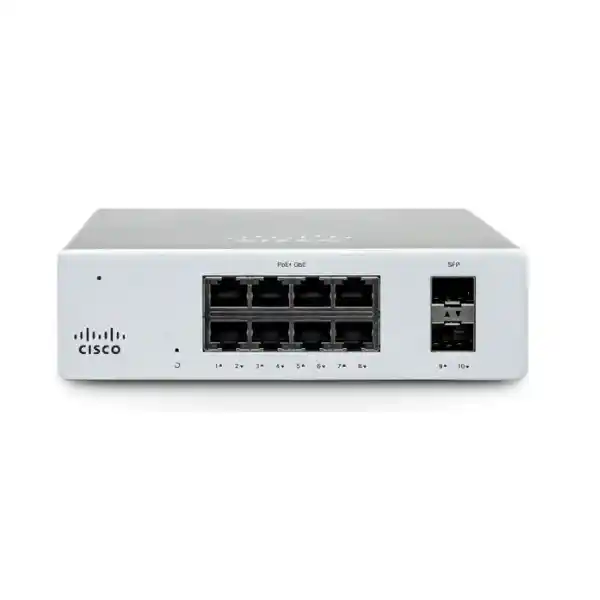
The Cisco Meraki MS130-8 provides eight 10/100/1000 Ethernet interfaces and two 1G SFP uplinks in a compact, fanless enclosure. It is designed for businesses that need centrally administered wired connectivity without the complexity of managing independent switch configurations at every site.
For a retailer with payment terminals and office workstations, the device can separate operational traffic using VLANs while providing fiber connectivity to an upstream distribution switch. For a branch office, it can extend the access network to printers, desktops and other wired endpoints while network administrators manage port configuration and troubleshoot remotely through the Meraki Dashboard.
Correct model selection matters. The MS130-8 is not a Power over Ethernet switch, does not offer 10G SFP+ uplinks and is not intended to replace a routed core. Its strengths are straightforward Layer 2 connectivity, compact installation and consistent management across geographically distributed sites.
At-a-Glance Procurement Facts
MS130-8, standard non-PoE model; verify ordered hardware SKU and regional bundle.
8 × 1 GbE copper RJ45 and 2 × 1 GbE SFP uplinks.
Cisco Meraki Dashboard; appropriate licensing is required.
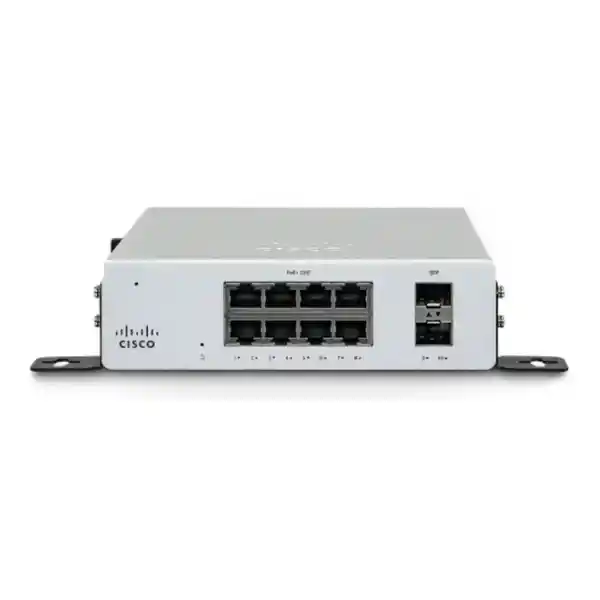
12 V DC, 2.5 A external adapter; desktop or integrated wall mounting.
Stock, delivery, warranty coverage and license term subject to written quotation.
Procurement enquiries from Kampala and across Uganda.
Network Architecture and Practical Fit
The MS130-8 is an access-layer switch. It forwards Ethernet traffic within the local network and can apply administrative controls such as 802.1Q VLAN tagging, 802.1X authentication and DHCP snooping. These capabilities help teams create repeatable port profiles across branch offices and maintain consistent security boundaries. A suitable upstream router, firewall or Layer 3 device remains necessary where inter-VLAN routing, internet access or advanced traffic inspection is required.
The two 1G SFP slots are especially useful when a compact location needs fiber connectivity back to an aggregation point. Supported optics include selected Meraki 1G SX, LX10 and copper SFP modules. Buyers should confirm fiber type, connector, distance, transceiver compatibility and the far-end interface before ordering. SFP slots should not be mistaken for 10G SFP+ ports.
Dashboard administration enables remote visibility, configuration changes, packet capture, event monitoring and coordinated firmware upgrades. Teams should account for reliable outbound management connectivity, organization ownership and the correct licensing arrangement. A loss of dashboard connectivity affects cloud management; operational behavior during a management outage should be assessed against Cisco’s current documentation and the intended configuration.
Because the MS130-8 is fanless and has an 8 W specified idle/maximum load, it can suit quiet deskside or wall-mounted installations. Installation still requires airflow, protected power and cable strain relief. The supplied external power adapter should be placed where it is not exposed to moisture, foot traffic or accidental disconnection.
Six Business Outcomes
- Predictable wired access: Eight Gigabit copper ports support ordinary business endpoints while a 20 Gbps switching capacity accommodates the listed interfaces. Actual application performance depends on endpoint speeds, cabling, uplink loading and traffic patterns.
- Quiet and economical installation: Fanless operation eliminates fan noise, while the published 8 W load can simplify power and thermal planning for small sites.
- Repeatable branch rollout: Cloud-based configuration reduces the need to manually administer each location as an isolated switch.
- Access controls: VLANs, 802.1X and DHCP snooping can contribute to a broader security design when correctly integrated with identity, DHCP and firewall services.
- Central diagnostics: Remote packet capture, alerts and operational visibility can shorten the time required to investigate port and connectivity issues.
- Transparent lifecycle planning: Separating hardware, license term, optics, cabling and support expectations in the quotation makes recurring costs easier to forecast.
Confirmed Technical Specification Ledger
| Attribute | MS130-8 |
|---|---|
| Access ports | 8 × 10/100/1000 Mbps RJ45 |
| Uplink interfaces | 2 × 1 GbE SFP |
| PoE output | None |
| Switching capacity | 20 Gbps |
| Power input | 12 V DC, 2.5 A |
| Published idle/max load | 8 W / 8 W |
| Power supply | External, supplied with unit |
| Cooling | Fanless |
| Dimensions | 2.8 × 22.2 × 15 cm (H × W × D) |
| Weight | 0.88 kg |
| Operating temperature | 0–45 °C |
| Storage temperature | −20 to 70 °C |
| Humidity | 5–95% |
| Mounting | Desktop or integrated wall mount |
| Layer and controls | Layer 2, VLAN tagging, 802.1X, DHCP snooping, IPv4/IPv6 ACL support |
Specifications are based on Cisco’s MS130 documentation. Confirm the exact regional hardware revision, accessory bundle and current software feature availability during procurement.
Configuration and Sizing Worksheet
Step 1 — Count endpoints: Inventory computers, printers, terminals and other devices requiring wired access. Reserve spare copper ports for growth rather than sizing for exactly eight current endpoints.
Step 2 — Determine uplinks: Record whether upstream connectivity uses copper or fiber. If fiber is required, specify 1G SFP module type, patch cord, connector and route length.
Step 3 — Validate power: Confirm mains socket, UPS runtime, external adapter placement and the region-appropriate power cord. The switch does not supply PoE.
Step 4 — Plan management: Confirm Dashboard organization, administrative access, VLAN design, authentication dependencies, outbound connectivity and approved firmware maintenance windows.
Step 5 — Select licensing: Ask for the applicable Enterprise, Advanced or subscription licensing arrangement based on the organization’s current licensing model and desired term. Compatibility rules differ by licensing model.
Step 6 — Prepare quotation: Supply the exact model, quantity, delivery city, SFP requirements, license term, accessories, requested deployment assistance and invoice details.
Deployment Examples Across Uganda
Retail and Distributed Branches
Connect payment terminals, inventory workstations and printers at a retail outlet while keeping relevant traffic in separate VLANs. A centralized administrator can standardize port policies across stores. Ensure transaction networks have appropriate firewall rules and resilience upstream.
Financial Service Offices
Use the switch for a small set of wired endpoints within a broader controlled network. Pair access authentication with monitoring and documented change control. The switch itself is not a substitute for an enterprise firewall, a redundant core or a regulatory compliance program.
Education and Training Centers
Provide wired connectivity for administrative desks, learning-room PCs and printers. The compact footprint can help in small classrooms and satellite campuses; consider a higher-port-count switch when expansion is likely.
Public Sector and Multi-Site Projects
Specify standardized equipment and licensing for branch installations where centralized visibility and documented procurement are important. Validate approved vendors, local warranty conditions and any required security controls before tender submission.
Three Technical Considerations
Switch Fabric and Traffic Paths
The 20 Gbps published switching capacity aligns with a compact ten-interface Gigabit configuration. Nonetheless, simultaneous flows can compete for individual uplink bandwidth. For example, eight busy copper ports feeding one 1G uplink cannot all achieve their maximum speed toward the upstream network at the same moment. Size upstream links around peak aggregate traffic, not merely the number of access ports.
Cloud Operations and Firmware Control
Dashboard-based administration can streamline multi-site configuration and remote diagnostics. Before deployment, document the license owner, organizational administrators, maintenance window, firmware policy and escalation contacts. Use role-appropriate access and maintain an inventory of serial numbers and deployed sites.
Resilience and Recovery
The MS130-8 has a single external power-supply arrangement and should not be presented as a dual-power, chassis-redundant switch. An upstream resilient design, a suitably sized UPS, documented configuration and spare hardware strategy may reduce disruption. Two SFP ports do not by themselves guarantee a fault-tolerant topology; redundancy depends on topology and configured protocols.
Buyer Questions to Resolve Before Purchase
Is a license included? Do not assume so. Request an itemized hardware-and-license quotation and check the applicable Meraki licensing model.
Will it power phones or wireless access points? No. Choose a PoE-capable model or separate injectors where appropriate.
Can it connect to a 10G backbone? Its built-in SFP uplinks are 1G, not 10G. A suitable upstream 1G interface or compatible design is required.
Does it fit a rack? The model supports desktop and integrated wall mounting. If a rack shelf or special bracket is needed, specify it separately.
Can it be deployed without internet access? Dashboard onboarding and ongoing cloud administration depend on connectivity; validate the site’s operational requirements and Cisco guidance before selecting a cloud-managed platform.
What about replacement and warranty? Confirm authorized sourcing, proof of purchase, serial-number eligibility and regional support arrangements in writing.
Uganda Procurement and Regional Delivery
FourTeck welcomes quotation requests from Kampala, Entebbe, Jinja, Mbarara and Gulu, as well as other Uganda locations. Specify the receiving address and whether the shipment is destined for a commercial office, campus, warehouse or remote branch. Lead time, available stock, freight charges, tax treatment and warranty conditions must be confirmed in the issued quotation rather than assumed from a general product listing.
For multi-location projects, consolidate quantities and site schedules into one bill of materials. This makes it easier to align hardware quantities with license terms, optics, cabling and any requested staging services. Regional procurement teams can also review FourTeck’s Uganda, Kenya, Africa, UAE and Kuwait sites when coordinating cross-border sourcing. Shipping eligibility and import responsibilities remain subject to confirmation.
Related Equipment and Procurement Alternatives
If the site requires powered endpoints, compare the MS130-8P or MS130-8P-I. For multigigabit access and 10G uplinks, evaluate the MS130-8X instead. A higher-port-count MS130 may be more suitable where eight copper ports leave insufficient growth capacity. Request compatible 1G SFP optics, the appropriate regional power cord, a UPS and matching license as separate bill-of-materials lines.
Explore the FourTeck Uganda catalogue or contact the procurement team for model-specific alternatives, accessories and availability. Compatibility should be validated against Cisco documentation rather than inferred from connector appearance alone.
Engineering and Procurement Assistance
For projects requiring deployment coordination, request a scope covering bill-of-materials review, network topology assessment, license selection, optic matching, firmware planning, inventory labeling and pre-shipment checks. Any configuration, staging, testing or post-sale service should be explicitly included in the commercial proposal; these services are not presumed to accompany every hardware purchase.
Frequently Asked Questions
1. How many Ethernet ports does the MS130-8 have?
It has eight Gigabit RJ45 access ports and two 1G SFP interfaces. The SFP ports are separate uplink interfaces and require compatible transceivers for fiber or other supported media. Confirm how many endpoints and uplinks the site needs before sizing the switch.
2. Does the MS130-8 support Power over Ethernet?
No. The standard MS130-8 has no PoE output. If phones, cameras or access points require power through their Ethernet cable, consider the MS130-8P or a suitable external power solution. Avoid confusing features of the wider MS130 family with the exact model offered.
3. Is a Meraki license necessary?
Yes, Meraki licensing is an essential part of planning. Available licensing structures and tiers depend on the organization’s chosen licensing model. Ask for an itemized quotation showing hardware and the exact license SKU and term, and confirm compatibility with existing Meraki devices in the organization.
4. Can I use the MS130-8 for fiber uplinks?
Yes, through its two 1G SFP interfaces with supported transceivers. Verify optical reach, multimode or single-mode fiber, patch connectors and far-end equipment. The MS130-8 does not provide 10G SFP+ uplinks.
5. Is this switch suitable for a quiet office?
Its fanless design makes it appropriate for noise-sensitive small offices and deskside installations. Keep ventilation paths clear and place the external adapter securely. A suitable UPS may be worthwhile where mains supply is unreliable.
6. Does the switch replace a router or firewall?
No. It is primarily a Layer 2 access switch. Routing between network segments, internet-edge security, VPN connectivity and application inspection should be provided by appropriately specified upstream infrastructure.
7. How is the switch first configured?
Typically, administrators claim the device in a Meraki Dashboard organization, assign it to a network, connect power and an upstream connection, and allow it to check in. Port configuration, VLANs and management policies are then applied through Dashboard. Prepare management connectivity and licensing before the installation date.
8. What comes in the box?
Cisco lists the MS130-8 switch and an AC power supply. Region-specific power cords are generally ordered separately, with a documented exception for certain US orders. Ask the supplier to confirm the actual regional bundle and the required Uganda-compatible power cord.
9. How do I plan warranty and support?
Request written confirmation of authorized supply, applicable hardware support, license-linked entitlements, regional replacement process and any service-level commitments. Preserve invoices, serial numbers and receiving records so support requests can be handled efficiently.
10. Can it be deployed across multiple branches?
Yes, centralized Meraki management can simplify administration across multiple locations. Standardize VLAN conventions, access policies, licensing ownership and documentation. Also plan site-specific internet connectivity, power backup and escalation procedures because cloud management does not eliminate local physical dependencies.
Request a Cisco Meraki MS130-8 Quotation for Uganda
Share the quantity, delivery city, intended use, required 1G SFP optics, licensing duration and preferred installation schedule. Ask for a written offer covering hardware, accessories, licensing, freight, applicable taxes, lead time and warranty terms. For a non-PoE branch access switch, the MS130-8 offers a compact option with centrally managed Gigabit connectivity.




Reviews
There are no reviews yet.