ENTERPRISE ACCESS SWITCHING · UGANDA
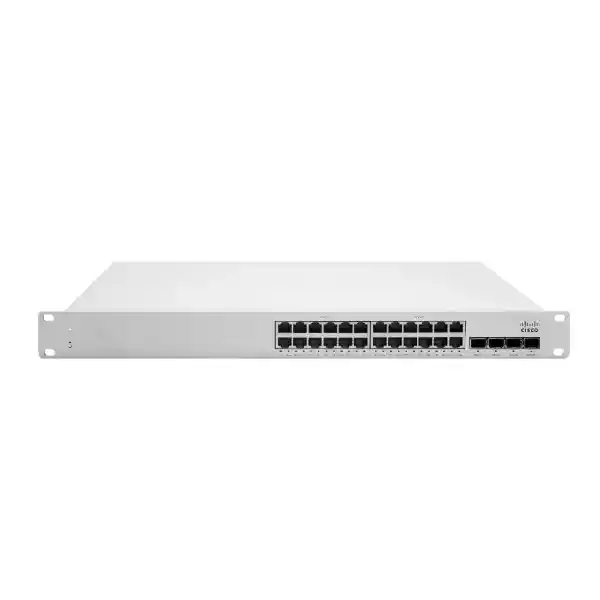
Cisco Meraki MS150-24P-4G Cloud-Managed PoE+ Access Switch
The Cisco Meraki MS150-24P-4G brings centrally administered Gigabit connectivity and endpoint power to enterprise access networks. With 24 copper Gigabit ports, four 1G SFP uplinks and a 370W shared PoE budget, it is designed for organizations consolidating wired users, access points, cameras and voice endpoints onto a manageable switching platform. Its two dedicated stacking interfaces provide 80Gbps stacking bandwidth, supporting a coordinated access-layer design as site requirements grow. This is a practical fit for offices, schools, clinics, distributed enterprises and structured network refresh projects in Uganda. Choosing the exact model matters: the MS150-24P-4G supplies 1G optical uplinks, while the separately available MS150-24P-4X is the option to evaluate when 10G uplinks are required.
FourTeck can help scope port demand, endpoint power, transceiver selection, licensing and delivery requirements before a purchasing decision. Request a configuration-specific quotation rather than treating the switch as an interchangeable 24-port commodity product.
At-a-Glance Procurement Facts
MS150-24P-4G; 24 x 10/100/1000 RJ45 access interfaces.
Four 1G SFP ports; compatible optics must be chosen separately.
370W total PoE budget, with up to 30W per supported access port.
Meraki Dashboard cloud management; appropriate license required.
Confirm current availability, lead time, applicable support entitlement and warranty conditions with the quotation.
Integrated 1U rack mounting, 100–240VAC input and appropriate ventilation clearance.
Network Architecture and Practical Value
An access switch is the meeting point between a building’s devices and its upstream distribution network. In a typical deployment, user workstations and printers connect over copper, compatible wireless access points and telephones draw power from the switch, and the SFP interfaces provide optical or copper uplink choices subject to supported transceivers. Separating these roles makes it easier to plan cabling, understand traffic paths and isolate faults. The MS150-24P-4G offers 56Gbps switching capacity and dedicated stack interfaces rather than relying on the four SFP uplinks for all inter-switch stacking traffic. Administrators can apply VLAN segmentation, 802.1X authentication, access-control rules and other supported features through a centralized management workflow. For multi-branch operations, remote visibility can reduce the need for repeated site visits, although local cabling and power failures still require hands-on intervention.
The shared 370W power budget is a critical sizing boundary. Twenty-four endpoints each requesting 30W would exceed that total, so a bill of materials must calculate actual or reserved demand for each powered device. For example, a mix of phones, cameras and access points may be viable when their combined requirements remain within budget and appropriate design margin is preserved. A power worksheet should also account for startup behavior, device upgrades and spare ports. The 4G uplink designation must likewise be considered against aggregate traffic; a design expecting sustained multi-gigabit uplink throughput should consider a different variant or architecture.
Business Outcomes
- Predictable access connectivity: Gigabit interfaces support mainstream business endpoints while uplink sizing determines aggregate upstream headroom.
- Improved operational visibility: Dashboard-based administration centralizes inventory, port configuration and troubleshooting workflows across sites.
- Structured expansion: Dedicated stacking ports offer a path to a coordinated access stack, subject to platform compatibility and design limits.
- Segmentation and policy: VLANs, authentication and supported access-control capabilities help separate business functions and device classes.
- Consolidated endpoint power: Standards-based PoE reduces the need for individual power adapters where compatible devices and budgets allow.
- Controlled lifecycle cost: Accurate licensing, optics, support, electricity and replacement planning helps avoid incomplete quotations.
- Remote branch support: Central visibility helps teams investigate faults before dispatching an engineer to a distant location.
Technical Specification Ledger
| Attribute | MS150-24P-4G specification |
|---|---|
| Copper access ports | 24 x 10/100/1000Mbps RJ45 |
| Fiber uplinks | 4 x 1Gbps SFP, not SFP+ |
| PoE allocation | 370W shared; up to 30W per port |
| Dedicated stack ports | 2; 80Gbps stacking bandwidth |
| Switching capacity | 56Gbps |
| Routing | Static routing supported |
| Power input | 100–240VAC |
| Power consumption | 22.9W idle; 422.2W maximum as listed in vendor documentation |
| Operating temperature | 0–45°C |
| Humidity | 5–95% as specified by vendor |
| Mounting | Integrated 1U rack mount |
| Management | Cisco Meraki Dashboard |
Reference specifications: Cisco Meraki MS150 datasheet and MS150 installation guide. Confirm the latest vendor revision and exact accessory part numbers before ordering.
Configuration and Sizing Worksheet
1. Count active and future ports. Record workstations, access points, IP phones, cameras, printers and other wired equipment, then reserve capacity for planned expansion.
2. Calculate powered-device demand. List each device’s negotiated or maximum PoE requirement and ensure the total fits within 370W with prudent headroom.
3. Validate uplink capacity. Decide whether four 1G SFP interfaces match the distribution design. Check optical distance, fiber type and transceiver compatibility.
4. Check rack and power. Verify 1U space, cooling, cabling routes, earthing, power distribution and UPS runtime using the documented maximum consumption.
5. Specify subscriptions. Request the correct Meraki license duration and management entitlement for the intended organization and support model.
6. Prepare a quote request. Include device count, destination, preferred delivery window, optic types, stack requirements, license term and any staging services.
Deployment Examples Across Uganda
Distributed enterprises and branch offices
At a branch, the switch can connect users and powered endpoints while an SFP uplink connects the branch access layer to the local router or distribution switch. Centralized management helps standardize port settings across multiple locations. A staged rollout should confirm each site’s addressing, VLAN assignments and failover paths before cutover.
Banking and regulated workplaces
Segment customer-facing devices, employee workstations, cameras and administrative equipment according to the organization’s approved security architecture. The switch provides useful access controls, but it is not a substitute for firewalls, identity governance or regulatory assessment. Document configuration changes and access privileges.
Schools, universities and training campuses
Use separate VLANs for administration, teaching devices and guest connectivity, with appropriate upstream policy enforcement. Budget PoE for classroom access points and telephony, and check whether the 1G uplinks provide enough aggregate capacity during busy periods.
Public sector and mission-critical sites
Plan controlled procurement, device inventory, license ownership, secure management access and resilient power. Where a service requires higher availability, use a complete redundancy design rather than assuming stacking alone prevents every interruption.
Engineering Deep Dives
Switch fabric and uplink planning
The 56Gbps published switching capacity describes the platform’s switching fabric capability, not a guarantee that any single 1G uplink can carry more than its rated line speed. Engineers should examine east-west traffic, aggregation oversubscription and distribution uplink utilization. A four-uplink layout can be useful for separate upstream connections or appropriate link aggregation designs, but link behavior must be validated against the selected topology and firmware. Dedicated stacking ports provide an additional architectural tool without changing the line speed of each SFP port.
Cloud administration and software control
Meraki Dashboard provides configuration visibility, remote troubleshooting, firmware workflows and monitoring. Before deployment, assign the device to the correct organization and network, verify licensing and administrative permissions, and document templates and security policies. Configure 802.1X, VLANs, ACLs, DHCP snooping and other supported controls only after confirming compatibility with the organization’s authentication and endpoint environment. Schedule firmware maintenance windows and keep a tested rollback and recovery plan.
Resilience and operational recovery
Stacking can simplify administration and expand access capacity, but power-feed resilience, upstream path redundancy and application continuity require separate design decisions. Calculate UPS autonomy using realistic load, preserve spare PoE capacity for critical devices and label physical links. Keep current diagrams, configuration records, device serial numbers and support entitlement details so replacement and fault isolation can proceed quickly.
Before You Buy: Common Gaps to Resolve
Licensing: Verify license term, entitlement and renewal ownership in writing. Optics: SFP transceivers and fiber patch leads may be separate quote items. Stacking: Confirm supported stacking cables and software compatibility. Power: Do not assume every port can deliver 30W simultaneously within a 370W aggregate budget. Uplinks: This 4G model does not provide 10G SFP+ ports. Lifecycle: Check vendor lifecycle notices and the current supported firmware train when approving long-term deployment. Warranty: Confirm geographic eligibility, replacement procedures and turnaround conditions before issuing the purchase order.
Uganda Procurement, Delivery and Regional Coverage
Organizations in Kampala, Entebbe, Jinja, Mbarara and Gulu can request a quotation tailored to site needs. Include the exact model, quantity, installation destination, license term, optical modules, required documentation and target project date. Delivery timing and inventory are quotation-dependent; no fixed local stock position or lead time is represented here. Where pre-configuration or staging is needed, provide the intended VLAN map, addressing plan, device naming conventions and acceptance criteria before shipment.
For projects spanning borders, procurement coordination may involve FourTeck Uganda, FourTeck Kenya, FourTeck Africa, FourTeck UAE and FourTeck Kuwait. Country-specific import rules, taxes, delivery arrangements, support eligibility and commercial terms should be validated for each destination rather than assumed to transfer unchanged.
Related Models and Accessories
For the exact switch family, compare the Cisco Meraki MS150 models. The MS150-24P-4X is a relevant alternative when 10G SFP+ uplinks are essential. The MS150-24T-4G is relevant when PoE is unnecessary, while 48-port MS150 variants can better match larger wiring closets. Also consider approved SFP transceivers, fiber patch cords, rack power distribution, UPS equipment and compatible stacking cables as distinct bill-of-materials items. For assistance validating these combinations, use the FourTeck Uganda contact page.
Technical Service and Project Readiness
FourTeck quotation discussions can cover bill-of-materials review, accessory matching, licensing checks, installation planning, staging requirements and post-sale support arrangements. Confirm which services are included in the written proposal. Before accepting delivery, check model identifiers, serial numbers, ordered licenses and optical module quantities against the purchase order. For deployments requiring pre-shipment firmware work or port configuration, agree on an approved change plan, access controls and acceptance tests in advance.
Frequently Asked Questions
How many powered devices can this switch support?
There are 24 Gigabit access ports and a 370W shared PoE budget. The practical number of powered endpoints depends on each device’s consumption or negotiated allocation. Twenty-four devices each demanding 30W cannot all receive their maximum simultaneously. Prepare a device-level power schedule and allow spare capacity.
Does the MS150-24P-4G have 10G uplinks?
No. The four uplink interfaces on this exact model are 1G SFP ports. If the design calls for 10G SFP+ connectivity, evaluate the MS150-24P-4X or another suitably specified model before purchasing.
Is a Meraki license needed?
Meraki cloud-managed operation requires the applicable license entitlement. License type, term, support provisions and renewal administration should be included in procurement planning. Ask for hardware and licensing to be itemized separately where useful.
Can the switch be stacked?
Yes. It includes two dedicated stacking ports with 80Gbps stacking bandwidth. Verify stacking compatibility, cables, physical topology and software requirements against current vendor documentation. Stacking is not equivalent to independent power redundancy.
Can I connect non-Meraki devices?
Standards-based Ethernet endpoints can generally be connected when interface speed, PoE requirements, VLAN configuration and authentication settings are compatible. Validate third-party optics and specialized powered devices against Cisco’s support guidance before procurement.
Can it provide Layer 3 routing?
The MS150 series supports static routing. Confirm the feature set required by your design and do not assume it replaces a full-featured enterprise router or security firewall.
How much rack space and electrical capacity are needed?
The switch uses an integrated 1U rack-mount design and accepts 100–240VAC. Cisco lists 22.9W idle and 422.2W maximum power load for this model. UPS and PDU sizing should consider maximum demand, connected devices, environmental conditions and other equipment in the rack.
What warranty is available in Uganda?
Warranty, hardware replacement and support conditions depend on the applicable Cisco entitlement, sourcing channel and commercial proposal. Request written confirmation of coverage and local replacement procedures before payment.
Can it be configured before shipment?
Pre-deployment staging may be discussed as part of a project quote. Provide an approved port map, VLAN design, access policies, license ownership details and acceptance checklist. Confirm availability and scope of any staging service before relying on it in the project timeline.
How do I request a quotation?
Send the exact model MS150-24P-4G, quantity, Uganda delivery location, desired license term, SFP requirements, stack design and project timeline through the contact form. Ask for an itemized response showing hardware, subscriptions, accessories, freight and any applicable technical services.



Reviews
There are no reviews yet.