UGANDA ENTERPRISE NETWORK PROCUREMENT
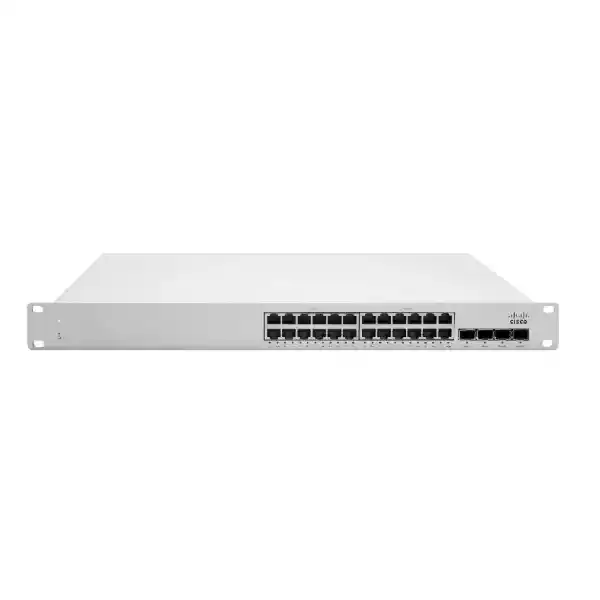
Cisco Meraki MS150-24T-4X Cloud-Managed Gigabit Access Switch
The Cisco Meraki MS150-24T-4X is a 24-port Gigabit Ethernet access switch with four 10GbE SFP+ uplinks, designed for cloud-managed wired networks. It gives network teams a straightforward way to connect workstations, printers, application appliances and other Ethernet devices while maintaining centralized configuration and visibility across branch and campus environments.
This is the data-only, non-PoE version. It is especially appropriate when powered endpoints have separate electricity supplies, when an existing PoE layer already serves wireless devices, or when procurement teams want to avoid paying for a PoE power budget that their deployment does not need. The four SFP+ uplinks create options for resilient upstream connectivity and high-capacity links to distribution equipment. The dedicated stacking interfaces enable compatible MS150 switches to be combined into a managed stack, subject to supported cabling and configuration.
Buyers should budget the complete solution rather than the switch alone: licensing, optics, stacking cables, compatible power cord, installation and support all affect the final acquisition cost. FourTeck can review a bill of materials for a single Kampala office or a multi-site rollout and provide a commercial quotation reflecting actual sourcing and delivery conditions.
Procurement facts at a glance
MS150-24T-4X; 24 × 10/100/1000 RJ45 access ports.
4 × 10GbE SFP+ interfaces; compatible transceivers must be selected separately.
2 dedicated stack ports and 80Gbps stacking bandwidth.
100–240VAC input; 13.7W idle and 32.4W maximum published load.
Meraki Dashboard cloud management; appropriate license required.
Price, stock, delivery, warranty coverage and licensing quoted on request.
Architecture and operational fit
The MS150-24T-4X belongs at the access layer of a structured Ethernet network. Twenty-four copper interfaces attach ordinary gigabit endpoints, while four 10-gigabit SFP+ ports can aggregate traffic towards a distribution switch or an appropriate upstream network device. This division of access and uplink capacity is useful where many users share applications, file servers, hosted business systems or local network services. The published 128Gbps switching capacity is a hardware switching specification; actual application performance depends on traffic profiles, uplink design, endpoint speeds and configuration.
Unlike models with 2.5GbE or 5GbE access ports, this specific variant has gigabit copper interfaces. Unlike the MS150-24P-4X, it has no Power over Ethernet output. These distinctions matter in purchasing because a visually similar model number can lead to a materially different installation. Confirm whether each endpoint needs Ethernet data only, higher-than-gigabit access, or switch-supplied electrical power before approving the order.
Cloud administration allows distributed IT teams to use the Meraki Dashboard for switch configuration, monitoring, remote packet capture and firmware management. Network segmentation can use IEEE 802.1Q VLANs; access control options include 802.1X authentication and IPv4/IPv6 access control lists. DHCP snooping and dynamic ARP inspection help strengthen local network controls when configured appropriately. Static routing is available for supported Layer 3 designs, but the unit should not be assumed to replace a high-end dynamic-routing core.
The two dedicated stacking ports and supported stacking cables allow a network architect to design a manageable group of compatible switches. Stacking should not be confused with guaranteed application availability: upstream routing, link redundancy, power protection, cable paths and recovery procedures remain separate design decisions. Plan these elements together, and test failure conditions before production handover.
Business outcomes
- Predictable access capacity. Twenty-four gigabit copper ports accommodate common business devices, while the four 10G uplinks provide flexibility to avoid concentrating all traffic on a single 1G connection. Capacity planning should account for real simultaneous demand rather than simply counting attached cables.
- Better operational visibility. Central dashboard administration supports remote inspection of switch health and port configuration, reducing the need to travel to every site for routine investigations. Remote troubleshooting still depends on working management connectivity and suitable administrative permissions.
- Growth through stacking. Dedicated stack connections support expansion within compatible MS150 designs. A procurement plan should reserve appropriate stack cable lengths, physical rack space and a consistent firmware and licensing approach.
- Segmentation and access safeguards. VLANs, 802.1X, access lists, DHCP snooping and ARP inspection support layered network policy. These functions must be aligned with identity services, address assignment and upstream security controls.
- Lower avoidable power spend. The published 13.7W idle and 32.4W maximum figures are modest for a 24-port non-PoE switch. Actual energy budgeting must include the rack environment, attached equipment and any separately powered devices.
- More consistent multi-site operations. Dashboard-based workflows make it easier to standardize configurations across branches. Templates, naming conventions, change approval and documentation remain important for maintaining that consistency.
- Clearer procurement scope. A model-specific bill of materials prevents missing optics, stack leads, licenses and regional power cords from delaying installation. Confirm inclusions explicitly with the supplier.
Hardware and software highlights
| Component or capability | Operational relevance |
|---|---|
| 24 × 1GbE RJ45 | Wired connectivity for ordinary enterprise endpoints without PoE delivery. |
| 4 × 10GbE SFP+ | High-capacity aggregation with approved fiber modules or direct-attach cables. |
| 2 stack interfaces | 80Gbps published stack bandwidth with compatible stacking accessories. |
| Dedicated management interface | Separate physical interface for management-related deployment requirements. |
| Dashboard and remote capture | Central monitoring and diagnostic workflows. |
| VLAN and access policy features | Logical separation and policy enforcement across business traffic. |
Technical specifications ledger
| Specification | Cisco Meraki MS150-24T-4X |
|---|---|
| Product class | Cloud-managed stackable access switch |
| Copper ports | 24 × 10/100/1000Mbps RJ45 |
| Uplinks | 4 × 10GbE SFP+ |
| PoE | Not supported on this variant |
| Stacking | 2 dedicated ports; 80Gbps stack bandwidth |
| Switching capacity | 128Gbps |
| Routing | Static routing |
| Input voltage | 100–240VAC |
| Idle / maximum power | 13.7W / 32.4W |
| Network controls | 802.1Q VLANs, 802.1X, ACLs, DHCP snooping, dynamic ARP inspection, storm control |
| Operations | Meraki Dashboard, remote packet capture, SNMP/syslog integration, firmware updates |
| Included hardware | Switch and rack-mount screw kit; regional power cord typically ordered separately |
| Dimensions, operating environment and regulatory approvals | Verify current regional Cisco installation documentation and quotation before final design sign-off |
Published specifications are sourced from Cisco Meraki MS150 product and installation documentation. Confirm the exact shipping revision and accessories on the supplier quotation; regional requirements can differ.
Configuration and sizing worksheet
Step 1: Count connected endpoints
List active workstations, printers, meeting-room systems, security appliances and other copper devices. Include anticipated growth, spare ports and the expected number of simultaneous users. Where more than 24 access connections are needed, evaluate multiple switches or a higher-density model.
Step 2: Calculate upstream traffic
Identify the distribution or core equipment, the physical distance to it and the media available. Determine whether one or more 10GbE SFP+ uplinks are required. Link aggregation, topology and failure behavior must be reviewed against the capabilities of both ends.
Step 3: Validate the rack and electricity
Confirm rack mounting hardware, cable bend clearance, ventilation, UPS sizing and grounding. Specify the appropriate country-compatible power lead separately. Do not assume a power cord is automatically included with every regional order.
Step 4: Specify licensing and optics
Request the applicable Meraki license term and entitlement for the intended organization. Specify approved SFP+ modules for each fiber type and distance, or compatible direct-attach copper where appropriate. For stacking, select supported MA-CBL-100G cable lengths based on actual rack geometry.
Step 5: Prepare the quotation
Provide site count, port requirements, deployment date, billing details, required optics, license term, installation services and destination address. Ask the supplier to identify any excluded items in writing.
Deployment scenarios
Enterprise and multi-site offices
Use the switch for standardized workstation and printer connectivity in branches with centralized Meraki administration. A branch topology may connect copper endpoints to the MS150 and then connect its SFP+ uplink to a local distribution switch or router. When designing several offices, apply a consistent VLAN plan and document exceptions for site-specific services.
Banking and financial operations
Financial branches often need disciplined segmentation for employee workstations, operational devices and restricted service networks. The MS150 offers relevant switching and access-control functions, but it is only one part of a compliant design. Include identity controls, firewalling, audit logging, change approval, resilient power and vendor-supported recovery procedures.
Schools, colleges and campus buildings
Administrative offices, computer laboratories and teaching spaces can use 24 gigabit access connections with 10G aggregation. Where access points or IP cameras require switch-delivered power, choose an appropriate PoE model or separate power arrangement rather than assuming the 24T variant provides it.
Public-sector and regulated procurement
Prepare a complete technical compliance schedule with exact model identifiers, support coverage, license term, delivery documentation and acceptance tests. Confirm any data governance, supplier authorization or regulatory requirements before placing an order. Security claims should be evaluated in the context of the entire network, not attributed to a switch alone.
Three technical deep dives
Switching engine and forwarding design
Access switching performance depends on how the switch handles traffic between endpoint ports and its upstream connections. Cisco publishes 128Gbps switching capacity for the MS150-24T-4X. This should not be misread as a guaranteed throughput figure for a particular application, or as a substitute for measuring traffic at the uplink. Plan oversubscription ratios using expected user demand, burst behavior, multicast needs and business-critical applications. If a workload requires more than gigabit per endpoint, select a multigigabit model instead of relying on the 10G uplink specification to overcome a 1G access-port limit.
Cloud management and firmware control
Meraki Dashboard provides a unified operational interface for switch administration and troubleshooting. Remote packet capture, monitoring, firmware upgrades and integration with SNMP or syslog can improve incident response when deployed with appropriate permissions and procedures. Organizations should establish administrative roles, change windows, alert routing and a documented licensing owner. Review connectivity prerequisites and the behavior of the selected licensing arrangement with Cisco or the supplier. An effective operating model also includes configuration records, a tested escalation path and clearly assigned responsibilities for changes.
Availability and recovery
Stacking allows compatible MS150 devices to be managed as a connected group using the dedicated stacking interfaces. The published stack bandwidth is 80Gbps. It does not eliminate the need for sound failure-domain planning. Separate critical uplinks where feasible, protect power through a correctly sized UPS, and test expected behavior after a cable or device failure. For important sites, document replacement lead times, spare optics, switch configuration recovery and incident escalation. Where an application requires continuous service, validate the entire network path, not just the access switch.
Pre-purchase checklist: questions worth resolving
Is a Meraki license included? Do not assume so. Request a distinct line item identifying the entitlement, term and licensing model. Does this model power phones or access points? No: the 24T-4X is a non-PoE switch. Are SFP+ optics bundled? Confirm separately; specify the correct fiber standard and link distance. Are stack cables included? List supported stack cables on the bill of materials rather than assuming they ship with the switch. Will the supplied power lead fit a Uganda site? Confirm the required regional cord and electrical installation. Can the switch replace a routing core? It offers static routing, but dynamic routing and advanced core requirements need separate design evaluation. What about warranty and replacement? Obtain written support and return terms, including eligibility, turnaround and shipment responsibility. Will it work with other vendors? Standard Ethernet and VLAN interoperability is possible, but optic acceptance, link aggregation and advanced functions should be validated in a mixed-vendor test plan.
Uganda procurement and delivery planning
FourTeck supports quotation-led sourcing for organizations planning wired network upgrades in Uganda. The commercial process should begin with confirmation of the exact MS150-24T-4X model, quantity, licensing and accessories. The team can then prepare a scope covering procurement, optional pre-configuration and delivery arrangements. Stock status and transit times vary, so buyers should request a dated offer rather than treating an indicative timeline as a commitment.
For installations in Kampala, Entebbe, Jinja, Mbarara and Gulu, include the destination, receiving hours, access requirements and local installation contacts in the purchase request. Remote locations may require additional coordination for transport and site acceptance. A well-prepared order specifies serial-number records, documentation, asset tagging and the expected handover package.
Regional coverage and cross-border sourcing
Uganda procurement can be coordinated alongside wider East African and Gulf sourcing programs where projects require consistent hardware standards. Explore the regional FourTeck sites for Uganda, Kenya, Africa, United Arab Emirates and Kuwait. Import arrangements, taxes, freight terms, export restrictions and support eligibility should be verified for each destination. Do not assume a product stocked in one country is immediately available in another.
Related models and accessories
Compare the MS150-24P-4X PoE model when connected devices need switch power. Consider the MS150-48T-4X for a larger non-PoE port count, or MS150-24MP-4X where multigigabit access is necessary. Include 10G SR optics, 10G LR optics, stacking cables and Meraki licensing in the scope where applicable. These are site-search links for product discovery; listing and availability are not guaranteed.
FourTeck technical service scope
Ask FourTeck about engineering review of port schedules, uplink media, stack compatibility, licensing requirements and power-cord selection. A staged rollout can include bill-of-materials verification, configuration planning, firmware review and pre-shipment documentation when agreed as part of the service scope. Post-sales arrangements should identify the support contact, covered services and escalation process in the commercial offer. Testing and acceptance criteria are best agreed before delivery.
Frequently asked questions
1. How many ports does the MS150-24T-4X provide?
It has 24 copper Gigabit Ethernet access ports and four 10GbE SFP+ uplink interfaces. The access ports support 10/100/1000Mbps connections; they are not multigigabit access ports. This makes the model suitable for conventional workstations, printers and other standard wired endpoints. Uplink optics and the far-end switch or router must be selected to match the actual connection medium and distance. When counting capacity, reserve ports for planned growth and document every required uplink.
2. Does it supply Power over Ethernet?
No. The MS150-24T-4X is the data-only model, so it does not provide PoE power to phones, access points or cameras. Those devices need separate power or a different PoE-capable switching model. The similarly named MS150-24P-4X offers PoE capabilities, but has a different power and procurement profile. Identify the power requirement of every attached device before ordering to avoid installing a switch that cannot energize essential equipment.
3. Is licensing required for management?
Meraki switches use the Meraki Dashboard licensing ecosystem. The appropriate license type, term and entitlement must be established for the organization’s licensing model. Buyers should request a written breakdown of hardware and licensing rather than assuming one includes the other. Clarify the consequences of license expiration, renewal ownership and support entitlement directly with the supplier and current Cisco licensing documentation. These commercial details are important to long-term operating cost.
4. Can multiple MS150 switches be stacked?
The MS150-24T-4X includes two dedicated stacking ports and Cisco publishes 80Gbps stacking bandwidth. Supported stacking cable options include MA-CBL-100G-50CM, MA-CBL-100G-1M and MA-CBL-100G-3M. Stack design should consider compatible models, cable lengths, topology, rack position and the supported software environment. Confirm the intended combination against current Cisco documentation before installation. A stack simplifies certain management and expansion tasks but is not a replacement for a tested availability plan.
5. Which uplink optics should be purchased?
Choose optics by fiber type, distance, far-end transceiver and supported Cisco compatibility. Cisco documents SFP+ options including 10G SR and LR modules, along with other supported variants and direct-attach cables. Short-distance multimode and longer-distance single-mode designs have different cabling requirements. Avoid ordering a generic transceiver based only on its connector shape. Provide the fiber schedule and link lengths with the quotation request so each uplink has an appropriate supported component.
6. Does this switch support VLANs and security controls?
Yes. Cisco documents IEEE 802.1Q VLAN tagging, 802.1X authentication, IPv4/IPv6 access lists, DHCP snooping, dynamic ARP inspection and broadcast storm control among MS150 features. Their effectiveness depends on correct design and configuration. Plan which endpoints belong to each VLAN, how identities are authenticated, where traffic is routed and what the upstream firewall permits. For sensitive environments, test access policies with representative devices before deploying them across the organization.
7. Is it suitable for a branch office?
It is designed for branch and campus access switching and can be a good fit where 24 gigabit data ports and 10G uplinks meet expected demand. Its cloud-managed approach can help an IT team support geographically separated offices. Nevertheless, the full branch design must include upstream routing, internet connectivity, power continuity and any wireless or PoE needs. If the site needs multigigabit access or switch-powered wireless devices, evaluate an alternative variant before approving the bill of materials.
8. What should be checked before rack installation?
Check rack space, mounting requirements, front and rear cable clearance, ventilation, grounding, power distribution and UPS capacity. The MS150 series package includes a rack-mount screw kit, while region-specific power cords are generally ordered separately. Obtain the current installation guide for exact physical and environmental limits instead of relying on an approximate measurement. Label copper and fiber links, document management connectivity and confirm that the receiving site has a compatible power lead before scheduling installation.
9. How do warranty claims and replacements work in Uganda?
Warranty and support arrangements depend on the commercial channel, the device entitlement and applicable Cisco terms. Ask for written confirmation of warranty eligibility, replacement process, support contacts, expected lead times and any return-shipping responsibilities. Keep purchase records, serial numbers and licensing details available for support cases. Organizations with critical sites may also wish to budget a spare device or documented workaround so an unexpected hardware failure does not depend entirely on shipping time.
10. Can FourTeck help with rollout planning?
Customers can request a scoped technical review covering endpoint counts, rack layout, uplink optics, supported stacking cables, licensing and acceptance tests. Any staging, firmware preparation, configuration assistance or post-sales support should be explicitly included in the quotation or service agreement. For multi-site projects, provide the deployment sequence, site contacts, target dates and existing network diagrams where available. This helps reduce missed accessories, configuration assumptions and avoidable delays during implementation.
Plan your MS150-24T-4X purchase with confidence
Request a complete Uganda quotation for the Cisco Meraki MS150-24T-4X including hardware, dashboard licensing, approved SFP+ optics, stacking accessories, regional power lead and delivery. Share the number of switches, sites, uplink distances and desired implementation date. FourTeck can review the procurement scope and clarify commercial terms before you commit to the rollout.




Reviews
There are no reviews yet.