Cisco Meraki MX67W Cloud-Managed Security, SD-WAN and Wi-Fi Appliance in Uganda
The Cisco Meraki MX67W brings a branch firewall, software-defined WAN capabilities and dual-band wireless connectivity into a compact desktop appliance. For an organization operating a small office, remote branch, retail location or service desk, the attraction is straightforward: the same managed platform can enforce traffic policies, connect sites securely and offer local wireless access. Instead of treating routing, security and branch visibility as separate procurement projects, an IT team can standardize a repeatable branch design around a centrally administered appliance.
The MX67W is intended for modest branch scale, rather than as a replacement for a large campus firewall or high-density wireless system. Cisco describes it as appropriate for approximately 50 users, while its published firewall performance reaches 700 Mbps under specified conditions. Actual results depend on the configured security services, firmware, traffic mix and connected clients. The integrated wireless function supports 802.11ac Wave 2, making it useful for everyday office access, but it should be evaluated against current client standards and site coverage expectations.
For Ugandan buyers, procurement should cover more than the appliance itself. A complete request includes the appropriate Meraki license, hardware variant, support entitlement, deployment plan, power requirements and delivery destination. FourTeck can help review the bill of materials and clarify which subscriptions are required for the desired feature set. Wireless coverage, ISP service levels, VPN destinations and security policy requirements should be confirmed before purchase rather than discovered during installation.
Procurement Facts at a Glance
Meraki MX67W, integrated wireless variant.
Small office and branch, approximately 50 users.
Up to 700 Mbps published throughput.
Dual-band 802.11ac Wave 2, 2×2 MU-MIMO.
30 W DC adapter rating; published load approximately 15 W idle and 23 W maximum.
Stock, lead time, license term and applicable warranty to be confirmed.
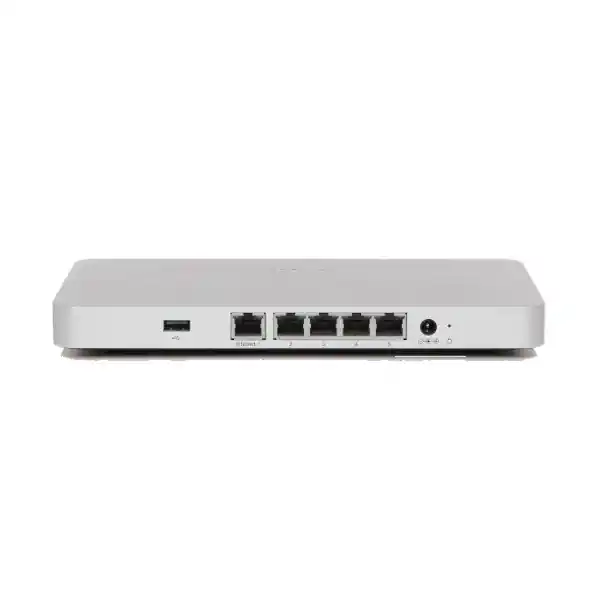
The MX67W has a dedicated gigabit WAN connection, three dedicated gigabit LAN connections and one additional gigabit port configurable for LAN or WAN use. This matters when a branch requires a second wired ISP connection, because using the flexible port as WAN changes the available LAN port count. The device does not have integrated LTE and should not be confused with cellular-enabled variants. If cellular continuity is required, ask about a supported external modem or an alternative appliance with integrated cellular connectivity.
Operational Architecture and Branch Design
At the network edge, the MX67W terminates the office internet connection and applies routing, security and traffic-handling policies to wired and wireless clients. A typical installation connects the primary ISP router or handoff to the dedicated WAN port. The LAN ports connect directly to a handful of endpoints or to a managed switch serving additional users, printers, voice equipment and access points. Where a second ISP is available, the convertible port can be assigned as another uplink. This design provides a practical foundation for link monitoring and policy-based failover, although service continuity still depends on the second provider and correct configuration.
The Meraki dashboard acts as the centralized management interface. Administrators can define site networks, claim supported devices, review uplink conditions, create traffic rules and manage VPN connections without requiring routine onsite configuration. This is especially helpful when a business maintains many branches with limited local technical staffing. Central visibility does not eliminate the need for a sound addressing plan, documented change procedures and secure administrative access. A rollout should still identify who owns the dashboard organization, who approves security changes and how emergency access is handled.
The wireless subsystem is integrated into the appliance rather than supplied as a separate ceiling-mounted access point. This saves components in small offices, but placement becomes a design consideration. A firewall often sits beside an ISP handoff or in a locked cabinet, while wireless coverage benefits from a central, unobstructed position. If those requirements conflict, the MX67W can still serve as a wired security gateway while separate access points deliver more suitable coverage. Integrated wireless supports up to four SSIDs according to Cisco documentation, allowing a small number of business and guest network identities.
Traffic performance must be sized against the actual workload. A quoted internet package is only one input: consider simultaneous video calls, cloud backup, file synchronization, voice traffic, guest browsing and interoffice VPN use. A 700 Mbps firewall rating should not be treated as a guaranteed speed for every security profile or VPN topology. Advanced security inspection and encryption introduce their own performance constraints. During planning, reserve capacity for peak hours and growth rather than choosing a platform solely because its headline throughput exceeds today’s ISP subscription.
Business Outcomes and Operational Value
- Predictable branch performance. Use documented throughput figures as an initial sizing guide, then compare them with the expected number of concurrent sessions, security services and uplink speeds. Performance validation before deployment reduces the risk of discovering a bottleneck after a branch opens.
- Resilient connectivity. A convertible WAN/LAN port allows a dual-wired-uplink design where suitable service is available. Two independent providers can reduce exposure to a single access-circuit outage, although both may still share upstream infrastructure.
- Repeatable multi-site rollout. Standardized dashboard templates and naming conventions make it easier to add small branches. A consistent approach to IP addressing, VLANs, guest policies and VPN membership simplifies handover to support teams.
- Policy-led security. Layer 7 controls and licensed threat-protection features support differentiated rules for business applications, guest users and administrative systems. Organizations should align these capabilities with their actual security obligations.
- Centralized troubleshooting. Cloud-based visibility into connectivity, clients and configuration helps a central IT team investigate common branch incidents without immediately dispatching a technician.
- Manageable ownership cost. Integrated wireless may reduce hardware count for a small site. Buyers should nevertheless include recurring licensing, replacement planning, ISP redundancy, accessories and support in a multi-year budget.
- Faster branch activation. Preparing configuration, dashboard ownership and circuit details before shipment can shorten installation time. Physical cabling and local connectivity still require validation onsite.
Hardware and Software Highlights
The MX67W combines gigabit Ethernet interfaces with integrated dual-band radios and external antennas. Its desktop or wall-mount form factor is suited to small communications areas, provided ventilation and physical security are considered. The wireless implementation uses two spatial streams and 2×2 MU-MIMO, with a published aggregate maximum radio data rate of 1.3 Gbps. This is a theoretical wireless link characteristic, not a promise of equivalent internet throughput to every client.
Cloud management, Auto VPN, application-aware traffic policies and security services distinguish the appliance from a basic consumer router. Advanced inspection features depend on the selected license and current software support. A procurement review should distinguish hardware capabilities from subscription entitlements, and should verify feature availability for the intended firmware train. For organizations with formal change management, schedule firmware updates, record rollback considerations and document configuration approvals.
The MX67W does not provide PoE output ports, so phones and additional access points generally require a PoE switch or suitable power injectors. It also lacks an integrated cellular modem. These omissions are important in bill-of-materials preparation: neither PoE delivery nor native LTE failover should be assumed merely because other models in the broader MX family provide them.
Technical Specifications Ledger
| Attribute | Cisco Meraki MX67W |
|---|---|
| Product class | Cloud-managed security and SD-WAN appliance with integrated wireless |
| Recommended branch size | Approximately 50 users/devices, subject to workload |
| Firewall throughput | 700 Mbps published maximum |
| Advanced security throughput | 400 Mbps in current MX family data sheet |
| VPN throughput | Consult current Cisco documentation and firmware-specific sizing; published materials differ by revision |
| Dedicated WAN | 1 x Gigabit RJ45 |
| LAN | 3 x dedicated Gigabit RJ45 plus 1 x configurable LAN/WAN Gigabit RJ45 |
| Wireless | 802.11a/b/g/n/ac Wave 2, 2.4 GHz and 5 GHz |
| Radio configuration | 2×2 MU-MIMO, two spatial streams |
| Wireless data rate | Up to 1.3 Gbps aggregate radio data rate |
| Wireless SSIDs | Up to four integrated SSIDs |
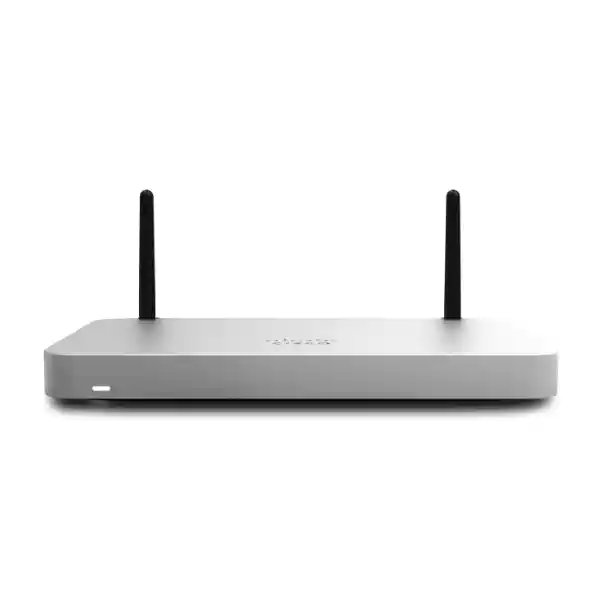
| Antennas | Two external dual-band dipole antennas |
| Cellular | No integrated LTE modem; compatible external options require verification |
| PoE output | Not provided |
| Dimensions | Approximately 239 x 164 x 27 mm |
| Weight | Approximately 0.83 kg |
| Power supply | 30 W DC adapter |
| Published power load | Approximately 15 W idle / 23 W maximum |
| Mounting | Desktop or wall mount |
| Warranty | Confirm manufacturer entitlement, regional replacement eligibility and reseller terms at quotation |
Specifications are planning references, not a substitute for a confirmed quotation and the exact Cisco documentation revision associated with the supplied hardware. Where datasheets and product summaries present different VPN throughput values, the deployment design should rely on a current model-specific sizing assessment.
Configuration and Sizing Worksheet
1. Define workloads and users
Record total users, simultaneously active devices, critical applications, guest access demand and expected traffic at peak hours. Include the number of remote sites and whether traffic traverses a central data center or uses local internet breakout. Identify any applications sensitive to latency or packet loss, such as voice and video.
2. Measure circuit and failover needs
Document primary ISP bandwidth, handoff media, static addressing, authentication requirements and any secondary service. If two wired circuits are planned, reserve the configurable Ethernet port for the second WAN. Confirm whether the providers offer physically independent paths and how failover will be tested.
3. Inspect placement and power
Measure cabinet clearance, airflow, wall-mount options and distance to the wireless service area. Confirm the correct power adapter and local electrical compatibility. Where outages are common, size a UPS for the appliance plus the ISP termination device and any switch needed to keep users connected.
4. Select subscriptions carefully
Identify the required security functions and the desired support term before choosing a Meraki license. Request line-item hardware and license pricing. Verify that the proposed licensing model, term and feature set align with the organization’s dashboard and current Cisco ordering rules.
5. Prepare the purchase request
Include model, quantity, delivery address, company details, license term, security requirements, installation assistance, warranty expectations and any documentation needed for institutional purchasing. Ask for an itemized offer with taxes, freight and lead times shown clearly.
Deployment Scenarios
Multi-site companies
A central IT team can deploy MX67W units at smaller offices while using a standardized dashboard organization and VPN design. Each site can maintain local internet access and connect securely to shared resources. Planning should establish address allocation, VPN routes, segmentation and escalation procedures before the first branch is commissioned. Where sites vary greatly in size, use the MX67W only where its performance and interface count remain suitable.
Financial and professional services branches
A small branch can separate employee access from visitor connectivity and apply security controls to sensitive applications. This appliance is a network component, not a substitute for endpoint protection, identity management, encryption or sector-specific compliance review. Financial institutions should assess logging, retention, administrative permissions and approved network architecture against their internal standards.
Education and training facilities
Administrative offices and compact training locations can benefit from a unified wired and wireless gateway. However, high-density classrooms, multiple floors and large outdoor areas usually need a dedicated wireless design with additional access points. Evaluate expected simultaneous client counts and radio coverage before assuming the built-in Wi-Fi will serve an entire campus.
Public-sector and regulated environments
Government purchasers can request detailed specifications, manufacturer documentation, approved supply-chain records and warranty clarification. Security teams should review cloud-management requirements, data governance obligations and change-control policies. Defense or restricted networks may impose additional procurement and connectivity rules that require explicit institutional approval.
Technical Deep Dive: Traffic Processing and Security Capacity
A branch security gateway must process multiple traffic classes simultaneously. Web sessions, SaaS connections, voice calls, VPN packets and guest browsing compete for uplink capacity, while inspection rules can affect processing overhead. The MX67W’s published firewall rating describes a defined performance envelope, not unlimited inspection capability. A realistic design estimates peak aggregate demand and reserves headroom for sudden traffic increases. When advanced security features are enabled, use the appropriate lower published throughput metric as a planning reference.
The practical objective is stable user experience rather than a single impressive speed-test number. Configure application prioritization where justified, avoid unnecessary traffic hairpinning, and test real business applications during acceptance. VPN design must account for encryption overhead and the capabilities of the appliance at the other end. If a branch routinely requires near-gigabit inspected throughput, a larger model may provide a safer growth path.
Technical Deep Dive: Dashboard Operations and Firmware Governance
Central management is most valuable when accompanied by disciplined administration. Assign named administrator accounts, apply appropriate role restrictions and use strong authentication. Maintain a device inventory with serial numbers, physical locations, assigned networks and subscription records. Document firewall changes with business justification and approval dates. Firmware updates should be evaluated against maintenance windows, known issues and the organization’s tolerance for service interruption.
The dashboard can simplify remote troubleshooting, but cloud administration depends on suitable connectivity and valid licensing. Buyers should understand the consequences of subscription expiry and avoid treating the license as an optional support extra. During deployment, verify that the appliance is correctly claimed to the intended organization and that network ownership is documented for future staff transitions.
Technical Deep Dive: Availability and Recovery
Continuity planning starts with identifying single points of failure. A second WAN connection helps only if it is operationally independent and has been configured and tested. The ISP modem, local switch, power circuit and physical site may still fail. For business-critical locations, consider UPS runtime, spare equipment, configuration records, escalation contacts and documented recovery procedures. An appliance replacement plan should include licensing, dashboard access and shipment logistics, not just the hardware serial number.
Where high availability is required, confirm supported topology and licensing details against Cisco guidance for the exact model and software version. Do not assume that installing two devices automatically provides a complete failover design. Test loss of primary internet, loss of power and replacement of a failed device under controlled conditions before relying on the architecture in production.
Pre-Purchase Questions Buyers Should Resolve
Does the appliance include the license? Not necessarily. Request a quotation that explicitly distinguishes hardware from subscription entitlements and identifies the license duration and feature tier. Is built-in Wi-Fi sufficient? Only after evaluating floor plan, obstructions, client density and placement. Can it power access points? The MX67W does not provide PoE output, so plan external PoE equipment. Does it contain cellular backup? No integrated LTE modem is provided on this variant. Will it work with existing switches? Standard Ethernet integration is generally practical, but VLAN, routing and security policies must be coordinated.
What happens when a subscription expires? Meraki licensing is fundamental to normal operation and management; buyers should confirm current enforcement and renewal terms. Can the device fit a standard rack? It is a compact desktop/wall-mount model rather than a native full-width rack appliance; plan a shelf or suitable mounting accessory if rack installation is necessary. Is a quoted throughput number a guaranteed real-world speed? No. Enabled services and workload change effective performance. What about product lifecycle? Ask for the current sale status, support milestones, firmware eligibility and available replacement options before committing to a long-term fleet standard.
An effective purchase decision compares the complete deployed solution: device, license, internet circuits, switch capacity, wireless coverage, power backup, implementation labor and renewal obligations. This avoids the common error of choosing the lowest hardware price while overlooking ongoing operating requirements.
Uganda Procurement, Delivery and Technical Preparation
FourTeck supports quotation-led procurement for organizations evaluating the Cisco Meraki MX67W in Uganda. Provide the delivery location, required quantity, license duration and desired implementation scope so the commercial proposal can reflect the actual project. Availability, shipment dates, taxes and warranty handling should be confirmed in writing; no stock level or delivery date is implied by this product page.
For a smoother rollout, share a basic network diagram, ISP handoff details and the intended VPN design before ordering. If the organization already uses Meraki, identify its existing dashboard and licensing approach. Where procurement requires formal specifications, serial tracking or approval documents, include these requirements in the request for quotation. Pre-shipment staging or firmware preparation may be discussed subject to service availability and authorization.
Local Coverage: Kampala, Entebbe, Jinja, Mbarara and Gulu
Kampala headquarters may require standardized branch policies and centralized oversight. Entebbe offices may prioritize resilient connections to cloud services and headquarters. Jinja commercial locations often need straightforward guest and employee segmentation. Mbarara regional operations may benefit from remote diagnostics, while Gulu deployments can place additional emphasis on power resilience and replacement logistics. These are examples of planning considerations rather than claims about local inventory or guaranteed service coverage. Confirm delivery options and onsite assistance for each destination.
Regional and Cross-Border Supply Coordination
Organizations operating across East Africa and the Gulf may need aligned hardware specifications, consistent license terms and coordinated deployment records. FourTeck regional websites include Uganda, Kenya, Africa, United Arab Emirates and Kuwait. Cross-border projects should verify local regulatory requirements, import documentation, radio approvals, warranty eligibility and shipping arrangements before purchase. A common configuration standard can reduce operational variation, but each location still requires a valid power, connectivity and regulatory assessment.
Related Equipment and Planning Resources
Buyers comparing branch connectivity options can explore the FourTeck Uganda product catalog and request alternatives such as the Cisco Meraki MX67 without integrated wireless, the MX67C cellular variant, or larger MX models for higher client density. Additional planning may involve managed switch selection, wireless access point sizing, UPS and power accessories, and Meraki licensing quotations. The correct combination depends on cabling, security segmentation, coverage, power availability and the number of active endpoints. Request model-specific compatibility checks rather than assuming accessories are interchangeable across the family.
FourTeck Technical Service Discussion
Before shipment, customers may request bill-of-materials review, interface validation, license matching and an implementation checklist. Engineering discussions can cover VLAN design, uplink allocation, VPN addressing, wireless SSIDs, guest isolation and change-control requirements. Where staging or preconfiguration is available, agree on administrative access, confidentiality, acceptance criteria and handover documentation in advance. After installation, support expectations should distinguish manufacturer entitlements from any separately contracted local engineering service. This clarity helps the purchasing team understand who responds to configuration issues, hardware faults and licensing questions.
Frequently Asked Technical and Procurement Questions
1. What type of office is the MX67W designed for?
The MX67W is designed for smaller branches that need secure internet access, centralized administration and modest integrated wireless coverage. Cisco positions the model around approximately 50 users, but that figure should be evaluated against concurrent traffic, security features and connected device types. A quiet professional office may have different requirements from a busy training room or media-heavy retail location. Count all endpoints, not just employees, and assess expected peak utilization. If the site needs extensive Wi-Fi coverage or greater inspected throughput, a larger gateway with dedicated access points may be more appropriate.
2. Does the MX67W require a Meraki subscription?
Yes, licensing is a core procurement requirement for Meraki cloud-managed appliances. The appropriate license type and term depend on the security features, management model and support requirements of the organization. Do not assume that a hardware quotation automatically includes the necessary subscription. Ask the supplier to identify each license line, its duration, the applicable support entitlement and any renewal implications. If the organization already has a Meraki estate, confirm compatibility with its existing licensing arrangement. Keep renewal dates in the asset register and assign an owner to prevent unexpected service or management disruption.
3. Can the integrated Wi-Fi replace separate access points?
For a compact office with suitable placement and a manageable client population, integrated Wi-Fi may be enough. The MX67W provides dual-band 802.11ac Wave 2 connectivity and supports multiple SSIDs for separating user groups. However, a security appliance is often installed near network cabling or inside a communications area, which may not be the best location for radio coverage. Walls, floors, neighboring networks and client density affect real performance. Larger spaces, multiple floors and high-density meeting rooms should undergo a wireless survey and may need dedicated access points connected through a suitable switch.
4. Can the MX67W use two internet connections?
The MX67W provides a dedicated gigabit WAN interface and an additional gigabit port that can be configured for LAN or WAN use. This allows a design with two wired uplinks when the configurable port is assigned as a second WAN. Before ordering, check the connection types, addressing and equipment supplied by both ISPs. A second contract does not guarantee diversity if the circuits share physical infrastructure. Configure health checks and traffic policies appropriately, then test failover during an agreed maintenance period. Document which applications are expected to continue operating and what performance is available on the backup circuit.
5. Is the MX67W suitable for secure site-to-site VPN?
The MX67W supports site-to-site VPN functions and can participate in Meraki Auto VPN designs. This is useful for branch access to centralized services and communication among geographically distributed offices. Suitability depends on the number of tunnels, routing design, encryption overhead and available bandwidth. Verify current VPN performance and tunnel limits against Cisco documentation for the chosen firmware and license. Plan non-overlapping subnets, security policies, DNS resolution and failure behavior before enabling production traffic. For hybrid networks with non-Meraki equipment, confirm the supported VPN interoperability options and test them with the actual peer devices.
6. Does the MX67W have built-in LTE or PoE ports?
No. The MX67W integrates wireless LAN radios but not an internal cellular modem, and it does not provide PoE output for powering phones or access points. Buyers should distinguish the letter W, which denotes wireless LAN capability, from cellular variants in the product family. Where mobile-network failover is necessary, review supported external modem options or compare a model with integrated cellular hardware. For PoE endpoints, specify an appropriately rated switch or injector. Include the additional equipment, power budget, cables and mounting accessories in the initial quotation to avoid installation delays.
7. How should warranty and replacement support be evaluated?
Ask for the manufacturer warranty terms applicable to the exact hardware and purchase channel, together with the regional replacement process and any local supplier commitments. A warranty description alone does not establish how quickly a replacement can reach a particular Ugandan site. Confirm proof-of-purchase requirements, serial-number handling, return logistics, advanced replacement eligibility and any exclusions. For critical branches, evaluate a spare-unit strategy and keep secure configuration records. The recovery plan should also cover dashboard ownership, licensing, ISP handoff information and technical contacts so a replacement can be installed without unnecessary administrative delay.
8. What should be checked before integrating the MX67W with existing switches?
Start with the intended network topology, VLAN segmentation and interface assignments. Standard gigabit Ethernet connectivity allows the appliance to connect to many conventional switches, but interoperability does not mean every configuration will work without adjustment. Confirm tagged and untagged VLAN behavior, addressing, DHCP responsibility, routing and any existing firewall policies. If voice systems or managed wireless access points are present, consider their quality-of-service and management needs. The MX67W has limited local Ethernet port capacity, so larger branches typically require a separate switch. Document the final cabling plan and test connectivity for each user group.
9. What information is needed for an accurate Uganda quotation?
Provide the exact model, quantity, business name, delivery destination, required license term and intended deployment date. State whether the site needs one or two internet uplinks, VPN to other offices, guest Wi-Fi, advanced security services, installation support or additional switching. If a tender requires formal technical compliance, attach the relevant schedule so the supplier can identify deviations or missing accessories. Ask for separate hardware, licensing, taxes, shipping and professional-services lines where applicable. Availability and delivery dates should be confirmed in the written offer rather than inferred from a catalog listing.
10. How can a company reduce deployment and renewal risk?
Use a repeatable commissioning checklist and maintain an accurate inventory of appliance serial numbers, locations, dashboard organizations, subscriptions and responsible administrators. Before go-live, test internet connectivity, failover, VPN access, guest isolation and business-critical applications. Schedule firmware maintenance and establish a process for approving firewall changes. Record renewal dates with sufficient advance notice for procurement. For organizations with several branches, standardize configuration conventions while allowing documented exceptions for local requirements. This approach makes the MX67W easier to support and helps prevent a routine hardware replacement or license renewal from becoming a major service interruption.



Reviews
There are no reviews yet.