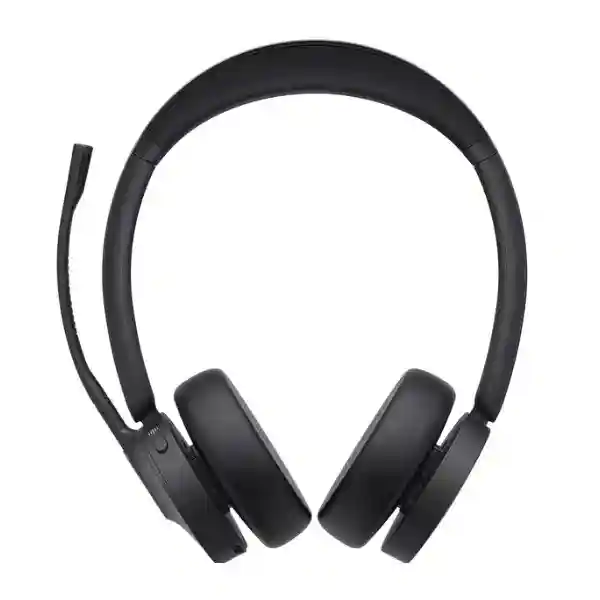
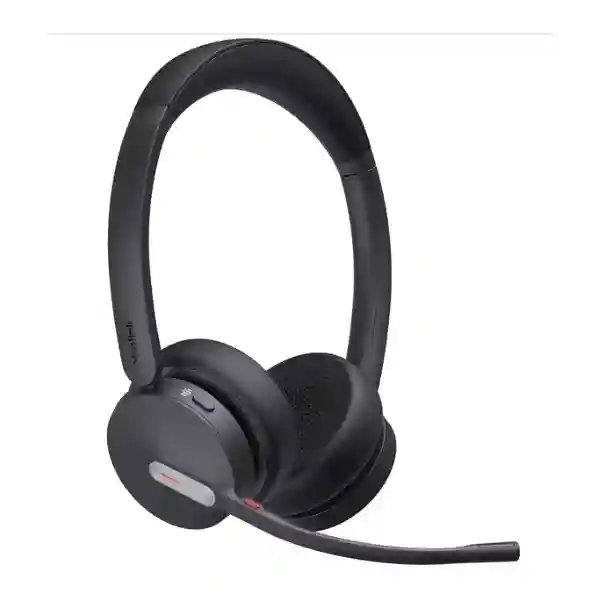
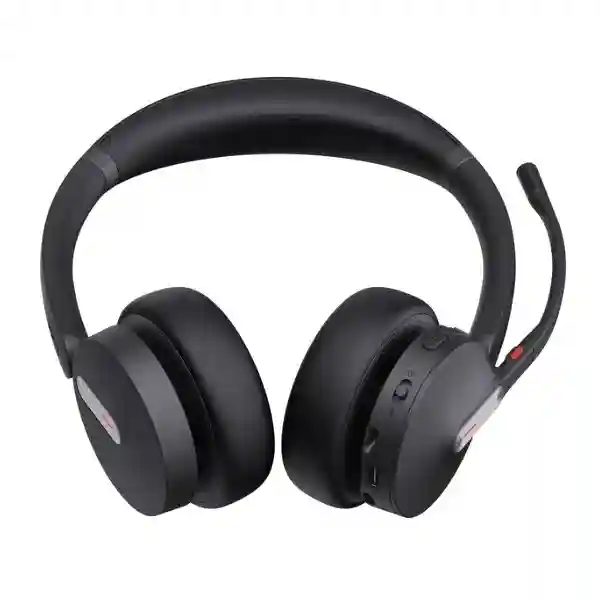
Yealink BH70 Bluetooth Headset – Professional Wireless Business Communication
The Yealink BH70 is a professional wireless communications headset designed for people who spend significant portions of the working day on voice calls, online meetings and collaborative applications. Rather than treating the headset as a simple audio accessory, the BH70 is designed as a managed business endpoint: it combines Bluetooth connectivity, a three-microphone voice capture system, long battery endurance, physical call controls, visible availability indication and centralized management options. For Ugandan organizations equipping offices, contact teams, executives, hybrid workers and distributed staff, this combination helps standardize user experience while reducing dependence on laptop microphones, consumer earbuds and inconsistent personal devices.
The current BH70 specification supports Bluetooth 5.3, a wireless range of up to 50 m / 164 ft under suitable conditions, two simultaneous Bluetooth connections and pairing memory for up to eight devices. It is offered in mono and dual wearing styles, with USB-A and USB-C BT51 dongle variants and UC or Teams-oriented configurations. The headset uses three MEMS microphones with Yealink Acoustic Shield functionality for business voice pickup. Its 35 mm speaker provides a 20 Hz–20 kHz frequency response, while battery figures reach up to 35 hours of talk time with the busylight off, up to 28 hours with it on, and up to 43 hours of music playback. These capabilities make the BH70 especially relevant where users need a headset that can remain available across a full workday without frequent charging interruptions.
FourTeck can support quotation planning around headset quantity, mono versus dual preference, USB connector type, collaboration environment, optional charging stands, replacement ear cushions and delivery destination. This matters in larger rollouts because ordering the correct variant at the beginning avoids adapter proliferation and simplifies endpoint support.
Instant Specifications & Procurement Fact Rail
Yealink BH70
Office, hybrid and mobile professionals
Bluetooth 5.3; BT51 USB-A/USB-C variants
Up to 35 h talk / 43 h music
Up to 50 m / 164 ft
Manufacturer documentation states 2 years; confirm quote terms
Procurement teams should distinguish the BH70 family variants before purchase. Mono is useful where situational awareness is important; dual is better suited to users who want greater acoustic focus. Teams and UC designations should be matched to the collaboration environment, while USB-A and USB-C dongle selection should follow the port availability of the deployed computers. Organizations replacing older PCs with USB-C notebooks may prefer USB-C or combination variants to reduce adapters. Availability and lead time can vary by exact part number, so the quotation should state the requested configuration rather than relying only on the BH70 family name.
Operational Product Architecture & Overview
The BH70 architecture centers on a wireless audio endpoint that must solve three practical enterprise problems simultaneously: capturing intelligible speech, maintaining dependable connectivity and remaining comfortable enough for sustained use. The three-microphone MEMS array is paired with Yealink Acoustic Shield processing to focus on the wearer’s voice and suppress distracting environmental sound reaching the far end of a conversation. This is distinct from active noise cancellation for the wearer: the BH70 specification does not list ANC. Buyers should therefore choose it primarily for microphone-side call clarity, business controls and endurance rather than expecting electronically cancelled ambient sound at the ear.
Connectivity is designed around modern multi-device work. A user may maintain two simultaneous Bluetooth connections and store pairing information for up to eight devices. In a typical deployment this allows a notebook and smartphone to remain part of the user’s communications workflow without constant re-pairing. The BT51 dongle provides a standardized computer connection in USB-A or USB-C form, which can be valuable where IT departments want repeatable endpoint behavior instead of relying exclusively on differing laptop Bluetooth implementations.
The acoustic output system uses a 35 mm speaker with a stated 20 Hz–20 kHz response. For business procurement, this gives the headset utility beyond calls: users can move between conferencing, recorded training, presentations and general media without changing devices. The microphone frequency range is 100 Hz–8 kHz, reflecting its focus on intelligible voice transmission. Controls for calls, volume, mute, playback, power and pairing reduce the need to interact constantly with application windows.
Battery architecture is another procurement consideration. With up to 35 hours of talk time when the busylight is off, up to 28 hours when it is active, up to 43 hours of music playback and up to 22 days of standby, the BH70 can accommodate extended working patterns. Charging is specified at up to 90 minutes. The optional BHC70 charging stand can provide a more structured desk workflow for users who want a fixed place to store and recharge the headset between sessions.
Physical design also affects fleet lifecycle. Dual and mono versions weigh approximately 147 g and 91 g respectively, and replacement ear cushions are available as an option. In large deployments, replaceable wear components can extend practical service life because organizations can refresh contact surfaces rather than discard otherwise functional headsets. Management is supported through Yealink USB Connect on PC, the Yealink Connect application on Android and iOS, and Yealink Device Management Platform, giving administrators options for configuration and device oversight.

Enterprise Business Outcomes & Value Analysis
Three MEMS microphones and Acoustic Shield functionality help keep transmitted speech intelligible when staff work around colleagues, home activity or moderate office noise. Clearer voice capture can reduce repetition and meeting fatigue.
Long talk and standby figures reduce the risk that headsets become unavailable during busy calling periods. The 90-minute stated charging time also supports rapid recovery when charging has been missed.
Mono/dual, Teams/UC and USB-A/USB-C choices let organizations align one headset family with different user groups rather than introducing unrelated devices for each department.
Physical mute control and boom-arm mute behavior give users immediate control of microphone state. Visible busylights also provide a social signal that helps reduce interruption during calls.
Yealink USB Connect, Connect App and Device Management Platform support configuration and administration, useful when IT teams need consistent settings across a growing headset estate.
Replaceable cushions, long battery endurance and optional charging stands support a maintainable deployment. Standardizing dongle and wearing-style choices can also simplify spares and support procedures.
Key Hardware & Software Highlights
Three-microphone array: The headset uses three MEMS microphones with a microphone frequency range of 100 Hz–8 kHz. The operational outcome is a voice-focused communications endpoint intended to provide consistent pickup for calls and meetings.
35 mm speaker: A 35 mm driver, 117 dB sensitivity at 1 mW/1 kHz and 20 Hz–20 kHz response support both speech and media. This helps employees use one endpoint for meetings, training and playback.
Bluetooth 5.3: Current Yealink technical information lists Bluetooth 5.3 with up to 50 m range in appropriate conditions. Real-world range depends on walls, radio congestion, host hardware and workplace layout.
Multipoint behavior: Two simultaneous Bluetooth connections and an eight-device pairing list suit professionals who alternate between mobile and computer communications.
Physical controls: Call, volume, mute, power/pairing and playback controls reduce dependency on on-screen actions. Boom movement can also be used for mute/unmute behavior.
Management software: Yealink USB Connect, Yealink Connect App and Yealink Device Management Platform provide a path for configuration, firmware administration and fleet consistency.
Technical Specifications Ledger
| Specification | Yealink BH70 | Procurement Relevance |
|---|---|---|
| Wearing style | Mono or dual | Choose by concentration and awareness needs. |
| Bluetooth | 5.3 | Modern wireless connectivity for business endpoints. |
| Wireless range | Up to 50 m / 164 ft | Allows desk mobility; actual range varies by environment. |
| Connections | 2 simultaneous; up to 8 paired | Supports multi-device workers. |
| Dongle | BT51 USB-A or USB-C variant | Match to computer port standards. |
| Microphones | 3 MEMS | Business voice pickup with Acoustic Shield. |
| Microphone response | 100 Hz–8 kHz | Voice-focused capture. |
| ANC | Not specified / No | Do not confuse microphone noise reduction with listener ANC. |
| Speaker | 35 mm; 20 Hz–20 kHz | Suitable for calls and media. |
| Talk time | Up to 35 h busylight off / 28 h on | Supports long shifts and multi-day light usage. |
| Music time | Up to 43 h | Useful for training and media playback. |
| Charging | Up to 90 min | Fast return to service. |
| Standby | Up to 22 days | Reduces charging pressure for intermittent users. |
| Weight | Dual 147 g; Mono 91 g | Relevant to all-day comfort planning. |
| Management | USB Connect, Connect App, Device Management Platform | Supports standardized administration. |
| Warranty | Manufacturer datasheet baseline: 2 years | Final regional terms should be confirmed on quotation. |
Specifications should be interpreted as manufacturer-rated values rather than guaranteed results in every workplace. Wireless distance, battery duration and voice performance can be influenced by host devices, radio interference, application behavior, call volume, busylight use and user settings. For fleet purchasing, FourTeck recommends validating a representative sample with the intended computers and collaboration applications before a large deployment where workflow requirements are especially strict.
Configuration & Sizing Worksheet
- Estimate user population. Separate permanent desk users, mobile executives, hybrid workers, reception personnel and shared-device teams. Add a sensible spare pool for replacements and onboarding.
- Select mono or dual. Mono can preserve awareness of surrounding colleagues; dual can help users concentrate on conversations and media. User preference should be tested for roles with very high daily wearing time.
- Audit computer ports. Count USB-A and USB-C endpoints. Avoid ordering a mixed fleet without recording which dongle belongs to which workstation profile.
- Confirm collaboration platform. Determine whether Teams-oriented or UC variants are required. Confirm application compatibility and button behavior during a pilot.
- Plan charging. Standard cable charging may be sufficient for mobile workers. The optional BHC70 stand can provide a consistent desk charging location for fixed users.
- Assess radio conditions. The quoted 50 m range is an ideal maximum. Walls, metal partitions and dense wireless environments can reduce usable distance.
- Plan lifecycle accessories. Consider replacement ear cushions for larger fleets and high-utilization users. A small accessory reserve can shorten downtime.
- Prepare the quote request. State quantity, mono/dual, UC/Teams, USB-A/USB-C, charging stand requirement, destination city, required delivery window and any staging needs.
Licensing should also be considered at the collaboration-platform level. The BH70 itself is a headset endpoint; meeting, telephony or calling-service subscriptions are generally determined by the customer’s chosen communications platform. Procurement teams should therefore avoid treating headset purchase as a substitute for the software licenses, SIP services or cloud calling plans required by their communications architecture. FourTeck can align the physical endpoint bill of materials with the customer’s stated environment, but the final licensing requirement depends on the deployed platform and organizational agreements.

Deployment Scenarios & Industry Use Cases
Large Enterprise and Multi-Site Networks
A multi-site organization can standardize the BH70 as a user-side communications device while maintaining different variants for role needs. Headquarters staff may prefer dual headsets, branch managers may use mono versions for environmental awareness, and mobile employees can use the same family with notebooks and smartphones. Central management tools can help maintain configuration consistency. A documented standard also simplifies onboarding: new employees receive a known headset, approved dongle type and clear support process rather than selecting unrelated consumer devices.
Financial and Banking Institutions
Banks and financial offices often combine customer calls, internal meetings and controlled workstation environments. Physical mute controls, business-focused microphone pickup and visible busylights are useful in such settings. Procurement should validate platform compatibility, USB restrictions, device-management policies and the organization’s rules for Bluetooth endpoints before rollout. Where Bluetooth use is restricted in particular secure areas, the BH70 should be deployed only where policy permits.
Educational and Campus Networks
Universities, training organizations and administrative campuses can use the BH70 for lecturers, admissions staff, finance teams and remote-learning support. Long battery endurance benefits employees moving between meetings and classrooms. The multi-device pairing model can also support staff who use both institutional laptops and mobile phones. For computer labs or shared stations, organizations should define ownership and sanitation procedures because the BH70 is primarily a personal wearable endpoint.
Government and Public-Sector Procurement
Government deployments typically require clear model identification, repeatable specifications and predictable support. A quotation can identify the exact BH70 part-number class, connector, wearing style and accessory set. For tender submissions, buyers should request documented warranty terms, delivery assumptions and any required compliance documentation. The headset’s management ecosystem can be evaluated as part of broader endpoint governance, while agency security teams should approve Bluetooth usage according to local policy.
Technical Deep Dive: Voice Processing & Acoustic Architecture
The practical value of a business headset depends heavily on what the far-end participant hears. The BH70 uses three microphones rather than a single generic boom microphone. This microphone arrangement, together with Yealink Acoustic Shield processing, is intended to distinguish the wearer’s speech from surrounding sound. In open offices, homes and shared workspaces, the objective is not to create silence around the wearer but to reduce the amount of irrelevant environmental sound transmitted into the call. That distinction is important when evaluating demonstrations: microphone-side suppression should be judged by recording the far-end signal, not simply by asking the wearer whether the room sounds quieter.
The BH70 does not list active noise cancellation for listener isolation. Buyers who require electronic cancellation of ambient sound at the ear should compare a model designed with that feature. For many business deployments, however, transmitted voice clarity, lightweight construction and long endurance may be more important than ANC. The 35 mm speaker and broad playback response also allow the headset to cover conferencing and general media, consolidating multiple audio tasks into one wearable endpoint.
Technical Deep Dive: Software Ecosystem, Firmware & Operational Control
Headsets become easier to support when IT teams have repeatable configuration tools. Yealink USB Connect provides a PC-oriented management path, while Yealink Connect App supports mobile environments and Yealink Device Management Platform provides broader administrative capability. In a managed rollout, organizations can establish an approved firmware and settings baseline, test updates with a pilot group, and then apply controlled changes rather than leaving every user to configure devices independently.
Operational control also includes physical behavior. Users can answer and end calls, adjust volume, mute and unmute, manage playback and use power or pairing controls from the headset. Boom-arm movement can support mute behavior, and busylights provide visible status. These apparently small details matter at scale because every avoided application-window interaction can make frequent calling more fluid.
Technical Deep Dive: Availability, Redundancy & Continuity
A headset is not a high-availability network appliance, but endpoint continuity still matters. The BH70 addresses continuity primarily through long battery life, rapid charging, multiple pairing records and replaceable wear components. Organizations can strengthen this further by maintaining spare headsets and dongles at major offices. For critical call roles, a small ready-to-issue spare pool is more practical than assuming every device will remain continuously available throughout its lifecycle.
Charging strategy should reflect work patterns. Fixed desk users can benefit from the optional stand, while mobile workers may prefer cable charging. Teams operating extended hours should establish a charging routine and keep spare charging cables available. In business-continuity planning, the headset should be considered alongside the computer, communications platform, internet connection and power availability; redundancy in only one layer cannot preserve service if another layer fails.
Pre-Purchase Buyer Gap Checklist
Are there hidden headset licenses? The physical BH70 does not replace or include the organization’s cloud calling, meeting or telephony service licensing. Confirm software subscriptions separately. Which generation am I ordering? Request the exact current part number and connector variant on the quotation. Does it have ANC? No active noise cancellation is specified for the BH70; Acoustic Shield addresses microphone-side noise handling. Will 50 metres always be achieved? No. It is a maximum stated wireless range under suitable conditions and can be reduced by building materials and radio interference.
Will it connect to two devices? The BH70 supports two simultaneous Bluetooth connections and stores pairing information for up to eight devices. Should we choose USB-A or USB-C? Audit the computer estate and future refresh plan. USB-C may align better with newer notebooks, while USB-A remains common in established desktops. What about Teams? Yealink lists Teams and UC variants; choose the variant aligned with the intended platform and validate call-control behavior in a pilot.
Can cushions be replaced? Replacement ear cushions are listed as optional accessories, useful for hygiene and lifecycle maintenance. Is the charging stand included? Standard BH70 packages and with-stand variants differ; the BHC70 stand may be optional depending on the selected SKU. Make this explicit in the quotation. How much does it weigh? Approximately 147 g for dual and 91 g for mono according to manufacturer information. How should a large rollout be validated? Test representative users, operating systems, applications, USB policies, Bluetooth conditions, comfort over long sessions, firmware management and charging behavior before final fleet acceptance.
Cross-vendor compatibility should be treated pragmatically. Bluetooth provides broad connectivity, but application-specific call controls and certification behavior can vary. A successful audio connection does not automatically prove that every mute indicator, answer button or collaboration-platform function behaves identically. For regulated or high-volume environments, record the tested host model, operating system, application version and headset firmware so the validated configuration can be reproduced.
Uganda Procurement & Delivery Logistics
FourTeck Uganda can structure BH70 quotations around the exact deployment requirement rather than a generic family description. A useful request includes quantity, mono or dual wearing style, UC or Teams preference, USB-A or USB-C interface, optional BHC70 stand requirement, delivery location and desired timeline. For multi-site projects, quantities can be separated by branch so logistics planning reflects where the devices will actually be used.
Order processing depends on the exact configuration, quantity and current supply position. Buyers should therefore request a formal quotation for confirmed commercial terms and lead-time assumptions. Where projects have a fixed go-live date, procurement should include time for internal approval, shipping, receiving, asset registration, pilot testing and distribution rather than treating the supplier lead time as the entire deployment schedule.
Technical pre-configuration can include validation of the selected variant, accessory matching, firmware planning and deployment guidance. For larger headset estates, agreeing on a standard model matrix before shipment can reduce support tickets after distribution. Organizations should also identify who owns firmware administration, user training, spare stock and warranty coordination.
Local Coverage Matrix
Kampala: suitable for headquarters, corporate offices, financial services, contact operations and government deployments requiring centralized receiving. Entebbe: support for airport-area businesses, hospitality organizations, NGOs and distributed corporate teams. Jinja: procurement support for industrial, educational and commercial organizations. Mbarara: headset supply planning for regional offices, healthcare administration, education and growing business operations. Gulu: support for organizations extending standardized communications endpoints into northern Uganda. For every location, delivery planning should consider exact quantity, receiving contact, branch distribution responsibilities and whether devices need to be staged centrally before onward dispatch.
Cross-Border & Regional Supply Chains
Organizations operating across several countries often benefit from keeping one approved headset standard while sourcing through regional channels. FourTeck supports procurement coordination across Uganda, Kenya, the broader African market, the UAE and Kuwait. Cross-border projects should identify destination, required quantities, model variants and target delivery dates separately because commercial terms, logistics and stock positions may differ by market. Standardizing the technical bill of materials while allowing regional fulfillment can make endpoint support more consistent for multinational teams.
Related Solutions & Internal Links
The BH70 is most effective when considered as part of the complete communications environment. Explore FourTeck Uganda enterprise technology solutions for complementary communication infrastructure. Organizations deploying Yealink endpoints can also use the site to plan related desk phones, meeting-room devices, unified communications equipment and workplace accessories. For projects that require a tailored bill of materials, use the FourTeck Uganda contact and quotation page to specify the user count, headset variants and collaboration environment. Related planning may include Yealink IP phones for fixed desks, conferencing endpoints for shared rooms, charging accessories for fixed headset users, replacement cushions for lifecycle maintenance and network infrastructure supporting cloud communications. Rather than purchasing each item independently, organizations can group endpoint requirements by persona—executive, standard office user, receptionist, hybrid worker, meeting room and branch office—to create a more consistent deployment standard.
FourTeck Technical Service Capabilities
FourTeck can assist with engineering validation before a headset order is finalized. This includes checking that the selected BH70 family variant matches the required wearing style, USB connector and collaboration environment; reviewing quantities and optional accessories; and helping customers create a repeatable bill of materials for multi-user deployment. For larger orders, staging considerations may include part-number verification, firmware planning and labeling or allocation logic according to project requirements.
Pre-shipment validation reduces the chance of receiving the correct headset family but the wrong connector or platform-oriented variant. Where firmware updates are appropriate and agreed for the project, a controlled version strategy can be planned so users begin with a consistent baseline. Post-sales support can focus on configuration guidance, compatibility troubleshooting, accessory identification and warranty coordination according to the commercial terms of the supplied product. Customers should retain serial and purchase records because these simplify support and replacement workflows.
Extended Technical FAQ
1. Is the Yealink BH70 suitable for all-day business calling?
Yes, it is designed for sustained professional use, with lightweight mono and dual variants, long battery endurance and business call controls. Manufacturer figures state up to 35 hours of talk time with the busylight off and up to 28 hours with it on. Comfort remains personal, so organizations buying for heavy call users should include a pilot group and allow users to test wearing style across realistic work sessions before a large rollout.
2. Does the BH70 include active noise cancellation?
No. The BH70 specification does not list active noise cancellation. It does provide Yealink Acoustic Shield functionality with a three-microphone system designed to reduce unwanted environmental sound transmitted to people on the far end of calls. Buyers should distinguish microphone noise suppression from ANC, which is intended to reduce ambient sound heard by the wearer. If listener-side ANC is mandatory, compare another model with that capability.
3. Can the BH70 connect to a laptop and phone at the same time?
The BH70 supports two simultaneous Bluetooth connections and can retain pairing information for up to eight devices. This makes it suitable for users who regularly work between a computer and smartphone. Actual call switching and application behavior should be tested with the organization’s chosen devices and software, particularly where call-control integration is operationally important. The included or selected BT51 dongle can provide a standardized PC connection.
4. What is the practical wireless range?
Yealink states a wireless range of up to 50 metres or 164 feet under suitable conditions. Real offices rarely provide uninterrupted open-space radio conditions, so usable distance can be lower. Concrete walls, metal partitions, elevators, dense Wi-Fi/Bluetooth activity and the location of the host device can all affect performance. Procurement teams should treat 50 metres as a rated maximum and validate mobility in the actual office where long-range movement is required.
5. Which USB connector should we order?
Choose according to the deployed computer estate. USB-A remains common on desktops and older notebooks, while USB-C is prevalent on newer mobile computers. Yealink offers BT51 dongle variants for both connector types, and some current configurations provide broader connector flexibility. Before ordering, inventory the ports available to the intended users and consider the organization’s next hardware refresh so the headset fleet does not immediately require adapters.
6. Are Teams and UC versions the same?
They belong to the same BH70 family but are offered in platform-oriented variants. Organizations should select the version that aligns with the collaboration environment and required call-control experience. The safest approach for a large purchase is to test the exact proposed part number with the organization’s application version, operating system and security policies. This verifies not only audio but also answer, mute and other control behavior important to daily use.
7. Does the headset require a separate subscription?
The headset itself is a hardware endpoint. Your organization may still require subscriptions or licenses for Microsoft Teams, another unified communications service, cloud telephony, SIP calling or meeting applications. Those platform costs are separate from the BH70 hardware purchase. When preparing a project budget, separate physical headset cost, optional accessories, communications-platform licensing, internet/network requirements, support and any deployment services so total project cost is clear.
8. What comes in the BH70 package?
Manufacturer information lists the headset, drawstring bag, USB charging cable, quick-start guide and BT51 dongle, with exact cable or connector details depending on variant. The BHC70 charging stand may be optional or included in specific with-stand packages, and replacement ear cushions are optional. Because the BH70 family has multiple part numbers, the commercial quotation should state the exact package being supplied rather than assuming every accessory is included with every variant.
9. How should warranty replacement be handled?
Yealink documentation for the BH70 states a two-year warranty baseline, but customers should rely on the warranty terms confirmed on their regional quotation and invoice. Keep purchase records, serial information and fault details. Before replacement, support teams may need to verify firmware, pairing, host configuration or physical condition to distinguish a hardware fault from an environment issue. For large fleets, maintaining a small spare pool helps keep users operational while a warranty case is processed.
10. Can FourTeck help configure a larger deployment?
Yes. Deployment assistance can begin with variant selection and bill-of-materials validation, then cover firmware planning, management-tool considerations, pilot testing and rollout guidance according to project scope. A useful project brief includes user count, locations, computer models, USB ports, operating systems, collaboration applications, security restrictions, preferred wearing style and accessory requirements. This information allows the headset order to be aligned with the real endpoint environment rather than selected solely from a model name.
Prepare Your Yealink BH70 Procurement Request
For an accurate Uganda quotation, provide the required quantity, mono or dual preference, Teams or UC environment, USB-A or USB-C requirement, optional charging stand quantity, delivery city and target deployment date. For larger organizations, also indicate whether the order will be distributed across multiple branches and whether a pilot quantity is required before full rollout. FourTeck can use these details to align the proposed BH70 configuration with the intended workplace and reduce avoidable variant or accessory mismatches.
The BH70 is a strong fit for organizations prioritizing clear business voice pickup, long battery endurance, multi-device Bluetooth connectivity and manageable enterprise deployment. Buyers who specifically require listener-side active noise cancellation should state that requirement during product selection so an appropriate alternative can be considered.




Reviews
There are no reviews yet.