Enterprise voice accessory • Uganda procurement
Yealink BT41 Bluetooth USB Dongle for Business IP Phone Headset Connectivity
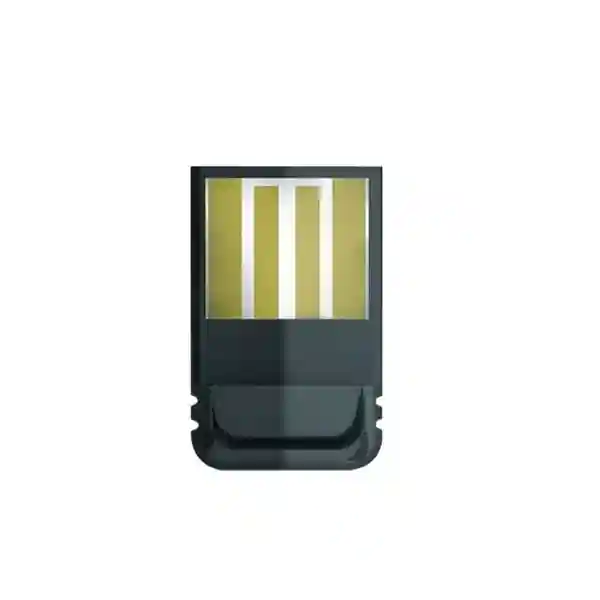
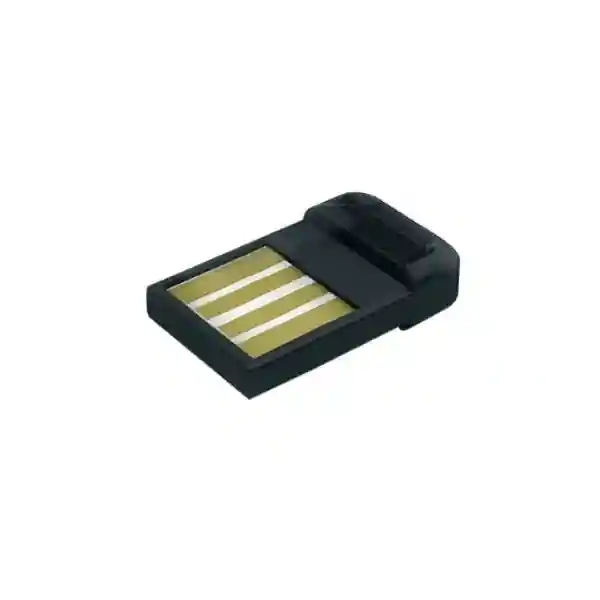
The Yealink BT41 is a compact USB Bluetooth adapter built to give supported Yealink IP phones a practical wireless-headset connection. For organisations that already operate compatible Yealink desk phones but need users to move away from the handset during calls, BT41 provides a focused upgrade path without replacing the telephone itself. The dongle uses Bluetooth 4.1, supports Enhanced Data Rate at 2 Mbps and 3 Mbps, includes A2DP technology and operates in the 2.402–2.480 GHz Bluetooth band. Its published operating distance is up to 10 metres under suitable conditions. Users can answer incoming calls, terminate calls and adjust headset volume using supported controls, helping reception, sales, administration and service teams work with less dependence on a corded handset.
Procurement should begin with compatibility, not quantity. BT41 is intended for defined Yealink phone families and firmware generations; it should not be treated as a universal Bluetooth adapter for every desk phone or computer. FourTeck can review the installed handset model list, expected headset types and rollout quantities before quotation. This is particularly useful for organisations with mixed-generation Yealink estates where several phone models may coexist. The objective is a clean bill of materials in which the dongle, phone firmware and headset requirements are aligned before dispatch.
Instant Specifications & Procurement Fact Rail
Yealink BT41
Bluetooth USB dongle for supported Yealink IP phones
Version 4.1 with EDR and A2DP
USB 2.0
Up to 10 metres
Contact FourTeck for current availability
The BT41 is a small accessory, but it should be specified with the same discipline applied to larger communications components. Its value depends on three things being correct at the same time: the desk phone must be a supported model, the phone should run an appropriate firmware generation, and the chosen Bluetooth headset should provide the call experience expected by the user. The published physical size is 18 × 14 × 5.5 mm and weight is approximately 2 g. These dimensions make the unit unobtrusive, yet its exposed USB placement means desk layout should still avoid accidental knocks or repeated removal. Warranty terms, commercial availability and delivery dates can vary by supply batch and project, so these should be confirmed on the issued quotation rather than assumed from generic accessory listings.
Operational Product Architecture & Overview
BT41 sits at the edge of the enterprise voice environment. It does not replace the SIP phone, PBX, call server or headset; instead, it provides the short-range Bluetooth radio interface that lets a supported Yealink phone communicate with a Bluetooth headset. That distinction matters during planning. Voice registration, extension credentials, VLAN settings, call routing and SIP security remain functions of the phone and communications platform. The dongle’s role is local peripheral connectivity.
Bluetooth 4.1 provides the wireless foundation, while Enhanced Data Rate support accommodates 2 Mbps and 3 Mbps signalling. A2DP support expands the Bluetooth profile capability, and Yealink specifies both narrowband and wideband audio support on particular phone families. The operating band of 2.402–2.480 GHz places the device in the common 2.4 GHz environment, so dense offices should consider normal radio coexistence factors such as nearby Wi-Fi access points, other Bluetooth peripherals, physical partitions and workstation layout.

The practical procurement problem BT41 addresses is common: an organisation has serviceable Yealink IP phones, but selected staff need a wireless headset workflow. Replacing every phone merely to gain integrated Bluetooth can be unnecessarily disruptive. Where the installed model is compatible, BT41 can preserve the existing endpoint while adding the required wireless peripheral path. This is especially relevant for front desks, supervisors, sales teams and staff who alternate between screen work and telephone conversations.
The dongle supports call answer and termination through a compatible Bluetooth headset and permits volume adjustment from the headset or phone. These seemingly small controls matter operationally because a wireless headset that only carries audio but cannot conveniently manage calls can create friction. The target outcome is not simply wireless sound; it is a usable desk-phone workflow where the user can move within the immediate office area and retain basic call control.
Compatibility remains the central architecture decision. Yealink’s current BT41 documentation lists support across a range including SIP-T27G, T29G, T46G, T48G, T41S, T42S, T46S, T48S, T42U, T43U, T46U, T48U, T44U, T53, T73U, T74U and T77U, with version requirements applying. Because installed fleets may have regional variants, old firmware or mixed hardware revisions, buyers should submit the exact phone model list for validation. A purchasing decision based only on the presence of a USB port is not sufficient.
Enterprise Business Outcomes & Value Analysis
A published range of up to 10 metres gives compatible users freedom to reach nearby files, screens or colleagues while remaining connected to a call. Actual range depends on the room, obstacles, radio conditions and headset behaviour, so 10 metres should be treated as a design maximum rather than a guaranteed radius through walls.
Where a supported Yealink phone remains fit for service, adding BT41 can be more economical and less disruptive than replacing the endpoint solely for Bluetooth. This supports phased communications upgrades and can reduce user retraining.
A validated dongle-and-headset combination can be documented as part of an approved workstation standard. This helps IT teams avoid a proliferation of untested consumer adapters and gives procurement a repeatable accessory specification.
BT41 is designed around supported Yealink endpoints. This narrower role can simplify troubleshooting because the deployment can be evaluated as a defined phone, firmware, dongle and headset chain rather than an arbitrary USB Bluetooth implementation.
The compact USB form factor requires little desk space and no separate external power supply. Low power consumption is part of the published design, helping keep workstation accessory requirements modest.
The correct cost comparison includes more than the dongle price. Buyers should compare BT41 plus compatible headset cost against endpoint replacement, installation time, user training and the remaining useful life of the existing phones. For compatible estates, the accessory route can be operationally attractive.
Key Hardware & Software Highlights
Bluetooth 4.1 radio
Provides the short-range wireless connection between supported Yealink IP phones and Bluetooth headsets, with backwards compatibility described for earlier Bluetooth generations.
EDR and A2DP
Enhanced Data Rate support covers 2 Mbps and 3 Mbps signalling, while A2DP forms part of the supported Bluetooth feature set.
USB 2.0 physical interface
A direct USB interface keeps installation physically simple and avoids an additional power adapter or desktop base unit.
Compact 2 g construction
At 18 × 14 × 5.5 mm, BT41 adds minimal bulk to a supported phone and is suited to standard office desks, counters and shared work areas.
The strongest technical benefit is the combination of compact hardware and phone-integrated call handling. Users can answer and terminate calls through a wireless headset and adjust volume through the headset or phone. The audio mode depends on the associated phone family: Yealink documentation identifies 8K narrowband support for selected older models and 16K wideband support for selected newer models. Procurement teams should therefore avoid promising identical audio performance across a mixed fleet without first mapping each handset model.
Technical Specifications Ledger
| Specification | BT41 detail | Procurement note |
|---|---|---|
| Bluetooth | 4.1 | Validate headset and phone compatibility. |
| EDR | 2 Mbps and 3 Mbps | Part of published radio capability. |
| A2DP | Supported | Profile support does not replace model validation. |
| Operating distance | Up to 10 m | Environment can reduce practical range. |
| Frequency | 2.402–2.480 GHz | Plan for normal 2.4 GHz coexistence. |
| USB | USB 2.0 | Designed for supported Yealink phone USB ports. |
| Symbol rate | 3 Mbps | Published device specification. |
| Dimensions | 18 × 14 × 5.5 mm | Allow physical clearance around phone USB port. |
| Weight | 2 g | Minimal workstation load. |
| Gift box | 119 × 113 × 26 mm | Useful for storage and deployment planning. |
| Carton quantity | 40 pieces | Bulk orders can be planned around project quantities. |
Published compatibility includes multiple Yealink SIP-T series phones. Because support lists can evolve with documentation and firmware, the exact endpoint estate should be verified during quotation. The BT41 itself is not a network switch, SIP endpoint or USB adapter intended for arbitrary computers. Its procurement context is a supported Yealink phone requiring Bluetooth headset connectivity.
Configuration & Sizing Worksheet
- Inventory the phones. Record every Yealink model that will receive a dongle. Mixed sites should separate counts by model rather than submitting a single total.
- Record firmware. Where practical, export or note the firmware version. Yealink documentation identifies version requirements for supported models, so firmware is part of compatibility validation.
- Define the headset. State whether the organisation already owns Bluetooth headsets or requires new units. Include headset make and model when known.
- Estimate movement. Determine whether users need mobility only around a desk, across a reception counter or into adjacent rooms. The published range is 10 metres, but walls and radio conditions affect results.
- Check USB clearance. Ensure the phone placement does not expose the small dongle to repeated impact, cable pressure or tampering.
- Plan rollout quantities. Include active users, spare units and phased deployment needs. For large fleets, pilot a representative workstation group before mass rollout.
- Prepare the quote request. Provide organisation name, delivery city, phone models, quantities, headset requirements and target delivery date.
Unlike software subscriptions, BT41 is primarily a hardware accessory, so buyers should not assume that the dongle introduces a recurring licence. However, the wider telephony environment may include PBX, hosted voice, phone-management or support subscriptions that are independent of BT41. Those platform costs should be reviewed separately. The safest bill of materials clearly distinguishes endpoint accessories from communications-service licensing.
For a 100-seat project, do not automatically order 100 dongles. First identify which users actually need wireless headsets, which phone models are compatible, whether any phones already provide Bluetooth natively, and whether shared or hot-desk locations require a different policy. Conversely, mission-critical reception or service desks may justify a small spare pool. Sizing based on user role and endpoint compatibility produces a cleaner project than one-for-one accessory purchasing.
Deployment Scenarios & Industry Use Cases
Large enterprise and multi-site offices
A central IT team can standardise BT41 for supported phone models used by staff who need headset mobility. Each branch should follow the same validated phone-firmware-headset combination, while local stock levels can include a controlled spare quantity.
Financial institutions
Branch operations, back-office teams and service desks can use wireless headsets where policy permits. Procurement should combine technical compatibility with internal security, clean-desk and peripheral policies. Bluetooth availability does not override institutional controls.
Education and campus administration
Admissions, finance, departmental administration and help desks may benefit from short-range call mobility. A campus rollout should inventory phone generations because endpoint fleets are often accumulated over several procurement cycles.
Government and regulated procurement
Projects can specify exact manufacturer model, interface, Bluetooth version, dimensions and compatibility requirements in the bill of materials. Where Bluetooth use is restricted by local policy, the buyer should obtain internal approval before deployment.

BT41 works best when treated as one component of an endpoint standard rather than an isolated gadget. The deployment topology is straightforward: the business communications platform serves the Yealink IP phone; the BT41 connects to the supported phone by USB; the Bluetooth headset pairs locally to the dongle-enabled phone. This keeps the radio link at the user edge while existing network, SIP and call-control architecture remains unchanged. It also means a Bluetooth issue can often be isolated without redesigning the LAN or voice platform.
Technical Deep Dive: Radio Processing & Peripheral Architecture
The BT41 architecture is intentionally narrow. Rather than adding a general-purpose radio stack to every system in the office, it attaches Bluetooth capability to supported Yealink phones through USB 2.0. Bluetooth 4.1, EDR and the published 3 Mbps symbol rate define the core connectivity characteristics. In practice, the phone remains responsible for call signalling and voice application behaviour, while BT41 provides the radio bridge to the headset. This separation is useful for troubleshooting: first verify the phone is operational on the voice service, then verify the dongle is recognised, then pair and test the headset.
The 2.4 GHz band is shared with many office technologies. Good deployment practice therefore avoids placing the phone directly beside high-density radio equipment when an alternative position is available. The stated 10 m range is appropriate for desk and nearby-office movement, not for roaming across floors or buildings. Buyers needing larger wireless coverage should consider purpose-built DECT or other enterprise wireless-headset architectures rather than expecting a small Bluetooth dongle to serve as a campus mobility system.
Technical Deep Dive: Firmware, Compatibility & Operational Control
Firmware is one of the most overlooked elements in accessory procurement. A phone model name alone may not describe the complete operational state of the endpoint. Yealink’s documentation identifies firmware-version requirements for BT41 compatibility. Before a bulk rollout, IT should record representative firmware versions, update phones according to organisational change-control procedures where required, and test pairing and call control with the intended headset. Firmware changes should follow the organisation’s normal backup, maintenance-window and rollback policies.
Operational control also includes user guidance. Staff should know how to pair the approved headset, answer and terminate calls, adjust volume and report connection issues. Shared desks may require a defined process for clearing previous pairings. In managed environments, IT should document the approved headset models and discourage arbitrary peripherals that have not been tested with the endpoint standard.
Technical Deep Dive: Resilience, Spares & Recovery
BT41 does not provide high availability in the server sense, but resilience still matters at the user edge. A failed or misplaced dongle can remove wireless-headset functionality from a workstation even though the phone itself continues operating. Critical desks can therefore keep a small pool of tested spare units. The recovery process should be simple: confirm phone service, replace the dongle if required, pair the approved headset and complete an inbound/outbound call test.
Because the dongle is tiny, asset handling deserves attention. Bulk deployments should store unused units in labelled packaging, record issue quantities and avoid loose storage in general cable bins. A lightweight accessory can create disproportionate support time if spares cannot be located or if incompatible adapters become mixed together. Clear labelling and a documented endpoint standard are inexpensive controls.
Pre-Purchase Buyer Gap Checklist
Before issuing a purchase order, buyers commonly need answers that are not obvious from a short accessory listing. Start with the exact phone model. A USB socket does not automatically make a phone compatible. Next, check firmware because supported hardware can still require an appropriate software version. Then confirm the headset. Bluetooth is a family of profiles and behaviours, so a headset should be tested for audio, call answer, call termination and volume control rather than judged only by whether it can pair.
Ask whether the workstation needs only short-range desk mobility. The 10 m published operating distance is suitable for typical immediate-office movement, but not for guaranteed room-to-room coverage through dense walls. Consider the 2.4 GHz radio environment if the office has high densities of Wi-Fi and Bluetooth devices. Test a representative area where call quality is operationally important.
Check physical clearance. The adapter is only 18 × 14 × 5.5 mm, but its position at the phone’s USB interface can still matter. Avoid installations where the side or rear of the phone is pressed tightly against furniture or where cleaning, cable movement or public access could strike the dongle. For reception counters and shared areas, consider whether the device can remain securely installed.
Clarify lifecycle expectations. If an organisation plans to replace its desk-phone fleet soon, compare the cost of BT41 deployment with moving directly to newer endpoints that may offer integrated wireless capabilities. If the existing phones have substantial remaining service life and are supported, BT41 can be a sensible bridge. This decision is about the lifecycle of the complete endpoint estate, not just the price of the accessory.
Finally, separate hardware accessory cost from wider voice-platform cost. BT41 itself is not a hosted voice subscription. Existing PBX licences, SIP services, management platforms and support contracts may still apply independently. A clear quotation should identify the physical dongle quantity and any separately requested services such as staging, firmware validation, delivery or technical support.
Uganda Procurement, Delivery & Technical Preparation
FourTeck Uganda can prepare a commercial quotation based on the required BT41 quantity, delivery destination and deployment context. For a single replacement unit, the model and destination may be sufficient to begin. For larger projects, buyers should provide the installed Yealink phone models and quantities so compatibility can be reviewed before order processing. Where headsets are also required, include the intended headset model or functional requirement.
Order processing should distinguish between confirmed stock, incoming supply and project lead time. Availability can change, so the issued quotation is the appropriate place to confirm commercial status and delivery expectations. For organisational procurement, provide company details, contact person, delivery location and any purchase-order or tax documentation requirements at the quotation stage.
Pre-configuration for a Bluetooth dongle is lighter than for a phone or network appliance, but technical preparation still adds value. FourTeck can help validate the endpoint list, identify obvious compatibility gaps and advise on a pilot deployment. If phone firmware updates are required, those changes should be planned under the customer’s endpoint-management process rather than performed casually during rollout.
Local Coverage Matrix
Kampala: suited to corporate offices, banks, service centres and multi-floor administrative deployments. Entebbe: support for hospitality, aviation-linked offices, NGOs and professional services. Jinja: supply planning for industrial, education and commercial environments. Mbarara: regional business, healthcare, education and administrative requirements. Gulu: project supply for institutions, NGOs, public-sector offices and growing commercial operations. For other Ugandan locations, provide the delivery point so logistics can be included in the quotation.
Cross-Border & Regional Supply
Organisations operating across East Africa, the Gulf and broader African markets often need consistent endpoint accessories across several countries. FourTeck’s regional web presence can support coordinated enquiries through Uganda, Kenya, Africa, UAE and Kuwait. Cross-border projects should standardise the exact manufacturer model and compatibility baseline while allowing each country quotation to reflect local delivery, taxes, import conditions and lead times.
For multinational rollouts, maintain a master endpoint matrix listing phone model, firmware family, headset standard and BT41 requirement by site. This reduces the risk of one office ordering accessories based on another office’s different phone generation. Regional consistency should come from validated technical standards, not from assuming every site has identical hardware.
Related Yealink Solutions
BT41 is commonly evaluated alongside Yealink desk phones, wireless headsets, reception endpoints and unified communications accessories. Explore FourTeck Uganda for Yealink business communications supply, or request a project-specific list through the contact team. Buyers planning broader upgrades can ask for compatible Yealink IP phones, headset options, power accessories, conferencing endpoints and replacement endpoint recommendations. Rather than selecting accessories independently, request a consolidated bill of materials so phones, headsets and adapters are checked as one working set.
FourTeck Technical Service Capabilities
Technical service begins with engineering validation. For BT41 projects, this means checking the proposed dongle against the installed Yealink phone family and intended headset workflow. Bill-of-materials verification can identify mixed handset generations, unnecessary quantities and locations where a different accessory or endpoint strategy may be more suitable. For larger deployments, a small pilot can establish the pairing process and user experience before the full quantity is released.
Staging can also include documenting firmware prerequisites and preparing a deployment checklist for the customer’s IT team. Where phone firmware needs attention, updates should follow the organisation’s maintenance and approval process. Pre-shipment verification can confirm ordered quantities and packaging, while post-sales support can assist with basic compatibility diagnosis, pairing workflow and replacement escalation subject to applicable warranty terms.
The service objective is to reduce avoidable deployment friction. A Bluetooth accessory should not consume days of engineering time because phone models were never inventoried or because an untested headset was selected after purchase. A small amount of validation before ordering creates a more predictable rollout.
Extended Technical FAQ
1. What does the Yealink BT41 actually do?
BT41 adds Bluetooth headset connectivity to supported Yealink IP phones through a USB 2.0 interface. It is designed for users who want wireless headset audio and basic call control while continuing to use a compatible Yealink desk phone. The phone remains the SIP endpoint connected to the business voice platform; BT41 handles the local Bluetooth link to the headset. It should not be purchased as a generic computer Bluetooth adapter. Before ordering, verify the exact phone model, firmware level and intended headset so the complete combination can be checked.
2. What is the wireless range?
Yealink publishes an operating distance of up to 10 metres. That figure is appropriate for short-range office mobility around a desk or nearby workspace. Real-world performance can vary with walls, furniture, people, radio congestion and the characteristics of the paired headset. Buyers should not design a floor-wide mobility solution around a 10 m Bluetooth specification. If staff must roam over much larger areas, a DECT or other enterprise wireless solution may be more appropriate. For critical locations, pilot the headset and dongle in the actual workspace before a large rollout.
3. Which Bluetooth version does BT41 support?
The BT41 datasheet specifies Bluetooth 4.1 and backwards compatibility with earlier Bluetooth generations, together with Enhanced Data Rate support for 2 Mbps and 3 Mbps and A2DP technology. Compatibility in Bluetooth environments is not determined by version number alone, however. Profiles, phone firmware and headset behaviour also matter. A headset advertising a compatible Bluetooth generation should therefore still be tested for audio, answer, termination and volume functions with the target Yealink phone.
4. Which Yealink phones can use BT41?
Yealink documentation lists a defined group of supported SIP-T series phones, including models across the T27G, T29G, T4xG, T4xS, T4xU and selected T5/T7 families. Current documentation should be checked because support lists and firmware requirements can change. Do not assume compatibility simply because a Yealink phone has a USB connector. For procurement, send FourTeck the exact model labels from the installed phones and, where possible, firmware versions. This is especially important in organisations that have expanded over several years and may operate multiple handset generations.
5. Does BT41 require a separate power adapter?
No separate external power adapter is specified for BT41; it connects through the supported phone’s USB 2.0 interface and is designed for low power consumption. This keeps the workstation tidy and avoids another mains-powered accessory. The phone itself still requires its normal power arrangement, whether that is Power over Ethernet or an appropriate phone power adapter depending on the endpoint model and deployment. BT41 does not change the underlying phone power design.
6. Can users answer and end calls from the headset?
Yealink specifies support for answering incoming calls and terminating calls through a Bluetooth headset, as well as adjusting Bluetooth-headset volume through the headset or phone. The practical experience depends on the paired headset and supported phone combination. For business standardisation, test the exact headset model rather than assuming every Bluetooth headset exposes identical controls. A short pilot should include inbound and outbound calls, answer and hang-up tests, volume adjustment, reconnection after restart and a movement test around the intended workspace.
7. Are there recurring licence fees for the BT41?
BT41 is a hardware Bluetooth USB dongle and its core accessory function is not described as a subscription service. The wider communications environment can still carry separate costs for hosted voice, PBX licensing, support, device management or other services. Those are independent of the dongle. When preparing a budget, separate the one-time physical accessory quantity from any existing voice-platform subscriptions and from optional implementation or support services. This makes total cost comparisons clearer.
8. How should a large organisation deploy BT41?
Begin with an endpoint inventory. Group phones by exact model and firmware, identify the users who genuinely require wireless headsets, select the intended headset model and pilot a representative sample. Document the pairing and support process, then roll out by department or site. Keep a modest spare pool for critical users and label stored units clearly. Large deployments should avoid issuing dongles to unsupported phones or to endpoints that already have a more appropriate integrated wireless option. The goal is a controlled accessory standard, not simply a bulk purchase.
9. What warranty and replacement process applies?
Warranty coverage should be confirmed on the FourTeck quotation or sales documentation for the supplied batch because commercial terms can vary. If a unit appears faulty, first isolate the issue by checking the phone, firmware, USB recognition, headset pairing and a known-good dongle where available. This prevents a headset or phone issue from being misidentified as a dongle failure. For approved warranty cases, retain purchasing records and follow the supplied return or replacement procedure.
10. What information should I provide for a quotation?
Provide the required quantity, delivery city in Uganda, exact Yealink phone models, firmware versions if readily available, and the Bluetooth headset model if already selected. For a new headset requirement, describe the user role and expected mobility so the accessory set can be considered together. Multi-site customers should separate quantities by location. If there is a target delivery date, include it. These details allow the quotation process to address compatibility and logistics rather than only unit price.
Request a Yealink BT41 Procurement Quote
For a reliable BT41 rollout, send FourTeck the phone models, required quantities, headset details and delivery location. The team can help review compatibility, prepare a project bill of materials and structure supply for a single office or multi-site deployment. Organisations in Kampala, Entebbe, Jinja, Mbarara, Gulu and other Ugandan locations can request current commercial availability and delivery planning. If your endpoint estate contains several Yealink generations, include the complete model list so the quotation can distinguish compatible phones from units that may require another approach.


Reviews
There are no reviews yet.