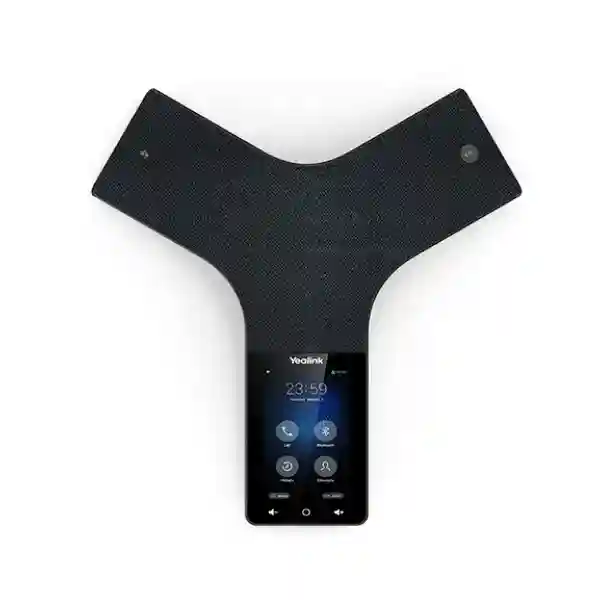
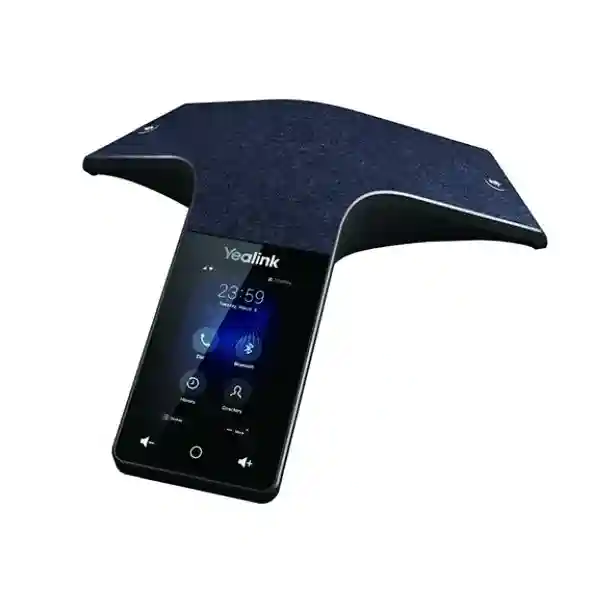
Yealink CP925 Touch-Sensitive HD IP Conference Phone for Business Meeting Rooms
The Yealink CP925 is a purpose-built IP audio conference phone for small and medium meeting rooms where a shared table device must make group calls simple, intelligible and repeatable. Instead of asking every participant to join from a laptop microphone or placing an ordinary handset in speaker mode, the CP925 provides a dedicated 360-degree audio endpoint with a 20-foot (6-metre) stated pickup radius, six microphones for voice pickup and a seventh microphone dedicated to noise cancellation. Its 4-inch 480 × 800 multi-touch display gives users a familiar touch interface for placing, receiving and managing calls, while the Linux-based platform keeps the appliance focused on room communications.
For procurement teams, the value is not simply the presence of a speaker and microphones. A conference-room endpoint must fit the existing voice architecture, receive suitable network power, register to the intended SIP service, remain manageable after deployment and give occasional users a predictable interface. CP925 addresses those practical requirements with IEEE 802.3af Class 3 PoE, 10/100 Ethernet, built-in dual-band 2.4 GHz/5 GHz Wi-Fi using 802.11a/b/g/n, Bluetooth 4.2, USB 2.0 Type-C connectivity, 5-way conferencing and support for Yealink device management. It can also participate in hybrid workflows by connecting compatible mobile or computer devices over Bluetooth, while the optional CPN10 can add local PSTN integration.
FourTeck supplies the CP925 for Uganda projects where buyers need a clearly specified conference endpoint rather than a generic tabletop speakerphone. Before quotation, organizations can provide room count, expected participants, SIP/PBX environment, PoE availability, delivery destination and accessory requirements. This allows the bill of materials to be checked against the real deployment rather than assuming that every room has identical infrastructure.
Instant Specifications & Procurement Fact Rail
Yealink CP925
Touch-sensitive HD IP conference phone.
Designed for small to medium conference rooms with shared-table audio conferencing.
Six pickup microphones, one noise-cancellation microphone, 360° coverage and up to 6 m stated pickup.
10/100 Ethernet and IEEE 802.3af Class 3 PoE; verify switch power budget before rollout.
Built-in 2.4/5 GHz 802.11a/b/g/n Wi-Fi and Bluetooth 4.2.
Stock, lead time, warranty term and project pricing should be confirmed on the current FourTeck quotation.
This fact rail is intended to prevent a common purchasing mistake: choosing a conference phone from a feature headline without checking the surrounding infrastructure. A CP925 project should be treated as an endpoint deployment. Confirm the number of rooms, network drops, PoE switch capacity, SIP registration method, VLAN and DHCP policies, outbound calling requirements, accessory needs and whether users expect Bluetooth-based hybrid meetings. Wireless connectivity is useful, but wired Ethernet with PoE can simplify permanent rooms by combining network and power on one cable. Where wireless operation is proposed, power still needs to be planned because CP925 is not a battery conference phone.
Operational Product Architecture & Overview
CP925 is built around the idea that room audio should behave like an appliance. The endpoint uses a Linux operating environment, a touch interface and integrated acoustic processing rather than depending on a general-purpose computer for every call. The Y-shaped tabletop design distributes microphones around the device so voices can be captured from multiple directions. Six microphones are dedicated to voice pickup and another microphone supports noise cancellation. This architecture matters in real rooms because participants do not sit in one fixed direction: people turn toward displays, papers and colleagues, and the audio endpoint must continue to collect speech from around the table.
Yealink specifies a 20-foot, or 6-metre, 360-degree pickup range. That figure is useful for initial sizing, but it should not be interpreted as a promise that every room with a six-metre radius will perform identically. Hard walls, glass, ceiling height, HVAC noise, table geometry, seating position and reverberation affect perceived results. Procurement teams should therefore use the specification as a room-planning baseline and validate unusually reflective or noisy spaces before standardizing a large estate. The CP925 is positioned for small and medium conference rooms; larger boardrooms may require a different audio architecture or a model designed for broader microphone expansion.
The audio path combines full-duplex speakerphone operation with echo cancellation and Yealink Noise Proof functions. Full duplex is important because natural meetings involve interruptions and overlapping speech. A basic half-duplex device can make one side disappear when another person speaks; a purpose-built full-duplex conference phone is intended to maintain a more conversational exchange. Noise filtering is equally relevant in offices where air conditioning, keyboard noise and incidental room sounds can reduce intelligibility. The dedicated noise-cancellation microphone complements the pickup array by helping the system distinguish wanted speech from environmental sound.

On the network side, the CP925 provides 10/100 Ethernet and IEEE 802.3af Class 3 PoE. This is adequate for an audio endpoint and lets IT teams use managed switching practices such as voice VLAN assignment, DHCP controls and centralized PoE monitoring where supported by their infrastructure. Built-in Wi-Fi adds placement flexibility for environments where a data cable is inconvenient, while Bluetooth 4.2 can bridge compatible mobile or computer audio into the meeting workflow. The USB Type-C interface provides another expansion path, including supported accessories and storage-related functions according to the deployment mode.
The phone supports 5-way conferencing, allowing multiple call legs to be brought into one conference subject to the voice platform and account configuration. For organizations with remaining analogue or PSTN requirements, Yealink identifies optional CPN10 integration for local 3-way PSTN conferencing. That distinction is important: PSTN connectivity is not simply assumed from the base device, and the optional accessory should be specified only when the use case requires it.
Operationally, the most common buyer friction is rarely whether the CP925 can make a call. It is whether the device will register cleanly to the chosen service, fit room acoustics, receive power at the table, support organizational security policy and remain maintainable at scale. FourTeck can use those questions as the basis of pre-sales validation so the purchase order represents the complete deployment requirement rather than only the endpoint quantity.
Enterprise Business Outcomes & Value Analysis
The CP925 concentrates room audio into a dedicated endpoint with full-duplex operation, HD audio functions and a distributed microphone array. For users, the operational outcome is a meeting experience designed around group speech rather than a laptop positioned at one end of a table. The six pickup microphones and stated 360-degree, 6-metre range give planners a concrete basis for matching device and room. Noise Proof and echo-cancellation functions help protect intelligibility when the meeting contains normal office noise and simultaneous conversation.
A dedicated room phone reduces dependence on whichever employee happens to bring a computer into the room. Users can interact with a fixed 4-inch touch interface and the organization can provision the endpoint as part of its voice estate. PoE further simplifies permanent installation by reducing separate power adapters at the table when compatible switching is available. Reliability still depends on network, SIP service and power design, so those layers should be included in acceptance testing.
For multi-room projects, consistency can be more valuable than adding unrelated features. Standardizing an appropriate model across similar small and medium rooms gives IT a repeatable configuration, common user interface and predictable support process. Yealink Device Management Platform support can assist centralized administration where the organization adopts the relevant management architecture. A room inventory should record device identity, location, firmware baseline, SIP account, VLAN and support status.
Conference endpoints sit on the corporate network and should be governed like other managed communications devices. Procurement should therefore be paired with configuration standards for administrator credentials, firmware maintenance, network segmentation, provisioning sources and approved calling services. The CP925 should not be deployed with default operational assumptions. Its security posture is strongest when the surrounding voice and network environment is intentionally configured and maintained.
Support for Yealink management tooling gives administrators a route toward structured endpoint operations rather than room-by-room manual intervention. Exact management capabilities depend on the selected platform and deployment. Before purchase, define who owns provisioning, firmware approval, configuration backups, user changes and incident escalation. This turns a hardware acquisition into an operationally supportable service.
The purchase price is only one part of conference-room cost. Cabling, PoE capacity, installation, configuration, support time and replacement strategy matter over the device lifecycle. Integrated Wi-Fi and Bluetooth can avoid some accessory purchases, while PoE can simplify table power. Buyers should nevertheless price optional CPN10 requirements, spare units, switching upgrades and any platform-side subscriptions separately so the comparison reflects the complete solution.
Key Hardware & Software Highlights
| Component | Confirmed Capability | Operational Outcome |
|---|---|---|
| Touch display | 4-inch, 480 × 800 multi-touch screen | Direct room-side call control without relying on a separate PC interface. |
| Microphone system | 6 pickup microphones plus 1 noise-cancellation microphone | Designed for group pickup around a meeting table and environmental-noise handling. |
| Acoustic coverage | 360° pickup, up to 20 ft / 6 m stated range | Supports small-to-medium rooms when acoustics and seating layout are suitable. |
| Ethernet/PoE | 10/100 Ethernet; IEEE 802.3af Class 3 | Single-cable network and power deployment with compatible switching. |
| Wireless | 802.11a/b/g/n 2.4/5 GHz; Bluetooth 4.2 | Flexible network placement and hybrid audio connectivity. |
| Conference function | 5-way conference call | Multiple call participants can be combined without treating the room endpoint as a single-person desk phone. |
| Operating environment | Linux | Focused appliance architecture for conferencing and endpoint management. |
These components should be evaluated together. For example, built-in Wi-Fi does not turn the unit into a battery-powered portable phone; power remains a deployment consideration. Bluetooth enables useful hybrid meeting scenarios, but organizations should verify the intended computer, mobile device and application workflow during staging. Likewise, a 5-way local conference capability does not remove any limits imposed by the SIP provider, PBX dial plan, trunks or account permissions. The endpoint should be considered one layer of the communications solution.
Technical Specifications Ledger
| Specification | Yealink CP925 | Procurement Note |
|---|---|---|
| Product class | Touch-sensitive HD IP conference phone | Designed for small-to-medium meeting rooms. |
| Display | 4-inch 480 × 800 multi-touch | Touch UI supports direct room operation. |
| Audio | Optimal HD audio, full duplex, echo cancellation, Noise Proof / smart filtering functions | Room acoustics remain an important deployment variable. |
| Microphones | 7 built in: 6 pickup + 1 noise cancellation | 360-degree group pickup architecture. |
| Pickup | 20 ft / 6 m stated range, 360° | Validate reflective/noisy rooms and unusual table layouts. |
| Conferencing | 5-way conference call | Platform-side limitations may also apply. |
| Ethernet | 10/100 Mbps | Sufficient for voice endpoint traffic; confirm VLAN policy. |
| PoE | IEEE 802.3af Class 3 | Check switch compatibility and aggregate PoE budget. |
| Wi-Fi | 2.4/5 GHz 802.11a/b/g/n | Survey coverage and authentication requirements. |
| Bluetooth | Bluetooth 4.2 | Useful for compatible mobile/PC hybrid meeting workflows. |
| USB | 1 × USB 2.0 Type-C | Confirm intended accessory/workflow compatibility. |
| PSTN option | Local 3-way PSTN conference via optional Yealink CPN10 | CPN10 should be quoted separately where required. |
| Management | Supports Yealink Device Management Platform | Define management architecture before large rollout. |
| Operating system | Linux | Firmware governance should be part of operations. |
Specifications are most useful when converted into acceptance criteria. A purchase specification can state that each room requires a CP925, a compatible PoE data point, successful SIP registration, outbound and inbound test calls, verified directory behavior, tested Bluetooth workflow where required and an approved firmware baseline. Where PSTN bridging is requested, the optional CPN10 and the local analogue line conditions should be included explicitly. This avoids ambiguity between the endpoint’s standard features and project-specific accessories.
Configuration & Sizing Worksheet
Step 1 — Estimate Room Workload and Scale
List every target room and classify it by normal seated participants, table dimensions, maximum meeting occupancy and frequency of external calls. CP925 is positioned for small-to-medium rooms, so do not standardize it into larger spaces solely for purchasing convenience. Note whether meetings are primarily SIP audio calls, Bluetooth-connected computer sessions, mobile calls or a mixture. Identify any room that requires PSTN integration because that changes the accessory requirement.
Step 2 — Check Physical and Acoustic Conditions
Record the intended tabletop position, distance to participants, cable route and nearby sources of noise. The stated 6-metre pickup range is a planning figure, not a substitute for acoustic judgment. Glass walls, bare floors and high ceilings can create reflections; HVAC outlets and shared open areas can add continuous noise. For a large rollout, pilot representative room types before final acceptance.
Step 3 — Validate Power, Switching and Cabling
For wired deployment, confirm that the network switch supports IEEE 802.3af and has sufficient PoE budget for all endpoints. Check the patch path from switch to meeting table and whether the table already has a suitable data outlet. If Wi-Fi will carry network traffic, confirm how the device will receive power and whether enterprise wireless authentication, RF coverage and security policies are compatible with the intended configuration.
Step 4 — Validate Voice Platform and Administration
Document the PBX or hosted SIP platform, account provisioning method, dial plan, extension numbering, caller ID policy, directory source and remote management process. If the organization requires centralized Yealink management, define that scope during design rather than after devices arrive. Confirm whether firmware is controlled centrally and who authorizes updates.
Step 5 — Prepare a Complete Quote Request
A useful quote request includes CP925 quantity, city and delivery site, required delivery date, room count, SIP/PBX platform, PoE availability, network type, any CPN10 requirement, expected staging, labeling or pre-configuration, and whether installation assistance is needed. Include tax or commercial documentation requirements relevant to your organization. FourTeck can then structure the quotation around the actual bill of materials instead of quoting an isolated model number.
Deployment Scenarios & Industry Use Cases
Large Enterprise and Multi-Site Networks
A distributed enterprise may have dozens of meeting rooms across headquarters, branches and operational sites. In that environment, the CP925 can serve as a standardized audio endpoint for rooms that fall within its intended size. The project should define a configuration template covering SIP accounts, VLAN behavior, time settings, directories, firmware and administrator access. Standard room naming and asset records make support easier when a user reports that “the conference phone in Room 3” is not registering. A small pool of staged spares can reduce downtime where conferencing is business critical.
Financial and Banking Institutions
Banks and financial organizations typically place greater emphasis on controlled network access, change management and traceable device administration. The CP925 can be deployed as a managed SIP endpoint, but the surrounding design should enforce the institution’s approved segmentation, credential, provisioning and firmware policies. Meeting-room devices should be included in asset inventory and lifecycle processes rather than treated as unowned peripherals. Bluetooth use can be enabled or governed according to local security policy and business requirements.

Educational and Campus Networks
Universities, colleges and training institutions can use shared conference endpoints for administration, faculty meetings, remote coordination and support functions. Campus deployments often involve segmented networks and a mixture of old and new switching. A room survey should therefore identify where PoE is available and where network upgrades are required. Consistent user interfaces are particularly helpful in shared rooms where many people use the device occasionally rather than every day.
Government and Public-Sector Procurement
Government projects often require detailed bills of materials, documented specifications, delivery schedules, asset identification and formal acceptance. The CP925’s key technical characteristics can be written into a compliance schedule without relying on vague marketing language: 4-inch touch display, seven-microphone architecture, 360-degree 6-metre stated pickup, 5-way conferencing, PoE, Wi-Fi and Bluetooth. Any requirement beyond those confirmed capabilities should be validated before award. Where security policy restricts wireless functions, the intended configuration should be agreed during staging.
Technical Deep Dive 1: Acoustic Processing and Microphone Architecture
The defining hardware characteristic of CP925 is its microphone arrangement. Six microphones collect speech from around the table while a seventh microphone is dedicated to noise cancellation. The geometry supports 360-degree pickup rather than forcing participants to speak toward a single handset microphone. This is valuable because a conference room is a shared acoustic environment: multiple voices arrive from different angles, participants move in their chairs and the device must reproduce remote speech while simultaneously capturing local speech.
Full-duplex operation and acoustic echo cancellation are central to that experience. When the far-end voice is played through the local speaker, the microphone system also hears that speaker. Echo-control processing is intended to prevent the remote party from hearing its own voice returned. Full duplex permits both sides to speak at once more naturally. Noise Proof and smart filtering functions target unwanted environmental sound. None of these functions can repeal room acoustics, so placement still matters. Avoid burying the device behind laptops, placing it directly beside loud HVAC outlets or assuming maximum stated pickup distance is always the best seating distance.
For a procurement pilot, test representative speech from every normal seat, interruptions between local and remote participants, quiet speakers, a typical HVAC state and the actual conferencing service. The purpose is not to manufacture an artificial laboratory result but to establish whether the selected room type delivers intelligible, comfortable conversation under normal operating conditions.
Technical Deep Dive 2: Software, Firmware Security and Operational Control
CP925 uses a Linux-based platform and supports Yealink device-management capabilities. That makes firmware and configuration governance an important part of lifecycle planning. Before deployment, organizations should define an approved firmware baseline, administrator credential policy, provisioning source and change-control process. The device should be treated as a network endpoint, not an unmanaged consumer accessory. Where remote management is adopted, management connectivity should follow the organization’s security architecture.
SIP deployment also introduces configuration dependencies outside the phone itself. Registration credentials, server addresses, transport choices, DNS, DHCP, time services, VLAN settings and dial-plan behavior may all affect service. A successful staging process tests the endpoint against the actual target platform before a large shipment is distributed. Configuration templates should be documented and retained so replacement units can be brought into service consistently.
Firmware updates should be deliberate. New firmware can deliver fixes and platform changes, but enterprises commonly validate releases before broad deployment. Keep a device inventory, record the firmware version and define who is authorized to change it. For environments with formal security or regulatory controls, include conference phones in vulnerability, asset and patch-management procedures applicable to communications endpoints.
Technical Deep Dive 3: Availability, Redundancy and Recovery
The CP925 itself is a single room endpoint, so high availability is achieved mainly through surrounding infrastructure and operational design. If a PoE switch fails, a wired endpoint on that switch can lose power and connectivity. If the SIP service is unavailable, the phone cannot create normal IP calls simply because its local hardware is healthy. Network redundancy, resilient voice services, UPS-backed switching and spare-device strategy therefore determine service continuity more than the conference phone alone.
For important meeting spaces, consider dual power protection at the network layer, resilient uplinks and documented incident procedures. Maintain at least one appropriately configured spare where downtime has a high business cost. A spare should not remain an untested box indefinitely; confirm firmware and provisioning compatibility periodically. If Wi-Fi is intended as an alternative network path, validate whether the organization’s actual configuration and support process allow a practical failover workflow rather than assuming wireless automatically provides redundancy.
Recovery documentation should be simple enough for support staff to execute: identify the room, check PoE link, verify network reachability, confirm SIP registration, test an internal call, test an external call if applicable and replace the endpoint when hardware failure is isolated. This operational discipline reduces meeting-room troubleshooting time.
Pre-Purchase Buyer Gap Checklist
Are there hidden platform charges? The hardware feature set does not define what your SIP provider, PBX vendor or hosted communications service charges for accounts, trunks, calling plans or management. Ask for those costs separately. FourTeck’s hardware quote should be read together with the service-side commercial model.
Is a power adapter required? CP925 supports IEEE 802.3af Class 3 PoE, which can simplify a wired installation. Confirm the exact package contents on the quotation and the available PoE infrastructure at each site rather than assuming every room has a compatible powered data port.
Does Wi-Fi mean the phone is cordless? No. Wi-Fi can provide network connectivity, but CP925 is not specified as a battery conference phone. Power planning remains necessary.
Will it cover a large boardroom? Yealink positions CP925 for small-to-medium conference rooms and specifies 360-degree pickup up to 20 feet / 6 metres. Larger or acoustically difficult rooms should be assessed for a more suitable architecture rather than stretching the specification.
Can it connect to a computer or mobile device? Built-in Bluetooth 4.2 supports hybrid meeting workflows with compatible devices. Validate the exact application and host-device workflow during staging, particularly if this is a mandatory business requirement.
Does it support analogue PSTN? Yealink documents local 3-way PSTN conferencing through the optional CPN10. If analogue integration is required, state that explicitly so the accessory and local line conditions can be checked.
Will it work with our PBX? Compatibility should be validated against the specific SIP platform, firmware and provisioning method. “SIP” describes a protocol family, not a guarantee that every feature behaves identically across every provider.
What about lifecycle and firmware? Ask for the current supplied hardware/firmware status and define an update process. Do not base a multi-year support plan solely on a static product-page snapshot.
How should warranty be handled? Use the warranty terms stated on the current FourTeck quotation or sales documentation for the specific supply. Avoid assuming a regional warranty duration from unrelated markets or resellers.
Uganda Procurement & Delivery Logistics
For Uganda projects, a CP925 quotation can be structured around quantity, delivery location and technical scope. Buyers should identify whether the request is a single-room purchase, a branch rollout or a multi-site standardization project. Larger deployments benefit from a room schedule that maps each device to its destination and states whether staging, labeling or pre-configuration is required. Current stock, lead time, warranty baseline, taxes and commercial validity should be confirmed on the issued quotation because those conditions can change.
Order processing is clearer when the purchase order references the exact model and any optional accessories. If CPN10 integration is needed, list it separately. If the project depends on PoE injectors, switching, structured cabling or other infrastructure, include those requirements in the bill of materials rather than discovering them during installation. For managed rollouts, provide SIP platform details through an appropriate technical channel so configuration requirements can be validated before staging.
Delivery planning should distinguish between available stock and items requiring upstream supply. FourTeck can communicate the applicable lead-time position during quotation and order confirmation. For time-sensitive projects, state the required-on-site date early and allow time for receiving, inspection, staging and acceptance. Where equipment is distributed to branches, consolidated staging before dispatch can help maintain a consistent configuration baseline.
Local Coverage Matrix
Head-office, enterprise, hospitality, education and meeting-room deployments.
Business, institutional and branch communications requirements.
Commercial, industrial and regional-office conference endpoints.
Branch, education, healthcare and enterprise voice projects.
Regional operations, public-sector and distributed-office deployments.
Coverage planning should be based on the actual destination, quantity and project schedule. For sites outside major hubs, provide the full delivery location and preferred receiving process so logistics can be reflected in the quote. Multi-city projects should use a destination schedule showing quantity per site, responsible recipient and whether equipment must arrive pre-labeled for a specific room. This is especially useful when the same CP925 configuration is being standardized across branches.
Cross-Border & Regional Supply Chains
Organizations operating across several countries often need consistent communications hardware but country-specific commercial handling. FourTeck regional web resources include Uganda, Kenya, broader African markets, UAE and Kuwait. A regional rollout should define where equipment is invoiced, delivered, staged and supported rather than assuming one country’s terms automatically apply elsewhere.
For cross-border projects, maintain one technical standard while allowing local quotations to state applicable availability, lead times, warranty handling, taxes and delivery conditions. This approach helps a group IT team standardize the CP925 where appropriate without obscuring country-level procurement realities.
Related Yealink Solutions & Internal Navigation
A CP925 project may sit alongside a broader Yealink voice deployment. Explore FourTeck Uganda enterprise communications for related solutions and use the project contact desk to request model-specific alternatives, compatible desk phones, conference-room options, accessories, PoE infrastructure or unified communications components. Buyers standardizing a complete office should consider reception phones, executive endpoints, general office SIP phones and room conferencing as separate user profiles rather than forcing one device class into every location.
The supplied Yealink portfolio imagery also reflects use cases spanning office communication systems, unified communications, executive phones, reception phones, call-center phones, hotel phones and Wi-Fi phones. Product selection should remain requirement-led: the CP925 is specifically a shared conference-room audio endpoint. If the requirement is an individual desk phone, cordless handset, video endpoint or large-room conferencing platform, ask FourTeck to propose the appropriate category rather than adapting CP925 beyond its intended role.
FourTeck Technical Service Capabilities
A successful conference-phone project starts with bill-of-materials validation. FourTeck can review the requested model, quantities, room type, network power, SIP environment and accessory needs before order finalization. This is particularly important where a buyer requests analogue PSTN connectivity, wireless operation or integration with an existing voice platform, because those requirements can introduce dependencies not represented by the base model alone.
For project staging, technical requirements can include firmware baseline review, device labeling, configuration preparation and pre-shipment functional checks where agreed in the project scope. Organizations should provide configuration data through controlled channels and avoid placing sensitive credentials in general procurement documents. The staging plan can define what is configured centrally and what is completed by the customer’s IT team after delivery.
Post-sales support is most effective when the deployed architecture is documented. Keep records of serial numbers, room assignments, SIP platform, firmware and network location. When a fault occurs, this information helps distinguish endpoint hardware issues from PoE, switching, network, registration or service-provider problems. Warranty or replacement handling follows the applicable terms of the specific sale, so retain the quotation, invoice and serial records for support cases.
Extended Technical FAQ
1. Is the Yealink CP925 suitable for a medium conference room?
Yes, Yealink positions the CP925 for small-to-medium conference rooms. It has a six-microphone voice pickup array plus a dedicated noise-cancellation microphone, with a stated 360-degree pickup range of up to 20 feet or 6 metres. Room dimensions alone should not be the only criterion. Table shape, participant distance, glass surfaces, ceiling height and background noise affect real acoustic performance. For a rollout across different room types, test a representative room before standardizing every location. Larger boardrooms or spaces with difficult acoustics may justify a different conferencing architecture.
2. Does CP925 require a separate power adapter?
The CP925 supports IEEE 802.3af Class 3 Power over Ethernet, so a compatible PoE switch can deliver network connectivity and power through the Ethernet connection. This can reduce tabletop cabling and simplify permanent installations. However, procurement teams should confirm package contents and the exact power design on the current quotation. A building may have Ethernet outlets without PoE, or the access switch may have insufficient remaining PoE budget. If the project uses Wi-Fi for data connectivity, the device still needs a power plan because CP925 is not a battery-powered conference phone.
3. Can CP925 connect to laptops and smartphones for hybrid meetings?
The CP925 includes Bluetooth 4.2, and Yealink describes hybrid meeting workflows that can connect the conference phone with compatible mobile or computer devices. This can be useful when the room needs to use CP925 audio while a participant runs a meeting application or call from another device. Because computer operating systems, Bluetooth profiles and conferencing applications can change, organizations with a mandatory workflow should validate it during staging using their actual managed laptops, mobile devices and applications. Treat successful integration as an acceptance test rather than relying only on a generic Bluetooth label.
4. Does the Yealink CP925 support Wi-Fi?
Yes. Yealink specifies built-in dual-band Wi-Fi supporting 2.4 GHz and 5 GHz with 802.11a/b/g/n. This can provide network flexibility in rooms where a wired data path is inconvenient. Enterprise deployment still requires planning: confirm wireless coverage, authentication method, segmentation, security policy and how the endpoint will be powered. Wi-Fi should not automatically be treated as preferable to wired Ethernet. In permanent meeting rooms, PoE Ethernet can provide a simple combined power-and-network path, while Wi-Fi may be useful where cabling constraints justify it.
5. How many participants can CP925 conference together?
The CP925 supports a 5-way conference call. That describes the endpoint’s conferencing capability, but the overall calling experience also depends on the registered SIP service, PBX configuration, trunks, dial permissions and any provider-side restrictions. If a procurement specification requires a particular conferencing workflow, describe the number and type of call legs and validate it against the actual voice platform. For larger scheduled conferences, an organization may use a hosted bridge or collaboration service rather than relying only on endpoint-local conferencing.
6. Can CP925 connect to a traditional PSTN line?
Yealink documents local 3-way PSTN conferencing through the optional CPN10 accessory. The important procurement point is that this should not be assumed to be a standard analogue port built into every base CP925 deployment. If the room must connect to an existing PSTN service, tell FourTeck during quotation so the CPN10 requirement and local line environment can be reviewed. Where an organization is migrating fully to SIP, the optional analogue path may not be needed at all.
7. What should be checked for SIP/PBX compatibility?
Start with the exact PBX or hosted voice platform, its supported endpoint policy and the intended provisioning method. Then confirm registration parameters, transport and security requirements, codecs, dial plan, directory behavior, time services and network segmentation. A phone supporting SIP does not guarantee every vendor-specific function will operate identically on every service. For an important or high-volume rollout, stage a CP925 against the production-equivalent platform and document the working configuration before ordering or distributing the full estate.
8. Does CP925 require a paid hardware license?
The base hardware specification does not by itself define the commercial terms of the SIP/PBX service, hosted account, calling plan or any management platform used by the customer. Those service-side costs should be identified separately during solution design. Ask the voice-platform provider what licenses or subscriptions are required for each room account, external calling, directories, management and any advanced collaboration features. This prevents the endpoint purchase price from being mistaken for the complete lifecycle cost of a working conference-room service.
9. How should firmware and security be managed?
Treat CP925 as a managed network communications endpoint. Define an approved firmware baseline, change-control owner, administrator credential policy and provisioning source. Keep an asset inventory that maps each unit to a room and records its firmware. Firmware updates should be reviewed and tested according to the organization’s normal endpoint-management process before broad rollout. Network controls such as segmentation and restricted management access should follow internal security standards. Exact controls depend on the enterprise architecture, so security requirements should be documented during design rather than added after deployment.
10. What information should I send FourTeck for an accurate Uganda quote?
Provide the model name Yealink CP925, required quantity, delivery city or site, required date, number and approximate size of rooms, existing PBX or hosted SIP platform, PoE availability and whether Wi-Fi, Bluetooth hybrid meetings or PSTN integration are required. Mention any staging, labeling, configuration, installation or support requirements. If the project spans Kampala, Entebbe, Jinja, Mbarara, Gulu or multiple branch locations, include quantity per destination. FourTeck can then prepare the commercial response around the actual project scope, while current stock, lead time, warranty terms and pricing are confirmed on the quotation.
Plan Your Yealink CP925 Deployment in Uganda
The CP925 is a strong fit when the requirement is a dedicated HD IP conference phone for small or medium rooms, with touch control, 360-degree microphone coverage, PoE, Wi-Fi, Bluetooth and flexible SIP-based calling. The best procurement result comes from matching those capabilities to the room and network before equipment is dispatched. Share your quantity, room profile, PBX or hosted voice service, PoE availability, delivery location and accessory requirements with FourTeck. The team can use that information to validate the bill of materials and issue a project-specific quotation.
For multi-site deployments, include a room schedule and any common configuration standard. For single-room purchases, provide enough infrastructure detail to identify likely dependencies before installation. Commercial details such as current availability, lead time, warranty terms and pricing should be taken from the issued quotation so the purchasing decision reflects the current supply position.


Reviews
There are no reviews yet.