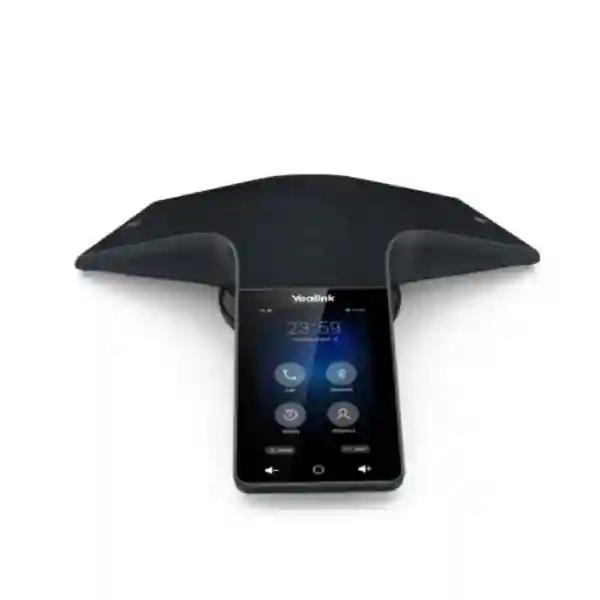
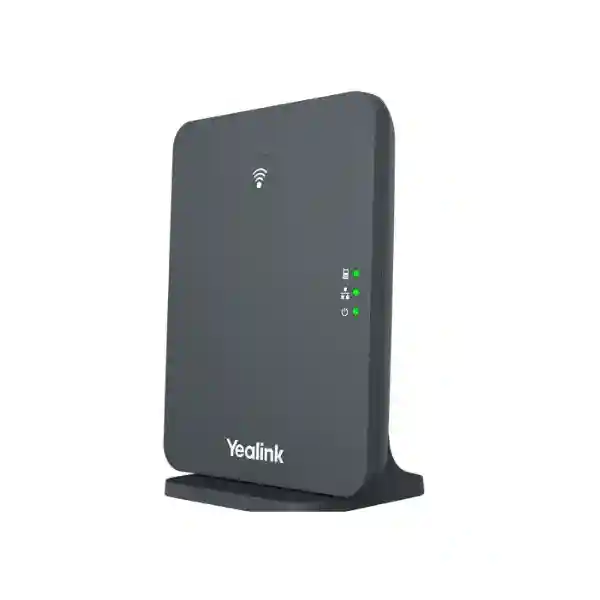
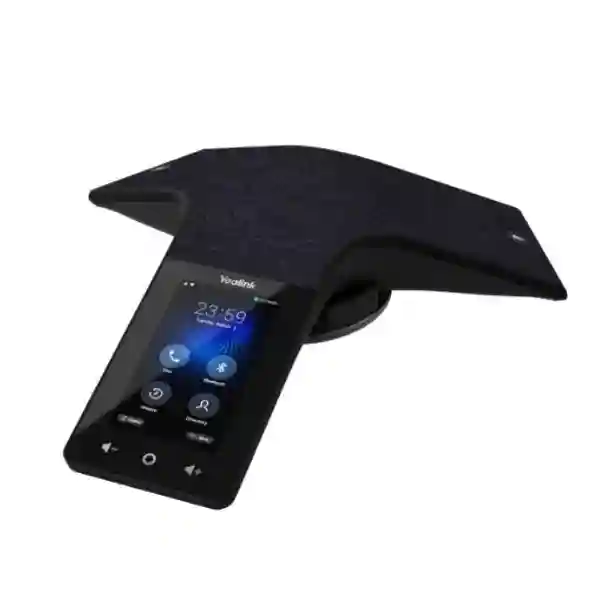
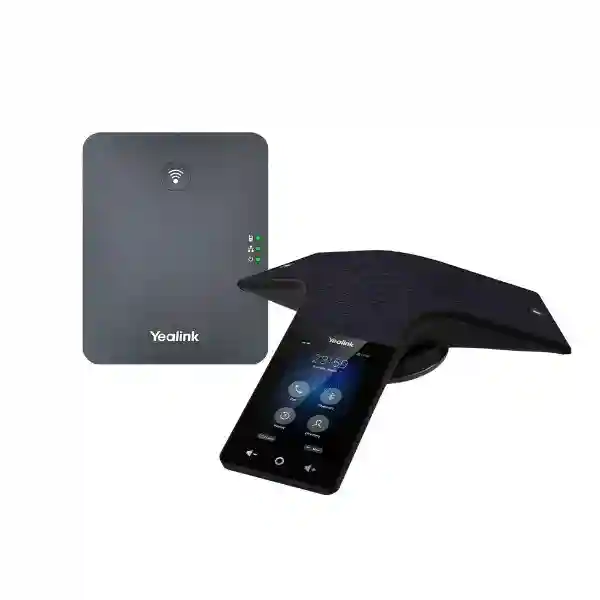
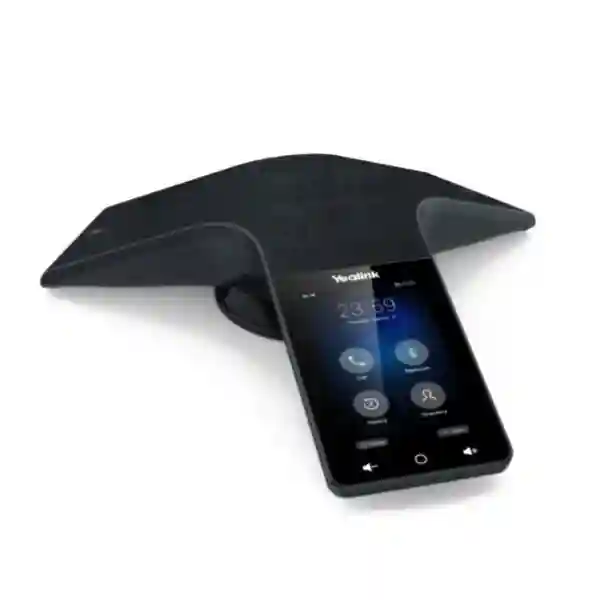
Yealink CP935W Wi-Fi Conference Phone for Wireless Business Meetings
The Yealink CP935W is a wireless SIP conference phone built for organizations that want professional meeting-room audio without running a network cable to the centre of the table. It combines dual-band Wi-Fi, a rechargeable battery, a six-microphone pickup array, a touch interface and full-duplex audio processing in a compact tabletop system. For procurement teams, the practical value is straightforward: a meeting room can be equipped with a dedicated voice endpoint while preserving flexible table layouts, reducing cable clutter and maintaining familiar SIP calling workflows.
The CP935W is particularly relevant where a boardroom, project room, training space or management meeting room already has dependable enterprise Wi-Fi but does not have a conveniently positioned Ethernet outlet. Its 360-degree microphone arrangement is specified for pickup up to 6 metres, making it suitable for small to medium conference rooms when room acoustics, seating density and background noise are appropriate. The built-in 7800 mAh battery is rated for up to 15 hours of talk time under ideal conditions, allowing the device to operate through long meeting schedules before charging is required.
FourTeck supplies the Yealink CP935W for Uganda business deployments with pre-sales assistance covering model selection, SIP environment checks, room sizing, quantity planning and logistics. Buyers should provide the intended PBX or hosted voice platform, Wi-Fi security method, room dimensions, number of regular participants and delivery location when requesting a commercial proposal. This information helps reduce avoidable compatibility issues and makes it easier to distinguish the Wi-Fi CP935W from the separate CP935W-Base DECT-oriented deployment option.
Instant Specifications & Procurement Fact Rail
Yealink CP935W
Small to medium meeting rooms
2.4/5 GHz 802.11a/b/g/n Wi-Fi
6 microphones, 360°, up to 6 m
7800 mAh; up to 15 h talk
Confirm price, lead time and warranty at quotation
The procurement baseline should be treated as a complete deployment requirement rather than only a hardware model number. Confirm the CP935W Wi-Fi version, intended SIP registration method, wireless coverage at the actual table position, charging access, required call features and management approach. Warranty terms, stock position and delivery timing can vary by supply batch and should therefore be recorded on the issued quotation rather than assumed from a generic listing.
Operational Product Architecture & Overview
The CP935W integrates the primary elements normally distributed across a wired conference endpoint into one wireless tabletop platform. Its communications layer registers a SIP account over Wi-Fi, while the audio subsystem combines a six-microphone array with a 56 mm, 5 W loudspeaker and full-duplex echo cancellation. The result is a purpose-built voice endpoint rather than a portable speakerphone dependent on a user’s laptop for every meeting. This distinction matters in shared rooms because a dedicated device can remain associated with the room’s telephony identity and standard operating procedure.
The microphone array is designed to capture speech around the table in all directions. Yealink specifies a 20-foot, or 6-metre, pickup range and supports technologies including Noise Proof, Smart Noise Filtering, background-noise suppression, automatic gain control, packet-loss concealment and adaptive jitter buffering. These functions address common meeting-room problems such as participants sitting at different distances, HVAC noise, keyboard sounds, room echo and variable IP-network conditions. Performance still depends on room acoustics and network quality, so exceptionally large, reverberant or noisy rooms should be assessed before standardizing on a single unit.
The display layer uses a 4-inch 480×800 capacitive touchscreen. This gives users a direct interface for dialing, call control and device operation without requiring a separate control tablet. The wireless layer supports 2.4 GHz and 5 GHz Wi-Fi using 802.11a/b/g/n and Bluetooth 4.2. A USB 2.0 Type-C device port supports hybrid collaboration scenarios, allowing the conference phone to participate in workflows beyond a conventional SIP call. This makes the unit useful for organizations that mix PBX calling with computer-based collaboration sessions.
The power architecture is another major procurement consideration. A 7800 mAh rechargeable battery supports up to 15 hours of talk time and up to 75 hours of standby in Wi-Fi mode under ideal conditions, with approximately four hours specified for charging. The manufacturer lists PSU consumption in the 2.2–6 W range. A battery-powered tabletop design reduces the need to leave a power lead attached during every meeting, although charging discipline should be built into room operations. Facilities teams may designate a charging location or routine so the device is ready for the next business day.
Management can be performed through browser, phone interface, automatic provisioning and the Yealink Device Management Platform. For fleets, this matters because manual per-device configuration becomes inefficient as the number of meeting rooms increases. Provisioning over FTP, TFTP, HTTP or HTTPS, PnP and supported remote-management mechanisms allows administrators to align settings across sites. Security controls should be configured according to the organization’s voice and wireless policies, including current firmware, protected management access, SIP transport choices and suitable Wi-Fi security.
Enterprise Business Outcomes & Value Analysis
1. Audio performance and conversation integrity
Full-duplex operation allows participants to speak naturally without the rigid turn-taking associated with lower-grade speakerphones. The microphone array, echo cancellation and noise-processing features are intended to keep speech intelligible across a meeting table. This can improve the usability of recurring management calls, supplier discussions, interviews and project meetings where voice clarity directly affects decision quality.
2. Meeting-room availability and reliability
A dedicated room endpoint avoids relying on whichever employee happens to bring a laptop or mobile phone. The rechargeable battery and Wi-Fi connectivity also remove two common points of table-side friction: network cabling and continuous power cabling. Reliability planning should still include charging procedures, wireless coverage checks and a defined support owner.
3. Scalable room standardization
Organizations can use a consistent model across similarly sized rooms, simplifying user familiarity, spare planning and administrator training. Before scaling, validate one representative room, confirm the voice platform and wireless environment, then document a repeatable configuration profile for additional locations.
4. Security and controlled access
The platform supports modern network and signaling security capabilities, including enhanced security mechanisms introduced through current firmware generations. Administrators should combine device features with strong wireless authentication, protected provisioning, current firmware and appropriate VLAN or network segmentation policies. Security is an operational configuration outcome, not merely a product checkbox.
5. Centralized management
Automatic provisioning and Yealink management tooling can reduce repetitive manual work. A structured deployment can standardize account parameters, time settings, dial plans, firmware baselines and administrative controls. This becomes especially valuable for distributed organizations with meeting rooms in several branches.
6. Total cost of ownership
The strongest cost argument is often infrastructure avoidance rather than the handset price alone. Where a meeting table lacks Ethernet, using established Wi-Fi may avoid floor boxes, cable runs or disruptive room alterations. Buyers should still account for wireless readiness, charging accessories, configuration labor, support and lifecycle replacement.
Key Hardware & Software Highlights
Six-microphone array
Provides 360-degree voice pickup across a specified radius of up to 6 metres, supporting balanced table coverage in appropriately sized rooms.
Full-duplex audio engine
Supports simultaneous two-way conversation with acoustic echo cancellation, background-noise suppression and speech-processing functions.
Wireless network interface
Integrated dual-band Wi-Fi removes dependence on a wired Ethernet connection at the table and supports direct SIP registration over the wireless network.
Rechargeable battery
The 7800 mAh battery is specified for up to 15 hours of talk time in ideal conditions, enabling flexible placement during meetings.
Touch control
A 4-inch 480×800 capacitive display provides an integrated user interface for shared-room operation.
Provisioning and management
Browser configuration, automatic provisioning and Yealink management support make the device suitable for controlled enterprise rollouts.
Technical Specifications Ledger
| Category | Specification | Procurement relevance |
|---|---|---|
| Display | 4-inch, 480×800 capacitive touchscreen | Integrated shared-room control |
| Microphones | Built-in 6-microphone array | 360° table coverage |
| Pickup | Up to 6 m / 20 ft | Small/medium room sizing reference |
| Speaker | 56 mm, 5 W; 100–20,000 Hz | Room audio output |
| Wi-Fi | 2.4/5 GHz, 802.11a/b/g/n | Wireless SIP deployment |
| Bluetooth | Bluetooth 4.2 | Peripheral/BYOD workflows |
| USB | 1 × USB 2.0 Type-C device port | Hybrid meeting connectivity |
| Battery | 7800 mAh; approx. 4 h charging | Mobile table placement |
| Runtime | Up to 15 h talk; up to 75 h Wi-Fi standby, ideal conditions | Charging-cycle planning |
| SIP | 1 SIP account; SIP v1/v2 support | PBX/hosted voice integration |
| Conference | Up to 5-way conference call | Local multi-party calling |
| Dimensions | 288.6 × 285.2 × 63.9 mm | Table-space planning |
| Operating temperature | -10 to +45°C | Indoor environmental validation |
| Humidity | 10–90% | Site environmental planning |
Codec support includes common enterprise voice formats such as G.722, G.722.1C, G.726, G.729/G.729A, G.723, iLBC, G.711 variants and AMR. DTMF supports in-band, RFC 2833 and SIP INFO methods. Actual interoperability depends on the PBX, hosted service, configured codec policy, firmware and network design, so buyers should validate their exact environment rather than assume every feature is exposed by every platform.
Configuration & Sizing Worksheet
Step 1: Estimate room workload and participant scale
Record the room dimensions, typical seating arrangement, normal participant count and maximum participant count. The stated 6-metre pickup range is a useful technical reference, but real rooms vary. Glass walls, hard floors, high ceilings, projectors and HVAC systems can change perceived quality. A pilot installation is advisable where acoustics are challenging.
Step 2: Validate wireless coverage
Measure both signal strength and stability at the actual tabletop position. A room can appear covered while still experiencing roaming, congestion or interference. Confirm the intended SSID, band, authentication policy and any voice VLAN or access-control requirements. Where possible, keep the conferencing endpoint on a managed business wireless network rather than an uncontrolled guest SSID.
Step 3: Plan charging and physical placement
Allocate a safe charging point and decide whether the unit will remain on the table or return to a designated charging location. Ensure the tabletop provides enough clear space for the approximately 289 mm footprint and that the device is not blocked by laptops, decorative objects or paperwork that could affect microphone paths.
Step 4: Confirm platform and licensing
Identify the SIP PBX or hosted voice provider, extension plan, authentication method and required call features. The CP935W itself is a SIP endpoint; service subscriptions, hosted PBX seats, external conferencing services or third-party platform licenses may be separate commercial items. Put these items on the bill of materials explicitly to avoid hidden budget gaps.
Step 5: Prepare the quotation brief
For an accurate quotation, provide quantity, delivery city, company details, required delivery date, PBX platform, Wi-Fi environment, room count, room sizes, configuration expectations and whether staging or pre-shipment firmware alignment is required. For multi-site rollouts, include the allocation by branch so packaging and dispatch can be planned.
Deployment Scenarios & Industry Use Cases
Large enterprise and multi-site networks
A multi-site company can standardize the CP935W in small and medium meeting rooms where corporate Wi-Fi is already centrally managed. Standardization reduces the number of endpoint models administrators must learn and can make remote support more predictable. A master configuration profile can define SIP, time, dialing and security parameters, while branch-specific values are applied through provisioning. Before volume deployment, validate WAN voice quality, Wi-Fi coverage and hosted/PBX behavior at a representative branch.
Financial and banking institutions
Banks, insurers and financial offices may use dedicated conference endpoints for internal management calls, branch coordination and supplier meetings. The priority in these environments is controlled configuration: isolate voice services appropriately, maintain firmware governance, protect administrative credentials and align deployment with internal information-security requirements. Wireless convenience should not bypass institutional network controls.
Educational and campus networks
Universities, colleges and training institutions can deploy conference phones in administrative rooms, faculty meeting spaces and project rooms. Wi-Fi operation can be particularly useful in older buildings where new cabling is difficult. Campus wireless teams should verify that authentication and network access policies are compatible with the endpoint and that the chosen SSID provides reliable service throughout scheduled meeting periods.

Government and regulated procurement
Public-sector projects often require clear model identification, formal quotations, delivery documentation, warranty records and controlled acceptance procedures. The CP935W can be specified by exact model and technical characteristics, but the purchasing organization should independently define its approved voice platform, wireless security standard, firmware baseline and information-assurance controls. Where tender documents require certificates or manufacturer documentation, request those items before award rather than after delivery.
Technical Deep Dive: Audio Processing & Acoustic Architecture
Conference-room audio quality is not determined by microphone count alone. The CP935W combines spatial pickup with full-duplex processing, acoustic echo cancellation, automatic gain control, voice activity detection, comfort-noise generation, packet-loss concealment and adaptive jitter buffering. Together these functions help maintain conversational continuity when users interrupt each other, sit at unequal distances or communicate over IP networks with variable packet timing. Echo cancellation is especially important because the loudspeaker and microphones occupy the same tabletop enclosure; without effective processing, far-end participants could hear their own voices returned through the room.
Noise Proof and Smart Noise Filtering address non-speech sounds, but room design remains important. A conference phone cannot fully compensate for severe reverberation, multiple loud HVAC sources or participants positioned beyond its intended pickup geometry. During procurement, treat the manufacturer’s range as a design envelope, not a guarantee that every 6-metre room will sound identical. The most reliable approach is to consider seating layout, acoustic surfaces and background noise alongside the device specification.
Technical Deep Dive: Firmware, Security & Operational Control
Enterprise endpoints should be managed as networked systems rather than appliances that are configured once and forgotten. The CP935W supports browser and device configuration, auto-provisioning and Yealink management. This enables administrators to establish a controlled baseline for firmware, SIP parameters, dial plans, certificates and administrative access. Current firmware generations also include enhanced security mechanisms such as TLS 1.3 and WPA3 support. The exact security posture depends on firmware and configuration, so project documentation should specify the approved release and wireless policy.
For large deployments, use authenticated, protected provisioning services and limit administrative exposure. Maintain an inventory linking serial numbers, rooms, extensions and firmware versions. Changes should be tested on a small group before broad rollout. This operational discipline is more valuable than relying on default settings because it gives IT teams a repeatable method for troubleshooting and audit.
Technical Deep Dive: Availability, Mobility & Recovery
The CP935W does not provide server-class hardware redundancy inside the endpoint; availability therefore comes from good system design. Reliable wireless coverage, resilient PBX services, adequate WAN connectivity and a charging routine are the relevant layers. If the PBX is unavailable, the conference phone cannot independently replace it. If the Wi-Fi network is unstable, call quality may deteriorate regardless of the endpoint’s audio capabilities.
For business continuity, document how rooms should operate during PBX, WAN or power incidents. The built-in battery can keep the endpoint powered during a local mains interruption, but access points and upstream network equipment must also remain powered for SIP service to continue. Organizations with critical meeting requirements may protect wireless and voice infrastructure with UPS systems and maintain alternative communication channels for extended outages.
Pre-Purchase Buyer Gap Checklist
Is a PBX license included? Treat telephony service and hardware as separate commercial layers unless the quotation explicitly bundles them. A hosted SIP seat, PBX extension license or third-party meeting subscription may be required.
Is the CP935W the same as CP935W-Base? No. The CP935W discussed here is the Wi-Fi-focused model for direct SIP registration over Wi-Fi. The CP935W-Base is a distinct DECT-oriented package and should not be substituted without checking the intended topology.
Will it work in a large boardroom? The built-in array is specified for up to 6 metres and Yealink positions the platform for small to medium rooms. Large or acoustically difficult spaces may need a different audio design. Provide room dimensions before purchase.
Can it use existing Wi-Fi? It supports 2.4 and 5 GHz 802.11a/b/g/n. Compatibility still depends on authentication, security policy, signal quality and network configuration. Validate the corporate WLAN rather than assuming consumer-style onboarding.
What happens when the battery is low? Establish a charging routine. The battery is rated for up to 15 hours talk time under ideal conditions and approximately four hours charging. Real runtime varies with use and conditions.
Does it support hybrid meetings? Yes, the device includes Bluetooth and USB Type-C connectivity for hybrid collaboration scenarios. Confirm the intended computer, software client and workflow during staging because third-party application behavior can vary.
Are firmware updates included? Firmware can be managed operationally, but project scope should state whether FourTeck is expected to align firmware before shipment, configure provisioning or simply supply hardware.
What should be checked before a volume order? Validate one unit against the PBX, Wi-Fi, security policies, room acoustics and user workflow. Record the successful settings and then use that baseline for the remaining rooms.
Uganda Procurement & Delivery Logistics
FourTeck can support Uganda organizations from initial bill-of-materials review through quotation, order processing and delivery coordination. A commercial request should identify the legal purchasing entity, quantity, delivery location, required date and any tax or documentation requirements. For technical accuracy, include the intended PBX or hosted voice service and whether the deployment is a new installation, an expansion or a replacement of existing conference phones.
Lead time should be confirmed on the quotation because availability can change with quantity and supply cycle. For project orders, allow time for incoming inspection, staging and configuration if those services are required. If a deployment is linked to an office opening, tender milestone or executive meeting-room upgrade, state the hard deadline at enquiry stage so logistics can be assessed before purchase commitment.
Pre-configuration can include agreed firmware alignment, basic device settings or provisioning preparation where project scope permits. Customers should supply final technical parameters through an authorized contact and avoid sending reusable administrative passwords through insecure channels. On receipt, inspect packaging and quantities promptly and retain commercial and warranty documents for lifecycle support.
Local Coverage Matrix
Kampala: suitable for headquarters, financial institutions, NGOs, hotels, professional services firms and multi-floor office deployments requiring centralized voice-room standards. Entebbe: support can address airport-area businesses, hospitality operations, institutions and satellite offices. Jinja: procurement can serve industrial, education and commercial environments needing meeting-room communications. Mbarara: regional offices, healthcare administration and education customers can plan standardized conference endpoints for branch collaboration. Gulu: organizations operating northern regional offices can include CP935W units within wider voice and networking projects. Delivery method and timing should be confirmed against the exact destination and order size.
Cross-Border & Regional Supply Chains
Organizations managing several countries may need consistent product specifications, documentation and deployment standards across regional offices. FourTeck’s regional web presence includes Uganda, Kenya, broader African markets, UAE and Kuwait. Cross-border projects should define which entity is purchasing, where goods will be delivered, whether configuration must be identical across sites and what local warranty or import documentation is required. Centralized specification control helps prevent branches from receiving different variants under similar product names.
Related Products & Internal Planning Links
A conference-phone purchase is often part of a wider unified-communications project. Buyers can use the FourTeck Uganda catalog as the starting point for compatible business communications requirements and use the technical quotation desk to request related Yealink desk phones, Wi-Fi phones, meeting-room endpoints, headsets, switching, wireless infrastructure and power-protection options. When replacing a mixed fleet, provide the existing PBX and endpoint inventory so related models can be evaluated together rather than purchased as isolated devices.
For rooms that require a fixed wired conference endpoint, ask for an appropriate Yealink wired conference-phone alternative. For larger spaces, request a room-audio assessment instead of simply adding another tabletop phone. For branch rollouts, consider access points, PoE switching for supporting network equipment, UPS protection and centralized device management as part of the same bill of materials. A complete infrastructure view usually produces a more supportable deployment than purchasing the conference phone without checking its network dependencies.
FourTeck Technical Service Capabilities
FourTeck can assist procurement teams with engineering validation before purchase. This can include checking whether the requested CP935W variant matches the proposed topology, reviewing room and network information, confirming required quantities and identifying supporting infrastructure that may otherwise be omitted from the bill of materials. For formal projects, the objective is to make the quoted scope explicit enough that purchasing, IT and deployment teams share the same expectation.
Staging requirements can be discussed before order confirmation. Depending on agreed scope, preparation may include firmware alignment, configuration templates, labeling or basic provisioning information. Pre-shipment work is particularly useful when devices are destined for remote branches where local technical resources are limited. Post-sales support should be tied to documented serial numbers, purchase records and configuration information so troubleshooting begins with an accurate deployment history.
For warranty cases, retain proof of purchase and avoid unauthorized hardware modification. A fault report should describe symptoms, firmware, network context, troubleshooting already completed and whether the issue follows the unit when moved to another known-good environment. Good diagnostic information shortens the path between initial support contact and an appropriate resolution.
Extended Technical FAQ
1. What type of meeting room is the Yealink CP935W designed for?
The CP935W is positioned for small to medium conference rooms. Its built-in six-microphone array provides 360-degree pickup with a manufacturer-specified range of up to 6 metres. Room dimensions alone do not determine suitability: ceiling height, wall materials, background noise, table shape and seating arrangement influence the experience. For a quiet conventional meeting room, the integrated design can provide a clean single-device solution. For a large boardroom, divisible training room or highly reverberant space, request an acoustic and room-system review before purchase rather than assuming the nominal pickup radius is sufficient.
2. Does the CP935W need an Ethernet cable?
The CP935W is designed to register its SIP account over Wi-Fi and therefore does not require an Ethernet cable at the meeting table for normal wireless deployment. It supports 2.4 GHz and 5 GHz 802.11a/b/g/n networks. That convenience depends on a properly engineered wireless environment. Corporate authentication, SSID policy, signal level, channel utilization and security configuration should be checked before rollout. If your room already has Ethernet and your standard requires wired endpoints, ask whether a different Yealink conference model better matches the policy instead of changing the network standard merely to fit this device.
3. How long does the battery last?
Yealink specifies a 7800 mAh battery with up to 15 hours of talk time and up to 75 hours of standby in Wi-Fi mode under ideal conditions, with approximately four hours charging time. Actual runtime depends on call activity, wireless conditions, display use, battery age and environmental factors. For shared rooms, do not rely on users remembering to charge the phone only when a warning appears. Assign a normal charging location or end-of-day procedure. For critical meetings, check battery status before the session and keep the charging equipment accessible.
4. Can the CP935W connect to a laptop for online meetings?
The CP935W supports hybrid collaboration workflows through Bluetooth and its USB 2.0 Type-C device interface. This allows it to participate in BYOD-style scenarios where a computer or other device is running the meeting application while the conference phone provides room audio. Exact behavior can depend on the operating system, conferencing client and local configuration. If a particular application is mandatory for your organization, state it during the pre-sales process and test the workflow on a pilot unit before a large purchase. This avoids assuming that every software feature behaves identically across third-party platforms.
5. What SIP and PBX compatibility should be checked?
The CP935W supports SIP v1 and v2 and a broad range of enterprise voice codecs, but successful registration is only the first layer of compatibility. Confirm authentication, transport, codec policy, DTMF method, dial plan, voicemail behavior, transfer/conference functions and any PBX-specific provisioning requirements. Hosted providers may expose only a subset of endpoint features or require certified configuration templates. Provide the exact PBX vendor, software version or hosted service name when requesting deployment guidance. A pilot call should test inbound, outbound, transfer, hold, mute, conferencing and recovery after network interruption.
6. Does the hardware purchase include calling service or subscriptions?
Do not assume that a hardware quotation includes a hosted voice seat, SIP trunk, PBX license or third-party collaboration subscription unless those items are explicitly listed. The CP935W is the endpoint. Your organization still needs the telephony service and account credentials required to place and receive calls. Existing PBX customers may already have spare licenses, while new deployments may need additional commercial services. During budgeting, separate hardware, voice service, implementation, network readiness, configuration and support so procurement can see the full lifecycle cost rather than only the conference-phone purchase price.
7. How should firmware and security be managed?
Treat the CP935W like other managed network endpoints. Establish an approved firmware baseline, protect administrator credentials, use secured provisioning where available, and align Wi-Fi security with organizational standards. Yealink has added modern security capabilities such as TLS 1.3 and WPA3 in current firmware generations. Feature availability can depend on release level, so confirm the deployed firmware before relying on a specific mechanism. For fleets, test updates on a limited group first, maintain an inventory of device versions and keep a rollback or recovery procedure consistent with your voice-service policy.
8. What warranty information should be requested?
Warranty handling should be based on the commercial quotation and invoice for the specific supply transaction. Ask for the applicable regional warranty baseline, process for reporting faults and any exclusions before purchase. Retain serial numbers, purchase documentation and delivery records. If a fault occurs, document the symptom and test the device in a known-good network and power environment where practical. Warranty replacement is not a substitute for configuration troubleshooting: registration failures, Wi-Fi policy conflicts or PBX settings may not indicate a hardware defect. Clear diagnostic evidence helps distinguish those cases.
9. Can FourTeck pre-configure units for multiple branches?
Pre-configuration and staging can be discussed as part of project scope. Multi-branch customers should provide a structured deployment sheet containing branch names, device quantities, extension assignments, provisioning details and any approved firmware requirement. Sensitive credentials should be exchanged through an agreed secure process. Where automatic provisioning is available, it may be preferable to prepare the devices for controlled enrollment rather than embedding static settings individually. The final staging method should match the customer’s operational model and make later support straightforward for internal IT staff.
10. What information produces the most accurate quotation?
Provide the product model, quantity, delivery city, required date, organization name and intended voice platform. Add room dimensions, typical participant count, Wi-Fi details, whether laptop-based hybrid meetings are required and whether the project needs configuration or staging. For tenders, include mandatory documentation, warranty wording and delivery conditions. For branch projects, list quantities by location. This level of detail lets the supplier distinguish a simple hardware purchase from a deployment project and helps prevent omissions such as PBX licenses, supporting network work, configuration services or delivery constraints.
Request a Yealink CP935W Procurement Quote
For a Uganda quotation, send the required quantity, delivery destination, target deployment date, PBX or hosted voice platform and the number and approximate size of meeting rooms. FourTeck can use this information to check the requested CP935W configuration, identify obvious infrastructure dependencies and prepare the commercial scope. For multi-site projects, include branch allocations and any staging requirements from the beginning. This helps purchasing teams compare the complete requirement rather than only the unit price and gives technical teams a clearer path from order to deployment.
The Yealink CP935W is most valuable where a business needs a dedicated conference endpoint with flexible placement, Wi-Fi SIP connectivity, battery operation and professional room audio. Confirm wireless readiness and voice-platform compatibility before standardizing at scale, then document the successful configuration for repeatable rollout.


Reviews
There are no reviews yet.