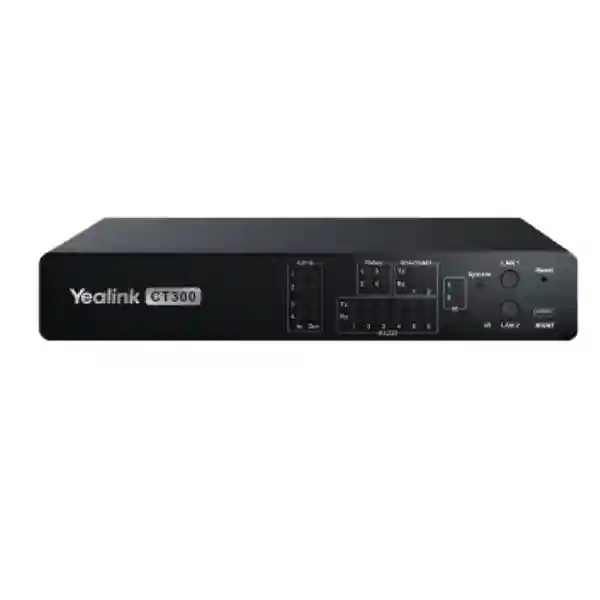
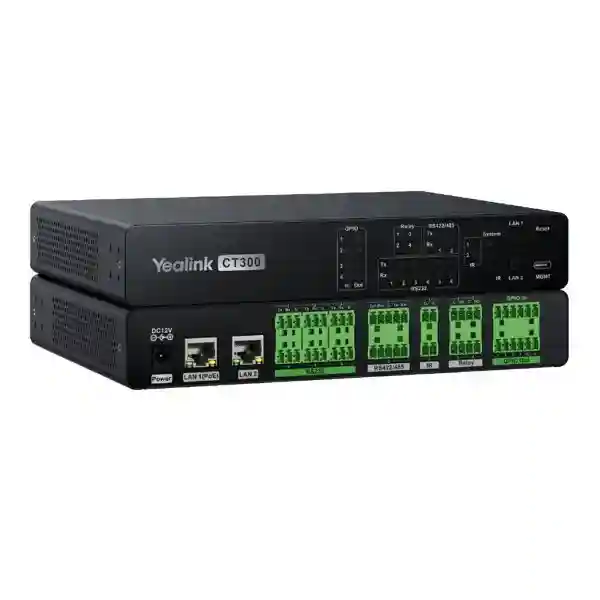
Yealink CT300 Room Device Navigator for Professional AV Room Control
The Yealink CT300 is an advanced room device navigator designed to coordinate control, configuration and monitoring across professional meeting-room and AV environments. It gives system designers a dedicated control layer for equipment that may use network connectivity, serial control, relays, GPIO or infrared commands. That matters in modern boardrooms and collaboration spaces because the user experience often depends on many separate devices behaving as one room: displays must power on, sources must switch, blinds or other relay-controlled equipment may need to respond, and third-party devices must fit into a consistent operational sequence.
Rather than treating room control as an afterthought, CT300 provides a purpose-built hardware platform with dual network ports, serial interfaces, relay outputs, GPIO, IR learning and IR output. Yealink also provides open integration capabilities for third-party devices. For procurement teams, this makes the model relevant when the requirement is not simply a meeting endpoint, but a controllable room infrastructure layer that can connect diverse equipment and support repeatable operational logic.
FourTeck supplies the Yealink CT300 for Uganda projects and can support pre-order validation around interface counts, network architecture, mounting approach, power, cabling and associated Yealink room-system components. Buyers should provide a room equipment schedule and control requirements so that the CT300 can be evaluated as part of the complete room design rather than as an isolated accessory.
Instant Specifications & Procurement Fact Rail
CT300
Advanced Room Device Navigator
PoE port plus RJ45 network port
RS232, RS422/485, Relay, GPIO, IR
PoE / 12V 2A input
Project quote basis
The CT300 is intended for professionally designed rooms where control interfaces must be mapped to actual equipment. Procurement should therefore confirm the exact controlled-device inventory, protocol requirements, network segmentation plan and physical installation position. Warranty terms, lead time and commercial availability should be confirmed on the project quotation because these can depend on supply channel, order quantity and project timing.
Operational Product Architecture & Overview
At the architectural level, CT300 sits between room-control logic and the physical devices that must respond to that logic. Its broad interface mix is the central reason to specify it. Serial connectivity remains common in professional AV, building-control and specialist room equipment; relay contacts remain useful for simple state changes; GPIO can link sensors, triggers and external logic; and infrared remains relevant for equipment that lacks a suitable network or serial control path. Combining these interface types in a single room navigator reduces the need to assemble several unrelated control adapters.
The hardware overview includes one PoE port, one RJ45 port, six RS232 connections, two RS422/485 connections, two IR outputs, four normally open relays, four GPIO input/output points, one IR learning port, one management port and a 12V/2A power input. Yealink documents two bidirectional RS232 ports with baud rates from 300 to 11520 baud and two bidirectional RS422/485 ports across the same documented baud range. Integrators should validate how each physical connector and control channel is assigned in the final design rather than assuming every legacy device uses identical electrical or protocol behavior.
Dual-network capability is valuable where management traffic and device-control traffic need deliberate separation. This can simplify room-network design and reduce the tendency to place every controllable component on one undifferentiated segment. Open API capability further extends the platform by allowing third-party integration where supported by the project design. The operational goal is a room in which users interact with a coherent control experience while the navigator handles communication with heterogeneous equipment behind the scenes.

Typical procurement friction arises when a room includes equipment from different generations and vendors. A display may accept serial commands, another device may depend on IR, and environmental or switching functions may require relay or GPIO interaction. CT300 is valuable precisely because the room designer can evaluate these requirements as a control matrix. This also makes documentation important: port allocation, command sets, IP addressing, cable pinouts, trigger behavior and recovery procedures should be recorded during staging.
Enterprise Business Outcomes & Value Analysis
Multiple interface families let designers select an appropriate control path for each room device instead of forcing every component into one protocol.
A dedicated control appliance helps formalize device dependencies, startup sequences and operational logic so room behavior can be tested before handover.
Organizations can build a documented room-control pattern and adapt it across boardrooms, training spaces and other managed collaboration environments.
Dual network ports support designs that separate management and device-control functions where the network architecture calls for it.
Centralizing heterogeneous control interfaces reduces dependence on multiple standalone adapters and fragmented user procedures.
Open integration capability and diverse physical interfaces provide room designers with options when endpoints or controlled equipment change over time.
The strongest financial case for a room-control platform is usually not a single hardware saving. It is the reduction of integration uncertainty and operational inconsistency. Rooms that require staff to use several remotes, manually select inputs or follow undocumented startup procedures consume support time and create avoidable meeting delays. A properly engineered control layer can standardize these interactions. That benefit depends on good design and commissioning: CT300 should be purchased with an interface schedule, defined control logic and a commissioning plan.
Key Hardware & Software Highlights
| Capability | Hardware / Function | Operational Value |
|---|---|---|
| Networking | PoE and RJ45 network connectivity | Supports structured network deployment and management/control separation. |
| Serial | RS232 and RS422/485 | Connects professional equipment using established serial-control methods. |
| Contact Control | 4 normally open relays | Provides straightforward contact-based switching for compatible systems. |
| Flexible I/O | 4 GPIO input/output | Supports external triggers, state inputs and low-level integration workflows. |
| Infrared | IR learning plus 2 IR outputs | Adds control options for compatible equipment without network or serial interfaces. |
| Integration | Open API | Enables tailored third-party integration subject to project engineering. |
Technical Specifications Ledger
| Item | Specification |
|---|---|
| Product | Yealink CT300 Advanced Room Device Navigator, part number 1303169 |
| Network | 1 × PoE port; 1 × RJ45 port |
| RS232 | Hardware overview lists 6 × RS232; documented bidirectional RS232 control: 2 ports, 300–11520 baud |
| RS422/485 | 2 × bidirectional ports, 300–11520 baud |
| IR | 2 × IR out, 34–42 kHz carrier; 1 × IR learning, below 38 kHz, capture distance below 4 m |
| Relay | 4 × normally open relays, rated 30VDC / 2A |
| GPIO | 4 × analog input or digital input/output; digital input 0–24VDC; 12-bit A/D analog input 0–24VDC; digital output 3.3V, 3.3mA |
| Management | 1 × MGMT port |
| Power input | 12V / 2A power supply port; PoE interface available |
| Consumption | Average 2.5W; peak 3.3W; standby 1.7W |
| Dimensions | 216 × 160 × 36.7 mm |
| Weight | 1.07 kg |
| Operating environment | -10°C to +45°C; 10%–95% operating humidity |
| Storage temperature | -30°C to +70°C |
| Installation | Rack installation or flat installation; supplied mounting kit supports wall, flat-surface or rack installation |
The package includes the CT300, a 3 m Cat5 cable, a 1 m USB 3.0 Type-C to Type-A management cable, 12V/2A power adapter, two infrared emitters, male Phoenix connectors, mounting kit and quick-start guide. Project teams should still verify accessory quantities and regional package contents on the commercial quotation.
Configuration & Sizing Worksheet
1. Build the controlled-device schedule
List every display, switcher, processor, environmental device and third-party endpoint that must respond to room-control commands. Record its manufacturer, model, available control protocol, physical location and required command set. This determines whether the project needs serial, relay, GPIO, IR or network integration and exposes interface-count constraints before installation.
2. Map physical interfaces
Assign each controlled endpoint to a CT300 interface and document pinout, cable type and termination. Serial standards are not interchangeable simply because they use similar connectors. Confirm RS232 versus RS422/485 electrical requirements and verify relay ratings before connecting external circuits.
3. Plan network and addressing
Decide whether management and device control should occupy separate network paths. Record VLAN, DHCP or static addressing requirements and switch-port configuration. Yealink’s setup workflow supports obtaining the device IP through the management interface or Room Designer, and documented static addresses can be invoked for setup. Treat these setup addresses as commissioning tools, not as substitutes for the organization’s approved addressing plan.
4. Validate power and placement
Confirm PoE availability or provision the 12V/2A adapter. The device itself has low documented consumption, but the full room design must include the load of every endpoint, display, switch and peripheral. Ensure service access around the CT300 so technicians can reach control wiring and the management connection without dismantling the room rack.
5. Prepare the quote package
Send FourTeck the number of rooms, CT300 quantity, equipment schedule, preferred mounting method, required Yealink room components, cable expectations and target delivery date. For multi-room rollouts, identify room types and quantities so the bill of materials can distinguish standard rooms from exceptional spaces.
Deployment Scenarios & Industry Use Cases
Large Enterprise & Multi-Site Rooms
Enterprises often want meeting rooms to behave consistently across offices even when individual spaces contain different displays or infrastructure. CT300 can form part of a standardized room-control architecture, with templates adapted to each site’s physical equipment. The engineering objective should be common user behavior with controlled variation behind the interface.
Financial & Banking Institutions
Boardrooms, executive meeting spaces, operations rooms and training facilities may require controlled startup/shutdown sequences and deliberate network separation. CT300’s dual-network design and physical control interfaces provide useful building blocks, while the institution’s own security standards should govern VLANs, credentials, management access and change control.
Educational & Campus Networks
Universities can use a repeatable control design across lecture spaces, hybrid classrooms and administrative meeting rooms. Serial, IR and relay capability is especially useful where campuses contain mixed generations of AV equipment. Standard documentation helps support teams troubleshoot rooms without relying on knowledge held by a single installer.
Government & Controlled Environments
Government procurement frequently emphasizes documented bills of materials, predictable configuration, serviceability and formal acceptance testing. CT300 can be evaluated as a room-control component within those requirements. Security classification or defense-specific suitability must be assessed by the responsible authority; no room-control appliance should be assumed to satisfy a specialized compliance regime without explicit validation.

Technical Deep Dive: Control Processing & Interface Architecture
The practical strength of CT300 is interface diversity rather than raw data throughput. A room-control processor does not need to behave like a network core; it needs deterministic, well-documented communication with devices that expose different control methods. Serial links can deliver structured commands to professional displays and AV equipment. Relays can provide simple contact closure. GPIO can accept or generate electrical states for compatible external systems. IR learning and transmission can preserve control over devices whose primary remote-control method remains infrared. The design task is to select the most dependable supported interface for each endpoint and avoid unnecessary protocol conversion.
Engineers should test command behavior under normal operation, device reboot and network interruption. For serial equipment, validate baud rate, wiring and command termination. For relay-connected circuits, confirm voltage/current requirements remain within ratings and use appropriate external isolation where the controlled system requires it. For GPIO, verify voltage ranges and state thresholds. For IR, position emitters so they remain aligned with the target receiver and document learned commands.
Technical Deep Dive: Software Ecosystem & Operational Control
Yealink positions CT300 for flexible automation and third-party integration through open API capability. Room Designer forms part of the deployment workflow described in Yealink documentation, including device discovery and room-control UI deployment scenarios. Software planning should begin with an approved room function list: what happens when a meeting starts, which devices power on, what inputs are selected, what controls users can access and what state the room returns to after use.
Administrative access should be treated as infrastructure access. Yealink’s quick setup requires a password to be created at first login and documents complexity requirements. Organizations should integrate the device into their credential-management and configuration-record processes, restrict management reachability appropriately, and keep approved configuration backups or design records where supported by their operating procedures.
Technical Deep Dive: Availability, Recovery & Serviceability
High availability in a meeting room is broader than redundant power supplies. It means knowing how the room behaves when a controlled device is unavailable, how quickly support staff can isolate a fault, and how configuration can be restored after replacement. CT300’s dedicated management interface and documented discovery methods give technicians practical access paths during commissioning and troubleshooting.
For critical rooms, keep a port map, cable labels, control-command documentation, network addressing record and tested recovery procedure. Consider spare-unit strategy based on business impact and local replacement lead time. A standardized configuration across similar rooms can shorten restoration because technicians are not rebuilding logic from memory. Where a room has business-critical status, acceptance testing should include power interruption, network interruption and endpoint reboot scenarios.
Pre-Purchase Buyer Gap Checklist
Licensing: Do not assume that every third-party integration, room platform feature or associated endpoint is license-free merely because CT300 offers open integration capability. Identify all software platforms and controlled products in the design and request a commercial bill of materials that separates hardware, subscriptions and services where applicable.
Generation and lifecycle: CT300 is positioned by Yealink as an advanced room device navigator. For long programs, confirm current lifecycle, firmware policy and expected availability at quotation stage, especially if rollout phases extend across multiple budget periods.
Physical clearance: The unit measures 216 × 160 × 36.7 mm and supports rack or flat installation with a mounting kit. Allow additional clearance for Phoenix connectors, network cables, IR leads, power and service loops. A dimension drawing alone does not represent the space needed for maintainable cabling.
Power: Documented CT300 consumption is modest—2.5W average, 3.3W peak and 1.7W standby—but room power planning must include all other AV equipment. Confirm whether the project will use PoE or the supplied adapter and whether the selected switch budget supports the planned architecture.
Cross-vendor compatibility: An available interface does not automatically guarantee control of every third-party product. Confirm that the target device exposes a supported control method and that its command protocol can be implemented in the planned room design. Obtain protocol documentation before purchase for unusual or legacy equipment.
Commissioning responsibility: Define who creates room logic, who validates third-party commands, who installs control wiring, and who owns final acceptance. This prevents a common procurement gap in which hardware arrives but no party is assigned responsibility for integrated room behavior.
Uganda Procurement & Delivery Logistics
For Uganda deployments, FourTeck can quote the CT300 as a standalone requirement or as part of a broader Yealink meeting-room bill of materials. A useful request includes customer or project name, delivery location, quantity, target schedule, room types and a list of equipment that the navigator is expected to control. This allows commercial preparation to run alongside technical validation.
Order processing and delivery timing depend on quantity and stock position at the time of quotation. Project buyers should therefore request lead-time confirmation for the exact quantity rather than planning around a generic availability statement. For phased rollouts, communicate the deployment schedule so sourcing can be aligned with installation milestones.
Pre-configuration discussions can cover IP planning, mounting, interface allocation, room topology and related Yealink components. Final on-site integration requirements should be documented separately where installation or commissioning services are required.
Local Coverage Matrix
FourTeck can support project enquiries serving Kampala as the primary enterprise and institutional hub, Entebbe for hospitality, aviation-linked and corporate environments, Jinja for industrial and commercial sites, Mbarara for western-region organizations, and Gulu for northern-region deployments. Delivery planning should account for site access, installation dates and whether equipment is being shipped to a central integrator or directly to the deployment location. Multi-site projects benefit from a room-by-room quantity schedule so devices and accessories can be allocated accurately.
Cross-Border & Regional Supply Chains
Organizations standardizing Yealink rooms across several countries can coordinate requirements through FourTeck’s regional web presence. Visit FourTeck Uganda, FourTeck Kenya, FourTeck Africa, FourTeck UAE and FourTeck Kuwait. Cross-border projects should keep the technical room standard consistent while allowing commercial documents, delivery terms and local installation arrangements to be handled per destination. Model numbers, accessory requirements and configuration baselines should be written explicitly into the regional bill of materials.
Related Yealink Room-System Planning
CT300 is most useful when considered within the full room architecture. Explore Yealink solutions in Uganda and request guidance for compatible room-system accessories, touch-control requirements, audio components, network infrastructure and professional meeting-room endpoints. Yealink’s room-system portfolio also includes products such as the CT200 Room Device Navigator, DE300 AVoIP Decoder, EN300 AVoIP Encoder and managed AV switches. Exact interoperability and version requirements should be validated for the intended design rather than inferred from portfolio membership.
For divisible rooms or touch-panel control scenarios, provide the complete room topology when requesting a quote. This allows the proposal to consider the control processor, user interface, meeting endpoint, switching, audio and controlled third-party equipment together. A complete bill of materials is usually more valuable than choosing accessories individually and discovering interface gaps during installation.
FourTeck Technical Service Capabilities
FourTeck’s project process can include engineering validation of the proposed bill of materials, review of interface requirements, staging discussions and pre-shipment planning. For a CT300 deployment, useful validation includes confirming room quantities, checking the expected control-interface count, identifying PoE or local-power requirements, reviewing mounting and cable access, and verifying that third-party equipment has usable control documentation.
Where requested and applicable to the project scope, staging can be used to establish a repeatable deployment baseline before equipment reaches site. Firmware and configuration requirements should be agreed in advance, particularly when room endpoints depend on specific software versions. Post-sales support should begin with good handover records: device identity, addressing, interface map, room designation, configuration ownership and escalation contacts.
Extended Technical FAQ
What is the Yealink CT300 used for?
The CT300 is a professional room device navigator used to control, configure and monitor equipment within advanced meeting-room and AV environments. Its role is to connect room-control logic with devices that may use network, serial, relay, GPIO or infrared interfaces. This is useful when a room contains multiple systems that need to operate through a coordinated workflow rather than through separate remotes and control procedures. The final functionality depends on the room design, the controlled devices and the integration logic implemented by the project team.
Which physical control interfaces are available?
Yealink’s hardware overview lists a PoE port, RJ45 port, six RS232 connections, two RS422/485 ports, two IR outputs, four relay ports, four GPIO input/output points, one IR learning port, one management port and a 12V/2A power input. The datasheet further documents two bidirectional RS232 ports and two bidirectional RS422/485 ports with baud rates from 300 to 11520. Because serial and GPIO designs are sensitive to wiring and electrical requirements, the integrator should verify pinout and endpoint specifications before termination.
Can CT300 control third-party equipment?
Yes, third-party integration is a core positioning point for CT300, and Yealink advertises open API capability. Physical interfaces also create integration options for compatible third-party equipment. However, compatibility should be validated device by device. A display with RS232 control, for example, still requires a usable command protocol and correct serial parameters. Before procurement, obtain the third-party manufacturer’s control documentation and identify exactly which functions must be exposed in the room workflow.
Does the CT300 support PoE?
The hardware overview includes a PoE port, and the unit also provides a 12V/2A power input. This gives designers flexibility in how the navigator is powered. The selected approach should be documented in the room bill of materials. When using PoE, confirm the switch design and available power budget. When using local power, plan socket location, cable routing and service access. Do not treat the CT300’s low device consumption as the power budget for the entire room; displays, codecs, switches and audio equipment must be calculated separately.
How much power does the CT300 consume?
Yealink documents average consumption of 2.5W, peak consumption of 3.3W and standby consumption of 1.7W. These figures are useful for the navigator’s own power planning and indicate that the control unit is a relatively low-load component. For a professional room, power engineering should still consider the complete equipment schedule, PoE switch capacity, UPS strategy where required, and startup behavior of other devices. Critical rooms should also define how control functions recover after a power interruption.
Can it be rack mounted?
Yes. Yealink documents rack and flat installation, and the package includes a mounting kit intended for wall, flat-surface or rack installation. The CT300 dimensions are 216 × 160 × 36.7 mm and its weight is 1.07 kg. When planning rack space, allow room not only for the chassis but also for connector depth, cable bend radius and technician access. Control wiring can become dense, so a clean labeling scheme and service loops are recommended for maintainability.
What are the environmental limits?
The documented operating temperature range is -10°C to +45°C with operating humidity from 10% to 95%. Storage temperature is listed from -30°C to +70°C. These limits should be compared with the actual rack or furniture environment rather than only the room’s ambient temperature. Enclosed AV cabinets can run significantly warmer than occupied spaces. Maintain suitable ventilation and avoid installation positions where heat from amplifiers, compute equipment or displays creates localized temperature stress.
How is initial management access performed?
Yealink documents several methods for obtaining the device IP address, including connection through the management interface and discovery using Room Designer. The quick-setup documentation also describes a method for switching LAN ports to documented static addresses during commissioning. On first web-interface login, a password must be set and Yealink specifies complexity requirements. Enterprise deployments should then apply the organization’s approved addressing, credential and management-access practices rather than leaving commissioning conventions as the production standard.
What should be supplied when requesting a quotation?
Provide the required CT300 quantity, project location, number and type of rooms, target delivery schedule and the list of equipment each navigator must control. Include preferred mounting, PoE availability, network design and any related Yealink room-system components. If third-party control is important, attach model numbers and protocol documentation where possible. This information helps identify interface-count issues and accessory requirements before the purchase order is issued, reducing the risk of changes during installation.
How should organizations plan replacement and support?
Keep a documented configuration baseline, room designation, network details, port map and cabling labels for each installed unit. For high-impact rooms, evaluate whether an on-site spare is justified by replacement lead time and business criticality. Warranty processing terms should be confirmed on the FourTeck quotation and order documentation. If a unit is replaced, restoration is faster when the organization has retained current design records and has a repeatable commissioning procedure instead of relying on undocumented installer knowledge.
Request a Yealink CT300 Uganda Project Quote
For a precise commercial proposal, send FourTeck your room count, CT300 quantity, controlled-device list, interface requirements, network plan, installation location and target deployment date. The team can use these details to review the proposed room-control architecture, identify associated Yealink components and prepare a project quotation. For multi-site deployments, include each site and room type so quantities and staging requirements can be structured clearly from the start.




Reviews
There are no reviews yet.