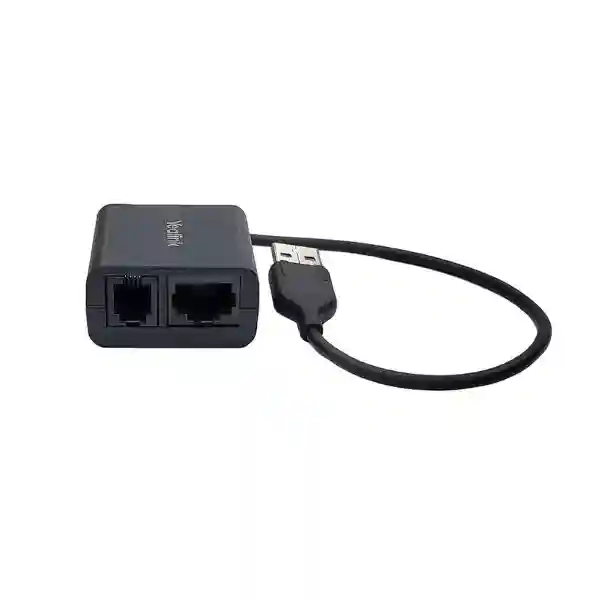
Yealink EHS40 Headset Adapter – Wireless Call Control for Business IP Phones
The Yealink EHS40 is a compact electronic hook switch interface designed to connect compatible Yealink IP phones with selected professional wireless headsets. Its purpose is straightforward but operationally important: it lets a supported wireless headset user answer an incoming desk-phone call, end the call and receive ringing notification without needing to remain beside the handset. In reception areas, customer-service teams, contact centres, finance departments, clinics, administration offices and busy shared workspaces, this can remove the repeated need to return to the desk simply to press the phone’s answer or release key.
The EHS40 connects to a supported Yealink phone through USB 2.0 and provides headset-side connectivity for compatible Jabra, Poly/Plantronics and Sennheiser/EPOS solutions. Yealink’s published compatibility information includes models from the VP59, T58, T57, T54, T53, T4U and selected T4S families, with firmware requirements applying. Because electronic hook switch operation depends on the exact phone, firmware and headset combination, professional procurement should validate all three components before quantity ordering. This is particularly important where an organization has a mixed estate of older and newer Yealink endpoints.
For Ugandan organizations, FourTeck can support compatibility checking, bill-of-materials review, quantity planning and supply coordination. Buyers can provide the installed phone model, current firmware, headset make and model, required quantity and destination. This creates a cleaner procurement process and reduces the risk of ordering an adapter for a phone or headset combination outside the manufacturer’s supported matrix.
Instant Specifications & Procurement Facts
Yealink EHS40 Wireless Headset Adapter
1 × USB 2.0 connector
RJ45 (8P8C) / RJ9 (4P4C), according to supported headset connection
Remote answer, hang-up and incoming-call signalling
Professional desk-phone accessory
Request current Uganda pricing and availability
The EHS40 is not a headset amplifier, network device or substitute for the wireless headset base station. It acts as the control bridge between a supported Yealink IP phone and a compatible third-party wireless headset system. The exact cable path depends on the headset brand and model. Yealink’s published package information identifies the EHS40 together with Jabra, Plantronics and Sennheiser Y-cords and a user guide. For fleet orders, confirm current package contents at quotation stage because packaging and regional bundles can change over a product lifecycle.
Operational Architecture and Product Overview
A wireless business headset solves only part of the mobility problem if the user still has to touch the desk phone to answer or terminate each call. The EHS40 addresses that control gap. In a supported deployment, the Yealink phone presents a USB interface to the adapter, while the adapter and supplied or appropriate connection lead interface with the wireless headset base. Control events generated by the headset can then be interpreted by the phone, allowing the user to manage fundamental call states remotely.
This architecture is especially relevant to staff who spend a working day moving between a workstation, filing area, counter, stock point or nearby colleagues while remaining responsible for inbound calls. A receptionist may need to collect documents while monitoring the main line. A support agent may need to consult a supervisor without abandoning an active communications position. A clinic administrator may need to move between a desk and records cabinet. The EHS40 does not increase the radio range of the headset; rather, it allows the existing wireless headset system to control supported phone functions while the user is within the headset system’s operating range.
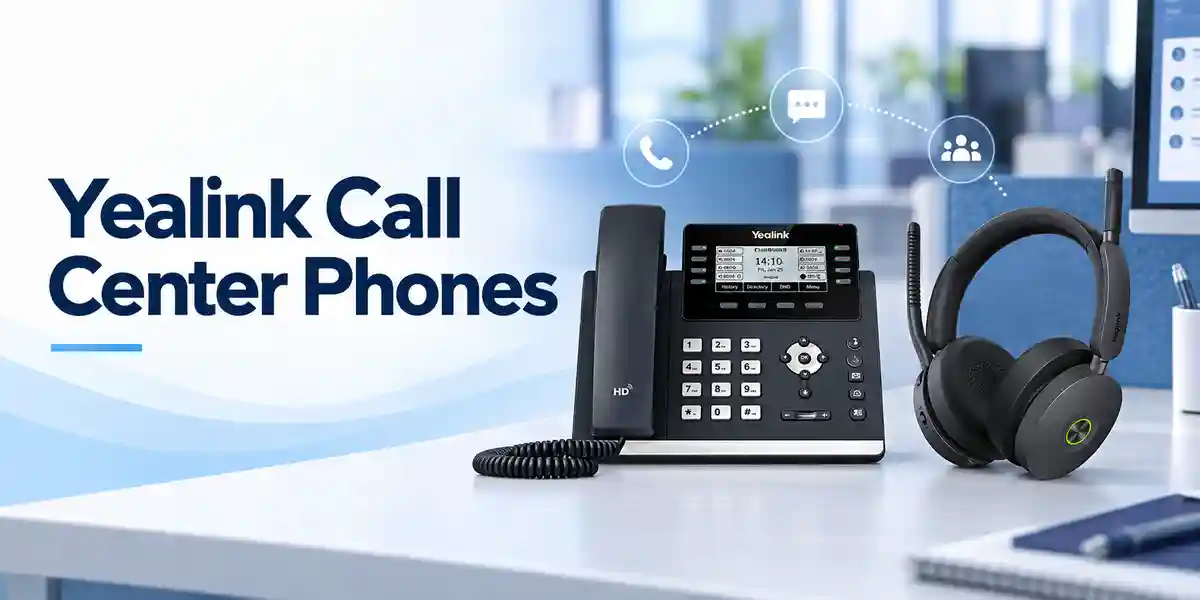
Compatibility is the central design consideration. Yealink currently describes EHS40 support for VP59, T58W, T58A, T57W, T54W, T53W, T53, T42U, T43U, T46U, T48U, T44U, T44W, T48S, T46S, T42S and T41S on its EHS40 product information, with applicable firmware requirements. Manufacturer support documentation also identifies tested combinations with selected Poly/Plantronics and Jabra wireless headsets. A procurement team should therefore avoid treating “Jabra compatible” or “Poly compatible” as universal statements. Compatibility should be checked at exact model level.
From an infrastructure perspective, the adapter is intentionally simple. It does not require an Ethernet address, switch port, SIP account or separate management server. It is an endpoint accessory attached locally to the phone. That simplicity reduces deployment overhead, but it also means troubleshooting begins at the physical and compatibility layers: verify the phone model, firmware release, USB connection, headset base, cable selection and headset configuration before escalating to wider voice-platform investigation.
Enterprise Business Outcomes & Value Analysis
Key Hardware and Software Highlights
| Component or capability | Technical role | Operational outcome |
|---|---|---|
| USB 2.0 connector | Connects EHS40 to a supported Yealink IP phone | Simple local integration without a separate network connection |
| RJ45/RJ9 output arrangement | Interfaces with supported headset connection leads | Supports validated third-party wireless headset ecosystems |
| Remote call control | Passes answer and terminate commands | Lets users handle supported calls away from the phone |
| Incoming-call signalling | Enables supported ringing notification in headset | Improves awareness when the user is not looking at the phone |
| Firmware-dependent compatibility | Phone firmware provides required accessory support | Encourages controlled validation before fleet rollout |
Technical Specifications Ledger
| Specification | Published / procurement detail |
|---|---|
| Product type | Wireless headset electronic hook switch adapter |
| Phone interface | 1 × USB 2.0 connector |
| Output interfaces | 1 × RJ45 (8P8C) / 1 × RJ9 (4P4C) output for supported GN/Jabra/Sennheiser/Plantronics headset arrangements |
| Primary controls | Remote answer and remote call termination |
| Call notification | Incoming calls can be signalled in the headset earpiece on supported combinations |
| Published phone families | Selected VP59, T58, T57, T54, T53, T4U and T4S models; validate exact model and firmware before purchase |
| Published headset brands | Jabra, Plantronics/Poly and Sennheiser; exact model validation required |
| Gift box size | 141 × 102 × 46 mm in Yealink datasheet |
| Carton quantity | 40 pieces per carton in Yealink datasheet |
| Carton dimensions | 430 × 243 × 297 mm in Yealink datasheet |
| Carton net / gross weight | 6.16 kg / 6.75 kg in Yealink datasheet |
| Package contents | EHS40, Jabra Y-Cord, Plantronics Y-Cord, Sennheiser Y-Cord and user guide as listed in manufacturer datasheet; reconfirm current regional packaging when ordering |
Specifications that Yealink does not publish for this passive accessory in the referenced product material—such as a standalone rated power draw, operating temperature range or independent network throughput—should not be invented for tender documentation. If a procurement form requires these fields, request the current manufacturer declaration or distributor documentation rather than substituting assumptions.
Configuration & Sizing Worksheet
Step 1: Count the users who genuinely require remote desk-phone control
Start with job function rather than total phone count. Receptionists, contact-centre agents, service-desk personnel, operations coordinators and managers who move frequently around a nearby work area are stronger candidates than occasional phone users. Build a quantity list by desk and include a small controlled spare pool only where operational continuity warrants it.
Step 2: Record the exact Yealink phone model
Do not specify “Yealink T5” or “Yealink T4” alone. Capture the complete model printed on the device or shown in its status interface. T58W, T58A, T57W, T54W, T53W, T53, T42U, T43U, T46U, T48U, T44U, T44W and older T4S variants do not all share identical firmware or accessory histories.
Step 3: Capture firmware
Yealink explicitly associates EHS40 operation with firmware requirements. For a large estate, export or document firmware versions before procurement. Standardizing supported firmware also makes troubleshooting and future support more predictable.
Step 4: Identify headset manufacturer and exact model
A brand name is insufficient. Record whether the intended system is, for example, a Poly CS540, a supported Savi model, a Jabra PRO or Engage model, or another tested unit. Some headset families have multiple connection modes and revisions. The correct adapter and cabling decision must follow the tested matrix.
Step 5: Prepare the quote
Provide quantity, delivery location, phone model, firmware, headset model and whether the deployment is new or an upgrade. For multi-site deployments, list quantities per branch. This allows compatibility questions to be resolved before shipment rather than at the installation desk.

Deployment Scenarios & Industry Use Cases
Large enterprise and multi-site offices
In an enterprise rollout, the EHS40 is best treated as part of a validated endpoint bundle rather than an isolated accessory. IT can approve specific phone and headset combinations, define the minimum firmware baseline, document cabling, and then replicate that desk standard across departments or branches. This approach is particularly valuable when the organization has inherited mixed generations of Yealink phones. A compatibility audit can identify which desks can use EHS40, which require a different adapter, and which newer headset or phone combinations support direct USB or Bluetooth connectivity without an EHS accessory.
Financial and banking institutions
Front-office, operations and service teams may need to remain available while accessing printers, secure cabinets or nearby colleague workstations. Remote call control can support this workflow while preserving the desk phone as the call endpoint. Procurement should still apply the institution’s internal controls for approved headset devices, endpoint firmware and physical accessory management.
Educational and campus environments
Admissions desks, registries, departmental offices and campus service centres can benefit where staff alternate between phone calls and nearby administrative tasks. Because campuses may contain endpoints purchased over several budget cycles, model-by-model validation is particularly important before placing a bulk adapter order.
Government and regulated procurement
For formal procurement, list the adapter model, required interface, supported phone estate and required headset interoperability in the bill of materials. Avoid broad equivalence statements that omit firmware and exact headset model. Where documentation is required, use current manufacturer datasheets and compatibility lists as the technical baseline.
Technical Deep Dive: Control Path and Interface Architecture
Unlike a network appliance, the EHS40 does not process voice packets or provide SIP registration. Audio remains part of the supported phone/headset solution, while the EHS accessory supplies the electronic control relationship needed for remote call handling. This distinction matters in troubleshooting. A voice-quality problem should not automatically be attributed to the EHS40; technicians should separately examine the network, phone audio path, wireless headset radio environment and headset base. Conversely, a failure of the headset button to answer or end a call should prompt inspection of EHS compatibility, cabling, firmware and accessory configuration.
The USB connection is a practical advantage because it uses an interface already present on supported Yealink phones. The headset side uses the appropriate output and Y-cord arrangement for the supported vendor. This makes physical installation relatively compact and allows the adapter to sit near the phone or headset base without requiring a separate data cable back to the access switch.
Technical Deep Dive: Firmware and Operational Control
Firmware is a critical part of the compatibility chain. Manufacturer support tables associate particular phone families with minimum firmware generations. In managed deployments, the safest process is to record the current release, compare it against the current Yealink compatibility guidance, test a representative phone/headset pair and only then expand the rollout. A firmware change should also be regression-tested on important reception or contact-centre positions before broad deployment.
The adapter itself does not introduce a separate administrative console. Operational control remains centered on the Yealink endpoint and the headset system. That reduces management overhead but places greater importance on configuration records. IT teams should document the approved phone firmware, headset model, adapter model and cable arrangement as a single endpoint standard.
Technical Deep Dive: Resilience and Service Continuity
High availability for an EHS accessory is achieved through sensible endpoint design rather than redundant electronics inside the adapter. Critical call positions can maintain a spare validated EHS40 and connection lead, while help-desk procedures can define a rapid fallback to handset or speakerphone operation if the headset control path fails. For sites with many identical desks, holding a small number of tested spares can be more practical than diagnosing an accessory at length during peak call periods.
Disaster-recovery planning should also distinguish essential from convenience functions. Loss of remote hook control does not necessarily mean the phone itself is unavailable. Where the phone remains functional, users can often continue calls using the handset or another supported audio path while the adapter or headset system is checked. This layered view helps support teams restore basic communications quickly.
Pre-Purchase Buyer Gap Checklist
Does every Yealink phone work with EHS40? No. EHS40 is intended for specified phone families and firmware levels. Some Yealink phones use other EHS adapters, while newer phone/headset combinations may connect directly by USB or Bluetooth. Always validate the exact endpoint.
Will any Jabra, Poly or EPOS headset work? No. Manufacturer names describe supported ecosystems, not blanket compatibility. Use Yealink’s tested-headset documentation and the headset manufacturer’s guidance for the exact model.
Are there recurring licences? The EHS40 is an endpoint accessory and Yealink’s published EHS40 material does not describe a recurring licence for the adapter itself. Separate phone systems, hosted voice services or headset management platforms can have their own commercial terms.
Does it improve wireless range? No. Wireless range is determined by the headset system and its environment. EHS40 enables the compatible call-control relationship with the phone.
Is a separate power supply required? Yealink describes a USB connection to the supported phone and does not list a separate EHS40 power adapter in the published package contents. Procurement teams with strict electrical documentation requirements should request current manufacturer documentation for the specific shipment.
What about desk clearance? The adapter is compact, but the complete installation includes the phone, headset base and connection leads. Plan cable routing so USB and headset leads are not strained, crushed or routed through moving furniture components.
Should we buy one for every wireless headset? Only where that specific phone/headset combination requires EHS40 for remote call control. Some supported modern headsets connect directly to compatible Yealink phones and do not need this adapter.
Uganda Procurement, Delivery and Deployment Planning
For Uganda supply, a useful quote request includes the required EHS40 quantity, the exact Yealink phone models already installed or being purchased, the wireless headset models, delivery destination and expected deployment schedule. Where the adapter is part of a larger communications refresh, include the phone and headset quantities so the complete endpoint bill of materials can be checked together.
Order processing can then distinguish simple accessory replenishment from compatibility-sensitive project supply. For a new call centre, reception rollout or multi-branch refresh, pre-shipment validation can reduce installation-day surprises. Delivery timing depends on current stock, quantity, import cycle and project requirements, so buyers should request a current written quotation rather than relying on a generic lead-time assumption.
Technical pre-configuration for EHS40 itself is limited because it is a plug-and-play accessory, but the surrounding endpoint environment can still be prepared: confirm phone firmware, validate the target headset, document cable connections and establish a test call procedure. For large deployments, pilot several representative desks before scheduling the full rollout.
Local Coverage Matrix
Organizations in Kampala can request supply for corporate offices, contact centres, financial services, hospitality and government environments. Entebbe deployments can include airport-area businesses, hotels, administration and service operations. In Jinja, the adapter can support office communications for industrial, education, service and commercial organizations. Mbarara buyers can plan deployments for regional offices, healthcare administration, education and enterprise service desks, while Gulu projects can cover institutional, NGO, government, education and private-sector communications. For every location, availability and delivery timing should be confirmed against the requested quantity.
Cross-Border and Regional Supply
Multi-country organizations can coordinate related communications procurement through FourTeck regional channels. For Uganda requirements, visit FourTeck Uganda. Projects with Kenyan branches can use FourTeck Kenya, while broader continental requirements can be coordinated through FourTeck Africa. UAE procurement can be directed through FourTeck UAE, and Kuwait requirements through FourTeck Kuwait. For cross-border projects, keep model, firmware and headset standards consistent in the bill of materials while allowing for country-specific stock, logistics and commercial terms.
Related Yealink Endpoint Planning
The EHS40 normally sits within a broader desk communications design. Buyers comparing endpoint options can review Yealink business communications solutions in Uganda and request guidance on compatible IP phones, wireless headsets and accessories. Existing T5-series environments may require different accessory decisions from newer deployments, while T4U and legacy T4S estates should be checked carefully against current compatibility documentation. Organizations planning reception desks may also want expansion modules, while mobile staff may be better served by a purpose-built wireless headset or DECT solution rather than adding accessories to every desk. The correct architecture depends on whether the requirement is remote call control, wireless audio, multi-line visibility, mobility across a building or simply comfortable all-day headset use.
FourTeck Technical Service Capabilities
Accessory procurement benefits from engineering validation because seemingly simple desk components can fail when model generations are mixed. FourTeck can review the intended phone and headset pairing, check the bill of materials, identify obvious adapter mismatches and help structure a pilot deployment. For project orders, staging can include confirmation of endpoint firmware requirements and preparation of deployment notes for the installation team.
Pre-shipment checks can be particularly useful when the organization is standardizing a large number of reception or call-handling positions. A representative combination can be validated before wider rollout, and the approved phone, headset, adapter and cable set can be recorded. Post-sales support can then start from a known baseline rather than reconstructing the desk configuration after an issue appears.
Extended Technical FAQ
1. What exactly does the Yealink EHS40 do?
The EHS40 provides an electronic control interface between supported Yealink IP phones and compatible professional wireless headset systems. Its key functions are remote answering and ending of calls and, on supported combinations, incoming-call signalling through the headset. It does not replace the headset, headset base, IP phone or PBX. Think of it as the control bridge that allows the wireless headset’s call button to interact with the desk phone. This is useful when staff need to move within the headset’s wireless coverage area while remaining able to handle incoming desk-phone calls.
2. Which Yealink phones support EHS40?
Yealink’s current EHS40 product page lists VP59, T58W, T58A, T57W, T54W, T53W, T53, T42U, T43U, T46U, T48U, T44U, T44W, T48S, T46S, T42S and T41S among supported phones, with firmware conditions applying. Manufacturer compatibility tables evolve as products and firmware change, so procurement should confirm the exact model and software release at the time of ordering. Do not assume another phone is supported simply because it belongs to the same broad T4 or T5 family.
3. Which headset brands are compatible?
Yealink identifies compatibility with selected wireless headsets from Jabra, Plantronics/Poly and Sennheiser, with current support documentation also reflecting the modern EPOS ecosystem. Compatibility must be checked by exact headset model. Published examples include selected Poly CS and Savi models and selected Jabra PRO and Engage products. A brand-level statement is not enough for a purchase order because connection methods, base stations and model generations differ. Supply the exact headset model when requesting a quote so the combination can be checked before shipment.
4. Does EHS40 need a network address or licence?
No network address is assigned to the EHS40 because it is not a standalone IP endpoint. It connects locally to the supported Yealink phone using USB and interfaces with the compatible wireless headset system. Yealink’s published EHS40 documentation does not identify a recurring licence for the adapter itself. However, the associated IP phone service, hosted PBX, call-centre platform, device management service or headset software may have separate licences or subscriptions. Those should be evaluated independently in the overall communications bill of materials.
5. Why is firmware important?
Electronic hook switch support depends on the phone firmware understanding and supporting the required accessory behavior. Yealink’s documentation associates compatible phone families with minimum firmware generations. A phone can therefore be physically capable of accepting the USB connection while still needing an appropriate software version for the expected call-control behavior. Before a large deployment, document the installed firmware, compare it with current manufacturer guidance, update through the organization’s normal change-control process where necessary, and perform test calls using the exact headset and adapter combination.
6. Can EHS40 fix poor wireless headset range or audio quality?
The EHS40 is not a radio range extender and does not replace the wireless headset’s own radio system. Wireless coverage depends on the headset technology, base station, building materials, interference and local environment. Audio quality can also depend on the headset, phone, network and voice platform. The EHS40’s primary responsibility is the supported call-control relationship. If users report range or audio issues, troubleshoot the headset and voice path separately while also confirming that EHS cabling and compatibility are correct.
7. What should be checked if remote answer does not work?
Start with the basics: confirm the phone model is supported, confirm the installed firmware meets the required level, identify the exact headset and base station, verify that the EHS40 and correct vendor cable are connected to the intended ports, and restart or reinitialize the endpoint according to normal support procedure if appropriate. Then test both incoming-call notification and the answer/end controls. If the phone works normally by handset but not through the remote headset control, focus troubleshooting on the accessory, cabling, headset base settings and compatibility rather than the wider SIP service first.
8. Is EHS40 suitable for a call centre?
It can be suitable where the selected Yealink desk phones and wireless headset systems require EHS40 and where agents benefit from remote answer and hang-up. However, call-centre design should consider the complete workflow. Some operations prefer USB headsets connected to computers, integrated soft clients or newer headset/phone combinations that support direct USB. Others require a physical desk phone and professional wireless headset. Evaluate agent applications, call-control platform, desk layout, mobility requirements and headset policy before standardizing on an accessory across every position.
9. How should warranty or replacement be handled?
Keep the purchase record, model information and deployment details for the adapter. If an issue occurs, first isolate whether the fault follows the EHS40, cable, headset base or phone by using a known-good supported combination where possible. Warranty terms can vary by sales channel and region, so request the applicable warranty baseline on the quotation or invoice rather than assuming a universal period. For critical desks, a small spare pool can restore service faster while a suspected unit is assessed through the normal support and replacement process.
10. What information should I send FourTeck for an accurate quote?
Send the quantity required, delivery city or site, exact Yealink phone model, phone firmware version where available, wireless headset manufacturer and full model, and whether the installation is a new deployment or an addition to an existing environment. For multi-site projects, split quantities by branch and identify any different phone or headset standards at each location. This information allows the quote to address compatibility rather than treating the EHS40 as a generic cable accessory and helps the project team identify any desks that may require a different solution.
Request a Yealink EHS40 Procurement Quote
For a reliable deployment, include your phone model, headset model, required quantity and delivery location. FourTeck can help validate the intended combination before supply and support quantity planning for individual offices, contact centres and multi-site organizations across Uganda. Current price, stock position, delivery timing and applicable warranty should be confirmed in the project quotation.




Reviews
There are no reviews yet.