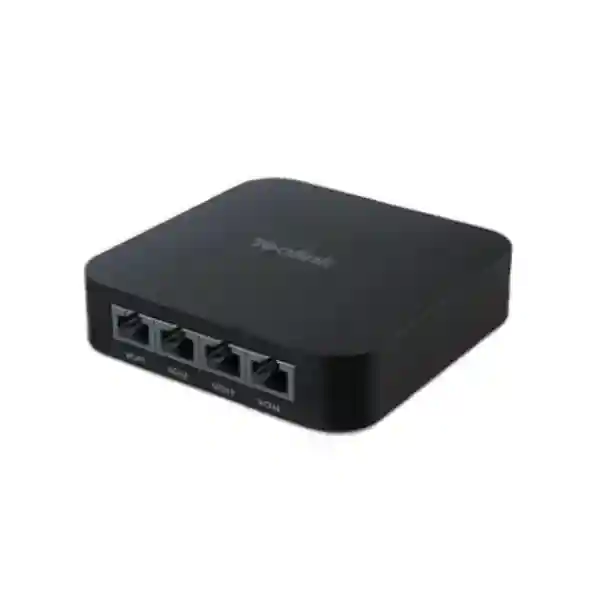
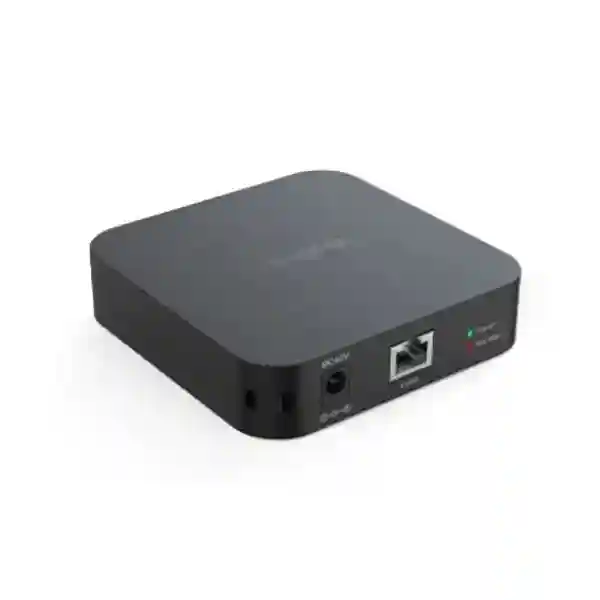
Yealink RCH40 Room Cable Hub – Gigabit PoE Meeting Room Connectivity
The Yealink RCH40 Room Cable Hub is a compact Gigabit connectivity and Power over Ethernet distribution device created for structured audio and video networking inside professional meeting rooms. Rather than treating every conferencing peripheral as an isolated cable run with its own local power arrangement, the RCH40 provides a practical point from which compatible room devices can be connected and powered. It offers four 10/100/1000 Mbps downlink ports, supports IEEE 802.3af/at operation, can deliver up to 30 W per port and provides a total PoE power budget of up to 90 W when correctly powered. For meeting-room designers, IT teams and audiovisual integrators, that combination can reduce wiring complexity while keeping the physical installation compact and serviceable.
The product is particularly relevant when a medium or large collaboration room requires several compatible endpoints around a table, display wall or equipment position. A centralized hub can make cable tracing easier, reduce the number of power adapters placed around furniture and give installers a clearer topology to document. Yealink also designed the RCH40 around its room-system ecosystem, so procurement should begin with compatibility validation rather than assuming it is a general-purpose office access switch. The exact RCH40 edition also matters: Yealink documents both RCH40 and RCH40 E2, with certain capabilities and endpoint requirements applying only to the E2 edition. FourTeck can therefore review the target camera, microphones, speakers, room processor and cable plan before a purchase order is finalized.
For organizations in Uganda, the procurement objective is not simply to buy another small network box. It is to obtain the correct room-cabling component, with the right edition, power arrangement, compatible endpoints and installation accessories. This page gives procurement teams a structured way to evaluate those points before requesting a commercial quotation.
Instant Specifications & Procurement Fact Rail
Yealink RCH40
Meeting-room A/V connectivity
4 × 10/100/1000 Mbps
802.3af/at, up to 30 W/port
Up to 90 W total
Contact FourTeck for current supply
The fact rail is intentionally procurement-focused. The RCH40 is small, but a correct order still depends on the edition, connected endpoints, power source, cable lengths and room topology. The documented chassis dimensions are approximately 100 × 100 × 23 mm, allowing discreet placement. Yealink lists power-state and PoE-budget indicators, helping installers identify basic operating condition during commissioning. A 48 V 2 A power supply is documented for the product, while Yealink deployment options can also involve connection within its room-system architecture. Warranty terms, lead time and included accessories can vary by sourcing channel and order batch, so FourTeck should confirm the commercial warranty baseline on the quotation rather than relying on an assumed regional term.
Operational Product Architecture & Overview
The RCH40 should be understood as a purpose-oriented room cable hub rather than a substitute for the building’s managed access switching layer. Its job is close to the collaboration endpoint: provide Gigabit Ethernet paths and PoE delivery for supported room devices while reducing the number of separate cable and power arrangements that would otherwise need to be planned around a conference table. Four downlink interfaces provide the connection points for room endpoints, while the wider Yealink room architecture determines how the hub is linked upstream. This distinction is important because procurement teams often see Ethernet ports and assume that every compact PoE device serves the same network role. In a conferencing design, however, endpoint compatibility, PoE behavior and the manufacturer’s topology matter as much as raw port count.
Power architecture is one of the principal reasons to specify the RCH40. Each supported port can provide up to 30 W, but the total available budget is up to 90 W. Therefore, a four-device design must be calculated from the actual endpoint requirements rather than multiplying four ports by 30 W and assuming 120 W is available. A well-prepared bill of materials records the maximum power requirement of every connected endpoint, adds appropriate engineering margin and verifies that the selected power arrangement can support the complete room. Yealink’s PoE priority behavior is intended to protect higher-priority devices when demand exceeds the available budget. This makes power planning more resilient, but it is not a replacement for correct sizing.
Cabling is equally significant. Gigabit operation depends on suitable structured copper cabling, correct termination and routes that respect installation standards. Conference rooms frequently contain floor boxes, cable cubbies, movable furniture, under-table trays and display-wall conduits. These introduce bends, joins and mechanical stress that are absent from a simple laboratory connection. The RCH40’s compact format gives an integrator flexibility to position the hub near the device cluster, potentially shortening multiple endpoint runs and leaving a cleaner service loop. During design, the installer should still document every cable origin, destination and label so future support teams can identify the room topology without dismantling furniture.
Another architectural consideration is product edition. Yealink currently documents RCH40 and RCH40 E2. The manufacturer states that QoS support and the Energy Efficient Ethernet behavior differ between them, and that certain devices including CM20, CS10 and Dante devices require RCH40 E2 because of the relevant EEE requirement. Buyers should therefore specify the exact endpoints rather than purchase solely from the family name. If an existing room is being expanded, photographs of device labels and a current bill of materials can help prevent an edition mismatch.

Operationally, the hub is attractive because it concentrates a portion of the room infrastructure into one identifiable service point. When troubleshooting, an engineer can inspect power and PoE indicators, verify physical links, isolate endpoints and compare the actual installation against the room drawing. That is a more disciplined support model than discovering several adapters and unmanaged cable joins hidden in furniture. For organizations standardizing many rooms, repeatable placement and labeling of the RCH40 can also make field support more predictable across sites.
Enterprise Business Outcomes & Value Analysis
Key Hardware & Software Highlights
The core hardware proposition is straightforward: four Gigabit Ethernet downlink ports, PoE support, compact dimensions and status indicators. The engineering value comes from how those elements are combined in a room system. Gigabit links give compatible conferencing endpoints a modern wired transport layer. PoE removes the need for a separate mains adapter at each supported endpoint. The 90 W aggregate budget gives designers a measurable capacity ceiling. Power and PoE-budget LEDs provide at-a-glance feedback without requiring a technician to begin diagnosis from software.
| Component | Confirmed Capability | Operational Outcome |
|---|---|---|
| Downlink interfaces | 4 × 10/100/1000 Mbps | Consolidates several compatible room endpoints at one hub. |
| PoE | 802.3af/at, up to 30 W per port | Carries network and electrical power over supported Ethernet connections. |
| Total power budget | Up to 90 W | Provides a defined design envelope for connected devices. |
| Indicators | Power and PoE-budget indication | Speeds basic physical-layer diagnosis. |
| Chassis | Approx. 100 × 100 × 23 mm | Fits discreetly in room furniture and equipment spaces. |
Software-dependent characteristics require edition awareness. Buyers planning CM20, CS10 or Dante-based designs should explicitly validate RCH40 E2 because Yealink identifies E2-specific behavior for those deployments. A procurement document should therefore include the complete model/edition requirement, not merely “RCH40 or equivalent.” That small specification detail can prevent significant rework at commissioning.
Technical Specifications Ledger
| Parameter | Specification / Procurement Note |
|---|---|
| Product type | Room cable hub / Gigabit PoE meeting-room connectivity device. |
| Downlink ports | 4 × 10/100/1000 Mbps Ethernet. |
| PoE standards | IEEE 802.3af/at support documented by Yealink. |
| Per-port PoE | Up to 30 W per port, subject to aggregate budget. |
| Total PoE budget | Up to 90 W total. |
| Power adapter | Yealink documentation lists PSE 48 V, 2 A. |
| Indicators | Power-state and PoE-budget indication. |
| Dimensions | Approximately 100 mm × 100 mm × 23 mm. |
| Operating humidity | 5%–90% as documented by Yealink. |
| Deployment methods | Multiple deployment methods; final topology should follow the compatible Yealink room-system design. |
| Edition note | RCH40 and RCH40 E2 differ. E2 includes documented QoS behavior and disables EEE; validate edition for CM20, CS10 and Dante deployments. |
| Package | Current Yealink documentation lists RCH40 switch, 48 V 2 A power supply and quick start guide; confirm exact regional package at quotation. |
Specifications should be interpreted in the context of a complete room. A port’s 30 W ceiling does not increase the 90 W aggregate budget, and the presence of an Ethernet connector does not guarantee that an arbitrary third-party device is supported in a Yealink room topology. Similarly, a compact chassis does not remove the need for ventilation, cable bend radius, strain relief and service access. Procurement teams should use the ledger as a baseline and have the complete room bill of materials validated before ordering.
Configuration & Sizing Worksheet
Step 1 — Count endpoints and document their role
List every camera, microphone, speaker, touch device or other component intended to connect through the room topology. Record the exact model number and quantity. Four physical downlink ports create a hard connection limit for the hub, while endpoint-specific architecture may impose additional rules. If a room has more devices than the topology supports, determine whether another hub, AVHub or a different room design is appropriate rather than improvising unmanaged connections.
Step 2 — Calculate the PoE load
For each powered endpoint, record its maximum PoE requirement. Add the values and compare the result with the RCH40’s 90 W aggregate budget. Keep the 30 W per-port limit visible in the worksheet. Do not size only from typical consumption because startup or peak conditions can differ. Where the exact endpoint requirement is unclear, request confirmation before purchase.
Step 3 — Survey the physical room
Measure cable paths rather than straight-line distances. Include table legs, under-floor routes, wall conduits, display mounts and service loops. Decide where the 100 × 100 × 23 mm hub can remain accessible without being visually intrusive. Confirm a suitable location for the power source if the deployment uses the external supply, and avoid placements where cables can be crushed by movable furniture.
Step 4 — Confirm edition and compatibility
Write “RCH40” or “RCH40 E2” explicitly on the design. This is essential for newer endpoints whose requirements depend on EEE behavior or E2 functionality. For CM20, CS10 or Dante-based designs, validate RCH40 E2 with the current Yealink compatibility documentation. Existing installations should be audited by model label before expansion.
Step 5 — Prepare the quote package
A useful quote request contains room count, room names, endpoint models and quantities, cable-length requirements, existing Yealink equipment, delivery city, desired installation date and whether staging or configuration support is required. For multi-site rollouts, provide a room-type schedule such as small, medium, boardroom and training room. FourTeck can then map quantities against each standard design and identify accessories that would otherwise be easy to omit.
Deployment Scenarios & Industry Use Cases
Large Enterprise and Multi-Site Networks
Enterprises with many collaboration rooms benefit from repeatability. A standard room drawing can define where the RCH40 is installed, how it is powered, which endpoints occupy each port and how cables are labeled. This reduces variation between branches and gives central IT a consistent support reference. The hub does not replace the enterprise switching environment; it complements the room-system layer by organizing supported audiovisual endpoints close to the meeting space.
Financial and Banking Institutions
Banks and financial organizations often operate executive meeting rooms, training facilities and distributed branch collaboration spaces where service interruptions are costly. A documented room hub supports clean physical infrastructure and faster fault isolation. Procurement should pair the hardware with strict change control, asset labeling and approved room designs. Any network security controls remain governed by the institution’s wider architecture.
Educational and Campus Networks
Universities and training centers can use standardized conferencing designs in lecture rooms, hybrid classrooms and administrative meeting spaces. The RCH40’s compact dimensions help where equipment must be concealed around lecterns or display walls. Facilities teams should plan cable protection carefully because education spaces often experience frequent furniture movement and higher physical wear than boardrooms.
Government and Public-Sector Procurement
Public-sector projects usually demand clear specifications, traceable bills of materials and predictable warranty handling. The RCH40 can be specified as part of a complete Yealink conferencing system with model, edition, power supply and accessories identified line by line. For tender evaluation, avoid vague substitutions where endpoint compatibility has not been demonstrated. FourTeck can support technical clarification and quotation documentation for approved procurement processes.

Technical Deep Dive: Gigabit Transport and PoE Architecture
The RCH40 combines data transport and endpoint power in a form suited to room-system cabling. Each downlink negotiates Ethernet connectivity with the attached supported endpoint, while PoE allows electrical power to travel over the structured cable. From a design perspective, the important figures are not only link speed but also electrical capacity. Four ports can each support up to 30 W, yet the system-wide ceiling remains 90 W. A designer therefore needs both a port map and a power map. This prevents a common error in which the physical port count is treated as proof that all four endpoints can simultaneously consume the maximum per-port figure.
For audiovisual environments, wired Gigabit connectivity also offers predictable physical transport compared with adding unnecessary wireless dependencies. It supports clean cable documentation and allows installers to test each run using established Ethernet practices. The RCH40 should be installed with quality cabling, proper terminations and sufficient service loops. Any couplers, patch panels or floor-box transitions should be documented because they become potential diagnostic points later.
Technical Deep Dive: Edition Behavior and Operational Control
RCH40 procurement now requires attention to the distinction between the original RCH40 and RCH40 E2. Yealink’s current documentation identifies QoS support on E2 and a difference in Energy Efficient Ethernet behavior. It specifically notes that CM20, CS10 and Dante devices can only work with RCH40 E2 because of the requirement associated with EEE being disabled. This is a material compatibility point, not a cosmetic revision. A project using those endpoints should state E2 explicitly on the bill of materials and commercial quotation.
The safest operational practice is to preserve model and edition information in the room asset register. When a support team later adds microphones or speakers, it can check the installed hub before ordering. This reduces the risk that a new endpoint arrives but cannot operate correctly with the older room infrastructure. Firmware and software lifecycle decisions for the wider Yealink room system should also be handled through the manufacturer’s supported release process and the organization’s change-management policy.
Technical Deep Dive: Availability, Redundancy and Recovery
The RCH40 is not presented as a dual-power, hot-swappable data-center switch, so availability planning should be realistic. Reliability is achieved primarily through correct sizing, protected power, quality cabling, accessible installation and a support plan. In rooms that are operationally critical, organizations can hold a validated spare hub and power supply so a failed unit can be replaced quickly. Standardized port labels and saved room drawings make that replacement far faster than troubleshooting an undocumented installation.
Power resilience can also be considered upstream. Where meeting rooms must remain usable through short utility disturbances, the room-system power sources may be placed on appropriately sized UPS infrastructure according to site electrical policy. This should be calculated for the complete conferencing stack rather than the RCH40 alone. Disaster recovery for meeting rooms is less about clustering a small cable hub and more about making the room reproducible: known-good configuration, spare components, cable schedule, endpoint inventory and documented replacement procedure.
Pre-Purchase Buyer Gap Checklist
Is a license required just to use the hub? The RCH40 is a hardware connectivity component; buyers should nevertheless assess licensing for the complete collaboration platform and any room-system software separately. Do not assume a hardware quote represents the total conferencing solution cost.
Which edition am I actually receiving? Ask the quotation to identify RCH40 or RCH40 E2 where the distinction matters. If the design includes CM20, CS10 or Dante devices, verify E2 compatibility explicitly.
Can every port deliver 30 W simultaneously? The documented aggregate budget is up to 90 W, so four ports cannot all be budgeted at 30 W at the same time. Build the power worksheet from endpoint maximum requirements.
Will it work as a normal office PoE switch? Procurement should treat it as a meeting-room cable hub designed around Yealink conferencing architecture. General enterprise switching requirements such as managed VLAN policy, uplink design and campus access controls belong to the main network infrastructure.
What physical clearance is needed? The chassis is compact, but allow space around it for RJ-style connectors, power cabling, bend radius, ventilation and technician access. A cabinet dimension equal to the chassis dimensions alone is not adequate.
Are cables included? Package contents have varied across documentation and revisions. Confirm the exact regional package and required cable lengths on the FourTeck quotation instead of assuming every cable in a reference diagram is included.
What about warranty and replacement? Request the applicable warranty term, return procedure and replacement lead-time expectations on the commercial quote. For critical rooms, consider purchasing a spare unit because replacement logistics can take longer than the business can tolerate.
Can I mix third-party endpoints? Physical Ethernet compatibility is not the same as validated room-system interoperability. Provide the exact third-party make and model for engineering review before committing to a mixed-vendor topology.
Uganda Procurement, Delivery & Project Logistics
FourTeck supports business procurement of the Yealink RCH40 in Uganda through a quote-led process. The most effective request begins with the number of rooms and the complete endpoint list. For a single replacement, provide the model label of the existing hub and connected Yealink devices. For a new rollout, provide room types, quantities, target collaboration platform and any existing cameras, microphones, speakers or processors that will be reused. This information helps the technical team validate whether the base RCH40 or RCH40 E2 is appropriate and whether additional room-system components are needed.
Commercial lead time depends on stock position, order quantity and sourcing route at the time of quotation. Project schedules should therefore separate the desired installation date from the purchase-order date and leave time for delivery, staging and site coordination. For larger orders, phased delivery can be discussed where it better matches room readiness. Before dispatch, bill-of-materials checking can reduce the risk of missing power supplies, cable requirements or endpoint accessories.
Pre-configuration support is especially useful when several rooms share a standard design. Each hub and connected device can be mapped to a room identifier, while packing lists can be organized by site or floor. This makes on-site installation more controlled and reduces the time spent sorting components during deployment.
Uganda Coverage Matrix
Corporate offices, financial institutions, hotels, education and government meeting-room projects.
Business, hospitality, institutional and transport-sector collaboration deployments.
Industrial, education and regional-office conferencing requirements.
Regional enterprises, universities, healthcare and branch collaboration spaces.
Public-sector, NGO, education and distributed enterprise meeting environments.
Delivery planning should account for the final destination, site receiving hours and whether equipment is being shipped directly to an installer or held for a coordinated rollout. For multi-city projects, provide a location-by-location quantity schedule so procurement and dispatch documentation can mirror the deployment plan.
Cross-Border & Regional Supply
Organizations operating across East Africa, the Gulf and wider African markets can coordinate related technology procurement through FourTeck regional channels. Uganda requirements can be handled through FourTeck Uganda, Kenya projects through FourTeck Kenya, wider continental requirements through FourTeck Africa, UAE sourcing through FourTeck UAE, and Kuwait requirements through FourTeck Kuwait. Cross-border projects benefit from a common room standard and a master bill of materials, but local power, warranty, tax, import and delivery conditions should still be confirmed per destination.
Related Yealink Solutions & Internal Planning Paths
The RCH40 is normally purchased as part of a room ecosystem rather than as an isolated device. Buyers planning larger rooms can review Yealink solutions in Uganda and discuss room processors, cameras, microphones, speakers and touch-control components with FourTeck. For complex multi-camera environments, ask whether Yealink AVHub is the more appropriate aggregation layer. For audio expansion, validate microphone and speaker models against the selected RCH40 edition. For complete room deployments, also review meeting-room design and quotation support.
A related-products list should never be treated as automatic compatibility approval. Yealink product generations evolve, and the RCH40 E2 distinction is an example of why the exact combination matters. Provide the intended camera, microphone, speaker, touch console and processor models when requesting alternatives or accessories. FourTeck can then prepare a compatible bill of materials rather than a collection of individually valid products that may not form a supported room architecture.
FourTeck Technical Service Capabilities
FourTeck’s value in a room-system project extends beyond supplying the RCH40 carton. Engineering validation can compare the proposed hub edition with the endpoint list, identify the expected PoE load and check whether the proposed topology follows the manufacturer’s supported architecture. Bill-of-materials verification is particularly important for multi-room orders because a missing cable or incorrect edition can delay an entire installation team.
For suitable projects, staging can organize equipment by room, apply asset labels and prepare deployment records before shipment. Where firmware updates are relevant to the associated Yealink system and supported by the project scope, pre-shipment update planning can reduce work on site. The final change policy should always follow the customer’s approval process, especially in government, banking and other controlled environments.
Post-sales support can assist with fault isolation, warranty coordination and configuration questions relating to the supplied solution. For fast resolution, customers should retain serial information, room diagrams and the original bill of materials. Those records make it easier to distinguish a hub issue from a cable, endpoint, power or wider network problem.
Extended Technical FAQ
1. What is the Yealink RCH40 primarily used for?
The RCH40 is designed as a room cable hub for professional Yealink conferencing deployments. It gives compatible room endpoints wired Gigabit connectivity and Power over Ethernet from a compact central device. This can simplify the cabling around cameras, microphones, speakers and other supported components. It should not automatically be treated as a replacement for a managed enterprise access switch because its primary role is inside the meeting-room system. Before purchase, map every intended endpoint and have the topology validated so the hub is used in the role Yealink designed it to perform.
2. How many devices can the RCH40 connect?
The hub provides four 10/100/1000 Mbps downlink ports, so four physical downlink connections are available. The actual supported device arrangement depends on the Yealink room topology and the models being connected. Port count alone does not guarantee that any four Ethernet devices can be combined. Buyers should also calculate power consumption because the total PoE budget is up to 90 W. If the room requires more endpoints, a larger room architecture or an additional supported aggregation component may be required. FourTeck can review the endpoint schedule before quotation.
3. Does each RCH40 port provide 30 W of PoE?
Yealink documents up to 30 W per port with an aggregate PoE budget of up to 90 W. That distinction is critical. A designer cannot assume four ports can all deliver 30 W simultaneously because that would total 120 W, exceeding the overall budget. The correct method is to record the maximum requirement of each connected endpoint, verify the per-port ceiling and then add the loads to ensure the complete design stays within the aggregate budget. Appropriate engineering margin should also be retained rather than designing directly at the limit.
4. What is the difference between RCH40 and RCH40 E2?
Yealink’s current documentation identifies two editions. RCH40 E2 adds documented QoS behavior and differs in its Energy Efficient Ethernet configuration. Yealink specifically states that CM20, CS10 and Dante devices can only work with RCH40 E2 because those deployments require EEE to be disabled. This means the edition can materially affect compatibility. When expanding an existing room, inspect the installed unit rather than assuming its edition. For a new procurement, include the endpoint list and request that the required edition be stated clearly on the bill of materials and quotation.
5. Does the RCH40 require separate software licensing?
The RCH40 itself is a hardware connectivity component, but a complete meeting-room solution may involve collaboration-platform subscriptions, room licenses or management services associated with other components. Procurement teams should therefore separate the hub hardware cost from the total solution cost. Ask for a complete commercial schedule that identifies hardware, any required platform licensing, optional support and installation services. This prevents a low hardware price from obscuring recurring costs elsewhere in the conferencing system. FourTeck can help structure the bill of materials so hardware and service elements are visible separately.
6. Can the RCH40 be hidden under a meeting table?
Its compact 100 × 100 × 23 mm dimensions make under-table or furniture-based placement practical in many rooms, but the installation must preserve cable bend radius, connector clearance, ventilation and service access. Avoid positions where moving table mechanisms, chairs or storage panels can crush cables or block technicians. The hub should also be secured so cleaning or furniture movement does not pull on the connected leads. A good room drawing records the exact hub position and cable labels, allowing support staff to locate and service it without dismantling the meeting space.
7. Can I connect third-party PoE devices to the RCH40?
Do not infer full interoperability simply from Ethernet and PoE standards. The RCH40 is intended for Yealink meeting-room architectures, and supported topology can depend on endpoint behavior, edition and system design. If a third-party device is proposed, provide its exact make, model, PoE requirement and intended function for technical validation. Even when electrical power negotiation appears compatible, the complete room may depend on transport or control behavior beyond basic link establishment. A validated design is preferable to discovering an interoperability limitation during final commissioning.
8. What should be included in a Uganda quotation request?
Include the quantity of RCH40 units, room count, existing Yealink equipment, all planned endpoint models, required cable lengths, delivery city and target deployment date. If this is a replacement, provide a photograph or model information from the existing hub and power supply. If it is a new room, provide the collaboration platform and room type. For multi-site projects, add a room schedule showing quantities by Kampala, Entebbe, Jinja, Mbarara, Gulu or other destinations. This gives FourTeck enough context to check edition, accessories, power planning and logistics before issuing the quote.
9. How should warranty replacement be planned?
Warranty terms and replacement procedures should be confirmed on the commercial quotation because they can vary by supply route and project arrangement. Keep serial numbers, invoice records and the room asset register available for any claim. For business-critical boardrooms, executive rooms or operations spaces, consider holding a validated spare hub and power supply. The cost of a spare can be modest compared with the operational impact of waiting for replacement logistics. A documented port map also allows technicians to swap a unit and reconnect endpoints consistently rather than rebuilding the room topology from memory.
10. Can FourTeck help validate the configuration before purchase?
Yes. The most useful pre-purchase review covers the hub edition, endpoint compatibility, port count, PoE budget, cable lengths, physical placement, power source and associated Yealink room components. For standardized rollouts, FourTeck can review a reference room bill of materials and then map quantities across the project schedule. This reduces ordering errors and gives procurement a clearer basis for comparing the technical offer. Configuration support is most effective when the customer supplies exact model numbers and room requirements rather than requesting the hub as a standalone item without deployment context.
Request a Yealink RCH40 Procurement Quote
For a precise Uganda quotation, send FourTeck your room quantity, endpoint models, preferred RCH40 edition if already specified, delivery location and target deployment date. If you are unsure which edition is required, include the camera, microphone, speaker and processor models so compatibility can be checked before the commercial offer is finalized. Multi-room and multi-site projects can also include a room schedule for bill-of-materials validation, staging and delivery planning.
A well-defined request helps avoid the most common procurement problems: insufficient PoE budget, incorrect edition, missing cables, unsupported endpoint combinations and unrealistic installation timelines. FourTeck can help turn the room requirement into a documented, orderable configuration for enterprise, education, government, hospitality and financial-sector deployments across Uganda.


Reviews
There are no reviews yet.