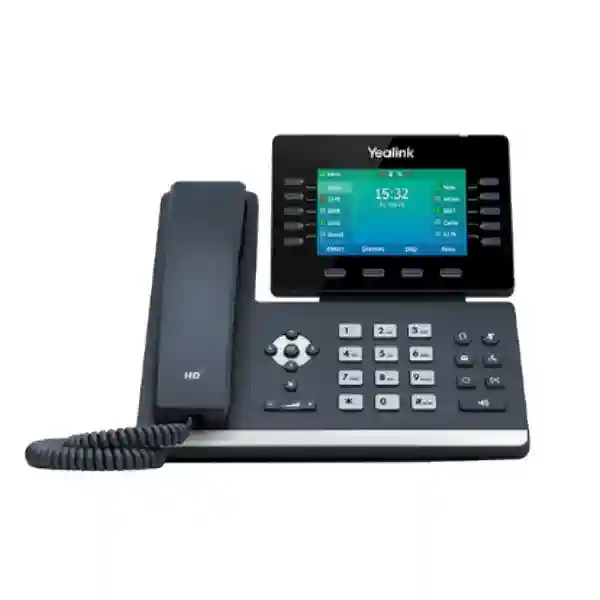
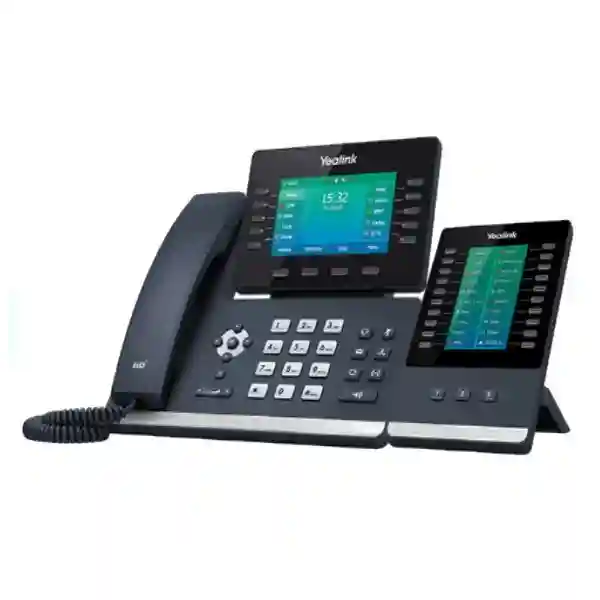
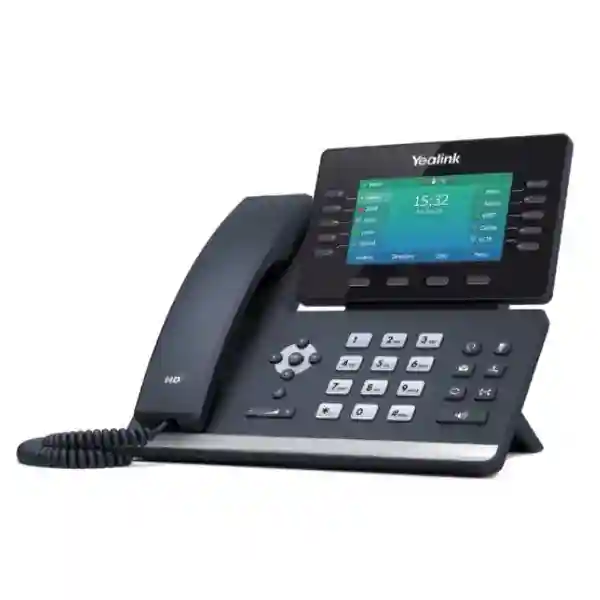
Yealink T54W with DD10K DECT Desk Phone for Enterprise Voice Communications
The Yealink T54W with DD10K is a professional desktop communications solution that combines the familiar control, screen visibility and programmable keys of a business SIP phone with Yealink DECT connectivity. It is designed for organizations that want fixed-position staff to remain part of a DECT environment without replacing the desktop experience with a small mobile handset. In practical deployments, the combination is especially useful at reception desks, warehouse control points, retail counters, hotel service stations, security posts, administrative offices and other locations where employees need a permanent telephone position plus integration with compatible Yealink wireless voice infrastructure.
At the center of the solution is the Yealink SIP-T54W, a feature-rich business phone with an adjustable 4.3-inch 480 × 272 color display, ten line keys, support for multiple SIP accounts, dual-port Gigabit Ethernet, IEEE 802.3af Power over Ethernet, integrated dual-band Wi-Fi, Bluetooth 4.2 and a USB 2.0 interface. The DD10K DECT USB dongle extends the platform into compatible Yealink DECT architectures. When correctly paired and provisioned with supported infrastructure, the result is a desk phone that can participate in a DECT system while preserving the direct visual controls that fixed-position employees frequently prefer.
For Uganda procurement teams, the important buying question is not simply whether the phone has DECT capability. A successful deployment requires validation of the existing or proposed Yealink base platform, firmware compatibility, SIP service, network segmentation, PoE availability, call-flow requirements and the expected mix of desk phones and cordless handsets. FourTeck can help structure the bill of materials around those practical conditions so buyers can avoid ordering a desk phone and dongle without the complementary infrastructure needed for the intended topology.
Instant Specifications & Procurement Fact Rail
T54W + DD10K DECT USB Dongle
Professional desktop voice with compatible Yealink DECT systems
Dual-port Gigabit Ethernet, PoE, dual-band Wi-Fi
USB 2.0, Bluetooth, compatible Yealink accessories
Project quotation recommended for confirmed configuration
Regional warranty terms confirmed on quotation
The procurement fact rail should be read as a configuration checkpoint rather than a substitute for solution design. The T54W can be powered by compatible PoE switching or an optional external power adapter, and its network connection can be wired or, where policy permits, wireless. The DD10K occupies the USB interface when used for DECT functionality, so buyers planning additional USB accessories should verify the intended accessory combination. The DECT architecture also needs to be mapped carefully: Yealink documents different operating modes in which the DD10K can help a supported desk phone participate in a Yealink DECT system or enable supported cordless-handset scenarios. Firmware and base-station compatibility should therefore be checked before deployment.
Operational Product Architecture & Overview
The T54W is built as a business SIP endpoint rather than a simple analog telephone. Voice signaling, network connectivity, directory services, programmable keys, local user controls and security functions are integrated into a single desktop platform. The phone supports SIP-based communications and can be configured through the device interface, browser-based administration or automated provisioning mechanisms. For IT teams, this matters because a fleet of phones can be incorporated into established deployment procedures instead of being configured independently at every desk.
The 4.3-inch backlit color display provides a larger information surface than a conventional cordless handset. Fixed-position users can see caller information, line states, soft-key functions and menu options without relying on a compact mobile interface. Ten illuminated line keys can be assigned to line appearances or operational functions, which is particularly valuable for reception, dispatch and supervisory roles. Busy Lamp Field, speed dial, transfer and pickup workflows can reduce the number of menu steps required for frequent call handling. The screen is adjustable, allowing the viewing angle to be changed for different desk heights and lighting conditions.
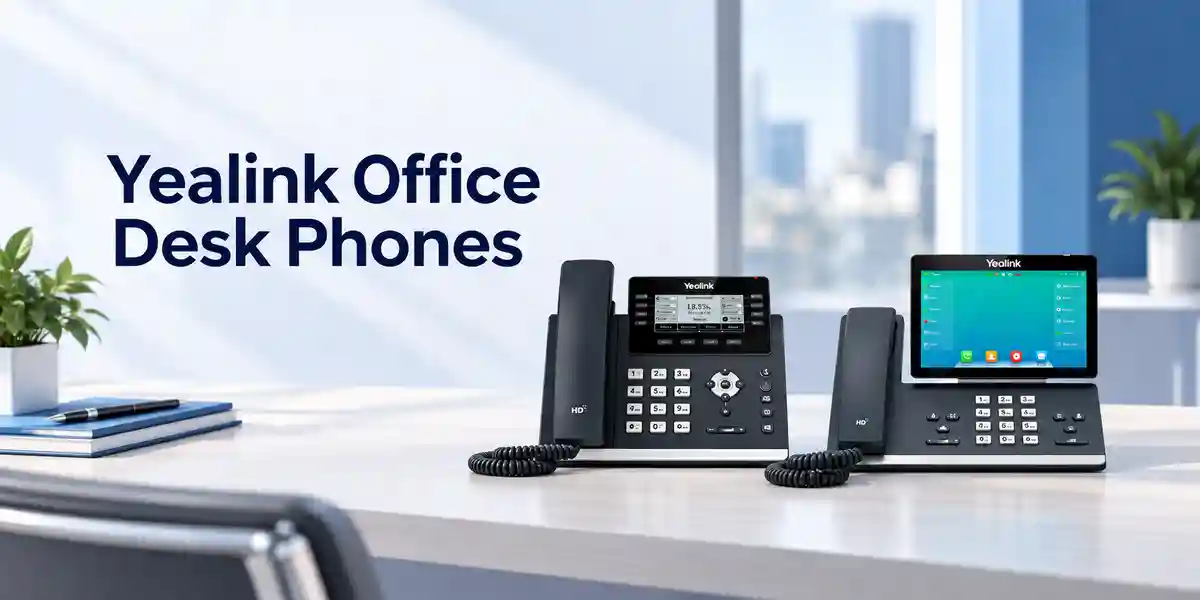
Audio architecture is another practical consideration. Yealink positions the T54W with HD handset and speaker capabilities, full-duplex hands-free operation, Acoustic Shield technology and Smart Noise Filtering. In real offices, these features are relevant when a desk is near conversations, customer queues, warehouse movement or other environmental noise. The handset is hearing-aid compatible, which can also support inclusive workplace planning. Codec support includes common enterprise voice formats, enabling integration with a broad range of SIP infrastructures when the call platform is correctly configured.
Network architecture is flexible. Dual Gigabit Ethernet ports permit the phone to sit between the network and a workstation where that topology is permitted, potentially reducing the need for a separate wall data outlet at each position. IEEE 802.3af PoE can simplify installation by carrying power over the network cable from a compatible switch. Integrated 2.4 GHz and 5 GHz Wi-Fi provides an alternative connection method where wired access is impractical, although enterprise buyers should still evaluate wireless coverage, VLAN design, QoS policy and security before choosing Wi-Fi for voice endpoints.
The DD10K adds the radio link that makes the combination distinct. Yealink states that the dongle supports a 1152 kbps DECT transmission rate and can be used with supported Yealink desk phones and DECT infrastructure. For the T54W+DD10K desk-phone scenario, compatible Yealink base stations can allow the desk phone to operate within a DECT system. This can be useful when an organization already uses Yealink cordless handsets and wants selected fixed-position workers to share the same wireless voice architecture. It can reduce the pressure to run a dedicated Ethernet path to every specific voice location in certain designs, but radio coverage, base capacity and local site conditions must still be engineered correctly.
The procurement pain point is often topology confusion. A DD10K does not by itself create a complete enterprise DECT network for every scenario. Buyers should identify whether the T54W is expected to act as a desk endpoint associated with an existing DECT base, whether cordless handsets are also required, and which base model and firmware are present. FourTeck can use those details to verify the proposed arrangement before shipment.
Enterprise Business Outcomes & Value Analysis
The combination gives fixed-position staff a full desktop interface with programmable line keys, color display, HD voice functions and established SIP call controls. For users who transfer, park, pick up or monitor calls repeatedly throughout the day, dedicated controls can be more efficient than navigating a compact cordless handset. Gigabit networking and enterprise QoS features allow the endpoint to participate in a properly segmented voice network.
Support for wired Ethernet, Wi-Fi, PoE and an optional external power supply gives solution designers multiple ways to fit the endpoint into existing infrastructure. Call-server redundancy is supported at the phone level. Continuity still depends on the wider PBX, LAN, power and DECT architecture, so resilient deployments should include UPS-backed switching, redundant call services where available and validated DECT coverage.
The T54W supports up to 16 VoIP accounts and can work with centralized provisioning. For larger estates, standardized templates and automated deployment can reduce repetitive configuration. In DECT environments, scaling depends on the chosen Yealink base architecture, handset counts, concurrent-call capacity and radio design rather than the desk phone alone.
The phone supports mechanisms including SRTP, TLS 1.3, HTTPS, certificate management, AES256 configuration-file encryption, 802.1X, secure boot and network segmentation features. Organizations should align these functions with their PBX, switch, identity and certificate policies rather than enabling settings in isolation.
Browser, phone and automated provisioning options can simplify lifecycle administration. Supported deployment methods include HTTP/HTTPS and other provisioning protocols, PnP and management functions appropriate to compatible platforms. Standardized firmware and templates across parts of the Yealink T5 family can also reduce operational variation.
PoE can eliminate a separate power adapter at each desk when compatible switching is already available. The published T54W power range is modest for an enterprise endpoint, while the ability to combine desktop and DECT roles can simplify selected deployments. Buyers should nevertheless price the complete architecture, including bases, switching, licenses, headsets, handsets and support.
Key Hardware & Software Highlights
The T54W combines a 4.3-inch 480 × 272 color screen with ten LED line keys, context-sensitive soft keys, navigation controls and dedicated function buttons. This physical layout is intended for users who need fast access to call functions throughout the working day. The handset, speakerphone and headset options provide several operating styles, while Bluetooth can support compatible wireless headsets and mobile contact synchronization. The USB 2.0 port supports several T54W expansion scenarios; when DD10K is used, buyers should plan USB requirements carefully.
On the network side, dual Gigabit Ethernet supports high-speed LAN pass-through and IEEE 802.3af Class 3 PoE. Built-in Wi-Fi supports 802.11a/b/g/n on 2.4 and 5 GHz bands. SIP signaling, VLAN tagging, QoS, IPv6 and common enterprise network services help the phone fit into managed LAN environments. Security capabilities include encrypted signaling and media options, HTTPS administration, secure boot and certificate functions. The exact security profile should be tested against the organization’s voice platform.
The DD10K is a compact USB DECT dongle measuring approximately 73 × 27 × 8 mm and weighing about 2 g. Yealink publishes a DECT transmission rate of 1152 kbps and radio ranges of up to 20–50 metres indoors and up to 300 metres outdoors under clear, ideal conditions. Actual coverage can be materially lower because of walls, shelving, reinforced concrete, metal structures, interference and building geometry. A site survey is recommended for operationally important coverage.
Technical Specifications Ledger
| Category | Specification | Procurement Relevance |
|---|---|---|
| Display | 4.3-inch 480 × 272 color display with backlight; adjustable angle | Clear line-state and caller information for fixed-position users. |
| SIP Accounts | Up to 16 VoIP accounts | Supports multi-line and multi-account business deployments. |
| Ethernet | Dual-port Gigabit Ethernet | Allows LAN connection and workstation pass-through where permitted. |
| Power | IEEE 802.3af PoE Class 3; optional 5V/2A adapter | Validate PoE budget or specify adapters where PoE is unavailable. |
| Wi-Fi | 802.11a/b/g/n, 2.4/5 GHz, up to 433 Mbps dynamic | Alternative network access for suitable wireless voice designs. |
| Bluetooth | Bluetooth 4.2 | Supports compatible headsets and mobile contact functions. |
| USB | 1 × USB 2.0 | Used by DD10K in the DECT desk-phone configuration. |
| DECT Dongle | DD10K, 1152 kbps transmission rate | Provides compatible Yealink DECT integration. |
| DD10K Range | Up to 20–50 m indoors; up to 300 m outdoors in ideal clear-view conditions | Real coverage requires site validation. |
| Audio | HD handset/speaker, full duplex, Acoustic Shield, Smart Noise Filtering, HAC handset | Designed for clear business calling and varied user needs. |
| Security | SRTP, TLS 1.3, HTTPS, AES256 configuration encryption, 802.1X, secure boot | Supports managed enterprise security policies when paired with compatible services. |
| T54W Dimensions | 233 × 222.6 × 186.1 × 41.7 mm published form dimensions | Check desk space and wall-mount requirements. |
| Environment | Operating temperature -10°C to 50°C; humidity 10–95% | Suitable placement still requires protection from moisture, dust and excessive heat. |
| Power Draw | Published T54W: 1.7–4.3 W PSU; 2.2–5.5 W PoE | Useful for PoE switch and UPS capacity planning. |
Specification values are manufacturer-published values for the T54W and DD10K families. Firmware revisions, regional radio requirements and accessory compatibility can affect deployment. A project quotation should therefore identify the exact required operating mode and existing infrastructure rather than relying only on the model name.
Configuration & Sizing Worksheet
1. Estimate users and workload
Count fixed desk positions separately from mobile DECT users. Identify receptionists, supervisors, warehouse controllers, service counters and other employees who need the T54W-style interface. Record the expected number of simultaneous calls, shared lines, monitored extensions and transfer destinations. This helps determine whether the proposed base architecture and PBX resources are appropriate.
2. Map the physical environment
Mark desk locations, walls, floors, warehouse racks, cold rooms, lifts and other radio obstacles. Published DECT ranges are laboratory-style maximums, not guaranteed building coverage. Multi-floor sites, metal shelving and reinforced structures can change propagation dramatically. Critical operations should use a proper coverage assessment before final quantities are ordered.
3. Validate power and cabling
Check whether every wired desk port comes from an IEEE 802.3af-capable switch and whether sufficient PoE budget remains. If not, identify where optional power adapters are required. Confirm whether a PC will share the phone’s second Ethernet port, whether VLAN tagging is needed and whether the switch access policy permits the planned topology.
4. Confirm base, firmware and accessory compatibility
Provide the exact Yealink base model, current firmware, PBX or hosted SIP service, existing handset models and desired operating mode. The DD10K supports specific Yealink combinations, and compatibility can be firmware-dependent. Also list USB headsets, expansion modules or recording requirements because the DECT dongle uses the phone’s USB connection.
5. Prepare the quote request
A useful request includes quantity, delivery city, existing base stations, required new bases, SIP platform, PoE switch availability, number of cordless handsets, headset requirements, provisioning method, desired warranty/support scope and target deployment date. For multi-site organizations, provide a per-site quantity schedule. This information allows a more accurate bill of materials and reduces revisions after the commercial quote is issued.

Deployment Scenarios & Industry Use Cases
Large Enterprise and Multi-Site Networks
Large organizations frequently operate a mixture of executive offices, service desks, reception points and mobile teams. The T54W+DD10K can serve selected fixed positions while compatible cordless devices serve roaming employees. Centralized SIP provisioning can standardize account settings, dial plans, security controls and directories across sites. Each branch should still have its own LAN, power and DECT coverage plan. Multi-site buyers should document extension numbering, survivability requirements, WAN dependencies and local support expectations before rollout.
Financial and Banking Institutions
Banks and financial institutions typically need predictable call handling at teller-support areas, back offices, customer service points and operations desks. The T54W offers dedicated line controls and security capabilities that can be incorporated into a managed voice design. Network access controls, encrypted signaling, media security, configuration governance and audit requirements should be aligned with institutional policy. DECT use should be evaluated against internal wireless-security standards and physical coverage boundaries.
Educational and Campus Networks
Schools, universities and training institutions often have administration offices, reception areas, libraries, laboratories, stores and maintenance teams spread across multiple buildings. A mixed desk-phone and DECT architecture can give administrators a full desktop interface while supporting mobile teams on compatible handsets. Campus planners should pay particular attention to building separation, outdoor paths, floor-to-floor coverage, network VLANs and emergency calling policies.
Government and Public-Sector Procurement
Government deployments benefit from clearly documented bills of materials, standardized configurations and controlled firmware processes. The T54W supports provisioning and security functions that can fit structured IT operations. Procurement documents should state the exact phone, DD10K, required base infrastructure, power method, accessories, support scope and acceptance criteria. Where sensitive communications policies apply, the organization’s technical authority should validate whether SIP, DECT and wireless features meet the required controls before deployment.
Retail, Hospitality and Warehousing
These environments are particularly relevant to the DECT desk-phone concept. A cashier supervisor, hotel reception desk or warehouse dispatch position may need a large display and dedicated call keys while other team members move around with cordless devices. Keeping the fixed desk endpoint within a compatible Yealink DECT environment can make the voice architecture more consistent. Radio surveys are especially important in warehouses and hotels because metal shelving, concrete cores, service corridors and multiple floors can affect coverage.
Technical Deep Dive 1: Processing, Voice and Radio Architecture
The T54W processes SIP signaling, voice codecs, display functions, directory access, network services and local call controls within the endpoint. It supports a range of common codecs, including wideband G.722 and established narrowband formats. Voice quality is not determined by the phone alone: LAN congestion, WAN latency, packet loss, jitter, codec policy, PBX configuration and the remote endpoint all influence the experience. The phone’s QoS and VLAN capabilities give network administrators mechanisms to classify voice traffic, but the switching and routing infrastructure must honor the same policy.
The DD10K creates a DECT radio interface through USB. This is operationally different from the T54W’s built-in Wi-Fi. Wi-Fi is an IP network connection, while DECT is used for compatible Yealink voice-device connectivity. Understanding that distinction prevents a common design mistake in which buyers treat both radios as interchangeable. The correct radio path depends on the intended topology, compatible base equipment and handset mix.
For capacity planning, consider both IP and radio resources. A desk phone may have multiple SIP accounts, but a DECT base system has its own registration and concurrent-call limits. Those limits differ by base platform. If a site expects many simultaneous calls, the base architecture must be sized for concurrency and coverage, not simply the total number of registered devices. In large facilities, multi-cell systems may be more appropriate than a single-base design. FourTeck can review these requirements as part of bill-of-materials validation.
Technical Deep Dive 2: Software Ecosystem, Firmware Security & Operational Control
Enterprise phones become easier to manage when configuration is treated as code-like policy rather than manual desk work. The T54W supports automated provisioning using standard mechanisms and can be incorporated into compatible centralized management processes. Administrators can define SIP accounts, time settings, directories, line keys, network parameters and security controls centrally. This is particularly important when tens or hundreds of endpoints must be deployed consistently.
Firmware governance deserves equal attention. New units should be checked against the organization’s approved firmware baseline before deployment, especially when DD10K or a specific DECT base is involved. Compatibility notes can specify minimum releases for particular combinations. A controlled process should record the approved version, test it against the PBX and base system, stage a pilot group, and then roll it out to the wider estate. Automatic updates should follow organizational change-control policy rather than being enabled without oversight.
Security functions such as TLS, SRTP, HTTPS, certificate management, AES-encrypted configuration files, 802.1X and secure boot can strengthen an enterprise deployment, but interoperability must be validated. Certificates need correct trust chains and dates; PBX services need matching protocol support; switch ports need compatible authentication policy. Security should therefore be implemented as an end-to-end voice-system design.
Technical Deep Dive 3: Availability, Redundancy & Recovery
A desk phone is only one component of service availability. The T54W supports call-server redundancy, but meaningful resilience requires redundancy across the broader path. PoE switches should be protected by UPS where voice continuity is important. WAN-dependent hosted calling may require redundant internet paths. On-premises call platforms may require high-availability servers, resilient gateways and tested backup configurations. DECT base coverage and capacity should also be considered so that the loss of one component does not unexpectedly isolate critical users.
Recovery planning should include configuration backups and documented replacement procedures. If a phone fails, the organization should know how a replacement unit receives the correct firmware, account configuration, certificates, line-key assignments and directory settings. Centralized provisioning can shorten this process considerably. For DD10K-based installations, replacement procedures should also document pairing and base registration steps.
Organizations with critical operations should test failure scenarios instead of assuming redundancy works. Disconnect a WAN link in a maintenance window, test PBX failover, verify UPS runtime, confirm emergency calling behavior and check whether DECT users retain required service. These exercises reveal dependencies that product specifications alone cannot show.
Pre-Purchase Buyer Gap Checklist
Does the DD10K replace a DECT base? Not in every topology. The dongle provides DECT capability to supported Yealink phones, while the intended operating mode may still require compatible Yealink base infrastructure. State your existing base model and desired design when requesting a quote.
Will every feature work with every PBX? Basic SIP interoperability is broad, but advanced features such as BLF, directories, centralized recording, executive-assistant functions or specific provisioning methods depend on the call platform and configuration. Confirm required features before ordering.
Are there hidden licenses? The physical phone and dongle do not define the licensing model of your PBX, hosted voice service or management platform. Ask your service provider whether each extension, device, recording function, contact-center feature or management service requires a subscription.
Can the phone use Wi-Fi and DECT? The T54W includes Wi-Fi for IP network connectivity and the DD10K provides compatible DECT functionality. These technologies serve different roles. The intended network and radio architecture should be documented before installation.
What happens to the USB port? The T54W has one USB 2.0 port, and the DD10K uses USB. If your design also needs USB recording, a USB headset or EXP50 modules, verify accessory coexistence and the exact intended configuration.
Is the advertised radio range guaranteed? No. Manufacturer range figures are maximum reference values under stated conditions. Real buildings introduce attenuation and reflections. Warehouses, hotels and multi-floor offices should be surveyed.
Does PoE mean no local adapter is needed? Yes, when the connected switch or injector provides compatible IEEE 802.3af power and has sufficient budget. Otherwise an appropriate external adapter may be required.
What should be checked for lifecycle planning? Confirm current firmware support, compatibility with the selected DECT base, availability of replacement accessories and alignment with the organization’s PBX roadmap. Standardizing on a tested configuration reduces future support complexity.
Uganda Regional Procurement & Delivery Logistics
FourTeck Uganda can prepare project quotations for single units, branch deployments and larger enterprise rollouts. To accelerate quotation, buyers should provide the quantity of T54W+DD10K positions, delivery location, required base stations, existing Yealink infrastructure, SIP platform, PoE availability and accessory requirements. Where a customer already owns Yealink DECT equipment, model and firmware information is particularly useful because it allows compatibility to be reviewed before commercial confirmation.
Order processing can include bill-of-materials validation, accessory checks and coordination of available stock or project supply. Delivery timing varies according to quantity, configuration, stock position and destination, so lead time should be confirmed on the formal quotation rather than assumed from a generic product page. For scheduled deployments, include the required installation date so procurement and logistics can be planned backward from the operational deadline.
Technical pre-configuration can be discussed for suitable projects. Depending on scope and customer requirements, staging may include firmware alignment, provisioning preparation, labeling, account templates or deployment documentation. Credentials and security-sensitive configuration should be handled under an agreed process. Customers using a hosted PBX should provide the provider’s supported provisioning method and any device onboarding requirements.
Uganda Coverage Matrix
Kampala: enterprise headquarters, financial institutions, hotels, retail groups, healthcare administration and contact operations can request project supply and deployment planning. Entebbe: offices, hospitality properties, logistics organizations and service facilities can specify fixed desk and mobile DECT requirements. Jinja: industrial, education, hospitality and branch-office buyers can request quantity-based quotations. Mbarara: regional offices, institutions and multi-site businesses can plan standardized voice endpoints with centralized configuration. Gulu: government, education, NGO and commercial organizations can request solution sizing and delivery coordination. For locations outside these hubs, provide the district and final delivery point so logistics can be included in the quotation.
Cross-Border & Regional Supply Chains
Organizations operating across East Africa and the Gulf often benefit from standardizing phone models, firmware and accessories across countries. FourTeck regional channels can support procurement coordination for Uganda, Kenya, broader African markets, the UAE and Kuwait. Multi-country buyers should provide a country-by-country quantity schedule, destination addresses, required delivery windows and any local PBX differences. Standardization can simplify spares, user training and support, but radio regulations, power accessories, warranty processes and local logistics should be confirmed for each destination.
Related Yealink Solutions & Internal Product Paths
A complete voice deployment may require more than the T54W and DD10K. Buyers can explore the Yealink product range in Uganda for compatible desk phones, DECT infrastructure, handsets and conferencing options. Projects that require roaming users should consider compatible Yealink DECT handsets and the appropriate single-cell or multi-cell base architecture. High-volume reception or attendant positions may also need programmable expansion options, while headset-intensive roles should include compatible wired or wireless headsets in the bill of materials.
For network readiness, confirm suitable networking infrastructure and PoE capacity. Sites with critical voice services should consider UPS-backed switching and resilient internet or WAN connectivity. The best related-product selection depends on the number of users, simultaneous calls, mobility pattern, building layout and call platform; these requirements should be assessed together rather than purchasing accessories independently.
FourTeck Technical Service Capabilities
FourTeck can assist with engineering validation before shipment by reviewing the requested phone quantity, DD10K requirement, DECT base platform, handset mix, PoE environment and PBX details. Bill-of-materials verification is valuable when a project includes several Yealink device types because one missing base, power component or accessory can delay deployment even when the phones themselves are available.
For larger rollouts, staging requirements can be defined before dispatch. This may include checking hardware quantities, confirming firmware baselines, preparing provisioning templates, labeling units by site or extension plan and documenting installation steps. Pre-shipment firmware updates can reduce the amount of work required at remote branches, provided the approved release has been agreed with the customer.
Post-sales technical support can focus on product setup, compatibility troubleshooting and deployment guidance within the agreed project scope. Complex PBX, LAN or security issues may require coordination with the customer’s service provider or network team because endpoint behavior depends on the wider environment. Clear documentation of the deployed topology makes later troubleshooting faster.
Extended Technical FAQ
1. What exactly does the DD10K add to the Yealink T54W?
The DD10K is a USB DECT dongle that adds compatible Yealink DECT functionality to supported desk phones, including the T54W. In a suitable deployment, the T54W+DD10K can participate in a Yealink DECT environment while retaining the larger display, line keys and fixed-position workflow of a desk phone. Yealink also documents DD10K operating scenarios involving supported cordless handsets. Because the exact behavior depends on base model, phone firmware and topology, buyers should state whether the T54W will join an existing W-series base system or is intended for another supported arrangement.
2. Can the T54W+DD10K work with the Yealink W70B?
Yes, Yealink specifically presents the T54W+DD10K DECT desk phone as a device that can be paired with compatible Yealink DECT infrastructure such as W70B. The W70B supports a defined total number of registered DECT devices, so capacity should be calculated across desk phones and cordless handsets rather than treating each device category separately. Firmware compatibility should also be checked. If you already have W70B units, include their firmware version and the models of existing handsets in the quote request so the proposed addition can be reviewed.
3. Does this phone require Ethernet when used with DECT?
That depends on the selected operating topology. The T54W itself has dual Gigabit Ethernet and built-in Wi-Fi, while the DD10K provides a DECT interface. In a DECT desk-phone arrangement, the radio relationship to the compatible Yealink base is central to the design. Buyers should not assume that every feature or provisioning path behaves identically in every mode. Explain whether the goal is to avoid cabling at a particular desk, integrate a fixed phone into an existing DECT estate, or attach cordless handsets to a desk-phone-based arrangement; the correct configuration can then be validated.
4. How many SIP accounts does the T54W support?
The T54W supports up to 16 VoIP accounts. This gives administrators flexibility for multi-line users, shared identities and different SIP service arrangements. The practical number of accounts used at a desk should be driven by the PBX design and user workflow rather than simply by the maximum specification. Line-key assignments, BLF monitoring, shared lines and call-routing policy should be planned together. Hosted PBX providers may also apply per-user or per-device licensing, so service subscription terms should be checked separately from the phone’s hardware capability.
5. What power options are available?
The T54W supports IEEE 802.3af Power over Ethernet, Class 3, allowing a compatible PoE switch to deliver network connectivity and power over the Ethernet cable. Yealink also specifies an optional external adapter with 100–240 V AC input and 5 V/2 A DC output. PoE is often preferred in enterprise deployments because phones can be powered centrally from UPS-backed switches, but the switch’s total PoE budget must be checked. If a location has no PoE, include the required adapter in the quotation rather than assuming it is bundled.
6. What security features are available for enterprise deployments?
The T54W supports a range of network and voice security mechanisms, including SRTP, TLS 1.3, HTTPS administration, certificate management, AES256 configuration-file encryption, 802.1X, secure boot, VPN options and network segmentation functions. These capabilities are building blocks rather than an automatic security guarantee. The PBX must support compatible encryption, certificates must be managed correctly, switch authentication must be configured, and administrators should disable unnecessary services. Organizations with formal security standards should test the phone against their approved voice architecture before mass deployment.
7. Can the phone be centrally provisioned?
Yes. Yealink documents configuration through the phone, browser interface and automated provisioning methods, including HTTP/HTTPS and other supported protocols. Centralized provisioning is strongly recommended for larger deployments because it allows administrators to apply consistent SIP settings, network parameters, line keys and other configuration without manually programming every endpoint. A controlled template also makes replacement easier. For hosted voice services, confirm whether the provider supports Yealink zero-touch or its own device onboarding process. Firmware should be tested with the service before a large fleet is upgraded.
8. How far will the DECT connection reach?
Yealink publishes DD10K reference ranges of approximately 20–50 metres indoors, with a maximum of 50 metres, and up to 300 metres outdoors in clear-view ideal conditions. These figures should not be interpreted as guaranteed site coverage. Reinforced concrete, metal warehouse racks, lift shafts, multiple floors, machinery and building geometry can reduce usable range. For a small open office, a simple validation may be sufficient; for warehouses, hotels, hospitals, campuses or operationally critical sites, a radio survey and careful base placement are much safer than designing from maximum published distance.
9. Can we use Bluetooth headsets and other USB accessories?
The T54W has built-in Bluetooth 4.2 and supports compatible Bluetooth headset functions. It also has a USB 2.0 port that can support several accessories in standard T54W deployments, including supported USB headsets, recording media and expansion modules. However, the DD10K itself connects through USB. This makes accessory planning important for the specific DECT configuration. If a user needs a DD10K plus a particular headset or expansion module, list all required accessories when requesting the quote so coexistence and connection requirements can be checked before purchase.
10. What information should we send FourTeck for a deployment quote?
Provide the number of T54W+DD10K desk positions, the exact Yealink DECT base model already installed or required, existing handset models, current firmware if known, PBX or hosted SIP provider, number of simultaneous calls, PoE availability, delivery city, headset needs, expansion requirements and target deployment date. For multi-site projects, separate quantities by branch. If the goal is to solve a specific problem—such as adding a fixed reception phone to an existing DECT network or avoiding new cabling at a warehouse desk—state that goal explicitly. It helps the technical team validate the topology rather than quoting isolated hardware.
Prepare Your Yealink T54W + DD10K Procurement Request
A reliable deployment starts with the complete environment, not only the phone model. Send FourTeck Uganda your required quantity, site locations, existing Yealink DECT base models, SIP platform, PoE status, handset mix and accessory needs. The team can use this information to review the bill of materials, identify compatibility checkpoints and prepare a commercial quotation aligned with the intended deployment. For multi-branch projects, include a location-by-location schedule so delivery and staging requirements can be planned clearly. If you are replacing an existing phone estate, also include the current models and the operational reason for the change; this helps preserve important functions such as BLF, transfer workflows, shared lines and directory access.



Reviews
There are no reviews yet.