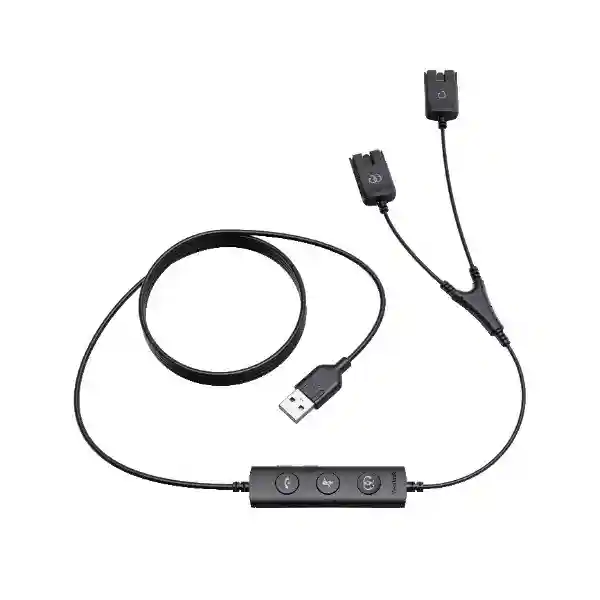
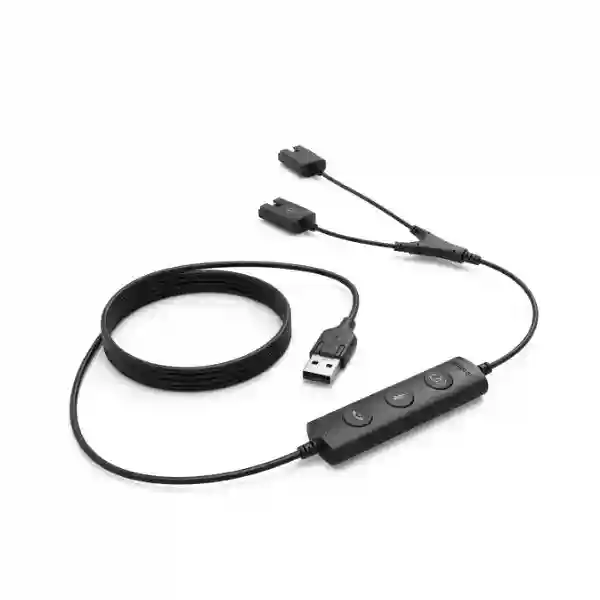
Yealink USB QD Trainer Cable – Dual-Headset Call Centre Training Accessory
The Yealink USB QD Trainer Cable is built for organisations that need a simple, repeatable way for a supervisor and an agent to work from the same PC audio session. Instead of moving headsets between workstations or relying on loudspeaker monitoring, the cable provides a purpose-built connection for two compatible Yealink Quick Disconnect headsets. Yealink positions the accessory for YHS-series headsets and specifically lists training-mode support with YHS34 and YHS36 models. This makes it particularly relevant to contact centres, customer-service teams, help desks, reservations teams, collections operations, telesales groups and internal support desks where new staff need supervised live-call exposure.
The operational value is straightforward: an agent can remain on the normal headset while a trainer joins the same PC connection. The supervisor can participate or remain muted and listen, depending on the coaching workflow. The cable can also function as a USB-to-QD adapter, giving IT teams a useful connectivity option when standardising Yealink QD headsets around computer-based calling. There is no network configuration, rack allocation or separate power supply to plan; the procurement focus is compatibility, quantity, workstation USB availability and headset model validation.
For Uganda deployments, FourTeck can assist buyers with compatibility checking, quantity planning, accessory matching and commercial quotation before order placement. This is useful when a contact centre is expanding in phases or when a training cable must match an existing fleet rather than a new headset purchase.
Instant Procurement Facts
USB/QD Trainer Cable
Yealink
1300084 (single-piece listing)
Supervisor and agent training
Yealink YHS series
USB to dual QD headset training
Commercial availability, packaging, warranty handling and delivery lead time should be confirmed on the current FourTeck quotation because these can vary by sourcing batch and order quantity.
Operational Architecture and Product Overview
A training cable is a small component, but in a high-volume service operation it solves a very specific workflow problem. New agents need to hear authentic customer conversations, supervisors need to assess call handling, and experienced staff may need to intervene during coaching. A conventional single-headset workstation makes that awkward. Sharing an earpiece is impractical, speakerphone monitoring reduces privacy, and repeatedly reconnecting devices interrupts the agent’s routine. The Yealink trainer cable creates a dedicated two-headset path from one computer so coaching can occur at the workstation.
The design uses Yealink’s QD headset ecosystem. Quick Disconnect connections are useful in staffed environments because the headset and lower cable can be separated without treating the complete headset as a permanently tethered workstation component. In the training arrangement, two QD headsets can be associated with the same PC-side connection. Yealink describes a shorter supervisor cable than agent cable, which helps distinguish the two positions and keeps the supervisor connection close to the coaching seat.
For procurement teams, the most important architectural question is not bandwidth or switching capacity; it is endpoint compatibility. Buyers should identify the exact Yealink headset model already deployed, confirm that it belongs to the supported QD family, document the PC connection requirement and determine whether the cable will remain assigned to a permanent trainer station or circulate between hot desks. Yealink’s current headset materials list the USB/QD Trainer Cable for YHS34 and YHS36. This gives buyers a clear reference point when planning a supported training setup.
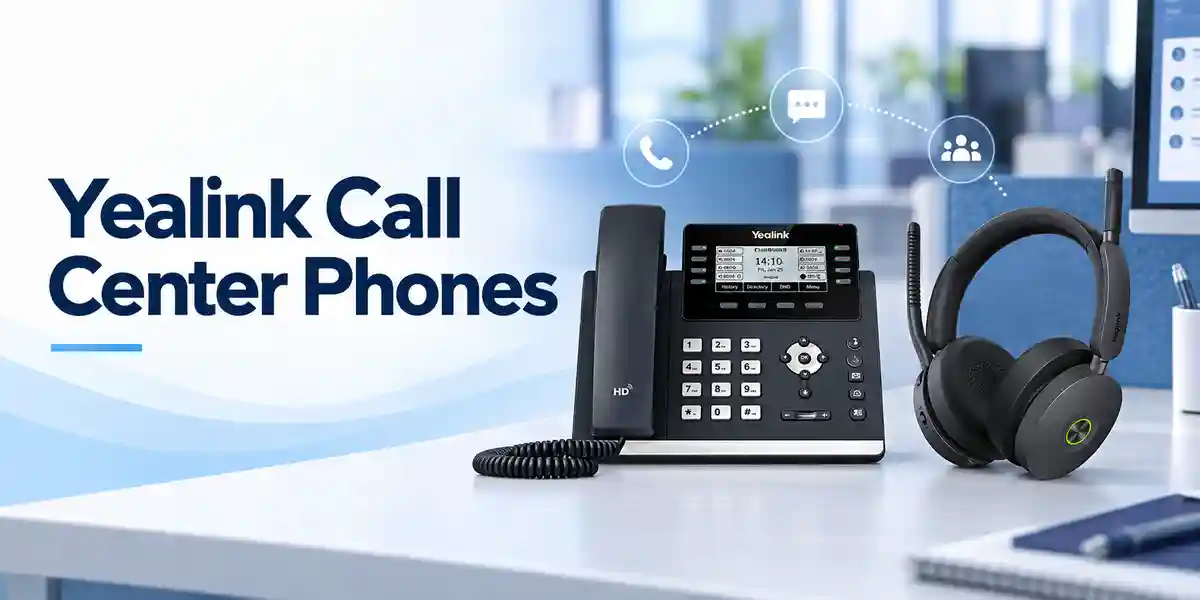
In larger contact centres, trainer cables can be treated as shared operational accessories. A ratio can be established based on the number of team leaders, nesting desks and new-hire cohorts rather than purchasing one cable for every agent. Smaller service teams may prefer one cable per supervisor. Spare units can also be held to reduce downtime from accidental cable damage in high-turnover desk environments.
Enterprise Business Outcomes and Value
1. Faster Agent Onboarding
Supervisors can sit beside new agents and share the same live-call audio path. This reduces the friction between classroom training and production calls and gives new employees immediate exposure to real customer scenarios.
2. Practical Quality Monitoring
A supervisor can listen while remaining muted, allowing observation of greeting quality, process adherence, questioning technique and escalation handling without forcing the call onto a room speaker.
3. Consistent Workstation Method
The agent continues using the normal headset and PC workflow. Training therefore happens within the same physical setup used for day-to-day service rather than on a separate demonstration station.
4. Better Hot-Desk Flexibility
Yealink identifies the accessory as suitable for hot-desking scenarios. Teams can keep trainer cables with supervisors or designated coaching desks and deploy them when required.
5. Simplified Accessory Standardisation
Organisations already using compatible YHS QD headsets can add a training function without introducing an unrelated headset platform, helping IT teams keep spares and user guidance more consistent.
6. Low Infrastructure Overhead
The cable does not require rack space, a network port, an external power brick or a dedicated management server. Deployment planning centres on endpoint compatibility and operating workflow.
Key Hardware and Workflow Highlights
The defining feature is the ability to connect two compatible Yealink QD headsets to a single PC simultaneously. That physical arrangement enables supervisor-and-agent participation on the same call. Yealink also describes the product as capable of acting as a QD-to-USB adapter. For operations teams, this dual role can make the accessory useful beyond formal training sessions, especially where QD headsets are retained as part of a standard desk kit.
The cable is intentionally simple. There is no complex configuration layer to administer, which is valuable for contact centres where accessories may move between desks. The supervisor lead is shorter than the agent lead, helping the cable layout correspond to the intended seating positions. The accessory is therefore best understood as a workflow enabler: it converts a single-user PC headset position into a two-person training position while preserving the familiar headset experience.
Technical Specifications Ledger
| Specification | Details |
|---|---|
| Brand | Yealink |
| Product type | USB/QD headset training cable |
| Primary application | Call-centre agent training and supervisor monitoring |
| Headset connections | Two compatible Yealink Quick Disconnect headsets |
| Host connection | USB PC connection |
| Compatible family | YHS series; Yealink materials specifically identify YHS34/YHS36 training support |
| Adapter function | Can operate as USB-to-QD adapter |
| Known single-unit MPN | 1300084 |
| External power | No separate power adapter normally required |
Specifications should be validated against the exact supplied part and current manufacturer documentation before a large rollout. Packaging quantities and regional warranty terms may vary by channel.
Configuration and Sizing Worksheet
- Identify headset models: record every YHS model in the target department. Do not assume that every headset using a detachable lower cable is automatically compatible.
- Count training positions: determine simultaneous coaching sessions at peak onboarding periods rather than total agent count.
- Check PC ports: document available USB connectivity and whether workstation policies restrict peripheral changes.
- Map supervisor workflow: decide whether trainer cables stay at fixed coaching desks or move with team leaders.
- Plan spares: busy contact centres should consider operational spare stock because cables are handled frequently.
- Prepare the quote: include headset model, quantity, cable quantity, delivery city and any requested staging or compatibility validation.
A practical sizing example is a 60-seat service operation with six team leaders and two dedicated nesting coaches. Rather than automatically ordering 60 trainer cables, procurement can start by identifying how many live coaching sessions occur concurrently. If eight supervisors or coaches may train at once, eight active cables plus an agreed spare allowance may be more appropriate. The correct ratio depends on operating policy, shift overlap and new-hire frequency.
Deployment Scenarios and Industry Use Cases
Large Enterprise and Multi-Site Service Desks
Enterprises running central customer-service or internal IT desks can use trainer cables during onboarding and quality sessions. A standard kit can be issued to each supervisor and moved between compatible workstations. Multi-site organisations can replicate the same kit across branches to keep coaching procedures consistent.
Financial and Banking Contact Centres
Banks and financial-service operations often require tightly supervised onboarding because agents handle sensitive processes and scripted verification. A dual-headset training position lets the trainer monitor how an agent follows approved procedures while keeping the normal workstation headset workflow. Organisations should still apply their own privacy, recording and customer-notification policies.
Education and Campus Support
University help desks, admissions call teams and campus service centres can use the cable when training temporary or seasonal staff. Supervisors can demonstrate call handling without replacing the existing PC endpoint.
Government and Public-Service Desks
Citizen-service centres and government help desks can use trainer positions for controlled staff induction and service-quality review. Procurement teams should confirm compatibility, warranty channel and required quantities before tender or purchase-order release.

Three Technical Deep Dives
1. Audio Path and Connection Architecture
Unlike an IP phone, switch or gateway, the trainer cable does not perform packet routing. Its job is at the endpoint: create the physical connection that lets two QD headset users work from one computer audio session. This distinction matters during design reviews because the cable should not be treated as a substitute for call-centre platform monitoring features. It is a local workstation training accessory. The host PC and calling application still provide the call itself, while the trainer cable enables the two-person headset arrangement.
2. Software Ecosystem and Operational Control
The cable’s value is its low administrative overhead. There is no separate subscription tier identified for the cable itself and no standalone management console. However, the calling application, operating system and enterprise endpoint policies remain relevant. Before a large deployment, IT should test the complete combination of PC, soft client, headset model and trainer cable in the production image. This verifies audio-device behaviour and ensures local security controls do not block peripheral use.
3. Reliability, Spares and Continuity
Continuity planning for a passive training accessory is different from server redundancy. The primary risks are physical wear, accidental loss, connector damage and lack of spare stock during a training wave. Organisations can mitigate these risks by labelling cables, assigning them to supervisors, storing spares centrally and including cable inspection in headset maintenance routines. This simple operational discipline is often more useful than overengineering the accessory deployment.
Pre-Purchase Buyer Gap Checklist
Is it for every Yealink headset? No assumption should be made. Yealink positions this USB/QD trainer cable around its QD YHS family, with current materials explicitly listing YHS34 and YHS36. Validate the exact headset model before ordering.
Does it replace software supervisor monitoring? It serves a different purpose. This is a local dual-headset training accessory. Contact-centre platforms may separately provide recording, silent monitoring, whisper or analytics features.
Are there recurring cable licence fees? The physical cable itself is not presented as a subscription product. Any licence requirements would arise from the calling platform or contact-centre software, not from the basic cable accessory.
What hidden infrastructure is needed? No rack unit, Ethernet switch port or separate AC feed is normally required. Buyers should instead verify workstation USB connectivity and supported headset models.
What about warranty? Warranty treatment can depend on region, distributor and purchase channel. Use the commercial quotation and supplied warranty documentation as the controlling reference.
How many should we buy? Size to simultaneous coaching positions, not automatically to total agents. Include a sensible spare allowance for high-use operations.
Uganda Procurement and Delivery Logistics
FourTeck Uganda can prepare a commercial quotation based on the requested quantity, destination and compatibility requirements. Buyers should provide the exact Yealink headset model where possible, because this reduces the risk of ordering an accessory for an incompatible headset fleet. For larger contact-centre projects, include the number of agents, supervisors, training desks and planned spare units so the quotation can reflect the operational design rather than a simple unit count.
Order processing may include bill-of-materials validation, sourcing confirmation and delivery planning. Lead time depends on current stock position, quantity and sourcing route, so project teams should request a dated quotation before committing deployment milestones. For phased rollouts, procurement can also separate an initial validation quantity from the wider production order.
Local Coverage Across Uganda
FourTeck supports business procurement requirements across Kampala, Entebbe, Jinja, Mbarara and Gulu, as well as other Uganda locations subject to delivery arrangements. Kampala contact centres may require rapid accessory replenishment for high-density operations, while regional offices may prefer consolidated shipments with headsets and related communications equipment. Entebbe hospitality and travel-service desks, Jinja industrial and service organisations, Mbarara regional enterprises and Gulu institutions can request project-specific quotations with delivery destination clearly stated. For multi-branch orders, provide a site-by-site quantity schedule so logistics and packing can be planned around the rollout.
Cross-Border and Regional Supply
Organisations operating across East Africa or the Gulf can coordinate related procurement through FourTeck Uganda, FourTeck Kenya, FourTeck Africa, FourTeck UAE and FourTeck Kuwait. Cross-border projects should identify destination country, receiving entity, required quantities and desired delivery window at quotation stage. Regional standardisation is especially useful when the same Yealink headset family is deployed in several offices because accessory kits and support documentation can be aligned across sites.
Related Yealink Procurement Options
A trainer cable is usually purchased as part of a wider headset or unified-communications environment. Buyers can review the Uganda product portfolio and request compatible Yealink YHS34 or YHS36 headset options, spare ear cushions, desk-phone accessories, USB wired headsets and call-centre endpoint solutions. Where a business is refreshing complete workstations, it is useful to quote headsets, training accessories and spare consumable components together. This gives procurement one consolidated view of the deployment bill of materials and helps engineering teams validate that the selected cable matches the headset generation being supplied.
FourTeck Technical Service Capabilities
FourTeck can support engineering validation before supply by reviewing the requested Yealink models and accessory relationships. For contact-centre projects, bill-of-materials verification can help identify whether the requested quantity reflects active seats, supervisor positions and spare requirements. Where practical, a sample or pilot quantity can be used to validate the workstation combination before a large rollout.
Pre-shipment support can include order verification and accessory matching. For active devices in a wider project, firmware and configuration requirements can be coordinated separately where applicable; the trainer cable itself does not require firmware. Post-sales assistance can focus on confirming the supplied part, deployment arrangement and escalation path if a compatibility or warranty issue arises.
Technical FAQ
Can two people listen to the same call with this cable?
Yes. Yealink describes the USB/QD Trainer Cable as allowing two Yealink Quick Disconnect headsets to connect to one PC simultaneously. This is intended to let an agent and supervisor share a call during training. The supervisor can participate or remain muted and listen. The exact behaviour experienced in a specific calling application should still be tested with the organisation’s PC image and headset models before a large deployment.
Which Yealink headsets are suitable?
The product is positioned for Yealink’s YHS QD headset family. Yealink’s current headset solution materials specifically list the USB/QD Trainer Cable for YHS34 and YHS36 and identify training-mode support for those models. If your organisation uses another Yealink headset, provide the exact model number before purchase rather than assuming connector appearance alone guarantees compatibility.
Can the cable be used as a USB-to-QD adapter?
Yes. Yealink states that the cable can also be used as a USB-to-QD adapter. This can be useful where a compatible QD headset needs to connect to a PC-based calling environment. For fleet planning, verify the complete endpoint combination, because the calling application and operating system remain part of the audio path even when the physical headset connection is correct.
Does the cable need a power adapter?
The trainer cable is designed as a workstation headset accessory and is not normally deployed with a separate AC power supply. That simplifies desk installation because there is no extra wall adapter, rack power requirement or UPS load to plan. The PC-side USB connection is the key host interface. Buyers should confirm available USB ports and any corporate endpoint restrictions before rollout.
Does it require a subscription or licence?
The physical Yealink trainer cable is not presented as a separately licensed subscription product. However, your softphone, unified-communications platform or contact-centre application may have its own user, supervisor, recording or monitoring licences. Those software entitlements are separate from the cable. Procurement teams should therefore distinguish between the physical two-headset training accessory and any platform-level supervision features required by their operating model.
Is this the same as contact-centre silent-monitoring software?
No. The cable creates a local physical training arrangement at the PC so two compatible headset users can share the session. Platform-based silent monitoring, whisper coaching, call recording and quality management are software functions that may operate remotely and can have different compliance implications. The cable is particularly useful for side-by-side coaching where the supervisor is physically present with the agent.
How should a large call centre determine quantity?
Start with the maximum number of simultaneous coaching sessions. Count team leaders, nesting coaches and dedicated training desks, then consider shift overlap and hiring waves. Add a spare allowance based on how intensively accessories are moved between desks. This approach usually gives a more realistic requirement than ordering one trainer cable per agent, because most mature operations do not coach every seat simultaneously.
What should be provided when requesting a Uganda quotation?
Provide the product name, required quantity, exact Yealink headset model, delivery city and preferred project timing. If the purchase is part of a wider contact-centre rollout, also share the number of agents and supervisors and whether new headsets are required. This allows the supplier to validate the accessory relationship and prepare a clearer bill of materials rather than quoting an isolated cable without deployment context.
How is warranty handled?
Warranty terms can vary by supply channel, region and commercial agreement, so the current FourTeck quotation and accompanying warranty documentation should be used as the controlling reference. Keep purchase records, serial or part information where applicable, and original order documentation. If a cable develops a suspected defect, support teams may first verify the headset and PC combination to distinguish an accessory fault from an endpoint configuration issue.
Can it be deployed in hot-desking environments?
Yes. Yealink specifically highlights the trainer cable as suitable for hot-desking use. Organisations can keep the accessory with supervisors, training teams or designated shared desks. For reliable operations, label shared cables, define a storage location and include them in periodic workstation checks. This reduces loss and makes it easier for supervisors to locate a working training kit when coaching is scheduled.
Request a Yealink USB QD Trainer Cable Quote in Uganda
For a correctly scoped quotation, send FourTeck the Yealink headset model you plan to use, the number of simultaneous training positions, required cable quantity and delivery location. This allows the commercial and technical teams to check the intended accessory relationship and prepare a project-specific offer. Organisations refreshing a complete call-centre environment can also request compatible headsets and related endpoint accessories in the same bill of materials.



Reviews
There are no reviews yet.