Professional USB Extension for Meeting Rooms
Yealink USB2CAT5E-EXT USB 2.0 over CAT5e Extender for Meeting Rooms
The Yealink USB2CAT5E-EXT is designed for a familiar meeting-room infrastructure problem: the USB camera or peripheral needs to sit where it provides the best operational result, while the room computer, mini-PC or conferencing host must remain somewhere else. Standard passive USB cabling can make that layout awkward. This dedicated extender converts the physical transport path so that a CAT5e cable can bridge the distance between the transmitter and receiver, allowing a supported USB 2.0 device to be positioned up to 40 metres from the host-side connection.
For procurement teams, the important point is that this is not an Ethernet networking device. The RJ45 connectors provide the CAT5e transport path between the paired extender units; they should not be treated as ordinary LAN ports. The solution is rated for USB 2.0 high-speed transmission up to 480 Mbps. Yealink documents the accessory for flexible meeting-room deployment and identifies it as suitable for extending USB connections used by models including UVC34, UVC40, UVC84 and UVC86, subject to the connected device operating within the supported USB 2.0 requirements.
Uganda buyers can use the USB2CAT5E-EXT when a boardroom, training space, conference room or collaboration suite requires cleaner cable routing, centralized compute placement or greater separation between the USB endpoint and host. Before purchase, FourTeck can help validate the endpoint model, host interface, intended cable route and approximate distance so the accessory is specified for the correct application.
Instant Specifications & Procurement Facts
USB2CAT5E-EXT / Part 1303109
Up to 40 metres
USB 2.0 high-speed, up to 480 Mbps
48V/0.7A DC adapter; 100–240V AC input
2 × USB Type-A, 1 × RJ45
Contact FourTeck for current Uganda supply and lead time
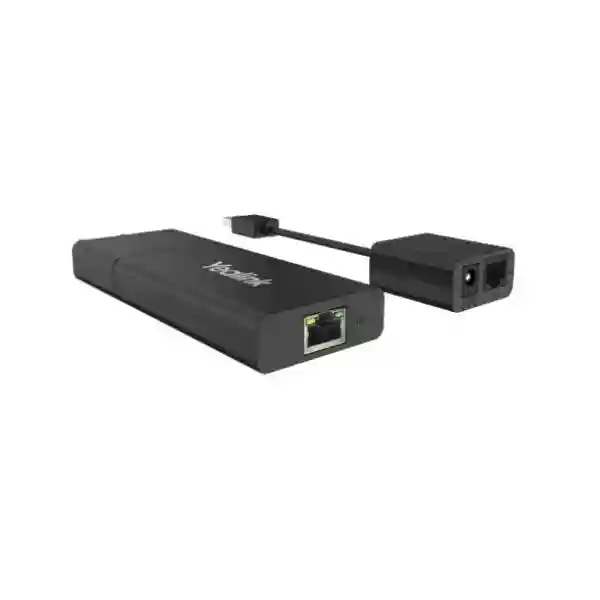
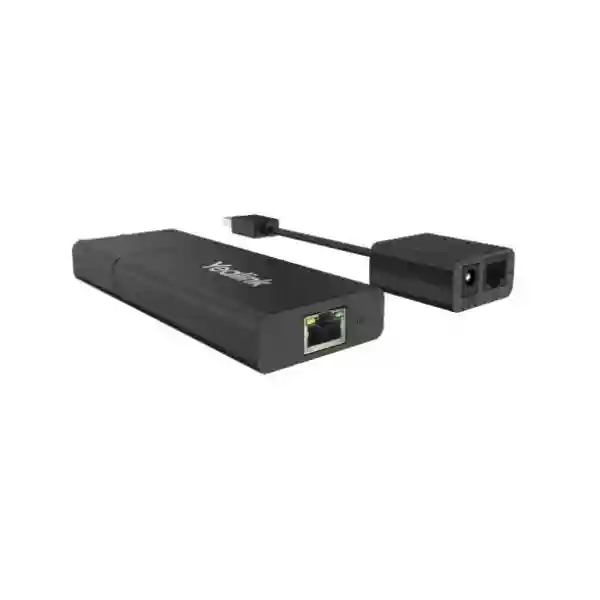
The kit combines a transmitter and receiver rather than relying on a single active cable. This architecture is useful when installers want CAT5e to form the long structured-cabling segment. The transmitter has a 0.1 m USB Type-A cable, one RJ45 port and the 48V/0.7A power port. The receiver has one RJ45 port and two USB Type-A ports. The package also contains an interface protective cover, power adapter and quick-start guide. Yealink lists operating temperature from 0°C to 40°C and operating humidity from 10% to 95%. Procurement teams should confirm the actual room environment, route length and endpoint requirements rather than selecting the accessory solely because the cable termination is RJ45.
Operational Architecture & Product Overview
Modern collaboration rooms frequently separate the camera, microphone, touch interface and display area from the compute equipment. A mini-PC may be installed behind a display, inside a credenza, beneath a table or in a protected technical area. The camera, meanwhile, may need to be mounted at the front of the room or at a carefully selected viewing position. That physical separation creates a cable-design problem. USB is convenient at the endpoint, but ordinary passive USB leads are not intended to solve every long-distance room topology. The USB2CAT5E-EXT addresses this by using a paired sender-and-receiver design and a CAT5e cable for the long run.
The host-side transmitter connects through its integrated short USB Type-A cable. The transmitter also accepts power and presents an RJ45 interface for the CAT5e segment. At the remote end, the receiver terminates the CAT5e run and presents two USB Type-A ports. This arrangement can reduce the need to place the room computer immediately beside the USB peripheral. It can also make the physical installation easier to document because CAT5e is familiar to structured-cabling teams and can be routed through appropriate containment more conveniently than a bulky long USB assembly in many projects.
The most important architectural limit is the USB generation. Yealink specifies USB 2.0 high-speed at 480 Mbps. This makes protocol validation essential. A peripheral that depends on USB 3.x bandwidth should not be assumed compatible simply because it uses a USB connector. Yealink specifically notes that SmartVision 60 requires a 5 Gbps USB 3.0 extension approach, while SmartVision 40 may require USB 3.0 when Multi-Intelliframe is used. By contrast, Yealink lists UVC34, UVC40, UVC84 and UVC86 as USB 2.0 camera models for which the USB2CAT5E extender can be used. This distinction is exactly why bill-of-materials verification matters before installation.

In a professionally designed room, the extender should be considered part of the signal path rather than an isolated accessory. The installer should record the host port, peripheral model, CAT5e route, termination method, available power point and total cable distance. Patch panels, couplers and uncertain cable quality can introduce variables, so the most dependable deployment plan keeps the path simple and verifies operation before the room is handed over. A pre-installation bench test with the intended endpoint and host is particularly valuable for projects where access becomes difficult after ceilings, furniture or wall finishes are completed.
Enterprise Business Outcomes & Value Analysis
1. Signal-Distance Integrity
The principal value is predictable USB 2.0 extension across a room-scale distance. The published maximum of 40 metres gives designers substantially more placement flexibility than a conventional short USB lead. This can support front-of-room camera positions while keeping compute equipment in a more practical location.
2. Installation Reliability
A purpose-built transmitter and receiver reduce reliance on improvised chains of passive extensions. Reliability still depends on correct cabling and compatible endpoints, but the architecture gives project teams a defined design boundary and a documented power requirement.
3. Room Scalability
The 40 m reach supports layouts ranging from ordinary boardrooms to larger training and collaboration spaces. It allows room planners to choose camera and host locations according to viewing geometry, furniture and serviceability rather than forcing both devices together.
4. Infrastructure Control
CAT5e is widely understood by cabling contractors, making pathway planning and cable management straightforward. The RJ45 link remains dedicated to the extender pair and must not be confused with a switched Ethernet connection.
5. Operational Simplicity
The accessory does not introduce a separate software-management platform or subscription tier. Once the physical path, power and USB compatibility are validated, day-to-day operation is primarily transparent to room users.
6. Cost Control
Using an extender can avoid relocating compute hardware or redesigning furniture simply to satisfy cable reach. Procurement value should be assessed against installation labor, cable pathway, endpoint compatibility and the operational benefit of placing equipment where it can be maintained effectively.
The receiver’s two USB Type-A ports also give installers physical connection flexibility, although the complete design should still be validated against the bandwidth and power behavior of the intended peripherals. Two connectors should not be interpreted as a guarantee that every pair of high-demand USB devices can operate concurrently in every scenario. For critical rooms, test the exact configuration before replication across multiple sites.
Key Hardware Highlights
| Component | Confirmed Design | Operational Outcome |
|---|---|---|
| Transmitter | 0.1 m USB Type-A lead, RJ45, 48V/0.7A power | Connects host side and launches the long CAT5e transport segment. |
| Receiver | RJ45 plus 2 × USB Type-A | Provides remote USB connection points near the peripheral location. |
| Transport | CAT5e, up to 40 m | Supports room-scale separation between host and USB endpoint. |
| USB protocol | USB 2.0 high-speed, 480 Mbps | Suitable for supported USB 2.0 peripherals; not a substitute for required USB 3.x transport. |
There is no conventional network switch, IP address or routing configuration associated with the extender’s CAT5e link. This distinction matters during handover because an RJ45 connector can easily lead non-specialist teams to assume that the units belong on the building LAN. They do not. The cable should be labelled at both ends as a dedicated extender link, and patching documentation should prevent accidental connection to active Ethernet equipment.
Technical Specifications Ledger
| Specification | Value | Procurement Note |
|---|---|---|
| Product | Yealink USB2CAT5E-EXT | USB extender accessory |
| Part number | 1303109 | Use part number on BOM where required |
| Maximum distance | 40 m | Plan route length before ordering |
| Transmission | USB 2.0 high-speed, 480 Mbps | Check endpoint protocol |
| Transmitter interfaces | 1 × 0.1 m USB Type-A cable; 1 × RJ45; 48V/0.7A power | Host-side unit |
| Receiver interfaces | 1 × RJ45; 2 × USB Type-A | Peripheral-side unit |
| Power adapter | AC 100–240V input; DC 48V/0.7A output | Confirm local socket/power planning |
| Operating temperature | 0–40°C | Use in controlled indoor environment |
| Operating humidity | 10–95% | Avoid unsuitable environmental exposure |
| Net package weight | 0.36 kg | Useful for shipping planning |
| Gross package weight | 0.41 kg | Published carton figure |
| Giftbox | 180 × 119 × 56 mm | Compact accessory packaging |
| Published compliance | REACH, CCC | Confirm project-specific compliance requirements separately |
Specifications should be read as system boundaries rather than isolated marketing numbers. The 40 m figure is the published maximum transmission distance, while 480 Mbps describes the USB 2.0 high-speed rate. Neither figure turns the accessory into a USB 3.x extender. Likewise, the AC 100–240V input range helps with international deployment, but the purchasing team should still confirm the supplied plug configuration and any site-specific electrical requirements at quotation stage.
Configuration & Sizing Worksheet
Step 1 — Define the endpoint
Record the exact USB peripheral model and the host system. Do not specify an extender from connector shape alone. Confirm whether the endpoint requires USB 2.0 or USB 3.x bandwidth. Yealink documents USB2CAT5E-EXT for USB 2.0 extension and identifies UVC34, UVC40, UVC84 and UVC86 among applicable camera examples.
Step 2 — Measure the real route
Measure the intended cable pathway rather than the straight-line distance across the room. Include vertical rises, furniture routing, service loops and containment. Keep the planned CAT5e segment within the published 40 m maximum and allow a sensible installation margin instead of designing exactly to the limit where avoidable.
Step 3 — Check environment and power
Confirm that the transmitter-side installation has appropriate access to power for the 48V/0.7A adapter and that the environment remains within the published 0–40°C operating temperature. Ensure the power adapter and cable are not trapped behind inaccessible finishes where routine troubleshooting would become unnecessarily difficult.
Step 4 — Plan cabling
Treat the RJ45-to-RJ45 segment as a dedicated extender path. Label it clearly. Avoid assumptions that the signal can be passed through ordinary Ethernet switching. Where a project proposes patch panels or additional interconnects, validate the complete physical path before rollout.
Step 5 — Licensing
The USB2CAT5E-EXT itself does not require a software subscription to perform its physical extension role. Licensing for a Teams Rooms, Zoom Rooms or other collaboration platform belongs to the wider room system and should be budgeted separately. Similarly, camera or room-system management services are not created by this accessory.
Step 6 — Prepare the quote
Provide FourTeck with quantity, deployment city, host system, peripheral model, approximate CAT5e distance, room count, desired installation schedule and whether pre-deployment validation is required. For multi-room projects, identify whether every room is identical or whether different room types require separate bills of materials. This reduces avoidable substitutions and makes the quotation easier for technical and procurement teams to review.
Deployment Scenarios & Industry Use Cases

Large Enterprise & Multi-Site Rooms
Enterprises standardizing collaboration rooms often want the compute platform mounted in a repeatable service location while cameras are positioned according to room geometry. USB2CAT5E-EXT can help bridge that physical separation in compatible USB 2.0 designs. Standardizing the extender, cable labeling and installation checklist across sites can also simplify support because technicians know where the sender, receiver and power source should be located.
Financial & Banking Institutions
Banks may deploy video collaboration in executive rooms, training facilities and operational offices where visible cabling needs to remain controlled and equipment should be installed in secure, serviceable positions. A CAT5e-based extension path can support cleaner room design, while the dedicated nature of the link makes clear documentation important. Procurement teams should still apply internal electrical, physical-security and change-control standards to the installation.
Education & Campus Networks
Lecture rooms and hybrid classrooms can require cameras at the front of a teaching space while the controlling PC is positioned at a lectern or technical desk. The 40 m maximum distance can be useful in these layouts. Because campuses may use varied camera generations, every room type should be checked for USB protocol requirements before a bulk order is released.
Government & Institutional Procurement
Public-sector meeting rooms often require a documented bill of materials, defined technical specifications and predictable support arrangements. The USB2CAT5E-EXT offers clearly published physical interfaces, transmission distance and environmental limits that can be captured in procurement schedules. Buyers should request current commercial terms, warranty handling and delivery lead time in the formal quotation rather than assuming these from another market.
Technical Deep Dive: USB Transport Architecture
The key engineering characteristic is the separation of the USB host connection from the remote peripheral connection by a CAT5e transport segment. The host attaches to the transmitter using the integrated 0.1 m USB Type-A lead. The transmitter then sends the extended signal over the dedicated CAT5e run to the receiver. The receiver exposes two USB Type-A ports for remote peripherals. This is fundamentally different from attaching a USB device to an IP network. No published feature suggests packet routing, switching or address assignment; the RJ45 connection is simply the physical interface selected for the extender link.
USB 2.0 high-speed has a nominal signalling rate of 480 Mbps, and Yealink publishes that rate for this product. That boundary is central to correct selection. A USB peripheral can look mechanically compatible while demanding a faster protocol. Video devices are particularly sensitive because resolution, frame rate and advanced processing modes can change transport requirements. Yealink’s own support guidance distinguishes its USB 2.0 UVC camera models from SmartVision 60, which requires 5 Gbps USB 3.0 extension, and from SmartVision 40 scenarios where USB 3.0 is needed for Multi-Intelliframe. Therefore, the safest engineering process starts with the endpoint’s protocol, not the desired cable distance.
Technical Deep Dive: Operational Control & Compatibility
The accessory’s simplicity is a strength. There is no separate operating system or user-facing configuration portal to maintain for the extension function. That means the operational control model is primarily physical: correct host port, correct endpoint, correct power, correct CAT5e path and correct distance. Troubleshooting should follow the same logic. Technicians can first confirm power, then verify the local host and peripheral interfaces, inspect the CAT5e path, and finally test with known-good cabling or a shorter route if required.
Compatibility should be documented at room-design level. Yealink describes the solution as applicable to nearly all USB peripherals, but enterprise buyers should interpret broad peripheral support alongside the explicitly published USB 2.0 and 480 Mbps limit. Devices requiring USB 3.x features are outside that transport specification. A controlled proof-of-concept is advisable for third-party USB devices or complex multi-device configurations, particularly when both receiver USB ports are intended for simultaneous use.
Technical Deep Dive: Availability, Resilience & Recovery
The USB2CAT5E-EXT is not a high-availability cluster and contains no published dual-power architecture. Resilience therefore comes from installation discipline and service planning. Mount the transmitter, receiver and power adapter where they can be inspected and replaced without dismantling major room finishes. Keep cable labels and room drawings current. For a fleet of critical meeting rooms, holding an appropriate spare unit can shorten recovery time because the paired accessory can be swapped without redesigning the entire room.
During incident isolation, teams should avoid treating every video or peripheral problem as an extender failure. Test the endpoint directly at the host where practical, verify the host USB port, then reintroduce the extender path. This structured approach distinguishes peripheral, host, cable and extender issues. In environments where meeting continuity is important, a documented bypass method and spare CAT5e patch lead can be included in the support runbook.
Pre-Purchase Buyer Gap Checklist
Is there a hidden subscription? The extender’s physical USB extension role does not require a separate subscription. Any Microsoft Teams Rooms, Zoom Rooms or other collaboration licensing belongs to the wider solution.
Can it carry USB 3.0? It is specified for USB 2.0 high-speed up to 480 Mbps. Do not purchase it for a peripheral or mode that explicitly requires USB 3.x bandwidth.
Can the RJ45 ports connect to a LAN switch? Plan them as the dedicated CAT5e link between transmitter and receiver, not as normal Ethernet network ports.
Is 40 m measured across the room? Use the actual routed cable distance. Include bends, containment, vertical paths and service loops.
Does the kit include the long CAT5e cable? Yealink’s published package list identifies transmitter, receiver, protective cover, power adapter and quick-start guide. Treat the required CAT5e installation cable as a project item unless the current quotation explicitly states otherwise.
What camera models are relevant? Yealink support specifically recommends USB2CAT5E Extender or another USB 2.0-compliant extender for UVC34, UVC40, UVC84 and UVC86. SmartVision requirements differ by model and feature mode, so those should be checked separately.
What about warranty? Yealink room-design references list a two-year hardware warranty with this accessory in supported solution examples. Commercial warranty processing can depend on sales channel and region, so FourTeck should confirm the applicable Uganda terms on the quotation.
What should be tested before deployment? Test the exact host, USB endpoint, intended CAT5e cable type and approximate production distance. A successful short bench connection is useful but does not replace testing of the planned room topology.
Uganda Procurement & Delivery Logistics
FourTeck can prepare a Uganda quotation around the required quantity and deployment context. For a single meeting room, the request should identify the camera or USB peripheral and approximate cable distance. For multi-room projects, a room schedule is more effective: list room name or type, host platform, peripheral, quantity and route distance. This allows technical validation to happen before purchasing and reduces the risk of ordering a USB 2.0 extender for a room that actually depends on USB 3.x bandwidth.
Order processing, stock position and delivery lead time should be confirmed at quotation stage because availability can change. Where a project has a fixed installation window, communicate the target date early and distinguish between equipment delivery, staging and on-site installation requirements. Buyers can also request bill-of-materials review so that the extender is assessed alongside cameras, room systems, power accessories and required cabling.
For projects that need repeatable deployment, pre-shipment validation can include checking model references, accessory quantities and firmware requirements for the wider Yealink solution. The USB extender itself has a simple physical role, but validating the complete room kit before dispatch helps prevent site delays caused by missing cables, incorrect peripheral assumptions or mismatched room-system components.
Local Coverage Across Uganda
Procurement support can be coordinated for organizations deploying collaboration technology in Kampala, Entebbe, Jinja, Mbarara and Gulu, as well as other Uganda locations subject to delivery arrangements. Kampala-based headquarters may require executive boardrooms and centralized IT support, while regional branches can need standardized smaller collaboration spaces. Using the same documented accessory model and cable methodology across sites can simplify spares, installation standards and troubleshooting.
For regional deployments, provide destination, quantity and desired delivery schedule with the quote request. Remote-site projects benefit from stronger pre-deployment documentation because last-minute replacement of an incompatible extender or missing cable can be more disruptive outside the primary logistics hub. FourTeck can align the proposed bill of materials with the room type and destination before commercial confirmation.
Cross-Border & Regional Supply
Organizations operating across East Africa, the Gulf and wider African markets may need consistent room standards across several countries. FourTeck maintains regional web channels for Uganda, Kenya, broader African markets, UAE and Kuwait. Multi-country projects should identify the destination of each quantity because logistics, taxes, warranty handling and lead times can differ.
A common technical standard can still be maintained: specify the same Yealink model where appropriate, preserve USB protocol validation, use documented CAT5e route limits and maintain consistent labeling. Commercial fulfillment can then be adapted to the destination without changing the engineering basis of the room design unnecessarily.
Related Yealink Room Components
The USB2CAT5E-EXT is commonly considered as part of a wider collaboration-room design rather than as a standalone user device. Buyers planning Yealink UVC camera deployments can review Yealink solutions in Uganda and use the FourTeck contact page to request compatible cameras, room systems, cabling and accessories. Relevant room designs may include UVC34, UVC40, UVC84 or UVC86 where USB 2.0 extension is required. Other projects may need a different extension technology, especially when the chosen endpoint requires USB 3.x.
Related procurement items can include CAT5e installation cable, suitable patch leads, room-system compute hardware, displays, camera mounting accessories, microphones, speakers and power accessories. Rather than treating each line item independently, request a room-level bill of materials. This makes it easier to confirm that the extension method, camera protocol, compute platform and physical room layout all agree before equipment reaches site.
FourTeck Technical Service Capabilities
Technical procurement support is most valuable before the purchase order, when incompatible assumptions can still be corrected without affecting the installation schedule. FourTeck can review the proposed bill of materials, identify the exact extender model, confirm the intended Yealink camera or USB peripheral, and check whether the room requires USB 2.0 or a higher-bandwidth extension method.
For larger deployments, staging can be organized around repeatable room types. The technical team can verify model quantities, accessory inclusion and broader solution firmware requirements before shipment. Cable routes and endpoint positions can be reviewed from room drawings or deployment notes. Where the project uses third-party peripherals, a proof-of-concept may be recommended rather than assuming universal behavior.
Post-sales support can focus on systematic fault isolation: host interface, power, transmitter, CAT5e path, receiver and peripheral. Keeping these elements documented makes troubleshooting faster and helps local IT teams distinguish room-system issues from extension-path issues. Warranty processing and replacement arrangements should follow the terms stated on the applicable quotation and invoice.
Extended Technical FAQ
1. What is the Yealink USB2CAT5E-EXT used for?
It extends a USB 2.0 connection across a CAT5e cable run so that a compatible USB peripheral can be located farther from the host computer. Yealink specifies a maximum transmission distance of 40 metres and USB 2.0 high-speed transmission up to 480 Mbps. Typical use is in meeting rooms where a camera or another USB peripheral needs to be placed at a practical front-of-room position while the compute hardware is installed elsewhere. The kit uses a transmitter at the host side and a receiver at the peripheral side.
2. Does it work with Yealink UVC cameras?
Yealink support specifically states that UVC34, UVC40, UVC84 and UVC86 use USB 2.0 and can use the Yealink USB2CAT5E Extender or another USB 2.0-compliant extender. This makes the accessory relevant to many Yealink camera installations. Compatibility still needs to be considered in the context of the complete room design, including host system, cable route and peripheral operating mode. For other camera models, check the required USB protocol before ordering rather than assuming that every Yealink video product uses the same bandwidth.
3. Can I use the extender for USB 3.0 devices?
Do not specify it as a USB 3.0 extender. Yealink publishes USB 2.0 high-speed at 480 Mbps for USB2CAT5E-EXT. Some devices and advanced video modes require USB 3.x bandwidth. Yealink notes, for example, that SmartVision 60 requires a 5 Gbps USB 3.0 extension solution and that SmartVision 40 needs USB 3.0 when Multi-Intelliframe is used. The connector alone does not establish compatibility; the peripheral’s required protocol and operating mode are the deciding factors.
4. Can the RJ45 link be connected through a network switch?
The product should be planned as a paired USB extender using CAT5e as the physical transport medium. Its RJ45 connectors are not described as ordinary Ethernet LAN interfaces. The safest design is a dedicated CAT5e path between transmitter and receiver, clearly labelled so technicians do not accidentally patch it into network switching equipment. If a proposed installation involves patch panels, couplers or unusual structured-cabling paths, validate that complete physical arrangement before deploying it across multiple rooms.
5. What comes in the package?
Yealink lists an extender transmitter, extender receiver, interface protective cover, 48V/0.7A power adapter and quick-start guide. The transmitter incorporates a 0.1 m USB Type-A cable, one RJ45 port and the power connection. The receiver provides one RJ45 port and two USB Type-A ports. The published package list does not identify the long project-specific CAT5e run as a standard included item, so buyers should make sure suitable cabling is included in the room bill of materials or explicitly included in the supplier quotation.
6. How far can the CAT5e cable run?
Yealink specifies transmission up to 40 metres. Measure the actual installed route, not just the straight-line distance between devices. Real rooms may require cable to travel vertically, around furniture, through containment and with service loops at termination points. A design that is comfortably within the published maximum is preferable to one that reaches the limit unnecessarily. Cable quality and installation workmanship also matter, so use appropriate cabling practices and test the production path before final handover.
7. Does the USB2CAT5E-EXT need a software license?
No separate software subscription is specified for the extender’s USB transport function. It is a hardware accessory. However, the collaboration system around it may have its own licensing requirements. A Microsoft Teams Rooms or Zoom Rooms deployment, for example, can require platform licensing independent of the extender. Procurement teams should therefore separate accessory cost from room-platform subscriptions, support contracts and any management services. FourTeck can help organize the bill of materials so hardware and licensing lines are not confused.
8. What power does the extender require?
The published external Yealink power adapter accepts AC 100–240V input and provides DC 48V/0.7A output. The transmitter includes the corresponding power port. During room planning, make sure the adapter can be connected in a serviceable location and is not buried behind inaccessible finishes. For multi-country deployments, confirm the supplied plug arrangement and local electrical requirements on the commercial quotation. Power should be treated as part of the room installation plan rather than an afterthought once the camera and cable path are already fixed.
9. What environmental limits should installers consider?
Yealink publishes an operating temperature range of 0°C to 40°C and operating humidity of 10% to 95%. The product is therefore best treated as indoor collaboration-room equipment installed in an appropriate controlled environment. Avoid locations exposed to unsuitable heat, moisture or physical disturbance. In furniture or equipment enclosures, preserve sensible ventilation and access for service. If the project environment falls outside the published conditions, raise that issue during design review rather than relying on the accessory without manufacturer-supported environmental specifications.
10. How should a Uganda buyer prepare for a quotation?
Provide the required quantity, delivery city, host system, USB peripheral or Yealink camera model, estimated CAT5e route length, number of rooms and desired deployment schedule. If the rooms differ, separate them into room types. State whether installation, staging or pre-deployment validation is required. This information lets FourTeck check that USB2CAT5E-EXT is technically appropriate before commercial processing. Current stock, lead time, warranty terms and delivery arrangements can then be stated in the quotation rather than being assumed from a generic product listing.
Plan the Yealink USB Extension Correctly Before Ordering
A reliable meeting-room installation starts with the correct USB protocol, accurate cable-route measurement and a verified bill of materials. The Yealink USB2CAT5E-EXT provides a practical 40-metre USB 2.0 extension option for compatible peripherals, but the best procurement result comes from matching the accessory to the exact camera, host and room topology. Send FourTeck your room details, quantity and deployment location for technical review and a Uganda quotation.
For multi-room rollouts, include a room schedule so repeated designs can be standardized and exceptions identified before equipment is dispatched. This helps reduce installation surprises and gives procurement, IT and AV teams a common reference for the approved configuration.




Reviews
There are no reviews yet.