Yealink WPP30 Wireless Presentation Pod for 4K Meeting-Room Content Sharing
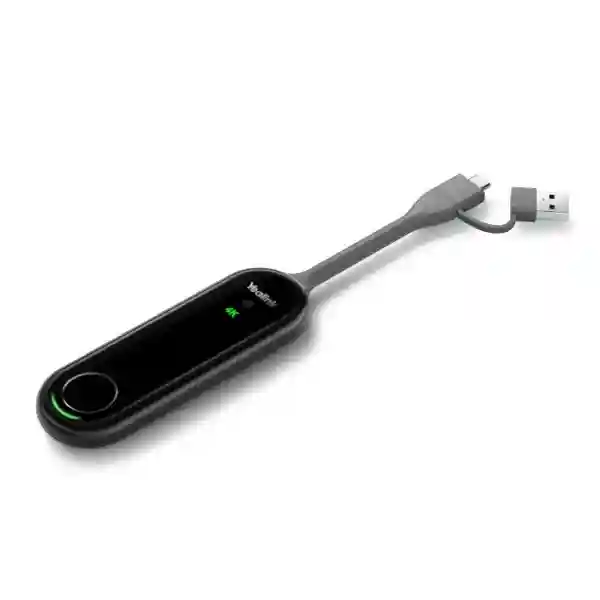
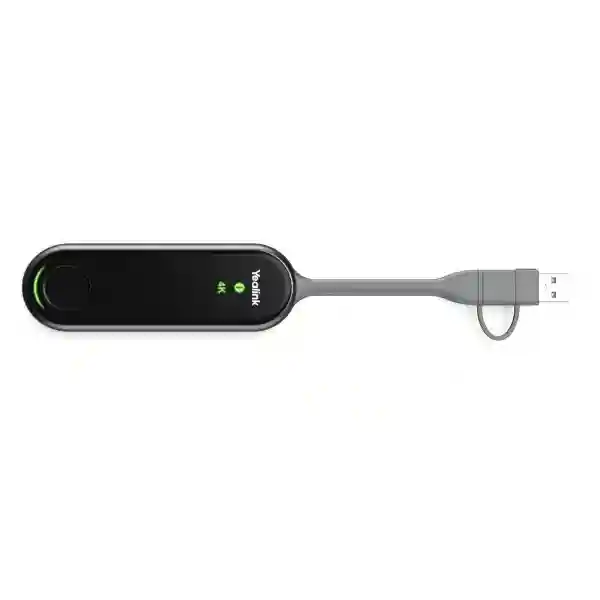
The Yealink WPP30 is a compact enterprise wireless presentation pod created for organizations that want users to walk into a compatible Yealink meeting space, connect a laptop and begin sharing content with minimal setup. Rather than relying on a long HDMI lead stretched across a conference table or asking every visitor to learn a complicated room-control workflow, the WPP30 places presentation control at the user’s computer. With a full-featured USB-C connection, integrated hardware encoding and a 2×2 MIMO Wi-Fi 6 radio, it can deliver content at up to 4K/30fps in supported operating conditions. The device also includes a USB-C to USB-A adapter for broader computer connectivity, although achievable resolution and encoding behavior can vary by interface, room system and meeting mode.
For procurement teams, the practical value is not simply wireless casting. WPP30 can reduce meeting-start friction, remove a common source of table-cable clutter, and standardize the presentation experience across rooms equipped with compatible Yealink collaboration infrastructure. Its self-built wireless link to the room system reduces dependence on the corporate LAN for the casting path. Yealink specifies AES and WPA protection for presentation data, while the Wi-Fi implementation supports 2.4 GHz and 5 GHz operation. In supported environments, collaboration can extend beyond basic screen mirroring to extended desktop, annotation, virtual whiteboard, reverse control and multi-screen presentation.
FourTeck supplies the Yealink WPP30 for Ugandan business deployments and can help validate the room-system pairing before order placement. This is especially important because advanced functions differ between Yealink Room and Video systems. A correct procurement request should identify the room endpoint, operating platform, laptop connection type, expected presentation resolution, number of rooms and whether reverse control or wireless bring-your-own-device workflows are required.
Instant Specifications & Procurement Fact Rail
Yealink WPP30
Wireless presentation and collaboration pod
Up to 4K/30fps via full-featured USB-C
2×2 MIMO Wi-Fi 6, 2.4/5 GHz
USB-C x1; USB-C to USB-A adapter
5V/600mA; 2.2 W typical
The WPP30 is best treated as part of a meeting-room system rather than as a generic stand-alone wireless display adapter. Compatibility with the target Yealink room endpoint should therefore be confirmed as part of the bill of materials. Organizations standardizing multiple meeting rooms should also document which rooms require 4K out-of-meeting presentation, which need in-meeting sharing, and which need advanced collaboration features. Published Yealink support information shows that maximum presentation resolution can differ between USB-C and USB-A use and between Teams, Zoom and general-mode operation. A procurement quote should therefore describe the intended workflow instead of specifying only the WPP30 quantity. Stock status, lead time and warranty handling are confirmed at quotation because supply conditions can change. FourTeck can align commercial documentation with the delivery city, quantity and deployment schedule.
Operational Product Architecture & Overview
At its core, the WPP30 combines a host connection, presentation processing and a dedicated wireless transport mechanism in a small handheld form. On a compatible full-featured USB-C host connection, the pod uses hardware encoding to prepare screen content for wireless transmission to the paired Yealink room system. This architecture matters because presentation workloads can otherwise consume host resources or require locally installed applications. Yealink positions the USB-C workflow as plug-and-play without extra driver installation. For USB-A operation, current support documentation should be checked because the operating path and maximum sharing resolution can differ.
The wireless layer uses 2×2 MIMO Wi-Fi 6 and supports 802.11 a/b/g/n/ac/ax across 2.4 GHz and 5 GHz bands. The WPP30 establishes a link with the room system’s access point rather than requiring the presentation stream to traverse the normal enterprise wireless network. This design can simplify deployments in organizations where guest VLANs, NAC policies or firewall segmentation make conventional network-based casting cumbersome. It does not eliminate the need for security review; instead, it changes the architecture the security team needs to assess. Buyers should document room-system firmware, wireless policy, physical access controls and the handling process for portable presentation pods.
The start/stop control provides a clear physical interaction model. Users connect the device, wait for system readiness and initiate sharing. LED indicators communicate 4K/UHD state, system error and operating status. This is operationally useful in rooms where meeting participants may not be familiar with the installed conferencing platform. A physical button reduces dependence on nested on-screen menus and gives presenters an immediate way to stop sharing before opening confidential applications.
WPP30 also supports richer collaboration in compatible Yealink environments. Duplicated display is suitable for conventional presentation, while extended desktop can let a presenter keep private controls or notes on the laptop and place the intended content on the room display. Annotation and virtual whiteboard functions can support workshops, design reviews and teaching sessions. Reverse control can allow interaction with the connected computer from a compatible touchscreen meeting display. Up to four content streams can be presented simultaneously in supported configurations, enabling side-by-side comparison of documents, dashboards or participant contributions.
Procurement friction typically appears in four places: host-interface assumptions, room-system compatibility, meeting-platform resolution expectations and advanced-feature expectations. A USB-C connector alone does not prove that a laptop port supports every required function. Similarly, the WPP30’s headline 4K/30fps capability does not mean every in-meeting workflow will render at 4K/30fps. FourTeck therefore recommends validating a representative room and laptop profile before a large rollout, especially in mixed Windows/macOS estates or deployments combining Teams, Zoom and general SIP/H.323 operation.
Enterprise Business Outcomes & Value Analysis
Up to 4K/30fps hardware-encoded sharing on supported USB-C workflows gives teams a practical path for presenting detailed spreadsheets, engineering drawings, visual dashboards and high-resolution creative material. Wi-Fi 6 with 2×2 MIMO supports responsive transport and helps the system operate in modern radio environments. Actual resolution should always be mapped to the target room platform and meeting state.
A dedicated presentation accessory creates a repeatable user journey. The user does not need to locate a loose HDMI cable or understand how the room display input has been routed. Physical start/stop control and status indicators reduce ambiguity. For larger estates, keeping a documented spare ratio can further reduce downtime caused by lost or damaged portable units.
Organizations can use the same presentation method across compatible Yealink rooms, reducing training differences between boardrooms, huddle spaces and collaboration areas. Standardization is strongest when room firmware, endpoint models, accessories and host-device policies are maintained as a controlled deployment baseline.
The WPP30 uses a self-built wireless connection to the room system and supports AES and WPA protection. This can reduce dependence on shared corporate-network casting. Security teams should still control firmware, physical possession, pairing procedures and guest-use policies as part of the collaboration-room security standard.
Plug-and-play USB-C presentation reduces the need to install a presentation driver for the core hardware-encoded workflow. This is valuable for guest presenters and tightly managed corporate laptops where local installation rights are restricted. IT should validate USB-A behavior separately when legacy notebooks remain in service.
Typical power consumption is only 2.2 W and power is drawn from the host USB connection. The larger economic benefit is potentially the reduction in meeting delay, support calls and damaged table cabling. Buyers should evaluate the accessory as part of room productivity rather than solely on unit price.
Supported annotation, whiteboarding, extended desktop, reverse control and multi-screen sharing allow a compatible Yealink room to become more interactive than a conventional one-way projector connection. Confirm which functions are available on the selected room system before procurement.
Key Hardware & Software Highlights
The full-featured USB-C interface is the central host connection for the WPP30’s highest-performance presentation workflow. Hardware encoding allows the pod to process presentation content without relying on a separately installed casting driver for the core USB-C workflow. A USB-C to USB-A adapter is supplied, helping organizations accommodate older computers, but USB-A operation should not be assumed to deliver the same maximum resolution as USB-C. Current Yealink support guidance indicates USB-A casting can use a software-encoding path and top out at 1080p/30fps in relevant scenarios.
The integrated Wi-Fi 6 radio supports 802.11 a/b/g/n/ac/ax and both major enterprise Wi-Fi frequency bands. The benefit is not that WPP30 becomes another general-purpose client on the office WLAN; its presentation link is designed around the compatible Yealink room system’s wireless access point. Bluetooth 5.0 is also listed in the product specifications. The unit weighs approximately 75 g and measures 220 mm × 38 mm × 16 mm, making it portable enough for a conference table while still providing a tethered connector format that is easy to handle.
Three LED functions provide visible feedback for 4K/UHD state, system errors and system status. A dedicated start/stop button gives users a simple privacy boundary: presentation can be initiated intentionally and stopped before moving to unrelated desktop material. From an operations perspective, this physical interaction is valuable because it reduces the training burden for occasional room users.
Technical Specifications Ledger
| Category | Specification | Procurement Note |
|---|---|---|
| Product | Yealink WPP30 Wireless Presentation Pod | Designed for compatible Yealink room/video systems. |
| Hardware encoding | Up to 4K/30fps | Maximum depends on host interface and room operating mode. |
| Input power | 5V/600mA | Powered from host USB connection. |
| Typical consumption | 2.2 W | Low-power portable accessory. |
| Host interface | Full-featured USB-C ×1 | Validate laptop port capability. |
| Adapter | USB-C to USB-A adapter ×1 | USB-A performance can differ from USB-C. |
| Wi-Fi | 2×2 MIMO Wi-Fi 6; 802.11 a/b/g/n/ac/ax | Supports modern dual-band wireless transport. |
| Frequency | 2.4 GHz / 5 GHz | Regional radio rules and room configuration apply. |
| Wireless security | WPA-PSK/WPA2-PSK; AES protection referenced by Yealink | Include collaboration devices in security governance. |
| Bluetooth | Bluetooth 5.0 | Integrated radio capability. |
| Desktop modes | Duplicated and extended display | Availability can vary by system. |
| Collaboration | Annotation, whiteboard, reverse control, multiple-screen sharing, wireless BYOD/BYOM on supported systems | Confirm room endpoint and firmware. |
| Operating temperature | -10°C to 40°C | Use within controlled indoor meeting spaces. |
| Humidity | Up to 90–95% non-condensing depending on published revision | Avoid condensation and uncontrolled storage. |
| Weight | 75 g | Portable conference-room accessory. |
| Dimensions | 220 × 38 × 16 mm | Plan secure tabletop storage when not in use. |
Specification values above are based on Yealink published product documentation. Because meeting-platform behavior evolves with room-system firmware and platform releases, deployment-specific resolution and feature availability should be confirmed against the exact room endpoint and software release before a large purchase. This is particularly important where a project tender names 4K as a mandatory in-meeting requirement rather than a maximum presentation capability.
Configuration & Sizing Worksheet
1. Workload and Room Count
Count every room that will use wireless presentation and classify it by room system model. Separate executive boardrooms, training rooms, huddle spaces and shared collaboration areas. Identify whether each room needs one WPP30 permanently assigned or whether a controlled pool will be shared. Permanent assignment generally reduces user uncertainty and loss risk. Shared pools can reduce initial quantity but require sign-out, charging/power assumptions and secure storage procedures.
2. Host Device Mix
Record the percentage of laptops using full-featured USB-C versus USB-A. Confirm Windows and macOS versions used in the organization. Do not treat physical connector shape as sufficient evidence of functional compatibility. For high-resolution USB-C workflows, validate representative laptop models. For USB-A estates, confirm expected software path and resolution before defining the user promise.
3. Environmental and Physical Requirements
WPP30 does not require rack space, but room design still matters. Provide a safe tabletop location that prevents the pod from being crushed by furniture or pulled from a laptop. In public or training spaces, consider a secure storage drawer or controlled accessory holder. Keep the device within the published temperature and humidity range and avoid storage in vehicles or other hot environments.
4. Power and Cabling
The pod draws power from the connected computer USB interface, so there is no separate room power brick to size. Verify that endpoint USB ports are healthy and capable of supplying the required 5V/600mA. Where users rely on USB-C docks, test whether the WPP30 will connect directly to the laptop or through the dock, because corporate docking configurations can affect available ports and workflow.
5. Software, Firmware and Feature Validation
Record the exact Yealink room endpoint, its firmware branch and the conferencing mode. Map required features such as 4K presentation, four-stream sharing, reverse control, annotation and wireless BYOD/BYOM. Advanced functions differ by Yealink system, so this matrix becomes the acceptance-test plan.
6. Quote Preparation Checklist
Provide product name, room-system models, required quantity, laptop connector mix, operating platforms, delivery city, organization name, desired delivery date and any requirement for pre-deployment validation. Include whether the project is a new Yealink room rollout or an accessory expansion for an installed base. This information helps FourTeck identify compatibility questions before the commercial quote becomes a purchase order.
Deployment Scenarios & Industry Use Cases
Large Enterprise and Multi-Site Networks
A multi-site company may have dozens of meeting rooms and a highly controlled laptop fleet. WPP30 can provide a consistent physical sharing action across compatible Yealink rooms: connect, wait for readiness and press to present. This consistency reduces room-to-room learning differences. IT can define a standard room profile covering firmware, display mode, WPP30 pairing, spare-unit policy and acceptance tests. The wireless casting path can also be attractive where enterprise WLAN segmentation makes guest casting difficult. The correct deployment model is still to validate each room-system family rather than assuming one accessory profile works identically everywhere.
Financial and Banking Institutions
Banks, insurers and financial-services firms frequently combine strict endpoint controls with high meeting density. Installing third-party casting software on managed laptops may be undesirable. The WPP30 USB-C hardware-encoding workflow can reduce that dependency. Security teams should assess the pod as a portable collaboration endpoint, documenting pairing, physical custody, firmware maintenance and the handling of guest presenters. Presenters should use the physical stop control before navigating away from intended content, especially when dashboards or customer information may be visible on adjacent applications.
Educational and Campus Networks
Universities, training centers and professional academies can use WPP30 in compatible teaching rooms where lecturers rotate frequently. Extended desktop can support presenter notes while the audience sees only teaching content. Annotation and whiteboarding can make supported rooms more interactive. Campus procurement should pay particular attention to accessory loss, connector wear and the variety of lecturer laptops. A room-by-room quick-start card and spare-unit inventory can be as important as the device specification.
Government and Defense Procurement
Public-sector environments often require formal bill-of-materials control, delivery documentation and security review. WPP30’s self-built wireless presentation link can be assessed as a defined room-system component rather than relying on open guest casting. However, suitability for a restricted environment must be determined by the organization’s own security authority. Procurement documents should identify radio policies, permitted room classifications, firmware control, physical custody and whether wireless presentation is allowed at all. FourTeck can provide product identification and commercial documentation, while customer security teams retain approval authority.
Technical Deep Dive 1: Processing, Encoding & Wireless Engine
The WPP30’s most important architectural feature is its hardware-encoding path for full-featured USB-C operation. Instead of treating the accessory as a simple radio bridge, Yealink integrates presentation processing so the pod can capture and encode host content for transmission to the compatible room system. The published maximum is 4K at 30 frames per second. For detailed business content, 30fps is a sensible presentation-oriented target: it can preserve fine visual information while maintaining smooth cursor movement and common office animation. Buyers should distinguish this from high-frame-rate entertainment streaming; WPP30 is engineered for meeting collaboration.
The radio engine uses 2×2 MIMO Wi-Fi 6. MIMO allows multiple spatial streams and Wi-Fi 6 brings a modern wireless foundation for responsive casting. Dual-band operation gives the room system flexibility across 2.4 GHz and 5 GHz spectrum. In a dense office, 5 GHz can be useful because it offers more channel options and is commonly used for high-throughput short-range applications. Actual radio behavior remains dependent on the room endpoint, local spectrum conditions and regional regulations.
USB-A compatibility should be considered a separate workflow rather than a transparent connector conversion. Yealink support documentation distinguishes the USB-C hardware-encoding path from USB-A software encoding in current comparisons, with USB-A presentation reaching up to 1080p/30fps in relevant scenarios. This difference is critical for tenders. If a requirement states that every user must achieve 4K/30fps, the project must ensure the intended hosts can use the appropriate USB-C path and that the paired room mode supports the required output.
Technical Deep Dive 2: Software Ecosystem, Firmware Security & Operational Control
The WPP30 is tightly connected to the Yealink room ecosystem. That is a strength when an organization is standardizing on Yealink, because presentation can become part of the room’s integrated collaboration workflow rather than a separate appliance with its own management experience. It also means buyers should avoid evaluating the pod in isolation. The room endpoint model, firmware, conferencing application and interactive display capabilities can determine which WPP30 functions are exposed.
For core USB-C sharing, the no-extra-driver model is particularly useful on managed endpoints. A visiting executive or contractor may not have administrator rights to install casting software. A standardized hardware-assisted presentation workflow reduces that barrier. Security governance still requires lifecycle discipline. Room-system firmware should be maintained under change control, and updates should be tested in a representative room before fleet rollout. Portable pods should be inventoried, labeled by room where practical, and inspected when users report repeated connection errors.
Operational control is deliberately simple at the presenter side. The start/stop button establishes intentional sharing. LED indicators expose basic state. Advanced interaction can include annotation, virtual whiteboard and reverse control when the paired Yealink system supports them. Reverse control deserves specific security and usability validation because it changes the room display from a passive output into an input surface capable of controlling the attached computer. Organizations should decide where this is desirable and train users accordingly.
Technical Deep Dive 3: Availability, Redundancy & Recovery Planning
A presentation pod is not a clustered server, so high availability is achieved operationally rather than through redundant power supplies or active/standby electronics. The correct resilience strategy is room standardization, spare inventory and fallback presentation paths. For important boardrooms, consider keeping a tested spare WPP30 or retaining an alternate wired input path. If a pod is lost, damaged or fails immediately before a critical meeting, the room should still have a documented way to present.
Power resilience is straightforward because WPP30 draws power from the host USB port. There is no independent power adapter that can fail or be misplaced. However, this means host-port condition matters. A damaged USB-C port, low-quality dock or restrictive endpoint configuration can present as a room problem even when the pod is healthy. Help-desk procedures should therefore include testing with a known-good laptop and known-good WPP30 before escalating the room system.
Recovery from software or compatibility issues begins with identifying which layer changed. Was the laptop operating system updated? Was the Yealink room firmware upgraded? Did the meeting platform change its room application? Is the user connecting through USB-A rather than USB-C? Maintaining a small acceptance-test matrix helps isolate changes. For large deployments, record a known-good firmware and endpoint combination, then verify key functions—connect, share, stop, extended desktop, reverse control and required resolution—after planned updates.
Pre-Purchase Buyer Gap Checklist
Is the WPP30 a universal wireless HDMI replacement? No. It is designed around compatible Yealink room/video systems. Confirm the receiving room endpoint before ordering.
Does every USB-C laptop deliver 4K/30fps? Do not assume so. The laptop needs an appropriate full-featured USB-C connection, and the room operating mode must support the desired resolution. Validate representative endpoints.
Does the included USB-A adapter preserve every USB-C capability? No. Current Yealink guidance differentiates USB-A and USB-C casting behavior. USB-A can use software encoding and lower maximum resolution in relevant modes.
Are advanced collaboration functions identical on every Yealink room system? No. Yealink explicitly notes that advanced features differ by Room/Video System. Reverse control also depends on compatible interactive display workflows.
Is additional presentation software always required? The core full-featured USB-C hardware-encoded workflow is designed without extra driver installation. USB-A behavior should be checked for the specific deployment.
What hidden infrastructure is required? The WPP30 uses the room system’s wireless access point for its casting data link, reducing dependence on the corporate network for that path. The room system itself must already be correctly deployed and maintained.
What about lifecycle and replacement? Treat portable presentation pods as controlled room accessories. Record serial/asset information where required, keep a spare ratio for critical rooms and include replacement handling in the support plan.
What should be tested before bulk procurement? Test the exact room endpoint, firmware, conferencing mode, representative Windows/macOS laptops, USB-C and USB-A workflows, target presentation resolution, start/stop behavior and any required annotation or reverse-control functions.
Uganda Procurement & Delivery Logistics
FourTeck supports Yealink WPP30 procurement for organizations deploying or expanding meeting-room collaboration in Uganda. A useful quotation request includes the WPP30 quantity, existing Yealink room-system model, delivery location, organization name and desired deployment date. For projects involving multiple room types, attach or describe the room bill of materials so compatibility can be reviewed before commercial processing.
After requirements are established, quotation can cover product quantity, applicable commercial terms, delivery planning and any requested staging or technical validation. Availability and delivery lead time are confirmed at the time of quotation rather than represented as permanent stock promises. For phased projects, buyers should state whether all units are required in one shipment or whether delivery should align with site rollout waves.
Pre-configuration support can include review of room-system compatibility, firmware considerations and an acceptance checklist. The WPP30 itself is intentionally simple, but the value of pre-deployment validation increases with project scale. A ten-room rollout with standardized laptops may need only a representative test; a national deployment mixing legacy USB-A notebooks, modern USB-C laptops and multiple Yealink room families should use a more formal compatibility matrix.
Local Coverage Matrix
Kampala: Suitable for headquarters, financial institutions, corporate offices, hotels, conference facilities and public-sector meeting environments requiring standardized Yealink presentation accessories. Entebbe: Procurement can support offices, hospitality properties, logistics organizations and institutional facilities needing reliable meeting-room content sharing. Jinja: Businesses, industrial operations and education facilities can specify WPP30 as part of compatible Yealink room deployments. Mbarara: Regional offices, universities, healthcare administration and growing enterprises can request project-based supply and compatibility guidance. Gulu: Organizations in northern Uganda can include WPP30 in centralized collaboration procurement with delivery requirements defined during quotation.
For locations outside these hubs, provide the exact delivery destination during quotation. Logistics planning can then account for shipment routing, project timing and whether units are being delivered directly to branches or first consolidated at a central IT facility for asset registration and testing.
Cross-Border & Regional Supply Chains
Organizations operating across East Africa, the Gulf and broader African markets often need consistent collaboration-room bills of materials across subsidiaries. FourTeck regional channels can support procurement planning through Uganda, Kenya, Africa, UAE and Kuwait. This can help multinational buyers maintain a consistent product specification while handling commercial documentation and delivery through the appropriate regional operation.
Cross-border projects should define the destination country for each unit, local room-system models, deployment dates and any staging requirements. Radio regulations, warranty procedures, taxes, import processes and delivery terms can differ by market, so a regional bill of materials should be commercially validated per destination rather than assuming a single-country quote applies everywhere.
Related Yealink Solutions & Internal Navigation
WPP30 is normally purchased as an accessory within a wider meeting-room architecture. Buyers planning a new room should review the wider FourTeck Uganda enterprise technology portfolio and request a complete room bill of materials rather than selecting the presentation pod alone. A complete design may include a Yealink MeetingBoard or room/video endpoint, display, camera, microphones, speakers, touch controller, network connectivity and suitable presentation accessories.
For existing Yealink estates, provide the installed room-system model and firmware when requesting WPP30. For new deployments, ask for related Yealink meeting-room systems, interactive meeting displays, video conferencing cameras, conference audio accessories, room controllers and network and power accessories. These contextual categories help procurement teams build a coordinated room solution with fewer integration gaps.
FourTeck Technical Service Capabilities
Enterprise collaboration procurement benefits from engineering validation before equipment reaches the site. FourTeck can review the requested bill of materials against the stated room architecture, identify obvious interface mismatches and help the buyer define what must be tested. For WPP30 projects, that typically means confirming the receiving Yealink room platform, laptop interface mix and the collaboration functions that users expect.
For larger projects, staging can include controlled inspection, asset documentation and coordination of firmware-validation requirements before shipment. Where room endpoints are part of the same project, pre-shipment planning can reduce the chance that accessories arrive before the receiving collaboration infrastructure is ready. Firmware updates should be approached as a system-level activity because feature availability can depend on the room endpoint as well as the accessory.
Post-sales support can assist with fault isolation and warranty-processing documentation. When reporting a WPP30 issue, capture the room-system model, firmware version, host computer operating system, connection type, observed LED state and whether the fault follows the pod when tested in another known-good compatible room. This information helps distinguish a pod fault from host USB, room firmware, wireless environment or configuration problems.
Extended Technical FAQ
1. What is the Yealink WPP30 used for?
The WPP30 is used to share a computer’s content wirelessly to a compatible Yealink room or video collaboration system. A presenter connects the pod to the computer, then uses the physical control to start or stop sharing. With an appropriate full-featured USB-C connection, WPP30 supports hardware-encoded content sharing at up to 4K/30fps. It is intended to reduce cable clutter and meeting-start complexity while adding collaboration capabilities such as extended desktop, annotation, whiteboard, reverse control and multiple-screen sharing where supported by the paired Yealink system.
2. Does WPP30 require a driver?
For the primary full-featured USB-C hardware-encoding workflow, Yealink describes WPP30 as plug-and-play without extra software or driver installation. This is useful for managed business laptops and guest presenters who may not have administrator rights. Buyers should distinguish USB-C from USB-A behavior. Current Yealink support information indicates that USB-A casting can use a software-encoding path and can have different maximum resolution. If your organization has a mixed laptop estate, test both connector workflows before standardizing user instructions.
3. Can WPP30 really share 4K content?
Yes, Yealink specifies hardware encoding up to 4K/30fps for WPP30. However, that is a maximum capability, not a promise that every meeting state and connector type will output 4K/30fps. Published support matrices show that resolution can vary by USB-C versus USB-A, conferencing platform and whether content is being shared in or out of a meeting. A project that has a strict 4K requirement should identify the exact Yealink room system, conferencing mode and host connection, then validate that combination before bulk purchase.
4. How does WPP30 connect wirelessly?
WPP30 incorporates 2×2 MIMO Wi-Fi 6 supporting 802.11 a/b/g/n/ac/ax across 2.4 GHz and 5 GHz. For casting, the data link is established between the WPP30 and the compatible room system’s wireless access point. This architecture reduces dependence on the normal corporate network for the presentation path and can simplify guest sharing where enterprise network access is tightly controlled. Security teams should still assess the complete room configuration, firmware management, physical custody and local wireless policy before deployment.
5. Is WPP30 compatible with USB-A laptops?
The product includes a USB-C to USB-A adapter, allowing use with computers that do not provide the preferred full-featured USB-C connection. The important procurement detail is that USB-A should not be treated as functionally identical to USB-C. Yealink support guidance differentiates the encoding method and maximum presentation resolution. For an organization with older laptops, include those models in pilot testing. If 1080p presentation is acceptable for legacy devices while newer USB-C laptops use higher-resolution workflows, document that distinction in the room quick-start guide.
6. What security mechanisms does WPP30 use?
Yealink lists WPA-PSK/WPA2-PSK wireless security in WPP30 specifications and describes AES and WPA protection for content sharing. The self-built wireless presentation path can reduce reliance on the enterprise LAN for casting. These controls are part of the security picture, not a substitute for governance. Organizations should maintain approved room firmware, control physical access to portable pods, define pairing and guest-use procedures, and decide whether reverse control is permitted. Highly regulated environments should have the deployment reviewed by their own security authority.
7. Can several people share content at the same time?
WPP30 supports up to four content streams presented on the main screen in supported Yealink configurations. This can be useful for comparing reports, design alternatives, dashboards or participant contributions without repeatedly disconnecting one presenter before another begins. The exact multi-screen experience depends on the receiving Yealink room system and its software capabilities. For rooms where four-way content comparison is a mandatory workflow, request compatibility validation against the exact endpoint and firmware rather than relying only on the accessory’s feature list.
8. Does WPP30 support reverse control and touch interaction?
Yes, reverse control is part of the WPP30 collaboration feature set on compatible Yealink systems. With an appropriate touchscreen meeting environment, users can interact with the connected computer through the room display, allowing actions such as clicking or dragging from the interactive surface. This can improve workshops and collaborative review sessions. Because reverse control depends on the complete room environment, buyers should confirm the display and Yealink system combination. Security and desktop-management teams may also wish to define when remote interaction with a connected computer is acceptable.
9. What warranty and replacement planning should a business use?
Warranty terms and processing should be confirmed on the commercial quotation for the destination and supply channel. Operationally, critical rooms should not rely on a single portable accessory with no fallback. Organizations with many WPP30 units can maintain a small spare pool, label units by room and document a known-good test process. When a fault occurs, test the suspect pod with a known-good host and compatible room, then record the room model, firmware, host operating system and LED behavior. This evidence can make support and replacement processing more efficient.
10. What information should I send FourTeck for an accurate WPP30 quote?
Send the required quantity, delivery city, organization name, existing or proposed Yealink room-system model, laptop connection mix and expected collaboration functions. If the requirement includes 4K presentation, specify whether that is needed during a live Teams/Zoom meeting or for general out-of-meeting presentation. Mention any need for reverse control, annotation, whiteboarding or multiple simultaneous content streams. For multi-site projects, list quantities by location and desired deployment dates. These details allow the commercial and technical review to focus on compatibility rather than simply quoting an accessory in isolation.
Procure Yealink WPP30 for Your Uganda Meeting Rooms
A successful WPP30 deployment starts with matching the presentation pod to the correct Yealink room platform and user workflow. Before issuing a purchase order, confirm the room endpoint, firmware, host-device interfaces, required presentation resolution and advanced collaboration functions. FourTeck can help turn those details into a practical procurement bill of materials for one room or a multi-site rollout.
For the fastest quotation, provide the WPP30 quantity, delivery destination, Yealink room-system model and whether your users primarily connect through full-featured USB-C or USB-A. If the project is still at design stage, include the planned conferencing platform and room type so the accessory can be reviewed as part of the complete collaboration architecture.




Reviews
There are no reviews yet.